need to delete OS off recovery drive!

gms

New member
Local time
9:57 AM
Messages
28
Please help; I'm at my wits' end here...

I did the same thing this fellow did on this thread (accidentally installed a version of Windows 7 onto the recovery drive): http://www.sevenforums.com/installation-setup/49760-accidently-installed-win7-recovery-d-2.html

And I thought I had found the answer with post # 18; however, when I go to the System Configuration pop-up window and highlight the "Boot" tab and then highlight the recovery drive and corresponding extra OS that it now contains, it dims out the "Delete" key and won't let me get rid of it per the instructions in the above thread...

I don't know what else to do... please help!!!

Thanks in advance!
Greg
 

My Computer My Computer

At a glance

Windows 7
OS
Windows 7
Hello gms, welcome to Seven Forums!


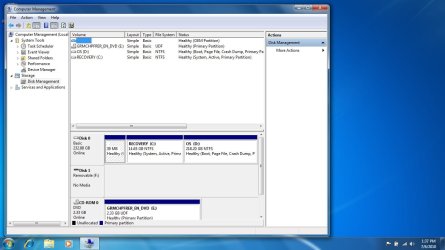
The odds are that the boot files (needed to boot/start Windows) are on that partition and if you delete it Windows won't start, to start with in the windows start menu, right click computer and select manage, in the left pane click disk management, then post a complete snip/screen-shot of disk management so we can see what you have, have a look at the tutorial at the link below.


How to Post a Screenshot in Seven Forums
 

My Computer My Computer

At a glance

W 7 64-bit UltimateIntel Q9550 Yorkfield8GB Dominator 8500C5DATI : XFX 5870
Computer Manufacturer/Model Number
* BFK Customs *
OS
W 7 64-bit Ultimate
CPU
Intel Q9550 Yorkfield
Motherboard
ASUS P5Q Pro
Memory
8GB Dominator 8500C5D
Graphics Card(s)
ATI : XFX 5870
Sound Card
Realtek HD Audio 7-1
Monitor(s) Displays
1x 47" LCD HDMI & 3x 26" LCD HDMI
Screen Resolution
1920x1080P & 1920x1200
Hard Drives
1x 80GB Intel X25-M G2 SSD : 1x 500GB & 1x 640GB WD Caviar Black(s)
PSU
Corsair 620HX
Case
Cooler Master RC-690
Cooling
Tuniq Tower 120, 2x 140mm and 3x 120mm case fans
Keyboard
Microsoft 500
Mouse
Razer Diamondback 3G
Internet Speed
14 Mb/s
Other Info
1x Koutech 3Gb/s SATA HDD Hot Swap Rack
First time I've uploaded a screenshot in this manner... bear with me.

screenshot 1.jpg
 

My Computer My Computer

At a glance

Windows 7
OS
Windows 7
The problem was my recovery drive was actually labeled (C: ) and I've NEVER owned a computer that the "C" drive wasn't my biggest harddrive... :(
 

My Computer My Computer

At a glance

Windows 7
OS
Windows 7
What OS is install to D:
 

My Computer My Computer

At a glance

ME/XP/Vista/Win7
OS
ME/XP/Vista/Win7
Hello again.


As I suspected the boot files are on your C: and you only want to have D: when you're finished, is that correct? The "System, Active" is where the boot files are.
 

My Computer My Computer

At a glance

W 7 64-bit UltimateIntel Q9550 Yorkfield8GB Dominator 8500C5DATI : XFX 5870
Computer Manufacturer/Model Number
* BFK Customs *
OS
W 7 64-bit Ultimate
CPU
Intel Q9550 Yorkfield
Motherboard
ASUS P5Q Pro
Memory
8GB Dominator 8500C5D
Graphics Card(s)
ATI : XFX 5870
Sound Card
Realtek HD Audio 7-1
Monitor(s) Displays
1x 47" LCD HDMI & 3x 26" LCD HDMI
Screen Resolution
1920x1080P & 1920x1200
Hard Drives
1x 80GB Intel X25-M G2 SSD : 1x 500GB & 1x 640GB WD Caviar Black(s)
PSU
Corsair 620HX
Case
Cooler Master RC-690
Cooling
Tuniq Tower 120, 2x 140mm and 3x 120mm case fans
Keyboard
Microsoft 500
Mouse
Razer Diamondback 3G
Internet Speed
14 Mb/s
Other Info
1x Koutech 3Gb/s SATA HDD Hot Swap Rack
A brief background:

When we purchased this laptop (a Dell Inspiron), it came with Windows 7, the 64-bit version. My wife is taking a work-from-home job which only supports the 32-bit version of Windows 7, so I had to go out and buy the lesser version after just buying her a brand-new computer :mad:

I accidentally installed the 32-bit version on the C: drive (recovery) because -- as I stated above -- I've never seen anything BUT the large hard drive be labeled C...

Now I don't have enough space left to do a system restore and I keep getting pop-up windows stating I don't have enough memory left...

I really just want to restore my recovery drive to the way it was, if possible. If I have to, I guess we can just delete it off altogether if that's the only option available to me at this point...

I have now installed the needed 32-bit version to my D drive, which hopefully shows up as it was done correctly to you guys in my screenshot above.

Let me know if you have any more questions...

Thanks,
Greg
 

My Computer My Computer

At a glance

Windows 7
OS
Windows 7
Do you have both OS working OK?
 

My Computer My Computer

At a glance

ME/XP/Vista/Win7
OS
ME/XP/Vista/Win7
Yes, I believe both are installed correctly: I receive the black & white text screen asking which instance of Windows 7 I want to use when rebooting (I believe I saw this referred to as the "multi-boot screen" somewhere?

As it is... I think my OS install on the D drive is good; I just need to delete off the OS install on my recovery drive to free up all the space, but haven't found a way to do so yet -- hence the plea for help.
 

My Computer My Computer

At a glance

Windows 7
OS
Windows 7
Hello Greg.


You seem to have a couple options as you have a 32-bit install disk to use, you could wipe everything on the PC and do a clean install, after you make backups of the stuff you don't want to lose, that may be the easiest way to go; have a look at this tutorial at the link below.

SSD / HDD : Optimize for Windows Reinstallation


The other option is a bit more complicated, to move / re-create the boot files to the Windows partition that you want to keep, start by having a look at this tutorial at the link below; as you have questions feel free to ask them as needed.

Partition Wizard : Use the Bootable CD


Be sure to keep us informed what you choose to do.
 

My Computer My Computer

At a glance

W 7 64-bit UltimateIntel Q9550 Yorkfield8GB Dominator 8500C5DATI : XFX 5870
Computer Manufacturer/Model Number
* BFK Customs *
OS
W 7 64-bit Ultimate
CPU
Intel Q9550 Yorkfield
Motherboard
ASUS P5Q Pro
Memory
8GB Dominator 8500C5D
Graphics Card(s)
ATI : XFX 5870
Sound Card
Realtek HD Audio 7-1
Monitor(s) Displays
1x 47" LCD HDMI & 3x 26" LCD HDMI
Screen Resolution
1920x1080P & 1920x1200
Hard Drives
1x 80GB Intel X25-M G2 SSD : 1x 500GB & 1x 640GB WD Caviar Black(s)
PSU
Corsair 620HX
Case
Cooler Master RC-690
Cooling
Tuniq Tower 120, 2x 140mm and 3x 120mm case fans
Keyboard
Microsoft 500
Mouse
Razer Diamondback 3G
Internet Speed
14 Mb/s
Other Info
1x Koutech 3Gb/s SATA HDD Hot Swap Rack
Which OS would like to have working OK on C:?
 

My Computer My Computer

At a glance

ME/XP/Vista/Win7
OS
ME/XP/Vista/Win7
I want the 32-bit version of Windows 7 as my OS and I need it installed on the D drive as opposed the recovery drive that I inadvertently installed it to...

And I'm perfectly content to do a clean install and start fresh if I can... I'll start reading the link below but check back in here before I actually start proceeding in case someone has something else to add.
 

My Computer My Computer

At a glance

Windows 7
OS
Windows 7
OK, looks like both of you are saying the same thing...

Here goes! :)

I'll report back when I finish.
 

My Computer My Computer

At a glance

Windows 7
OS
Windows 7

My Computer My Computer

At a glance

W 7 64-bit UltimateIntel Q9550 Yorkfield8GB Dominator 8500C5DATI : XFX 5870
Computer Manufacturer/Model Number
* BFK Customs *
OS
W 7 64-bit Ultimate
CPU
Intel Q9550 Yorkfield
Motherboard
ASUS P5Q Pro
Memory
8GB Dominator 8500C5D
Graphics Card(s)
ATI : XFX 5870
Sound Card
Realtek HD Audio 7-1
Monitor(s) Displays
1x 47" LCD HDMI & 3x 26" LCD HDMI
Screen Resolution
1920x1080P & 1920x1200
Hard Drives
1x 80GB Intel X25-M G2 SSD : 1x 500GB & 1x 640GB WD Caviar Black(s)
PSU
Corsair 620HX
Case
Cooler Master RC-690
Cooling
Tuniq Tower 120, 2x 140mm and 3x 120mm case fans
Keyboard
Microsoft 500
Mouse
Razer Diamondback 3G
Internet Speed
14 Mb/s
Other Info
1x Koutech 3Gb/s SATA HDD Hot Swap Rack
Do you have the Hardware Drivers DVD?
 

My Computer My Computer

At a glance

ME/XP/Vista/Win7
OS
ME/XP/Vista/Win7
The laptop didn't come with any drivers at all...nothing but the computer itself.

I'm having trouble following the instructions in the above link, because my first step appears to be that I need to change the boot priority.

I am not being given a screen like it talks about in step # 1 because the first thing that appears is that "multi-boot screen" I mentioned above, where it asks me to choose which OS I want to utilize -- the one in D or the one in C.
 

My Computer My Computer

At a glance

Windows 7
OS
Windows 7

My Computer My Computer

At a glance

W 7 64-bit UltimateIntel Q9550 Yorkfield8GB Dominator 8500C5DATI : XFX 5870
Computer Manufacturer/Model Number
* BFK Customs *
OS
W 7 64-bit Ultimate
CPU
Intel Q9550 Yorkfield
Motherboard
ASUS P5Q Pro
Memory
8GB Dominator 8500C5D
Graphics Card(s)
ATI : XFX 5870
Sound Card
Realtek HD Audio 7-1
Monitor(s) Displays
1x 47" LCD HDMI & 3x 26" LCD HDMI
Screen Resolution
1920x1080P & 1920x1200
Hard Drives
1x 80GB Intel X25-M G2 SSD : 1x 500GB & 1x 640GB WD Caviar Black(s)
PSU
Corsair 620HX
Case
Cooler Master RC-690
Cooling
Tuniq Tower 120, 2x 140mm and 3x 120mm case fans
Keyboard
Microsoft 500
Mouse
Razer Diamondback 3G
Internet Speed
14 Mb/s
Other Info
1x Koutech 3Gb/s SATA HDD Hot Swap Rack
THAT'S the set of instructions I'm having problems with... I don't have a chance to see the BIOS screen, because instead I'm being given a choice of which OS I want to utilize.

Then... once I choose one of them, it goes straight to loading Windows and bypasses the BIOS screen; I never see it at all.

Is there another way to access it?
 

My Computer My Computer

At a glance

Windows 7
OS
Windows 7
As soon as you power on the PC start tapping the delete key till the PC starts to see if that's the one.
 

My Computer My Computer

At a glance

W 7 64-bit UltimateIntel Q9550 Yorkfield8GB Dominator 8500C5DATI : XFX 5870
Computer Manufacturer/Model Number
* BFK Customs *
OS
W 7 64-bit Ultimate
CPU
Intel Q9550 Yorkfield
Motherboard
ASUS P5Q Pro
Memory
8GB Dominator 8500C5D
Graphics Card(s)
ATI : XFX 5870
Sound Card
Realtek HD Audio 7-1
Monitor(s) Displays
1x 47" LCD HDMI & 3x 26" LCD HDMI
Screen Resolution
1920x1080P & 1920x1200
Hard Drives
1x 80GB Intel X25-M G2 SSD : 1x 500GB & 1x 640GB WD Caviar Black(s)
PSU
Corsair 620HX
Case
Cooler Master RC-690
Cooling
Tuniq Tower 120, 2x 140mm and 3x 120mm case fans
Keyboard
Microsoft 500
Mouse
Razer Diamondback 3G
Internet Speed
14 Mb/s
Other Info
1x Koutech 3Gb/s SATA HDD Hot Swap Rack
Back
Top