need to delete OS off recovery drive!

I'm not sure what all I'm looking at anymore.. :confused:

Like I said, I don't mind taking this thing back to original -- if I'm able to do that -- as it's basically a brand-new computer and we've really got nothing on it at this point.

So... following along with the tutorial I'm alreay in the midst of... I've got a "Disk 0" with 232 GB of space that I'm "cleaning all" on...

Should I go ahead and do anything to "Disk 1"? It reads 'size ... 0. Free... 0" Perhaps nothing is needed to be done with it?
 

My Computer My Computer

At a glance

Windows 7
OS
Windows 7
You can't delete the default boot menu entry. You also can't delete the system partition

You can also make another partition system ( e.g D ), You won't have a boot menu entry for the installation C after that.

You would also then be able to delete C.


Where are you up to now with all this?

I'm still watching the cursor sit beneath the DISKPART> clean all prompt and blink... according to the tutorial in the link, this may take some time I gather...

I'm not sure I'm technically saavy enough to grasp your quick summation above, SIW... Sure would appreciate it if you keep checking back in later to asssist me through whatever I need to do to delete the C drive and reinstall my OS as it should be... Thanks in advance.
 

My Computer My Computer

At a glance

Windows 7
OS
Windows 7
About a hour for a 300g HD.
 

My Computer My Computer

At a glance

ME/XP/Vista/Win7
OS
ME/XP/Vista/Win7
I'm not sure what all I'm looking at anymore.. :confused:

Like I said, I don't mind taking this thing back to original -- if I'm able to do that -- as it's basically a brand-new computer and we've really got nothing on it at this point.

So... following along with the tutorial I'm alreay in the midst of... I've got a "Disk 0" with 232 GB of space that I'm "cleaning all" on...

Should I go ahead and do anything to "Disk 1"? It reads 'size ... 0. Free... 0" Perhaps nothing is needed to be done with it?


It may take about an hour to do disk 0 , it'll tell you "Succeeded in cleaning the disk" when it's done just let it do its thing.
 

My Computer My Computer

At a glance

W 7 64-bit UltimateIntel Q9550 Yorkfield8GB Dominator 8500C5DATI : XFX 5870
Computer Manufacturer/Model Number
* BFK Customs *
OS
W 7 64-bit Ultimate
CPU
Intel Q9550 Yorkfield
Motherboard
ASUS P5Q Pro
Memory
8GB Dominator 8500C5D
Graphics Card(s)
ATI : XFX 5870
Sound Card
Realtek HD Audio 7-1
Monitor(s) Displays
1x 47" LCD HDMI & 3x 26" LCD HDMI
Screen Resolution
1920x1080P & 1920x1200
Hard Drives
1x 80GB Intel X25-M G2 SSD : 1x 500GB & 1x 640GB WD Caviar Black(s)
PSU
Corsair 620HX
Case
Cooler Master RC-690
Cooling
Tuniq Tower 120, 2x 140mm and 3x 120mm case fans
Keyboard
Microsoft 500
Mouse
Razer Diamondback 3G
Internet Speed
14 Mb/s
Other Info
1x Koutech 3Gb/s SATA HDD Hot Swap Rack
You will be fine.

You will end up with a shiny new 32 bit installation on the drive and nothing else.
 

My Computers My Computers

  • At a glance

    7 X64i5 84002x8gb 3200mhz
    Computer type
    PC/Desktop
    OS
    7 X64
    CPU
    i5 8400
    Motherboard
    gigabyte b365m ds3h
    Memory
    2x8gb 3200mhz
    Hard Drives
    various
    PSU
    pure power 11 400w cm
    Case
    Coolermaster
    Cooling
    cryorig m9i
  • At a glance

    7x64g54008gb ddr4 2400
    Computer type
    PC/Desktop
    OS
    7x64
    CPU
    g5400
    Motherboard
    ga b365m ds3h
    Memory
    8gb ddr4 2400
    PSU
    xfx pro 450w
You do not need to use a newly purchased Product Key to install 32 bit Win7 on that machine.

You own a license that came with the machine to run either 64 bit or 32 bit Windows 7 using the Product Key stickered to the machine. This is in the Win7 EULA and the manufacturer cannot override it.

If you put in the retail Product Key already during install, change it at the link where you activate at Computer>Properties to the key stickered to machine. It may require a quick call to MS to activate.

Otherwise you have thrown away the $100+ value of the OS which came with the machine. You can use the retail Win7 you purchased on any other machine, sell it or save it til later.

If you bought another version, ask back here for the workaround to do a Repair Install which will change it to the version which is licensed on that machine.

Hopefully your clean install will go well as "Clean All' gives you the cleanest possible slate. Use the drivers given by the installer, with newer arriving quickly in optional Windows Updates. Any missing drivers can then be found on the Support Downloads webpage for your model computer.
 
How necessary is finding old drivers for the machine now that I've wiped the slate completely clean?

I shouldn't have anything on it but the 32-bit version of Windows 7 I just intalled... and I'll probably load up Microsoft Office 2000 here in a bit (it's the latest version I've got access to...) and then just update all the programs via the 'net to get the latest releases...

The only driver I'm familiar with that I would need would be one for a printer if and when I eventually purchase one. Are there other ones behind the scenes I'm obvilious to that I need for the machine to operate?

Thanks again.
 

My Computer My Computer

At a glance

Windows 7
OS
Windows 7
So you got it all installed OK?
 

My Computer My Computer

At a glance

W 7 64-bit UltimateIntel Q9550 Yorkfield8GB Dominator 8500C5DATI : XFX 5870
Computer Manufacturer/Model Number
* BFK Customs *
OS
W 7 64-bit Ultimate
CPU
Intel Q9550 Yorkfield
Motherboard
ASUS P5Q Pro
Memory
8GB Dominator 8500C5D
Graphics Card(s)
ATI : XFX 5870
Sound Card
Realtek HD Audio 7-1
Monitor(s) Displays
1x 47" LCD HDMI & 3x 26" LCD HDMI
Screen Resolution
1920x1080P & 1920x1200
Hard Drives
1x 80GB Intel X25-M G2 SSD : 1x 500GB & 1x 640GB WD Caviar Black(s)
PSU
Corsair 620HX
Case
Cooler Master RC-690
Cooling
Tuniq Tower 120, 2x 140mm and 3x 120mm case fans
Keyboard
Microsoft 500
Mouse
Razer Diamondback 3G
Internet Speed
14 Mb/s
Other Info
1x Koutech 3Gb/s SATA HDD Hot Swap Rack
So you got it all installed OK?


Well... I thought I did, until I just ran into a problem: it's not accepting my Windows product key for my Windows 7 OS.

I've installed it several times before (obviously) in this saga, so I don't know what the deal is. I've scrutinized the typing to make sure I'm entering it correctly, and I've tried twice now to no avail...

thoughts? suggestions?
 

My Computer My Computer

At a glance

Windows 7
OS
Windows 7

My Computer My Computer

At a glance

W 7 64-bit UltimateIntel Q9550 Yorkfield8GB Dominator 8500C5DATI : XFX 5870
Computer Manufacturer/Model Number
* BFK Customs *
OS
W 7 64-bit Ultimate
CPU
Intel Q9550 Yorkfield
Motherboard
ASUS P5Q Pro
Memory
8GB Dominator 8500C5D
Graphics Card(s)
ATI : XFX 5870
Sound Card
Realtek HD Audio 7-1
Monitor(s) Displays
1x 47" LCD HDMI & 3x 26" LCD HDMI
Screen Resolution
1920x1080P & 1920x1200
Hard Drives
1x 80GB Intel X25-M G2 SSD : 1x 500GB & 1x 640GB WD Caviar Black(s)
PSU
Corsair 620HX
Case
Cooler Master RC-690
Cooling
Tuniq Tower 120, 2x 140mm and 3x 120mm case fans
Keyboard
Microsoft 500
Mouse
Razer Diamondback 3G
Internet Speed
14 Mb/s
Other Info
1x Koutech 3Gb/s SATA HDD Hot Swap Rack
restart the install, & use the key on your PC case.
 

My Computer My Computer

At a glance

ME/XP/Vista/Win7
OS
ME/XP/Vista/Win7
Use the key on the rainbow COA sticker on the bottom of your Laptop.

It doesn't matter what disk you use to install Win7 as long as it is the same version - retail or OEM are the same installer since Vista.

If it will not take the key upfront, then install anyway and insert the key after install at Computer>Properties activation link.

You may need to make a quick call to MS to activate it which sorts out the specific key since the stickers nowadays contain a batch key.
 
Use the key on the rainbow COA sticker on the bottom of your Laptop.

It doesn't matter what disk you use to install Win7 as long as it is the same version - retail or OEM are the same installer since Vista.

If it will not take the key upfront, then install anyway and insert the key after install at Computer>Properties activation link.

You may need to make a quick call to MS to activate it which sorts out the specific key since the stickers nowadays contain a batch key.

I see no rainbow COA sticker on the bottom of the laptop? Unless I don't know what I'm looking for... there is a thin white strip of a sticker that reads: Express Service Code, but it doesn't look in the same format as the product key.

Somehow though... I've backed out of the install or something and got it to load... not sure if it accepted the product key by backing out of it or if it just didn't take. It appears as if Windows is loaded now, though. If I go to Control Panel>System and Security>System, it says I have Windows 7 Home Premium and all the corresponding information is correct.. so it must have took somehow?
 

My Computer My Computer

At a glance

Windows 7
OS
Windows 7
On a Dell you will find it under the battery.
 

My Computer My Computer

At a glance

ME/XP/Vista/Win7
OS
ME/XP/Vista/Win7
Cool. Thanks.

But I guess there's no need to now since all appears ok?
 

My Computer My Computer

At a glance

Windows 7
OS
Windows 7
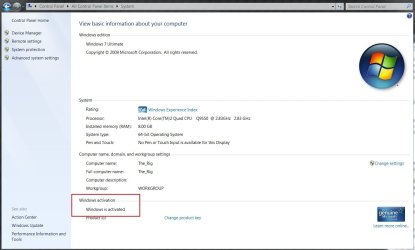
Does System say it is activated?

If not, click activation link, insert Product Key from the Microsoft Certificate of Authenticity on the bottom of the laptop, then see if it will activate. If not, there will be a phone option which shouldn't take more than a quick call to sort out the specific key from batch.

If you activated using the retail Product key you purchased, change the key to the OEM key from the sticker to avoid wasting the $100+ license tied to the machine. Use "Change Product Key" link on System page or run "slmgr -ipk" to reset activation and start with correct key.
 
In control panel, system it'll say whether it's activated.


click to enlarge
Capture.JPG
 

My Computer My Computer

At a glance

W 7 64-bit UltimateIntel Q9550 Yorkfield8GB Dominator 8500C5DATI : XFX 5870
Computer Manufacturer/Model Number
* BFK Customs *
OS
W 7 64-bit Ultimate
CPU
Intel Q9550 Yorkfield
Motherboard
ASUS P5Q Pro
Memory
8GB Dominator 8500C5D
Graphics Card(s)
ATI : XFX 5870
Sound Card
Realtek HD Audio 7-1
Monitor(s) Displays
1x 47" LCD HDMI & 3x 26" LCD HDMI
Screen Resolution
1920x1080P & 1920x1200
Hard Drives
1x 80GB Intel X25-M G2 SSD : 1x 500GB & 1x 640GB WD Caviar Black(s)
PSU
Corsair 620HX
Case
Cooler Master RC-690
Cooling
Tuniq Tower 120, 2x 140mm and 3x 120mm case fans
Keyboard
Microsoft 500
Mouse
Razer Diamondback 3G
Internet Speed
14 Mb/s
Other Info
1x Koutech 3Gb/s SATA HDD Hot Swap Rack
Back
Top