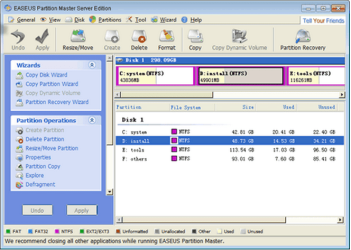
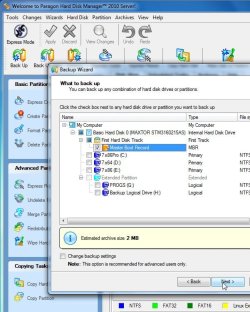
need to expand C partition.

op3studios

New member
Local time
5:01 PM
Messages
15
I've Gparted a copy of the C partition and need to expand the size of the original.

before I resize, I want to back up a restorable MBR.

what's the best free program to use for this on W7-64?

thanks,

Jim
 

My Computer My Computer

Computer Manufacturer/Model Number
self built
OS
Windows 7 Home Premium
CPU
AMD Athalon 64 3200+
Motherboard
Asus K8V Deluxe
Memory
2 GB
Graphics Card(s)
Asus ATI 3450 HD
Sound Card
Asus Xonar D-1
Monitor(s) Displays
HP 2210m, Dell
Hard Drives
WD 70 Raptor, WD 100, WD 80,
Keyboard
Microsoft Ergonomic Split 4000
Mouse
Logitech Performance MX
Internet Speed
tfs!

Attachments

  • EASEUS.PNG
    EASEUS.PNG
    71.7 KB · Views: 15

My Computer My Computer

Computer Manufacturer/Model Number
packard bell IXTREME M5722
OS
Operating System : Windows 7 Home Premium Edition 6.01.7600 SP1 (x64)
CPU
Processor : Intel Core 2 Quad Q8300 @ 2500 MHz
Motherboard
Mainboard : Packard Bell (Acer EG43M )
Memory
Physical Memory :8GB Corsair4x 2GB 800MHz C5 DDR2
Graphics Card(s)
Video Card : XFX 6700 AMD
Monitor(s) Displays
Maestro 234DL - BenQ V2220 - BenQ VW2420H
Screen Resolution
Current Display :1920x1080p pixels at 60 Hz in HD LED
Hard Drives
Hard Disks : WDC (1000 GB)
Drive C: (Hard Disk) : 428 GB available on 491 GB
Drive D: (Hard Disk) : 426 GB available on 492 GB
SAMSUNG spinpoint HD103SJ 1000.2 GB
(X 2) KINGSTON SSD NOW V 30GB
PSU
XFX ProSeries 550W PSU
Case
PACKARD BELL IXTREME
Cooling
System Blower Current: 150mA Air Flow16CFM ;Akasa 90mm rear
Keyboard
Gigabyte Aivia K8100
Mouse
TRUST-Wireless Laser Mouse - Carbon edition MI-7770C
Internet Speed
TP-LINK > TL-WN951N / AV500 Gigabit Powerline Adapters
Browser
chrome dev
Other Info
EXTRA COOLING>(FAN CONTROLLER) PC Bay Cooler 3 x 40mm fans; Akasa AK-HD-BL Blue hard drive cooler 2 x 40 mm fan 4500 rpm 29.7 dBA
Bios> American Megatrends Inc.
Version : P01-A1
Date : 08/31/2009
I'd use free Partition Wizard bootable CD which has been used for hundreds of repartitioning/resizing operations here without a single failure. It has a data protection mode which will not fail during Resizing (unlike Easeus and others) but just start again until you bail out at restart.

Make sure Win7 is marked Active in case you need to repair the MBR by booting the Win7 DVD Repair console or Repair CD to run Startup Repair up to 3 separate times with reboots. http://www.sevenforums.com/tutorials/105541-startup-repair-run-3-separate-times.html

I'd also back up a Win7 System Image so you can start over if necessary. Reinstall or resizing is also a good time to back up the latest set of files.

http://www.partitionwizard.com/download.html
 
easeus free only works for 32 bit.
you have to buy the 64bit capability and the trial doesn't execute.
 

My Computer My Computer

Computer Manufacturer/Model Number
self built
OS
Windows 7 Home Premium
CPU
AMD Athalon 64 3200+
Motherboard
Asus K8V Deluxe
Memory
2 GB
Graphics Card(s)
Asus ATI 3450 HD
Sound Card
Asus Xonar D-1
Monitor(s) Displays
HP 2210m, Dell
Hard Drives
WD 70 Raptor, WD 100, WD 80,
Keyboard
Microsoft Ergonomic Split 4000
Mouse
Logitech Performance MX
Internet Speed
tfs!
resolved

Partition Wizard encountered what it called a known bug
and failed.
said partitions were going to overlap, (not) and wanted me to send in a bug report.

I've been chasing Windows solutions with results like this since Windows opened shop back in the day.
no more.
I'm still interested in helping my friends with their Windows installations here in my small town, but from now on I use W7 for production, and Linux (Ubuntu 10.10) for everything else....especially for diagnostic and utility use.

so I just used GParted to resize then repaired MBR with W7 install disk.
the world has taken on a rosy glow.

Hirens Boot Disk 12 is highly recommended to you Tech types.
it boots ISO and has powerful Linux and Windows interfaces.
sometimes I just use Hirens mini-Linux as my OS.

again, I like Windows7. it's a good OS and I recommend upgrading from XP/Vista all the time.
but for someone just starting out learning a new OS, Ubuntu is in the mix of options.

cheers,

Jim
 

My Computer My Computer

Computer Manufacturer/Model Number
self built
OS
Windows 7 Home Premium
CPU
AMD Athalon 64 3200+
Motherboard
Asus K8V Deluxe
Memory
2 GB
Graphics Card(s)
Asus ATI 3450 HD
Sound Card
Asus Xonar D-1
Monitor(s) Displays
HP 2210m, Dell
Hard Drives
WD 70 Raptor, WD 100, WD 80,
Keyboard
Microsoft Ergonomic Split 4000
Mouse
Logitech Performance MX
Internet Speed
tfs!
I've Gparted a copy of the C partition and need to expand the size of the original.

before I resize, I want to back up a restorable MBR.

what's the best free program to use for this on W7-64?

thanks,

Jim
I use this for the MBR backup
MBR Backup
 

My Computer My Computer

Computer type
PC/Desktop
Computer Manufacturer/Model Number
Own build
OS
Windows 7x64 Home Premium SP1
CPU
Intel i7 2600k
Motherboard
ASUS P8Z68 Deluxe
Memory
G.Skill Ripjaws (DDR3-1600) 2x4GB
Graphics Card(s)
Nvidia GeForce GTS 450; Intel HD Graphics 3000(GT2+)
Monitor(s) Displays
Dell Ultrasharp IPS panel U2311H, Samsung SyncMaster P2350
Screen Resolution
1920x1080
Hard Drives
Samsung 850 Pro SSD 256GB, Samsung SSD 840 120GB, Seagates 1TB Barracuda ST31000528AS x2
PSU
Seasonic M12II 520W
Case
Lian Li Lancool PC-K60
Cooling
Case: 1x120mm, 3x140mm CPU: Hyper 212+
Keyboard
Logitech MK520 (wireless)
Mouse
Logitech MK520
Internet Speed
6-7 Mbps
Antivirus
Norton Security Premium, Malwarebytes on 2 (MSE on 3rd PC)
Browser
FireFox
Other Info
Audio: Logitech Z523 2.1
thanks,
MBR Backup is in my bag o tricks now.
 

My Computer My Computer

Computer Manufacturer/Model Number
self built
OS
Windows 7 Home Premium
CPU
AMD Athalon 64 3200+
Motherboard
Asus K8V Deluxe
Memory
2 GB
Graphics Card(s)
Asus ATI 3450 HD
Sound Card
Asus Xonar D-1
Monitor(s) Displays
HP 2210m, Dell
Hard Drives
WD 70 Raptor, WD 100, WD 80,
Keyboard
Microsoft Ergonomic Split 4000
Mouse
Logitech Performance MX
Internet Speed
tfs!

My Computers My Computers

System One System Two

  • Computer type
    PC/Desktop
    OS
    7 X64
    CPU
    i5 8400
    Motherboard
    gigabyte b365m ds3h
    Memory
    2x8gb 3200mhz
    Hard Drives
    various
    PSU
    pure power 11 400w cm
    Case
    Coolermaster
    Cooling
    cryorig m9i
  • Computer type
    PC/Desktop
    OS
    7x64
    CPU
    g5400
    Motherboard
    ga b365m ds3h
    Memory
    8gb ddr4 2400
    PSU
    xfx pro 450w
SIW2;1091601[B said:
]You might prefer just to use an imaging app to back it up - only takes a few secs.[/B]


Otherwise, I like plppart Plop - Windows Tools
If your specific purpose is to simply back up the mbr why use an imaging program? I know most backup the mbr as a matter of course along with partitions.
 

My Computer My Computer

Computer type
PC/Desktop
Computer Manufacturer/Model Number
Own build
OS
Windows 7x64 Home Premium SP1
CPU
Intel i7 2600k
Motherboard
ASUS P8Z68 Deluxe
Memory
G.Skill Ripjaws (DDR3-1600) 2x4GB
Graphics Card(s)
Nvidia GeForce GTS 450; Intel HD Graphics 3000(GT2+)
Monitor(s) Displays
Dell Ultrasharp IPS panel U2311H, Samsung SyncMaster P2350
Screen Resolution
1920x1080
Hard Drives
Samsung 850 Pro SSD 256GB, Samsung SSD 840 120GB, Seagates 1TB Barracuda ST31000528AS x2
PSU
Seasonic M12II 520W
Case
Lian Li Lancool PC-K60
Cooling
Case: 1x120mm, 3x140mm CPU: Hyper 212+
Keyboard
Logitech MK520 (wireless)
Mouse
Logitech MK520
Internet Speed
6-7 Mbps
Antivirus
Norton Security Premium, Malwarebytes on 2 (MSE on 3rd PC)
Browser
FireFox
Other Info
Audio: Logitech Z523 2.1
The question was
I want to back up a restorable MBR.

One valid answer is back it up with an imaging app. - easy to restore also - no need to type it all in manually.


mbr-backup.jpg

Not all imaging apps. allow backing it up alone or separately
 

My Computers My Computers

System One System Two

  • Computer type
    PC/Desktop
    OS
    7 X64
    CPU
    i5 8400
    Motherboard
    gigabyte b365m ds3h
    Memory
    2x8gb 3200mhz
    Hard Drives
    various
    PSU
    pure power 11 400w cm
    Case
    Coolermaster
    Cooling
    cryorig m9i
  • Computer type
    PC/Desktop
    OS
    7x64
    CPU
    g5400
    Motherboard
    ga b365m ds3h
    Memory
    8gb ddr4 2400
    PSU
    xfx pro 450w
well, know that for my personal use I have found no more powerful and intuitively direct utility tools than the Windows/Linux softwares present on the Hirens Boot Disk linked above.
for the last month I've been experimenting with Linux and Windows7 installs on this new build.
I've used my old Dos 6.21 floppies, Partition Magic, Native Windows Disk Manager, this and that...trials and demos are simply frustrating.
GParted. if you haven't tried it...

I now copy, transplant, and nuke partitions as often as I open a text editor.
I mean I have a pristine unallocated SSD space that I drop Designed Partitions onto as needed. some Partitions are resident, some I consider portable.
like, one is Adobe Web Premium. as mentioned above it takes minutes to copy and paste into an unallocated space and I know I have top form fresh and prestine at every Partition paste event. Generated program data; pics, footage, waveforms, etc are resident on a separate drive accessible to any Partition I choose.
few people need this level of flexibility.
these days, problems are few and far between on a decent home user rig.
but for multi-media Studio production all these abilities are just tools to be used efficiently in getting a job done well.


my friends get True Image on my recommendation.
takes byte transfer time though...whatever your pipe and load = job time. backing up 80GB on a three year old machine? snore.
but they just want things to work without having to think about it so they can get on with their Facebook lives. a box program like TI, once properly set up, automates the backup/restore tasks with the push of a button. and I want to be able to reliably guide them to Nirvana when they wake me out of my warm bed. 'yeah, go to the Start button> click on True Image. no, use the left button... hit restore and go watch Californication or something..."
but these program$ tend to use a proprietary file structure and you must accept the addiction to frequent purchases and $updates$.

a partition is either there or it's not. if it is there, an accurate copy is a true mirror of every byte. cloning is cool. all my partitions are fail-safe{haha} cloned on an external hard-drive that lives in my closet. my working partitions reside where ever I need and put them for any given time. a large project is fully contained in it's own movable Partition.

working with Partitions is so much more efficient and there is little possibility of data corruption. just know that you may have to restore your MBR, which should be accurately archived and easily restorable anyway.

now.
I'm off to the Market.
I think I deserve some Raspberry Ginger Beer.

Jim

 

My Computer My Computer

Computer Manufacturer/Model Number
self built
OS
Windows 7 Home Premium
CPU
AMD Athalon 64 3200+
Motherboard
Asus K8V Deluxe
Memory
2 GB
Graphics Card(s)
Asus ATI 3450 HD
Sound Card
Asus Xonar D-1
Monitor(s) Displays
HP 2210m, Dell
Hard Drives
WD 70 Raptor, WD 100, WD 80,
Keyboard
Microsoft Ergonomic Split 4000
Mouse
Logitech Performance MX
Internet Speed
tfs!
Back
Top