Neither W7 install disc or W7 repair disc find my new system

52yankee

New member
Local time
6:43 AM
Messages
31
I have a problem trying to set up raid 1. I have a new PC with W7 Pro 64 bit installed and have migrated everything off the old failing desktop. Everything works well and W7 has no problem booting. I can take W7 image dumps as well. Somewhere in the process of setting up RAID I have done something that does not allow me to complete the process. I decided to use the Install Disk and do a startup repair to clear things, but for some reason neither the Install Disc or the W7 System Repair disc find a system to repair yet my system boots properly.
I've read that I can image dump the whole thing, enter BIOS and setup Raid 1 properly and then restore the image. The proper drivers for RAID were loaded. Can someone tell me if this process would work? Thanks in advance for any help.
 

My Computer My Computer

At a glance

Windows 7 Professional 64bit
OS
Windows 7 Professional 64bit
Thank you for your update. I don't think I have older Raid. The mother board is band new and has the latest chipset from AMD S850. In any case I am looking for an answer as to why neither Install or System Repair disks can locate a W7 image that works perfectly and whether or not I can use dump/restore to put back everything once I go into raid via Bios and create the Raid 1 environment with my two hard disks.
 

My Computer My Computer

At a glance

Windows 7 Professional 64bit
OS
Windows 7 Professional 64bit
Sorry I meant that RAID is dated, not your hardware.

Is your problem that image is not detected by the booted installer or Repair CD when you select "System Image Recovery?"

Is the Win7 backup image placed in the root of an external or another internal HD?

It's possible it will not reimage to RAID with an image made from a single HD. You can try.
 
Last edited:
It may be a glitch, but if you are looking at the Repair options, if you check the top button, will it continue with the repair? I think it looks for the System partition, but have no proof, and someone else may know better.

Any chance you could get a snipping tool picture of your disk management window and attach using the paperclip?

Does that board have any type of RAID monitor utility that can give you the status of the array?

I have only played with RAID a couple of times, but have never really run it. If you go through how you set it up, maybe someone will see something meaningful. You know, like you enabled the RAID SATA controller in the bios, then entered the RAID OPRom during boot .........
 

My Computer My Computer

At a glance

Windows 7 x64i7-2600K8 GGTX 480
Computer Manufacturer/Model Number
Homebuilt
OS
Windows 7 x64
CPU
i7-2600K
Motherboard
Asus P8Z77-v Pro
Memory
8 G
Graphics Card(s)
GTX 480
Sound Card
Onboard
Monitor(s) Displays
LG W2753V
Screen Resolution
1920x1080
Hard Drives
Crucial M4 128 G SSD
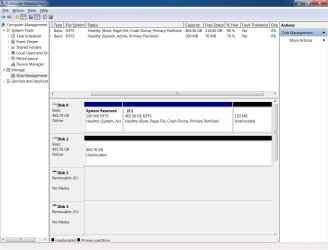
Both the W7 Install CD and the W7 System Repair disc report that they cannot find an operating system, yet I boot from it without a problem. I used the option to repair in both cases . The RAID utility does not show any Raid Arrays but it does show my two 500gb hard drives one of which is the boot disk. Disk management shows a 100mb System Partition and the W7 install partition and that is all. I will get a disk image and clip here tomorrow.

Thanks for the replies.
 

My Computer My Computer

At a glance

Windows 7 Professional 64bit
OS
Windows 7 Professional 64bit
Make sure the installer and Repair CD have SP1 if the OS does, as it should.

The OS will generate the Repair disk, while the latest official installer is in the Clean Reinstall tutorial.

System Repair Disc - Create
 
Both the Install DVD and System Repair are SP1.

W7 Computer MGMT Disk view.jpg
 

My Computer My Computer

At a glance

Windows 7 Professional 64bit
OS
Windows 7 Professional 64bit
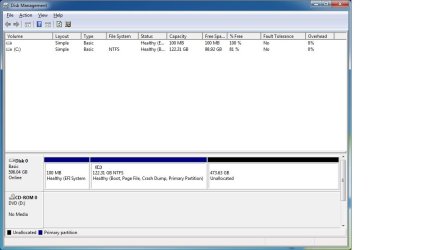
Ok, I actually had to install a RAID 1 system to know for sure, but your system does not appear to be a RAID setup. You can look at mine to compare. I am using two 640 GB drives.

The fact is shows two disks with one drive space unallocated, may be a glitch in disk management, or something else.

Running a sfc /scannow from an Administrative would not hurt and maybe repair something.

I will be testing this setup to see how Image backups and repairs work.

It is also funny, that for me to get into the RAID setup, I had to revert to a PS/2 keyboard, on this motherboard.
 

Attachments

  • RAID1.jpg
    RAID1.jpg
    51.3 KB · Views: 6

My Computer My Computer

At a glance

Windows 7 x64i7-2600K8 GGTX 480
Computer Manufacturer/Model Number
Homebuilt
OS
Windows 7 x64
CPU
i7-2600K
Motherboard
Asus P8Z77-v Pro
Memory
8 G
Graphics Card(s)
GTX 480
Sound Card
Onboard
Monitor(s) Displays
LG W2753V
Screen Resolution
1920x1080
Hard Drives
Crucial M4 128 G SSD
I do see one more thing. On my system, under bios boot devices I show a volume0 option and not just a individual drive. This is an Intel board, so it might be different for yours, but something to check.
 

My Computer My Computer

At a glance

Windows 7 x64i7-2600K8 GGTX 480
Computer Manufacturer/Model Number
Homebuilt
OS
Windows 7 x64
CPU
i7-2600K
Motherboard
Asus P8Z77-v Pro
Memory
8 G
Graphics Card(s)
GTX 480
Sound Card
Onboard
Monitor(s) Displays
LG W2753V
Screen Resolution
1920x1080
Hard Drives
Crucial M4 128 G SSD
Thank you all for responding as I try to understand just what I might have finger checked when I was attempting to build the RAID 1 setup. The 2nd drive shown in my Computer Management actually came from the older PC and was the 2nd of two RAID 1 volumes, not the primary, but that raid was Intel. My new pc has ASUS mother board with onboard AMD Raid and a utility under W7 called Raidxpert. I don't know what RAID puts on the drives that identifies them as RAID so I think you are right to format the drive and see what happens. Thanks again for doing the testing. I really appreciate everyones efforts.
 

My Computer My Computer

At a glance

Windows 7 Professional 64bit
OS
Windows 7 Professional 64bit
I think I created my own problem. Adding the 2nd drive from the old PC that had been in a RAID 1 setup and not formatting it to get rid of whatever RAID scribbles in the MBR is a no-no. I formatted the 2nd drive yesterday and today I can boot either the Install Disk or the System Repair disk and they both find my W7 operating system now. Thanks to Saltgrass for suggesting that the 2nd disk reported by disk management looked funny and might be causing the problem. I am now at the point where I want to create the RAID 1 evinroment but don't know if I will be able to restore a system image to a freshly created raid environment. Anyway, thanks to everyone.
 

My Computer My Computer

At a glance

Windows 7 Professional 64bit
OS
Windows 7 Professional 64bit
I am now at the point where I want to create the RAID 1 evinroment but don't know if I will be able to restore a system image to a freshly created raid environment. Anyway, thanks to everyone.
Funny you should mention this, since it is one thing I tested. If the image is useable, and it will fit on your new configuration, you should be able to re-image it.

I found out, you need the same circumstances you need to install the RAID in the first place. That being RAID set for the SATA controller and entering the RAID OpRom to set up the Array. Once you do that, you should be able to install or re-image. And if it comes up, my RAID was set up with a UEFI install, but it should not matter, as long as you boot the Install media to the same configuration as the image.

Good Luck..
 

My Computer My Computer

At a glance

Windows 7 x64i7-2600K8 GGTX 480
Computer Manufacturer/Model Number
Homebuilt
OS
Windows 7 x64
CPU
i7-2600K
Motherboard
Asus P8Z77-v Pro
Memory
8 G
Graphics Card(s)
GTX 480
Sound Card
Onboard
Monitor(s) Displays
LG W2753V
Screen Resolution
1920x1080
Hard Drives
Crucial M4 128 G SSD
Back
Top