Solved Netflix CPU usage maxes out and causes video to lag

rkv43

New member
Member
Local time
10:55 AM
Messages
26
I've been having some serious problems playing netflix on my computer using any browser (Firefox, IE9, or Chrome). At first the video will play fine and my cpu usage remains below 20%. Then within about 1 or 2 minutes my cpu usage will jump up around 70% to 100%. The task manager shows the majority of the usage is by whichever browser I'm currently using. When the cpu usage jumps up the video begins to become choppy and starts to lag the audio and it becomes worse and worse. Sometimes this would cause the computer to completely shutdown and give me the Kernal 41 power failure with a bug report of all 0's. I have a consistent internet connection at around 15 m/b down. Also I am able to watch 1080p videos on youtube without any problem.

Computer specs:
Asrock H55M motherboard
Intel i3 processor
2x2 G Skill DDR3 RAM
64 Gig Samsung SSD
2 Tb Samsung HDD
430W Corsair PSU
Windows 7 Enterprise x64 Service Pack 1

This computer should be able to handle Netflix streaming with ease. My 5 year old Dell laptop plays Netflix streaming hd flawlessly using the same wireless connection. I've updated all my graphics, sound, and BIOS drivers. I use Microsoft Security Essentials as my antivirus. I've already ran the Windows Memory Diagnostic and Memtest86 and everything checked out fine. I've had this system for about a year and a half now and the problem started just recently but I cannot isolate a program/driver that is at fault. The fact that I'm able to stream youtube fine makes me lean towards Silverlight being a problem.

Any help/suggestions would be greatly appreciated. I've been troubleshooting this for the past week to no avail.
 

My Computer My Computer

At a glance

Windows 7 Enterprise x64Intel Core i3 Processor i3-540 3.06GHz 4MB LG...G Skill DDR3 1333 2x2HIS H675F1GD Radeon HD 6750
OS
Windows 7 Enterprise x64
CPU
Intel Core i3 Processor i3-540 3.06GHz 4MB LGA1156
Motherboard
Asrock H55M
Memory
G Skill DDR3 1333 2x2
Graphics Card(s)
HIS H675F1GD Radeon HD 6750
Monitor(s) Displays
2 Asus 23 inch widescreen LED's
Hard Drives
Samsung 830 series SSD 64 gigabyte
Samsung HD204UI 2TB
PSU
CORSAIR Enthusiast Series TX650 V2 650W
Internet Speed
Comcast Xfinitity 15mB down
It could very well be a silverlight problem. Have you tried uninstalling and reinstalling the latest Silverlight plugin? Are you running any codec packs?
 

My Computer My Computer

At a glance

XP / Win7 x64 ProIntel Quad-Core Q9450 @ 3.2GHz2x2GB GSkill DDR2NVIDIA GeForce 8600 GTS (EVGA)
OS
XP / Win7 x64 Pro
CPU
Intel Quad-Core Q9450 @ 3.2GHz
Motherboard
Asus P5-E
Memory
2x2GB GSkill DDR2
Graphics Card(s)
NVIDIA GeForce 8600 GTS (EVGA)
Monitor(s) Displays
Dell 2408WFP
Screen Resolution
1920x1200
Yes I've tried uninstalling and reinstalling the silverlight plugin several times. I have not installed any codec packs (I just use VLC to play any media files since it supports just about anything without the help of codecs). It just seems strange that the netflix show will play fine for a minute or two with a very low cpu usage and then the cpu usage spikes up and causes the video to lag behind the audio. If I refresh the page it will work again for a couple of minutes but the problem repeats everytime. And the process in task manager responsible for the bulk of the usage is the firefox plugin container. If I use IE9 it is the IE9 process which eventually spikes up which makes me think the plugin is not playing nicely with some driver.
 

My Computer My Computer

At a glance

Windows 7 Enterprise x64Intel Core i3 Processor i3-540 3.06GHz 4MB LG...G Skill DDR3 1333 2x2HIS H675F1GD Radeon HD 6750
OS
Windows 7 Enterprise x64
CPU
Intel Core i3 Processor i3-540 3.06GHz 4MB LGA1156
Motherboard
Asrock H55M
Memory
G Skill DDR3 1333 2x2
Graphics Card(s)
HIS H675F1GD Radeon HD 6750
Monitor(s) Displays
2 Asus 23 inch widescreen LED's
Hard Drives
Samsung 830 series SSD 64 gigabyte
Samsung HD204UI 2TB
PSU
CORSAIR Enthusiast Series TX650 V2 650W
Internet Speed
Comcast Xfinitity 15mB down
What version of VLC do you have?
 

My Computer My Computer

At a glance

XP / Win7 x64 ProIntel Quad-Core Q9450 @ 3.2GHz2x2GB GSkill DDR2NVIDIA GeForce 8600 GTS (EVGA)
OS
XP / Win7 x64 Pro
CPU
Intel Quad-Core Q9450 @ 3.2GHz
Motherboard
Asus P5-E
Memory
2x2GB GSkill DDR2
Graphics Card(s)
NVIDIA GeForce 8600 GTS (EVGA)
Monitor(s) Displays
Dell 2408WFP
Screen Resolution
1920x1200
I'm not positive but I think it's the latest version. I'll give you the specific number when I get home from work.
 

My Computer My Computer

At a glance

Windows 7 Enterprise x64Intel Core i3 Processor i3-540 3.06GHz 4MB LG...G Skill DDR3 1333 2x2HIS H675F1GD Radeon HD 6750
OS
Windows 7 Enterprise x64
CPU
Intel Core i3 Processor i3-540 3.06GHz 4MB LGA1156
Motherboard
Asrock H55M
Memory
G Skill DDR3 1333 2x2
Graphics Card(s)
HIS H675F1GD Radeon HD 6750
Monitor(s) Displays
2 Asus 23 inch widescreen LED's
Hard Drives
Samsung 830 series SSD 64 gigabyte
Samsung HD204UI 2TB
PSU
CORSAIR Enthusiast Series TX650 V2 650W
Internet Speed
Comcast Xfinitity 15mB down

My Computer My Computer

At a glance

XP / Win7 x64 ProIntel Quad-Core Q9450 @ 3.2GHz2x2GB GSkill DDR2NVIDIA GeForce 8600 GTS (EVGA)
OS
XP / Win7 x64 Pro
CPU
Intel Quad-Core Q9450 @ 3.2GHz
Motherboard
Asus P5-E
Memory
2x2GB GSkill DDR2
Graphics Card(s)
NVIDIA GeForce 8600 GTS (EVGA)
Monitor(s) Displays
Dell 2408WFP
Screen Resolution
1920x1200
Ok I'll try that, but how would that be affecting streaming video play using an internet browser? Does VLC install a type of plugin that effects media files played from Netflix?
 

My Computer My Computer

At a glance

Windows 7 Enterprise x64Intel Core i3 Processor i3-540 3.06GHz 4MB LG...G Skill DDR3 1333 2x2HIS H675F1GD Radeon HD 6750
OS
Windows 7 Enterprise x64
CPU
Intel Core i3 Processor i3-540 3.06GHz 4MB LGA1156
Motherboard
Asrock H55M
Memory
G Skill DDR3 1333 2x2
Graphics Card(s)
HIS H675F1GD Radeon HD 6750
Monitor(s) Displays
2 Asus 23 inch widescreen LED's
Hard Drives
Samsung 830 series SSD 64 gigabyte
Samsung HD204UI 2TB
PSU
CORSAIR Enthusiast Series TX650 V2 650W
Internet Speed
Comcast Xfinitity 15mB down
VLC tends to use its own codecs as standalone for the player itself and not implement them system wide. However, in version 2.0, it integrated itself into the browser to the point where it was involved in playing every type of media file, which I did not like. And, there was no way to prevent it from doing so. This is the reason I reverted back to version 1.x. I didn't like the forced integration with the new version, which could be causing some issues with this. Even if it's not, it's worth a shot. In the thread below, it helped a user to uninstall VLC (but obviously YMMV):

http://www.sevenforums.com/media-center/198778-wmc-freezes-end-netflix-episodes.html
 

My Computer My Computer

At a glance

XP / Win7 x64 ProIntel Quad-Core Q9450 @ 3.2GHz2x2GB GSkill DDR2NVIDIA GeForce 8600 GTS (EVGA)
OS
XP / Win7 x64 Pro
CPU
Intel Quad-Core Q9450 @ 3.2GHz
Motherboard
Asus P5-E
Memory
2x2GB GSkill DDR2
Graphics Card(s)
NVIDIA GeForce 8600 GTS (EVGA)
Monitor(s) Displays
Dell 2408WFP
Screen Resolution
1920x1200
Tried uninstalling VLC player which didn't change anything. Turns out I was still using an older 1.1.xxx version number. I'm going to go through and try uninstalling programs one by one to see if I can get any results.
 

My Computer My Computer

At a glance

Windows 7 Enterprise x64Intel Core i3 Processor i3-540 3.06GHz 4MB LG...G Skill DDR3 1333 2x2HIS H675F1GD Radeon HD 6750
OS
Windows 7 Enterprise x64
CPU
Intel Core i3 Processor i3-540 3.06GHz 4MB LGA1156
Motherboard
Asrock H55M
Memory
G Skill DDR3 1333 2x2
Graphics Card(s)
HIS H675F1GD Radeon HD 6750
Monitor(s) Displays
2 Asus 23 inch widescreen LED's
Hard Drives
Samsung 830 series SSD 64 gigabyte
Samsung HD204UI 2TB
PSU
CORSAIR Enthusiast Series TX650 V2 650W
Internet Speed
Comcast Xfinitity 15mB down
You might try installing incrementally older versions of Silverlight as well to see if that could help.
 

My Computer My Computer

At a glance

XP / Win7 x64 ProIntel Quad-Core Q9450 @ 3.2GHz2x2GB GSkill DDR2NVIDIA GeForce 8600 GTS (EVGA)
OS
XP / Win7 x64 Pro
CPU
Intel Quad-Core Q9450 @ 3.2GHz
Motherboard
Asus P5-E
Memory
2x2GB GSkill DDR2
Graphics Card(s)
NVIDIA GeForce 8600 GTS (EVGA)
Monitor(s) Displays
Dell 2408WFP
Screen Resolution
1920x1200
Yeah, I tried that earlier and installed Silverlight version 4.0.xxxx but when I opened Netflix it told me that I did not have Silverlight installed making it seem like it didn't support that older version. However on my laptop that is running Windows 7 32 bit I have Silverlight version 4.1.xxxxx installed and Netflix works perfectly.

So does Netflix support older Silverlight versions on 64 bit machines because I was unsuccessful to get any video playing unless I used the Silverlight 5 plugin.
 

My Computer My Computer

At a glance

Windows 7 Enterprise x64Intel Core i3 Processor i3-540 3.06GHz 4MB LG...G Skill DDR3 1333 2x2HIS H675F1GD Radeon HD 6750
OS
Windows 7 Enterprise x64
CPU
Intel Core i3 Processor i3-540 3.06GHz 4MB LGA1156
Motherboard
Asrock H55M
Memory
G Skill DDR3 1333 2x2
Graphics Card(s)
HIS H675F1GD Radeon HD 6750
Monitor(s) Displays
2 Asus 23 inch widescreen LED's
Hard Drives
Samsung 830 series SSD 64 gigabyte
Samsung HD204UI 2TB
PSU
CORSAIR Enthusiast Series TX650 V2 650W
Internet Speed
Comcast Xfinitity 15mB down

My Computer My Computer

At a glance

XP / Win7 x64 ProIntel Quad-Core Q9450 @ 3.2GHz2x2GB GSkill DDR2NVIDIA GeForce 8600 GTS (EVGA)
OS
XP / Win7 x64 Pro
CPU
Intel Quad-Core Q9450 @ 3.2GHz
Motherboard
Asus P5-E
Memory
2x2GB GSkill DDR2
Graphics Card(s)
NVIDIA GeForce 8600 GTS (EVGA)
Monitor(s) Displays
Dell 2408WFP
Screen Resolution
1920x1200
Well I reinstalled Windows 7, and only installed the silverlight plugin (the latest and an older one) but the video still begins to lag after about a minute and the CPU usage jumps up. So I guess it could be hardware related but the fact that other videos like youtube and movie files that I have play fine is what really throws me off.

My temporary solution was to borrow my girlfriend's Roku XS which does an excellent job streaming Netflix. But it still bugs me that my computer isn't able to replicate those results.
 

My Computer My Computer

At a glance

Windows 7 Enterprise x64Intel Core i3 Processor i3-540 3.06GHz 4MB LG...G Skill DDR3 1333 2x2HIS H675F1GD Radeon HD 6750
OS
Windows 7 Enterprise x64
CPU
Intel Core i3 Processor i3-540 3.06GHz 4MB LGA1156
Motherboard
Asrock H55M
Memory
G Skill DDR3 1333 2x2
Graphics Card(s)
HIS H675F1GD Radeon HD 6750
Monitor(s) Displays
2 Asus 23 inch widescreen LED's
Hard Drives
Samsung 830 series SSD 64 gigabyte
Samsung HD204UI 2TB
PSU
CORSAIR Enthusiast Series TX650 V2 650W
Internet Speed
Comcast Xfinitity 15mB down
Have you ever been able to play netflix on this computer without the CPU spike?
 

My Computer My Computer

At a glance

XP / Win7 x64 ProIntel Quad-Core Q9450 @ 3.2GHz2x2GB GSkill DDR2NVIDIA GeForce 8600 GTS (EVGA)
OS
XP / Win7 x64 Pro
CPU
Intel Quad-Core Q9450 @ 3.2GHz
Motherboard
Asus P5-E
Memory
2x2GB GSkill DDR2
Graphics Card(s)
NVIDIA GeForce 8600 GTS (EVGA)
Monitor(s) Displays
Dell 2408WFP
Screen Resolution
1920x1200
Yes, for about a year. I also know it was working fine after I installed my SSD about 3 months ago. So obviously something changed but I'm not sure about the time period that it happened. And the fact that I did a clean install of Windows 7 again last night with the problem still being there really confuses me.
 

My Computer My Computer

At a glance

Windows 7 Enterprise x64Intel Core i3 Processor i3-540 3.06GHz 4MB LG...G Skill DDR3 1333 2x2HIS H675F1GD Radeon HD 6750
OS
Windows 7 Enterprise x64
CPU
Intel Core i3 Processor i3-540 3.06GHz 4MB LGA1156
Motherboard
Asrock H55M
Memory
G Skill DDR3 1333 2x2
Graphics Card(s)
HIS H675F1GD Radeon HD 6750
Monitor(s) Displays
2 Asus 23 inch widescreen LED's
Hard Drives
Samsung 830 series SSD 64 gigabyte
Samsung HD204UI 2TB
PSU
CORSAIR Enthusiast Series TX650 V2 650W
Internet Speed
Comcast Xfinitity 15mB down
When you did a clean install, did you reinstall all of the necessary system drivers before installing silverlight?

ASRock > Products > Motherboard > H55M > Download

If you have not, completely uninstall silverlight (or maybe even better yet, do a system restore to before you installed it), reboot, then download and install all of those drivers, except the INF driver. That one is pretty out of date. Instead, go straight to Intel and download the INF update utility here and run it:

http://downloadcenter.intel.com/Det...hipset+Software+Installation+Utility&lang=eng

Reboot again, run Windows Updates and see if there are any recommended updates for your drivers. If so, copy/paste that screenshot to here so we can see which ones we'd recommend further updating at that point.
 

My Computer My Computer

At a glance

XP / Win7 x64 ProIntel Quad-Core Q9450 @ 3.2GHz2x2GB GSkill DDR2NVIDIA GeForce 8600 GTS (EVGA)
OS
XP / Win7 x64 Pro
CPU
Intel Quad-Core Q9450 @ 3.2GHz
Motherboard
Asus P5-E
Memory
2x2GB GSkill DDR2
Graphics Card(s)
NVIDIA GeForce 8600 GTS (EVGA)
Monitor(s) Displays
Dell 2408WFP
Screen Resolution
1920x1200
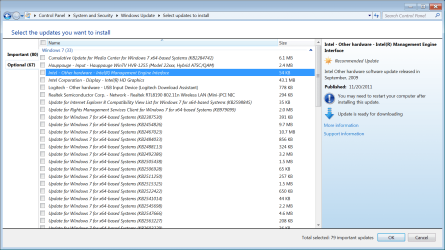
Ok I uninstalled Silverlight and installed all the drivers like you said. Here are two screenshots of the updates suggested by Windows Update. One is the important updates and the other is the optional.

Updates_Important.png

Updates_Optional.png

Updates_Important1.png
 

My Computer My Computer

At a glance

Windows 7 Enterprise x64Intel Core i3 Processor i3-540 3.06GHz 4MB LG...G Skill DDR3 1333 2x2HIS H675F1GD Radeon HD 6750
OS
Windows 7 Enterprise x64
CPU
Intel Core i3 Processor i3-540 3.06GHz 4MB LGA1156
Motherboard
Asrock H55M
Memory
G Skill DDR3 1333 2x2
Graphics Card(s)
HIS H675F1GD Radeon HD 6750
Monitor(s) Displays
2 Asus 23 inch widescreen LED's
Hard Drives
Samsung 830 series SSD 64 gigabyte
Samsung HD204UI 2TB
PSU
CORSAIR Enthusiast Series TX650 V2 650W
Internet Speed
Comcast Xfinitity 15mB down
Can we get more information on both of the Intel updates? I believe the Intel HD Graphics update is going to install an older version than you just installed direct from Intel, which we don't want. In the meantime, you can install updates 1,2,5, and 6 in the Optional Updates section right now.
 

My Computer My Computer

At a glance

XP / Win7 x64 ProIntel Quad-Core Q9450 @ 3.2GHz2x2GB GSkill DDR2NVIDIA GeForce 8600 GTS (EVGA)
OS
XP / Win7 x64 Pro
CPU
Intel Quad-Core Q9450 @ 3.2GHz
Motherboard
Asus P5-E
Memory
2x2GB GSkill DDR2
Graphics Card(s)
NVIDIA GeForce 8600 GTS (EVGA)
Monitor(s) Displays
Dell 2408WFP
Screen Resolution
1920x1200
Ok, the "Intel - Other hardware - Intel Management Engine Interface" update says it was released in September 2009

The "Intel Corporation - Display - Intel HD Graphics" update says it was released in January 2012

Both give me no more details when I click "More Information" on the right side of the screen.
 

My Computer My Computer

At a glance

Windows 7 Enterprise x64Intel Core i3 Processor i3-540 3.06GHz 4MB LG...G Skill DDR3 1333 2x2HIS H675F1GD Radeon HD 6750
OS
Windows 7 Enterprise x64
CPU
Intel Core i3 Processor i3-540 3.06GHz 4MB LGA1156
Motherboard
Asrock H55M
Memory
G Skill DDR3 1333 2x2
Graphics Card(s)
HIS H675F1GD Radeon HD 6750
Monitor(s) Displays
2 Asus 23 inch widescreen LED's
Hard Drives
Samsung 830 series SSD 64 gigabyte
Samsung HD204UI 2TB
PSU
CORSAIR Enthusiast Series TX650 V2 650W
Internet Speed
Comcast Xfinitity 15mB down

My Computer My Computer

At a glance

XP / Win7 x64 ProIntel Quad-Core Q9450 @ 3.2GHz2x2GB GSkill DDR2NVIDIA GeForce 8600 GTS (EVGA)
OS
XP / Win7 x64 Pro
CPU
Intel Quad-Core Q9450 @ 3.2GHz
Motherboard
Asus P5-E
Memory
2x2GB GSkill DDR2
Graphics Card(s)
NVIDIA GeForce 8600 GTS (EVGA)
Monitor(s) Displays
Dell 2408WFP
Screen Resolution
1920x1200
Back
Top