Solved Netflix CPU usage maxes out and causes video to lag

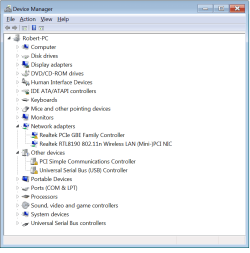
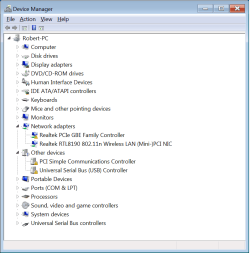
The first yellow exclamation point for the device status it says "This device cannot start. (Code 10)"

For the PCI Simple Communications Controller it says "The drivers for this device are not installed. (Code 28). To find a driver for this device, click Update Driver." (And it cannot find a driver online to install if I click update driver)

It says the same thing for the Universal Serial Bus Controller
devicemanager.png
 

My Computer My Computer

At a glance

Windows 7 Enterprise x64Intel Core i3 Processor i3-540 3.06GHz 4MB LG...G Skill DDR3 1333 2x2HIS H675F1GD Radeon HD 6750
OS
Windows 7 Enterprise x64
CPU
Intel Core i3 Processor i3-540 3.06GHz 4MB LGA1156
Motherboard
Asrock H55M
Memory
G Skill DDR3 1333 2x2
Graphics Card(s)
HIS H675F1GD Radeon HD 6750
Monitor(s) Displays
2 Asus 23 inch widescreen LED's
Hard Drives
Samsung 830 series SSD 64 gigabyte
Samsung HD204UI 2TB
PSU
CORSAIR Enthusiast Series TX650 V2 650W
Internet Speed
Comcast Xfinitity 15mB down
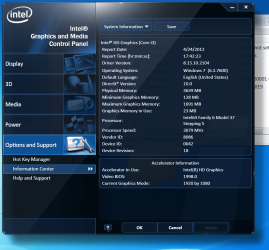
Ok, so install the numbers 1,2,5, and 6 updates (basically all of the first 6 except the Intel ones) in the list of optional updates you provided earlier and reboot. That should solve some of those issues. Then, see which version of Intel HD Graphics you have installed:

Graphics — How to identify the version of your graphics driver

Let us know which version that shows and then give us another Device Manager screenshot.

Also, it would be helpful to show which chipset driver version you have installed:

http://www.tomshardware.com/forum/209590-30-which-chipset-driver-version-have#t1898926
 

My Computer My Computer

At a glance

XP / Win7 x64 ProIntel Quad-Core Q9450 @ 3.2GHz2x2GB GSkill DDR2NVIDIA GeForce 8600 GTS (EVGA)
OS
XP / Win7 x64 Pro
CPU
Intel Quad-Core Q9450 @ 3.2GHz
Motherboard
Asus P5-E
Memory
2x2GB GSkill DDR2
Graphics Card(s)
NVIDIA GeForce 8600 GTS (EVGA)
Monitor(s) Displays
Dell 2408WFP
Screen Resolution
1920x1200
The chipset version is 9.3.0.1019 and it says "success" under the install.

The device manager still has the same exclamation points as before even after installing the optional updates and rebooting.

intelgraphics.png

devicemanager1.png
 

My Computer My Computer

At a glance

Windows 7 Enterprise x64Intel Core i3 Processor i3-540 3.06GHz 4MB LG...G Skill DDR3 1333 2x2HIS H675F1GD Radeon HD 6750
OS
Windows 7 Enterprise x64
CPU
Intel Core i3 Processor i3-540 3.06GHz 4MB LGA1156
Motherboard
Asrock H55M
Memory
G Skill DDR3 1333 2x2
Graphics Card(s)
HIS H675F1GD Radeon HD 6750
Monitor(s) Displays
2 Asus 23 inch widescreen LED's
Hard Drives
Samsung 830 series SSD 64 gigabyte
Samsung HD204UI 2TB
PSU
CORSAIR Enthusiast Series TX650 V2 650W
Internet Speed
Comcast Xfinitity 15mB down

My Computer My Computer

At a glance

XP / Win7 x64 ProIntel Quad-Core Q9450 @ 3.2GHz2x2GB GSkill DDR2NVIDIA GeForce 8600 GTS (EVGA)
OS
XP / Win7 x64 Pro
CPU
Intel Quad-Core Q9450 @ 3.2GHz
Motherboard
Asus P5-E
Memory
2x2GB GSkill DDR2
Graphics Card(s)
NVIDIA GeForce 8600 GTS (EVGA)
Monitor(s) Displays
Dell 2408WFP
Screen Resolution
1920x1200
You also should fill in exactly which i3 processor you have in your system specs.
 

My Computer My Computer

At a glance

XP / Win7 x64 ProIntel Quad-Core Q9450 @ 3.2GHz2x2GB GSkill DDR2NVIDIA GeForce 8600 GTS (EVGA)
OS
XP / Win7 x64 Pro
CPU
Intel Quad-Core Q9450 @ 3.2GHz
Motherboard
Asus P5-E
Memory
2x2GB GSkill DDR2
Graphics Card(s)
NVIDIA GeForce 8600 GTS (EVGA)
Monitor(s) Displays
Dell 2408WFP
Screen Resolution
1920x1200
Now the Driver Version for the Intel Graphics is 8.15.10.2622. The PCI Simple Communications exclamation point is gone but the other 2 are still there.
 

My Computer My Computer

At a glance

Windows 7 Enterprise x64Intel Core i3 Processor i3-540 3.06GHz 4MB LG...G Skill DDR3 1333 2x2HIS H675F1GD Radeon HD 6750
OS
Windows 7 Enterprise x64
CPU
Intel Core i3 Processor i3-540 3.06GHz 4MB LGA1156
Motherboard
Asrock H55M
Memory
G Skill DDR3 1333 2x2
Graphics Card(s)
HIS H675F1GD Radeon HD 6750
Monitor(s) Displays
2 Asus 23 inch widescreen LED's
Hard Drives
Samsung 830 series SSD 64 gigabyte
Samsung HD204UI 2TB
PSU
CORSAIR Enthusiast Series TX650 V2 650W
Internet Speed
Comcast Xfinitity 15mB down
Are you sure you installed the RealTek LAN driver? Does your LAN connection (direct cable connection to your router) work? Are you using a wired or wireless connection right now?

I'll be unavailable for a bit, but will check back in a couple hours.
 

My Computer My Computer

At a glance

XP / Win7 x64 ProIntel Quad-Core Q9450 @ 3.2GHz2x2GB GSkill DDR2NVIDIA GeForce 8600 GTS (EVGA)
OS
XP / Win7 x64 Pro
CPU
Intel Quad-Core Q9450 @ 3.2GHz
Motherboard
Asus P5-E
Memory
2x2GB GSkill DDR2
Graphics Card(s)
NVIDIA GeForce 8600 GTS (EVGA)
Monitor(s) Displays
Dell 2408WFP
Screen Resolution
1920x1200
I'm sure I installed it but I'm using a wireless connection anyway. Updated my computer specs with the specific i3 processor.
 

My Computer My Computer

At a glance

Windows 7 Enterprise x64Intel Core i3 Processor i3-540 3.06GHz 4MB LG...G Skill DDR3 1333 2x2HIS H675F1GD Radeon HD 6750
OS
Windows 7 Enterprise x64
CPU
Intel Core i3 Processor i3-540 3.06GHz 4MB LGA1156
Motherboard
Asrock H55M
Memory
G Skill DDR3 1333 2x2
Graphics Card(s)
HIS H675F1GD Radeon HD 6750
Monitor(s) Displays
2 Asus 23 inch widescreen LED's
Hard Drives
Samsung 830 series SSD 64 gigabyte
Samsung HD204UI 2TB
PSU
CORSAIR Enthusiast Series TX650 V2 650W
Internet Speed
Comcast Xfinitity 15mB down
Go back into Device Manager and try right clicking on the Realtek PCIe GBE Family Controller and selecting Update Driver (from the internet). If that doesn't work, try downloading and installing the driver from the Realtek site (it should be the Win7 and WinServer 2008 R2 Driver):

Realtek

Try that for the other one, too.
 

My Computer My Computer

At a glance

XP / Win7 x64 ProIntel Quad-Core Q9450 @ 3.2GHz2x2GB GSkill DDR2NVIDIA GeForce 8600 GTS (EVGA)
OS
XP / Win7 x64 Pro
CPU
Intel Quad-Core Q9450 @ 3.2GHz
Motherboard
Asus P5-E
Memory
2x2GB GSkill DDR2
Graphics Card(s)
NVIDIA GeForce 8600 GTS (EVGA)
Monitor(s) Displays
Dell 2408WFP
Screen Resolution
1920x1200
Ok the Realtek PCIe GBE Family Controller is fixed now but I still have the exclamation point on the Universal Serial Bus Controller. That may be irrelevant though.

Also I updated the firmware for my SSD to the latest firmware from Samsung using their Magician software. I now have firmware CXM03B1Q on it.
 

My Computer My Computer

At a glance

Windows 7 Enterprise x64Intel Core i3 Processor i3-540 3.06GHz 4MB LG...G Skill DDR3 1333 2x2HIS H675F1GD Radeon HD 6750
OS
Windows 7 Enterprise x64
CPU
Intel Core i3 Processor i3-540 3.06GHz 4MB LGA1156
Motherboard
Asrock H55M
Memory
G Skill DDR3 1333 2x2
Graphics Card(s)
HIS H675F1GD Radeon HD 6750
Monitor(s) Displays
2 Asus 23 inch widescreen LED's
Hard Drives
Samsung 830 series SSD 64 gigabyte
Samsung HD204UI 2TB
PSU
CORSAIR Enthusiast Series TX650 V2 650W
Internet Speed
Comcast Xfinitity 15mB down
Excellent.

Go here and see if it can find any missing drivers for you:

Intel® Driver Update Utility

After we get all these figured out and you have a strong baseline system, we can start installing silverlight and see if the issue persists.
 

My Computer My Computer

At a glance

XP / Win7 x64 ProIntel Quad-Core Q9450 @ 3.2GHz2x2GB GSkill DDR2NVIDIA GeForce 8600 GTS (EVGA)
OS
XP / Win7 x64 Pro
CPU
Intel Quad-Core Q9450 @ 3.2GHz
Motherboard
Asus P5-E
Memory
2x2GB GSkill DDR2
Graphics Card(s)
NVIDIA GeForce 8600 GTS (EVGA)
Monitor(s) Displays
Dell 2408WFP
Screen Resolution
1920x1200
Ok, everything looks good there but for some reason on my audio drivers it tries to use the Hauppauge WinTV HVR-1255 (Model 22xxx, Hybrid ATSC/QAM) and says the device in unknown or unsupported. But if I look under Device Manager > Sound, video and game controllers I have 3 listed the Hauppauge device, High definition audio device, and Intel Display Audio.
 

My Computer My Computer

At a glance

Windows 7 Enterprise x64Intel Core i3 Processor i3-540 3.06GHz 4MB LG...G Skill DDR3 1333 2x2HIS H675F1GD Radeon HD 6750
OS
Windows 7 Enterprise x64
CPU
Intel Core i3 Processor i3-540 3.06GHz 4MB LGA1156
Motherboard
Asrock H55M
Memory
G Skill DDR3 1333 2x2
Graphics Card(s)
HIS H675F1GD Radeon HD 6750
Monitor(s) Displays
2 Asus 23 inch widescreen LED's
Hard Drives
Samsung 830 series SSD 64 gigabyte
Samsung HD204UI 2TB
PSU
CORSAIR Enthusiast Series TX650 V2 650W
Internet Speed
Comcast Xfinitity 15mB down
On what Audio drivers in what program?

If there are no more exclamation marks, create a restore point, then install the latest silverlight and see if the netflix issue is still there.

Is there any way to connect your machine with a cable to the router?
 

My Computer My Computer

At a glance

XP / Win7 x64 ProIntel Quad-Core Q9450 @ 3.2GHz2x2GB GSkill DDR2NVIDIA GeForce 8600 GTS (EVGA)
OS
XP / Win7 x64 Pro
CPU
Intel Quad-Core Q9450 @ 3.2GHz
Motherboard
Asus P5-E
Memory
2x2GB GSkill DDR2
Graphics Card(s)
NVIDIA GeForce 8600 GTS (EVGA)
Monitor(s) Displays
Dell 2408WFP
Screen Resolution
1920x1200
It said that where I checked the Intel drivers from your link.

I'll go ahead and create a restore point.

Aside from unplugging it and moving it into the living room next to the router, nope. Do you think that could make much of a difference. I haven't had any problems with the wireless.
 

My Computer My Computer

At a glance

Windows 7 Enterprise x64Intel Core i3 Processor i3-540 3.06GHz 4MB LG...G Skill DDR3 1333 2x2HIS H675F1GD Radeon HD 6750
OS
Windows 7 Enterprise x64
CPU
Intel Core i3 Processor i3-540 3.06GHz 4MB LGA1156
Motherboard
Asrock H55M
Memory
G Skill DDR3 1333 2x2
Graphics Card(s)
HIS H675F1GD Radeon HD 6750
Monitor(s) Displays
2 Asus 23 inch widescreen LED's
Hard Drives
Samsung 830 series SSD 64 gigabyte
Samsung HD204UI 2TB
PSU
CORSAIR Enthusiast Series TX650 V2 650W
Internet Speed
Comcast Xfinitity 15mB down
Depending on the wireless card, it can add a lot of overhead to intensive streaming, causing some much higher CPU usage. That's the only reason I ask.
 

My Computer My Computer

At a glance

XP / Win7 x64 ProIntel Quad-Core Q9450 @ 3.2GHz2x2GB GSkill DDR2NVIDIA GeForce 8600 GTS (EVGA)
OS
XP / Win7 x64 Pro
CPU
Intel Quad-Core Q9450 @ 3.2GHz
Motherboard
Asus P5-E
Memory
2x2GB GSkill DDR2
Graphics Card(s)
NVIDIA GeForce 8600 GTS (EVGA)
Monitor(s) Displays
Dell 2408WFP
Screen Resolution
1920x1200
Ok, I'll remember that as something to try later but I know it worked fine with it. I've had that wireless adapter installed since last May. Are we ready for me to download and install the latest version of Silverlight?
 

My Computer My Computer

At a glance

Windows 7 Enterprise x64Intel Core i3 Processor i3-540 3.06GHz 4MB LG...G Skill DDR3 1333 2x2HIS H675F1GD Radeon HD 6750
OS
Windows 7 Enterprise x64
CPU
Intel Core i3 Processor i3-540 3.06GHz 4MB LGA1156
Motherboard
Asrock H55M
Memory
G Skill DDR3 1333 2x2
Graphics Card(s)
HIS H675F1GD Radeon HD 6750
Monitor(s) Displays
2 Asus 23 inch widescreen LED's
Hard Drives
Samsung 830 series SSD 64 gigabyte
Samsung HD204UI 2TB
PSU
CORSAIR Enthusiast Series TX650 V2 650W
Internet Speed
Comcast Xfinitity 15mB down
Yea, go ahead and download and see how it goes. There's no more exclamation points in Device Manager, right?
 

My Computer My Computer

At a glance

XP / Win7 x64 ProIntel Quad-Core Q9450 @ 3.2GHz2x2GB GSkill DDR2NVIDIA GeForce 8600 GTS (EVGA)
OS
XP / Win7 x64 Pro
CPU
Intel Quad-Core Q9450 @ 3.2GHz
Motherboard
Asus P5-E
Memory
2x2GB GSkill DDR2
Graphics Card(s)
NVIDIA GeForce 8600 GTS (EVGA)
Monitor(s) Displays
Dell 2408WFP
Screen Resolution
1920x1200
I still have an exclamation point for the Universal Serial Bus Controller. But my USB ports seem to be working fine.
 

My Computer My Computer

At a glance

Windows 7 Enterprise x64Intel Core i3 Processor i3-540 3.06GHz 4MB LG...G Skill DDR3 1333 2x2HIS H675F1GD Radeon HD 6750
OS
Windows 7 Enterprise x64
CPU
Intel Core i3 Processor i3-540 3.06GHz 4MB LGA1156
Motherboard
Asrock H55M
Memory
G Skill DDR3 1333 2x2
Graphics Card(s)
HIS H675F1GD Radeon HD 6750
Monitor(s) Displays
2 Asus 23 inch widescreen LED's
Hard Drives
Samsung 830 series SSD 64 gigabyte
Samsung HD204UI 2TB
PSU
CORSAIR Enthusiast Series TX650 V2 650W
Internet Speed
Comcast Xfinitity 15mB down
Try downloading and running the chipset installation utility again.

http://downloadcenter.intel.com/Detail_Desc.aspx?ProductID=816&DwnldID=20775&lang=eng&iid=dc_rss

Except this time, create a desktop shortcut to the exe, then right click on the shortcut and add " -overall" to the target line after the .exe. So the target line should read something like:

"C:\....\infinst_autol.exe" -overall

Click OK, then right click on the shortcut and run as administrator. See if that removes the exclamation point.
 

My Computer My Computer

At a glance

XP / Win7 x64 ProIntel Quad-Core Q9450 @ 3.2GHz2x2GB GSkill DDR2NVIDIA GeForce 8600 GTS (EVGA)
OS
XP / Win7 x64 Pro
CPU
Intel Quad-Core Q9450 @ 3.2GHz
Motherboard
Asus P5-E
Memory
2x2GB GSkill DDR2
Graphics Card(s)
NVIDIA GeForce 8600 GTS (EVGA)
Monitor(s) Displays
Dell 2408WFP
Screen Resolution
1920x1200
Ok did that again and the yellow exclamation point is still there. Also installed silverlight and tried out Netflix and had the exact same results as before. The video starts off playing fine but then within a minute of playback the video begins to lag the audio and cpu usage jumps up around 90%.

If I play the video from this site, everything works fine though (no lag, dropped frames, audio and video in sync)
Experience Smooth Streaming : Media : The Official Microsoft IIS Site
 

My Computer My Computer

At a glance

Windows 7 Enterprise x64Intel Core i3 Processor i3-540 3.06GHz 4MB LG...G Skill DDR3 1333 2x2HIS H675F1GD Radeon HD 6750
OS
Windows 7 Enterprise x64
CPU
Intel Core i3 Processor i3-540 3.06GHz 4MB LGA1156
Motherboard
Asrock H55M
Memory
G Skill DDR3 1333 2x2
Graphics Card(s)
HIS H675F1GD Radeon HD 6750
Monitor(s) Displays
2 Asus 23 inch widescreen LED's
Hard Drives
Samsung 830 series SSD 64 gigabyte
Samsung HD204UI 2TB
PSU
CORSAIR Enthusiast Series TX650 V2 650W
Internet Speed
Comcast Xfinitity 15mB down
Back
Top