Netflix/Silverlight fullscreen problem

SquirrelTakos

New member
Power User
Local time
7:31 AM
Messages
73
Location
MI, USA
I watch many videos instantly on netflix and I have a dual monitor setup. I used to be able to fullscreen the netflix window and it would stay that way upon clicking something off the screen. Now, it seems to have forgotten that I want it to stay that way and I can't keep it fullscreen after clicking outside the video. I am using the newest version of chrome, and the newest version of silverlight. I have attempted to remove silverlight from my computer and reinstall it. I have also deactivated all of my streaming devices in netflix, hoping that it would ask me if I would like to enable the feature again.

This is very annoying and I'd really appreciate it if anyone knows the solution to this problem. Thank you.
 

My Computer My Computer

OS
Windows 7 Pro 64 bit
CPU
AMD Phenom II X4 925
Motherboard
Gigabyte GA-870A-UD3
Memory
2 x 4gb DDR3 1333
Graphics Card(s)
Radeon 6950 2gb
Sound Card
Onboard
Monitor(s) Displays
Samsung BX2431 (x2)
Screen Resolution
1920-1080 (x2)
Hard Drives
120GB OCZ Vertex 2 &
750GB & 250gb Seagate &
1TB Samsung
PSU
Corsair 750TX
Case
Antec 900
Cooling
Cooler Master 212
Keyboard
Logitech Illuminated Keyboard
Mouse
Razer Deathadder
Internet Speed
12 Mb
bump?
 

My Computer My Computer

OS
Windows 7 Pro 64 bit
CPU
AMD Phenom II X4 925
Motherboard
Gigabyte GA-870A-UD3
Memory
2 x 4gb DDR3 1333
Graphics Card(s)
Radeon 6950 2gb
Sound Card
Onboard
Monitor(s) Displays
Samsung BX2431 (x2)
Screen Resolution
1920-1080 (x2)
Hard Drives
120GB OCZ Vertex 2 &
750GB & 250gb Seagate &
1TB Samsung
PSU
Corsair 750TX
Case
Antec 900
Cooling
Cooler Master 212
Keyboard
Logitech Illuminated Keyboard
Mouse
Razer Deathadder
Internet Speed
12 Mb

My Computer My Computer

Computer Manufacturer/Model Number
HAL-9000
OS
Windows 7 Ultimate 64bit
CPU
Intel i7 3770K
Motherboard
Asus Sabertooth Z77
Memory
16GB DDR3 1333 Corsair XMS3
Graphics Card(s)
XFX HD6950 2GB EyeFinity
Sound Card
Logitech G35 & Sennheiser PC135 & VIA HD
Monitor(s) Displays
23" HP 2310e, 23" Samsung B2230, 21.5" Viewsonic
Screen Resolution
5760x1080
Hard Drives
16TB of Storage
128GB & 256GB Crucial M4 SSD's, 2X 1TB WD Black, 3x 2TB WD, 3x 2TB Samsung F4, 1.5TB Seagate, WD 500GB,
PSU
Antec True Power New 650watt
Case
Cooler Master HAF-932
Cooling
Corsair H60 Hydro Cooler, 3x 230mm Fans, 2x120mm Fan
Keyboard
Logitech G15 and G13
Mouse
Logitech G700 Gaming Mouse
Internet Speed
50/10 Mbit
Other Info
Speakers : Alesis M1 Active Mk2 Studio Monitors , APC RS 1200 UPS, HP 4500DN Color Laser, HP P1006 mono Laser, Kodak 8500 Dye-Sub, Epson 1280 inkjet, Epson Worforce 610 MFC
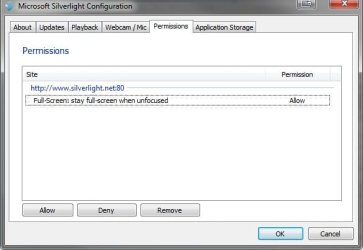
I went to the site and maximized that video to see if it was a problem with silverlight, but it asked me if I wanted to always keep the windows fullscreened on this site. The attached picture shows my current silverlight configuration, showing the new permission for silverlight.net.

I can't seem to get netflix to ask me if I'd like to keep the video fullscreen. I don't believe am I able to manually add a permission in for netflix either.
 

Attachments

  • silverlightconfig.jpg
    silverlightconfig.jpg
    23.4 KB · Views: 1,053

My Computer My Computer

OS
Windows 7 Pro 64 bit
CPU
AMD Phenom II X4 925
Motherboard
Gigabyte GA-870A-UD3
Memory
2 x 4gb DDR3 1333
Graphics Card(s)
Radeon 6950 2gb
Sound Card
Onboard
Monitor(s) Displays
Samsung BX2431 (x2)
Screen Resolution
1920-1080 (x2)
Hard Drives
120GB OCZ Vertex 2 &
750GB & 250gb Seagate &
1TB Samsung
PSU
Corsair 750TX
Case
Antec 900
Cooling
Cooler Master 212
Keyboard
Logitech Illuminated Keyboard
Mouse
Razer Deathadder
Internet Speed
12 Mb
Try Firefox and see if it will work on that browser and if the settings carry over to Chrome. I am testing it now on mine and it is working fine. I am on version 3.6.6.
 

My Computer My Computer

Computer Manufacturer/Model Number
HAL-9000
OS
Windows 7 Ultimate 64bit
CPU
Intel i7 3770K
Motherboard
Asus Sabertooth Z77
Memory
16GB DDR3 1333 Corsair XMS3
Graphics Card(s)
XFX HD6950 2GB EyeFinity
Sound Card
Logitech G35 & Sennheiser PC135 & VIA HD
Monitor(s) Displays
23" HP 2310e, 23" Samsung B2230, 21.5" Viewsonic
Screen Resolution
5760x1080
Hard Drives
16TB of Storage
128GB & 256GB Crucial M4 SSD's, 2X 1TB WD Black, 3x 2TB WD, 3x 2TB Samsung F4, 1.5TB Seagate, WD 500GB,
PSU
Antec True Power New 650watt
Case
Cooler Master HAF-932
Cooling
Corsair H60 Hydro Cooler, 3x 230mm Fans, 2x120mm Fan
Keyboard
Logitech G15 and G13
Mouse
Logitech G700 Gaming Mouse
Internet Speed
50/10 Mbit
Other Info
Speakers : Alesis M1 Active Mk2 Studio Monitors , APC RS 1200 UPS, HP 4500DN Color Laser, HP P1006 mono Laser, Kodak 8500 Dye-Sub, Epson 1280 inkjet, Epson Worforce 610 MFC
Just tried doing that in internet explorer and no such luck. It does the same thing.

I tried googling my problem and while others seemed to have had this same problem, I couldn't find any real solution. A lot of different people claimed different things, but I can't seem to find a way. It just makes me mad that a complete reinstall won't resolve this issue.
 

My Computer My Computer

OS
Windows 7 Pro 64 bit
CPU
AMD Phenom II X4 925
Motherboard
Gigabyte GA-870A-UD3
Memory
2 x 4gb DDR3 1333
Graphics Card(s)
Radeon 6950 2gb
Sound Card
Onboard
Monitor(s) Displays
Samsung BX2431 (x2)
Screen Resolution
1920-1080 (x2)
Hard Drives
120GB OCZ Vertex 2 &
750GB & 250gb Seagate &
1TB Samsung
PSU
Corsair 750TX
Case
Antec 900
Cooling
Cooler Master 212
Keyboard
Logitech Illuminated Keyboard
Mouse
Razer Deathadder
Internet Speed
12 Mb
I figure I'll just use Windows Media Center's netflix addon until this problem fixes itself or becomes more apparent to netflix/microsoft. I can fullscreen in there. I just am not a fan of opening up that bloated program for such a simple task.

Thank you for your help though. I appreciate it.
 

My Computer My Computer

OS
Windows 7 Pro 64 bit
CPU
AMD Phenom II X4 925
Motherboard
Gigabyte GA-870A-UD3
Memory
2 x 4gb DDR3 1333
Graphics Card(s)
Radeon 6950 2gb
Sound Card
Onboard
Monitor(s) Displays
Samsung BX2431 (x2)
Screen Resolution
1920-1080 (x2)
Hard Drives
120GB OCZ Vertex 2 &
750GB & 250gb Seagate &
1TB Samsung
PSU
Corsair 750TX
Case
Antec 900
Cooling
Cooler Master 212
Keyboard
Logitech Illuminated Keyboard
Mouse
Razer Deathadder
Internet Speed
12 Mb
I do know netflix recently changed their container a little bit, you may want to contact them directly about the issue.
 

My Computer My Computer

Computer Manufacturer/Model Number
Insane hobo technologies. ;-)
OS
Windows 7 x64
CPU
Intel i7 2600k
Motherboard
Asrock z68 extreme 4 gen 3
Memory
G.skill Ripjaw 16gigs @ 1866
Graphics Card(s)
Nvidia gtx580 (evga)
Sound Card
Integrated HD audio + hdmi
Monitor(s) Displays
24" ASUS widescreen + 42" insignia
Screen Resolution
1080p (1920x1080)
Hard Drives
128 Samsung 830
256 Samsung 840
3 x 1tb storage drive (various)
1 western digital 1tb (eSATA)
1 Seagate 1tb (eSATA)
PSU
1 kilowatt SLI/Crossfire rated Silverstone modular
Case
NZXT Phantom + additional 220 fan
Cooling
Zalmann
Keyboard
Microsoft wireless 3000 (v2)
Mouse
MS - wireless 5000 (bluetrack)
Internet Speed
depends on if you ask me or my provider.
Other Info
The above information is provided as is, and the author assumes no responsibility for issues it may cause with your sanity or fanboyism.
bump, this is still an issue and isn't solved!
 

My Computer My Computer

OS
Windows 7 Pro 64 bit
CPU
AMD Phenom II X4 925
Motherboard
Gigabyte GA-870A-UD3
Memory
2 x 4gb DDR3 1333
Graphics Card(s)
Radeon 6950 2gb
Sound Card
Onboard
Monitor(s) Displays
Samsung BX2431 (x2)
Screen Resolution
1920-1080 (x2)
Hard Drives
120GB OCZ Vertex 2 &
750GB & 250gb Seagate &
1TB Samsung
PSU
Corsair 750TX
Case
Antec 900
Cooling
Cooler Master 212
Keyboard
Logitech Illuminated Keyboard
Mouse
Razer Deathadder
Internet Speed
12 Mb
full screen mode

I was able to get Silverlight to stay in full screen mode. When Netflix is NOT in full screen mode, just right click, click on Silverlight. Go to the Permissions tab and allow Full-screen: stay full-screen when unfocused.
 

My Computer My Computer

OS
Windows 7 Home Premium x64
I was able to get Silverlight to stay in full screen mode. When Netflix is NOT in full screen mode, just right click, click on Silverlight. Go to the Permissions tab and allow Full-screen: stay full-screen when unfocused.

If this doesn't work, remove the permission, then go back to Netflix and restore the full screen mode. It'll bring up the original pop up to allow full screen while off focus.
 

My Computer My Computer

OS
windows 7
how to actually do it

go to the silverlight options for netflix (right click the enter full screen mode) then permissions and remove the netflix line. then restart chrome and open the full screen mode on the second monitor and the option should pop up and it will remain functioning
 

My Computer My Computer

OS
DOS
still an issue!

I have had this problem for months and it is NOT a simple permissions issue! As someone has shown earlier, there is no existing permission set for Netflix on my computer ( ad3e2fcc6a9ab87b8ce6dd83986dcb4e.png ). I have tried uninstalling and reinstalling everything that could possibly be related. Netflix will not ask to stay fullscreen on Chrome, IE, or Firefox. Every other website with a Silverlight player WILL ask to stay fullscreen. It is something on Netflix's end, that's the only possibility I can think of. Conveniently, Netflix has no way to report this issue to them.

Kind of a workaround I have recently figured out, is to F11 fullscreen the browser and CTRL+minus to zoom way out of the page so the Netflix controls become tiny while the video takes up the gained space. Practically fullscreen.

It's unfortunate that this isn't a more common problem, I'm doubting it will ever be fixed at this point....I've been dealing with this on my new laptop since around August. Old laptop had no issues with Netflix.
 

My Computer My Computer

Computer Manufacturer/Model Number
ASUS G74SX-XT1
OS
Windows 7 Home Premium x64
CPU
Intel Core i7-2630QM
Memory
16GB
Graphics Card(s)
3GB NVIDIA GeForce GTX 560m
Monitor(s) Displays
Samsung SyncMaster TA350
Hard Drives
OCZ Agility 120GB SSD, Samsung Spinpoint 640GB 7200rpm HDD
Internet Speed
15Mbps
You can only hope microsoft will weed it out in future silverlight updates.
They are still pretty constant at this time.
 

My Computer My Computer

Computer Manufacturer/Model Number
Insane hobo technologies. ;-)
OS
Windows 7 x64
CPU
Intel i7 2600k
Motherboard
Asrock z68 extreme 4 gen 3
Memory
G.skill Ripjaw 16gigs @ 1866
Graphics Card(s)
Nvidia gtx580 (evga)
Sound Card
Integrated HD audio + hdmi
Monitor(s) Displays
24" ASUS widescreen + 42" insignia
Screen Resolution
1080p (1920x1080)
Hard Drives
128 Samsung 830
256 Samsung 840
3 x 1tb storage drive (various)
1 western digital 1tb (eSATA)
1 Seagate 1tb (eSATA)
PSU
1 kilowatt SLI/Crossfire rated Silverstone modular
Case
NZXT Phantom + additional 220 fan
Cooling
Zalmann
Keyboard
Microsoft wireless 3000 (v2)
Mouse
MS - wireless 5000 (bluetrack)
Internet Speed
depends on if you ask me or my provider.
Other Info
The above information is provided as is, and the author assumes no responsibility for issues it may cause with your sanity or fanboyism.
I got it working

In order for this to work, I had to have the silverlight property set AND my chrome window could not be full size. I slightly shrank my chrome window, clicked on full screen and then could work on my second monitor while the netflix silverlight window remained full screen.

I have windows 7, premium home edition, 64 bit.

Good luck
 

My Computer My Computer

OS
windows 7 Home premium 64 bit
disabling the aero desktop features also seems to work for some people.
 

My Computer My Computer

Computer Manufacturer/Model Number
Insane hobo technologies. ;-)
OS
Windows 7 x64
CPU
Intel i7 2600k
Motherboard
Asrock z68 extreme 4 gen 3
Memory
G.skill Ripjaw 16gigs @ 1866
Graphics Card(s)
Nvidia gtx580 (evga)
Sound Card
Integrated HD audio + hdmi
Monitor(s) Displays
24" ASUS widescreen + 42" insignia
Screen Resolution
1080p (1920x1080)
Hard Drives
128 Samsung 830
256 Samsung 840
3 x 1tb storage drive (various)
1 western digital 1tb (eSATA)
1 Seagate 1tb (eSATA)
PSU
1 kilowatt SLI/Crossfire rated Silverstone modular
Case
NZXT Phantom + additional 220 fan
Cooling
Zalmann
Keyboard
Microsoft wireless 3000 (v2)
Mouse
MS - wireless 5000 (bluetrack)
Internet Speed
depends on if you ask me or my provider.
Other Info
The above information is provided as is, and the author assumes no responsibility for issues it may cause with your sanity or fanboyism.
Full screen mode.

I have an asus laptop. Top of the line and a 1080p screen and for a little while i was having troubles too but i found out how to get it to work.

Only reason fullscreen gets taken off is because it was probably a tab part of the chrome window you opened to begin with.

If you exit netflix (if opened), and open a separate new window and just go on netflix on that window (netflix only for separate window). You should be able to do fullscreen with no problem. If you go down to taskbar it should show two windows for netflix one thats black (original page) and the fullscreen thats actually playing.

It worked for me everytime as long as netflix is opened on a new chrome. If opened as a tab from original window, it will take off fullscreen because i believe it thinks your working on something else on that same window. Something like that.
 

My Computer My Computer

OS
windows 7
i too had the problem with netflix where netflix would not stay full in screen. once i updated my video card driver i no longer had the problem.
 

My Computer My Computer

OS
Windows 7 64 bit
Already updated video drivers

Still only works in Chrome, and only if I do it 'just' right.
 

My Computer My Computer

OS
windows 7 Home premium 64 bit
Doesn't work

Doesn't work. This is sad. People have been using dual monitors as long as I've been using computers ... over 40 years. Microsoft was one of the big pushers to get engineers more productive with 2-4 monitors each; yet decades later they fail to provide simple code to make this work easily, and every time.

Last month I bought an Iphone, amazing. Next month and ipad, and when I graduate in two years NOTHING but mac. MS has had decades to be user friendly.

I have an asus laptop. Top of the line and a 1080p screen and for a little while i was having troubles too but i found out how to get it to work.

Only reason fullscreen gets taken off is because it was probably a tab part of the chrome window you opened to begin with.

If you exit netflix (if opened), and open a separate new window and just go on netflix on that window (netflix only for separate window). You should be able to do fullscreen with no problem. If you go down to taskbar it should show two windows for netflix one thats black (original page) and the fullscreen thats actually playing.

It worked for me everytime as long as netflix is opened on a new chrome. If opened as a tab from original window, it will take off fullscreen because i believe it thinks your working on something else on that same window. Something like that.
 

My Computer My Computer

OS
windows 7 Home premium 64 bit
Back
Top