
gmkeyworth
New member
- Local time
- 10:38 PM
- Messages
- 2
I have an Acer Aspire D255e running Windows 7 Home Premium edition 32bit. I upgraded the memory to 2 GB to handle the Samsung Allshare streaming software. I have a Samsung LED TV with the wireless dongle (Samsung brand) that connects it to my Belkin 594 router. Plug and play are enabled on both the router and the TV so connecting the TV to the network was easy. I was able to start using Netflix immediately.
When I go to Add a Device in the control panel my netbook can't detect the TV. It never appears on a list of devices that can be added. When I go to the Network and Sharing Center and look at my full network map I see an icon for the TV shown below
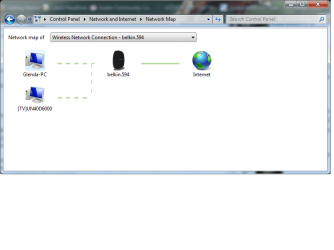
When I mouse over the PC icon I see both an IP address and a MAC address for the device. For the TV there is only a MAC address; there is no IP address listed.
It seems like the Windows 7 network did detect the TV to an extent because it's on the network map, but not completely because it can't be detected by the add device utility. None of my digging around the web has given me any clue why the device can't be detected and added, expecially if plug and play worked to allow me to connect to the Internet and watch Netflicks, and I can see the device with its Mac address on my network map.
Does anyone have any ideas about how to force the network to detect and add the TV?
When I go to Add a Device in the control panel my netbook can't detect the TV. It never appears on a list of devices that can be added. When I go to the Network and Sharing Center and look at my full network map I see an icon for the TV shown below
When I mouse over the PC icon I see both an IP address and a MAC address for the device. For the TV there is only a MAC address; there is no IP address listed.
It seems like the Windows 7 network did detect the TV to an extent because it's on the network map, but not completely because it can't be detected by the add device utility. None of my digging around the web has given me any clue why the device can't be detected and added, expecially if plug and play worked to allow me to connect to the Internet and watch Netflicks, and I can see the device with its Mac address on my network map.
Does anyone have any ideas about how to force the network to detect and add the TV?
My Computer
- Computer Manufacturer/Model Number
- Acer Aspire One D255e
- OS
- Windows 7 Home Premium 32bit
- CPU
- Intel Atom N570
- Memory
- 2 gb


