Network card - Ethernet not plugged in

have a look at this picture

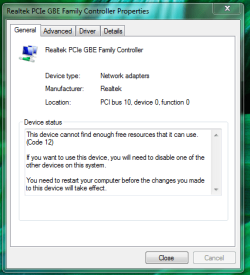
MAD Network card.PNG

kk.PNG
 
Last edited:

My Computer My Computer

Computer Manufacturer/Model Number
Custom built
OS
W 7
CPU
Intel Core 17 950
Motherboard
Evga x58 snd Classified
Memory
6gig Corsair 1800mhx
Graphics Card(s)
2x Evga geforce 285's
Sound Card
Creative XFI Titanium Champion series
Monitor(s) Displays
Asus 23 inch hd monitor thingy
Hard Drives
Segate 1.5tb barracuda
Case
Cool master haf 932
Cooling
Random fan
Hey guys bought a NEW PCIe Network card everything seems to work i'm able to play games download and so on but one issue now is Cant use my Expensive sound card. :cry:


Mother board is EVGA X58 e760 Classified edition
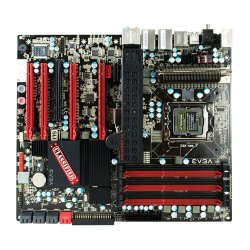
take a look at the picture shows you the slots on my board.

11636-evgax583xsliclassifiedflat.jpg


Network card takes PCIe Due to me not having PCI Zzz
Sound card Takes PCIe

Sound card - Creative X-FI Titanium Fatality champion series
Network card - intel(R) Gigabit CT desktop adapter
 

My Computer My Computer

Computer Manufacturer/Model Number
Custom built
OS
W 7
CPU
Intel Core 17 950
Motherboard
Evga x58 snd Classified
Memory
6gig Corsair 1800mhx
Graphics Card(s)
2x Evga geforce 285's
Sound Card
Creative XFI Titanium Champion series
Monitor(s) Displays
Asus 23 inch hd monitor thingy
Hard Drives
Segate 1.5tb barracuda
Case
Cool master haf 932
Cooling
Random fan
Hey guys bought a NEW PCIe Network card everything seems to work i'm able to play games download and so on but one issue now is Cant use my Expensive sound card. :cry:


Mother board is EVGA X58 e760 Classified edition
take a look at the picture shows you the slots on my board.

View attachment 28095


Network card takes PCIe Due to me not having PCI Zzz
Sound card Takes PCIe

Sound card - Creative X-FI Titanium Fatality champion series
Network card - intel(R) Gigabit CT desktop adapter

You can run the PCI-E sound card in a regular PCI slot you know.
 

My Computer My Computer

Computer type
PC/Desktop
Computer Manufacturer/Model Number
Home built
OS
Windows 7 Ult, Windows 8.1 Pro,
CPU
Q9650-4.275GHz, E8600 4.5GHz, E6750-3.8GHz
Motherboard
Evga 780i FTW
Memory
G.Skill PC2 9600 1200Mhz 5 5 5 15 2T
Graphics Card(s)
GTX480
Sound Card
Asus Xonar D2
Monitor(s) Displays
HannsG
Screen Resolution
1680X1050
Hard Drives
GSkill Phoenix Pro 120GB SSD
PSU
ThermalTake Toughpower 1000Watt modular
Case
ThermalTake XaserV
Cooling
Xigmatek S1283
Keyboard
Logitech G15
Mouse
Logitech G9
Internet Speed
T1
Just read this whole thread...
From you you have gone thru, you definately have some hardware conflicts.
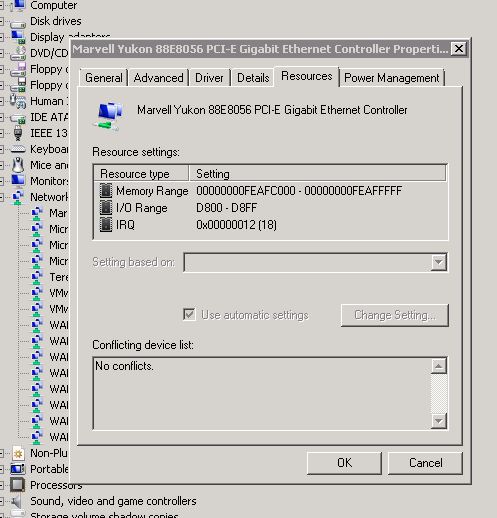
Checkout what resources its using (mem range/IRQ)
nicshot.jpg

Have you (as previously suggested) cleared your CMOS? Load DEFAULTS or 'OPTIMIZED'? (Sorry..I'm unfamiliar with your mobo) This may sort out any IRQ/resource conflicts.

Also review the windows settings.
Go to device manager and check out your IRQ settings. and look for conflicts.
(Yes..two devices CAN use the same IRQ, but depending on the devices can cause problems)

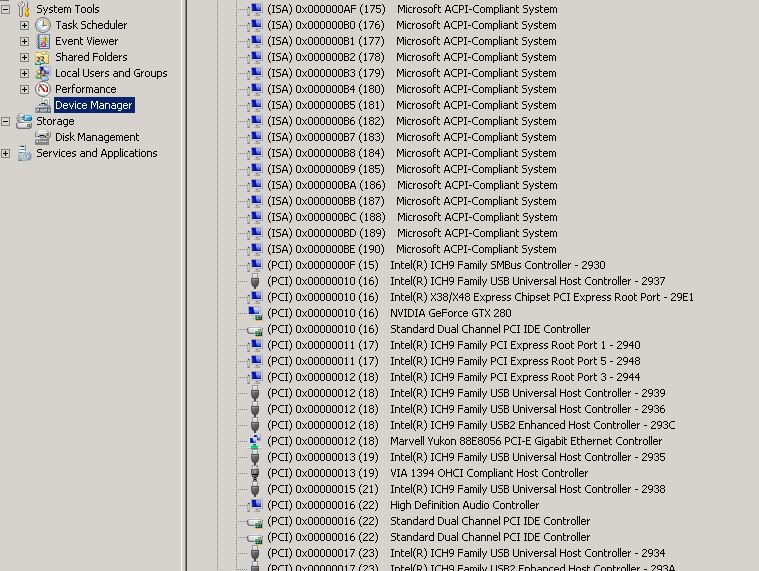
right click device manger..choose VIEW--> RESOURCES BY TYPE
Open INTERUPT REQUEST(IRQ)
nicshot2.jpg

Then REVIEW The nic may be sharing an IRQ with another device.
Move it. Either in the bios or move it to a different slot.

Good luck!
 

My Computer My Computer

Computer Manufacturer/Model Number
HomeBrew
OS
Win7/XP
CPU
INTEL E8600 @ 4.2GHz
Motherboard
Asus P5E w/Formula Rampage BIOS
Memory
8GB PC8500 Corsiar Dominator
Graphics Card(s)
nVidia GTX 280
Sound Card
Asus FXII (SoundMax controlled)
Monitor(s) Displays
2 x I-INC 28'
Screen Resolution
1920x1200
Hard Drives
2 x Seagate 1.5TB
PSU
Ultra 700W
Case
Something..with alot of air
Cooling
Tuniq 120 CPU - Several 80mm and one 120MM fan
Keyboard
IBM MODEL M - YA BABY!!! NEVER SAY DIE!
Mouse
MS Intellimouse
Internet Speed
50/5
Hey guys i'm back Bought a PCIE Network Card internet been smooth for 2 weeks 2 Slight problems though

My mother Board is a EVGA X58 e760 2nd classified Version Have a look at picture 11636-evgax583xsliclassifiedflat.jpg Thats my motherboard


ok now problem is i have to take out my Sound card which is a PCIe sound card (Creative X-Fi Soundblaster Titanium Champion series) To put in my new network card which is PCIe cause there is no PCI slots and the other slots well... are PCIex8 and 16's any solution?

Another problem. I tested out my motherboards network card again hope it works so i can use my sound card :D but it seems to be giving me all kinds of problems. when its enabled and the coord is plugged in i randomly get BSOD's Constant Network disconnects AND "Ethernet Cable is not plugged in: i dont no what i did to cause this issue cause well its a brand new system.

OH one more thing i seem to be getting alot of these scattered with in my Event viewer

Performance power management features on processor 5 in group 0 are disabled due to a firmware problem. Check with the computer manufacturer for updated firmware.

It rangers from Processor 0 to 7

Thanks
 

My Computer My Computer

Computer Manufacturer/Model Number
Custom built
OS
W 7
CPU
Intel Core 17 950
Motherboard
Evga x58 snd Classified
Memory
6gig Corsair 1800mhx
Graphics Card(s)
2x Evga geforce 285's
Sound Card
Creative XFI Titanium Champion series
Monitor(s) Displays
Asus 23 inch hd monitor thingy
Hard Drives
Segate 1.5tb barracuda
Case
Cool master haf 932
Cooling
Random fan
Sounds like you need to update the BIOS and install mobo drivers.

~Lordbob
 

My Computer My Computer

Computer Manufacturer/Model Number
Hera
OS
Windows 7 Ultimate x64, Mint 9
CPU
Intel i5-2500k
Motherboard
ASUS P8P67 Pro
Memory
2x 4Gb Corsair VENGEANCE DDR3-1600
Graphics Card(s)
NVidia GeForce N260GTX Twin Frozr
Sound Card
Realtek HD OnBoard Audio
Monitor(s) Displays
ASUS 24" Monitor
Screen Resolution
1920x1080
Hard Drives
G.SKILL Phoenix Series 60GB SATA II MLC Internal Solid State Drive (SSD)
SAMSUNG Spinpoint F3R 1TB 7200 RPM 32MB Cache SATA II
PSU
Cooler Master Real Power Pro 750W
Case
Cooler Master Haf 932
Cooling
Fans
Keyboard
Razer Tarantula
Mouse
Razer Lachesis
Internet Speed
not fast enough
i have updated the BIOS thats the thing..


i was reading up on the Processor problem and some guy called the issue "artifacts" saying something related to Graphics driver
 
Last edited:

My Computer My Computer

Computer Manufacturer/Model Number
Custom built
OS
W 7
CPU
Intel Core 17 950
Motherboard
Evga x58 snd Classified
Memory
6gig Corsair 1800mhx
Graphics Card(s)
2x Evga geforce 285's
Sound Card
Creative XFI Titanium Champion series
Monitor(s) Displays
Asus 23 inch hd monitor thingy
Hard Drives
Segate 1.5tb barracuda
Case
Cool master haf 932
Cooling
Random fan
This is defiantly a Realtek NIC Win 7 bug too many people are having this problem to ignore it (drivers maybe?) this is how I "fixed" the problems I had. Go to the advanced tab in the Realtek controller properties in network adaptors in device manager & adjust the "Speed & Duplex" from Auto Negotiation to 10 mbps full duplex. I know it's not a true fix & my router shows amber lights but at least I'm not getting the dreaded "cable not connected" issue & yes I've tried new cat 6 cables & a different router. Oh & if your've got duel NIC's dont forget to change both. I should be running 100 mbps full duplex & green liights but I'll just wait for a driver or Win 7 fix.
 

My Computer My Computer

OS
windows 7
Hey guys bought a NEW PCIe Network card everything seems to work i'm able to play games download and so on but one issue now is Cant use my Expensive sound card. :cry:


Mother board is EVGA X58 e760 Classified edition
take a look at the picture shows you the slots on my board.

View attachment 28095


Network card takes PCIe Due to me not having PCI Zzz
Sound card Takes PCIe

Sound card - Creative X-FI Titanium Fatality champion series
Network card - intel(R) Gigabit CT desktop adapter

You can run the PCI-E sound card in a regular PCI slot you know.


Motherboard doesnt have a PCI slot
 

My Computer My Computer

Computer Manufacturer/Model Number
Custom built
OS
W 7
CPU
Intel Core 17 950
Motherboard
Evga x58 snd Classified
Memory
6gig Corsair 1800mhx
Graphics Card(s)
2x Evga geforce 285's
Sound Card
Creative XFI Titanium Champion series
Monitor(s) Displays
Asus 23 inch hd monitor thingy
Hard Drives
Segate 1.5tb barracuda
Case
Cool master haf 932
Cooling
Random fan
Hey guys bought a NEW PCIe Network card everything seems to work i'm able to play games download and so on but one issue now is Cant use my Expensive sound card. :cry:


Mother board is EVGA X58 e760 Classified edition
take a look at the picture shows you the slots on my board.

View attachment 28095


Network card takes PCIe Due to me not having PCI Zzz
Sound card Takes PCIe

Sound card - Creative X-FI Titanium Fatality champion series
Network card - intel(R) Gigabit CT desktop adapter

You can run the PCI-E sound card in a regular PCI slot you know.


Motherboard doesnt have a PCI slot
It has one.
As well as one or two PCIe

~Lordbob
 

My Computer My Computer

Computer Manufacturer/Model Number
Hera
OS
Windows 7 Ultimate x64, Mint 9
CPU
Intel i5-2500k
Motherboard
ASUS P8P67 Pro
Memory
2x 4Gb Corsair VENGEANCE DDR3-1600
Graphics Card(s)
NVidia GeForce N260GTX Twin Frozr
Sound Card
Realtek HD OnBoard Audio
Monitor(s) Displays
ASUS 24" Monitor
Screen Resolution
1920x1080
Hard Drives
G.SKILL Phoenix Series 60GB SATA II MLC Internal Solid State Drive (SSD)
SAMSUNG Spinpoint F3R 1TB 7200 RPM 32MB Cache SATA II
PSU
Cooler Master Real Power Pro 750W
Case
Cooler Master Haf 932
Cooling
Fans
Keyboard
Razer Tarantula
Mouse
Razer Lachesis
Internet Speed
not fast enough
Back
Top