
Solved network connection available - can't use internet

Total

Web Dude
Pro User
Local time
2:22 PM
Messages
365
My internet connection around once per day , when I click on IE or firefox , when trying to load a site , I get done on the bottom of the screen . Try to start "trobleshoot problems:" and I get a error that the network troubleshooter can't be started . I restart the computer then it is good for maybe a day or longer then the same problem ..... Ideas ?? Installed a new nic card , same issue .... thanks people ..
 

My Computer

Computer type
PC/Desktop
Computer Manufacturer/Model Number
Custom Build
OS
Windows 10 Pro - 64 bit
CPU
Intel i7 2600K
Motherboard
Asus P8P67
Memory
8 Gig ddr3 1600 mhz - viper extreme (Patriot)
Graphics Card(s)
EVGA 980 TI
Monitor(s) Displays
2 - Lg 21" LED , sony 48 " bravia LED
Hard Drives
one - samsung 840 series 465.76 GB SSD
two - wd 2 tB black
one - wd 1.5 tb black
one - wb 1 tb black
PSU
1000 Watt Coolmaster : Silent Pro Gold
Case
antec 1200
Cooling
watercooled
Mouse
logitech wireless
Antivirus
Norton Security 2015
Other Info
powerware 3.1 KVA FERRUPS with 4 - 1000 Amp Deep cycle batteries ...
Is this a wired or wireless connection?

Same machine as your specs show?

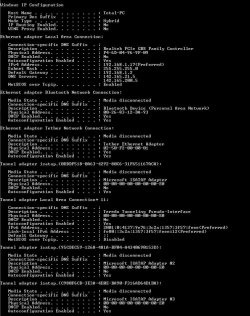
Can you post a screen shot of the ipconfig/all ? :)
 

My Computer

Computer type
PC/Desktop
Computer Manufacturer/Model Number
Home built
OS
Windows 7 Ult, Windows 8.1 Pro,
CPU
Q9650-4.275GHz, E8600 4.5GHz, E6750-3.8GHz
Motherboard
Evga 780i FTW
Memory
G.Skill PC2 9600 1200Mhz 5 5 5 15 2T
Graphics Card(s)
GTX480
Sound Card
Asus Xonar D2
Monitor(s) Displays
HannsG
Screen Resolution
1680X1050
Hard Drives
GSkill Phoenix Pro 120GB SSD
PSU
ThermalTake Toughpower 1000Watt modular
Case
ThermalTake XaserV
Cooling
Xigmatek S1283
Keyboard
Logitech G15
Mouse
Logitech G9
Internet Speed
T1
same machine ..wired connection . all the other computers that are connected to my router / switch work fine . I have never had this problem before . thanks
 

Attachments

  • net.JPG
    net.JPG
    103.2 KB · Views: 5

My Computer

Computer type
PC/Desktop
Computer Manufacturer/Model Number
Custom Build
OS
Windows 10 Pro - 64 bit
CPU
Intel i7 2600K
Motherboard
Asus P8P67
Memory
8 Gig ddr3 1600 mhz - viper extreme (Patriot)
Graphics Card(s)
EVGA 980 TI
Monitor(s) Displays
2 - Lg 21" LED , sony 48 " bravia LED
Hard Drives
one - samsung 840 series 465.76 GB SSD
two - wd 2 tB black
one - wd 1.5 tb black
one - wb 1 tb black
PSU
1000 Watt Coolmaster : Silent Pro Gold
Case
antec 1200
Cooling
watercooled
Mouse
logitech wireless
Antivirus
Norton Security 2015
Other Info
powerware 3.1 KVA FERRUPS with 4 - 1000 Amp Deep cycle batteries ...
Using a static IP, have you tried switching to DHCP just to see if anything changes.

You might also try disabling the Bluetooth device and the tether Ethernet adaptor in Device Manager>Network adaptors.


There are some new drivers for your Asus P8P67 , they might be worth trying who knows although they show Intel Ethernet for your board. They show some chipset drivers also.

ASUSTeK Computer Inc. -Support- Drivers and Download P8P67 PRO
 

My Computer

Computer type
PC/Desktop
Computer Manufacturer/Model Number
Home built
OS
Windows 7 Ult, Windows 8.1 Pro,
CPU
Q9650-4.275GHz, E8600 4.5GHz, E6750-3.8GHz
Motherboard
Evga 780i FTW
Memory
G.Skill PC2 9600 1200Mhz 5 5 5 15 2T
Graphics Card(s)
GTX480
Sound Card
Asus Xonar D2
Monitor(s) Displays
HannsG
Screen Resolution
1680X1050
Hard Drives
GSkill Phoenix Pro 120GB SSD
PSU
ThermalTake Toughpower 1000Watt modular
Case
ThermalTake XaserV
Cooling
Xigmatek S1283
Keyboard
Logitech G15
Mouse
Logitech G9
Internet Speed
T1
Discovered what the problem was in device manager / realtek pcie gbe family controller / power management , I shut off allow computer to shut off device to save power ...


Life is good again ...
 

My Computer

Computer type
PC/Desktop
Computer Manufacturer/Model Number
Custom Build
OS
Windows 10 Pro - 64 bit
CPU
Intel i7 2600K
Motherboard
Asus P8P67
Memory
8 Gig ddr3 1600 mhz - viper extreme (Patriot)
Graphics Card(s)
EVGA 980 TI
Monitor(s) Displays
2 - Lg 21" LED , sony 48 " bravia LED
Hard Drives
one - samsung 840 series 465.76 GB SSD
two - wd 2 tB black
one - wd 1.5 tb black
one - wb 1 tb black
PSU
1000 Watt Coolmaster : Silent Pro Gold
Case
antec 1200
Cooling
watercooled
Mouse
logitech wireless
Antivirus
Norton Security 2015
Other Info
powerware 3.1 KVA FERRUPS with 4 - 1000 Amp Deep cycle batteries ...
Discovered what the problem was in device manager / realtek pcie gbe family controller / power management , I shut off allow computer to shut off device to save power ...


Life is good again ...

I noticed that particular setting seems to cause problems for certain machines, it should be coming right out of power saving mode but instead it seems to be stuck in power saving mode.

I wonder if the Power Options Advanced settings would have an effect on this.


Glad that you have it fixed Total. :geek:
 

My Computer

Computer type
PC/Desktop
Computer Manufacturer/Model Number
Home built
OS
Windows 7 Ult, Windows 8.1 Pro,
CPU
Q9650-4.275GHz, E8600 4.5GHz, E6750-3.8GHz
Motherboard
Evga 780i FTW
Memory
G.Skill PC2 9600 1200Mhz 5 5 5 15 2T
Graphics Card(s)
GTX480
Sound Card
Asus Xonar D2
Monitor(s) Displays
HannsG
Screen Resolution
1680X1050
Hard Drives
GSkill Phoenix Pro 120GB SSD
PSU
ThermalTake Toughpower 1000Watt modular
Case
ThermalTake XaserV
Cooling
Xigmatek S1283
Keyboard
Logitech G15
Mouse
Logitech G9
Internet Speed
T1
Back
Top