
Network Folders (Lowercase Folder Name0

steverido

New member
Member
Local time
10:33 AM
Messages
70
Hi,

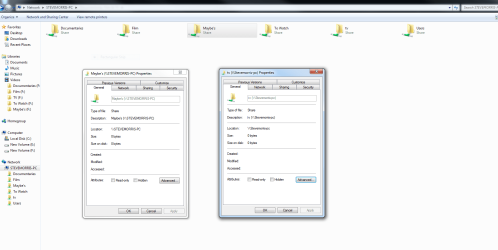
I have just re-installed windows 7 Ultimate and am setting up sharing options for my folders and added shared folders to the network but am getting my TV folder showing as lower case. I notice in properties that my PC name is showing lower case here too but everywhere else it is upper case. How do I change it to uppercase please?

See screenshots.
 

Attachments
  • Capture.PNG
    Capture.PNG
    184.8 KB · Views: 20

My Computer

OS
Windows 7 64
CPU
Intel Core 2 Q9400 Quad Core
Motherboard
EvGA 680i
Memory
OCZ Reaper - 4 x 1GB @ 800
Graphics Card(s)
2 x Evga 9400 GTX Super Super Clocked
Sound Card
Creative Soundblaster X-treme Music
Monitor(s) Displays
NEC mULTISYNC 20wgx
Screen Resolution
1680x1050
Hard Drives
4 X Seagate Barracuda 320 GB
1 X Seagate Barracuda 2 TB
1 x Seagate Barracuda 1TB
PSU
950 W PC Quiet & Cooling
Case
Antec 900
Cooling
Standard Plus Hard Drive 7 Case Fans
Keyboard
Wolf claw
Mouse
Microsoft
Internet Speed
18 MB/S
WOW, no one knows or understands what I mean!!
 

My Computer

OS
Windows 7 64
CPU
Intel Core 2 Q9400 Quad Core
Motherboard
EvGA 680i
Memory
OCZ Reaper - 4 x 1GB @ 800
Graphics Card(s)
2 x Evga 9400 GTX Super Super Clocked
Sound Card
Creative Soundblaster X-treme Music
Monitor(s) Displays
NEC mULTISYNC 20wgx
Screen Resolution
1680x1050
Hard Drives
4 X Seagate Barracuda 320 GB
1 X Seagate Barracuda 2 TB
1 x Seagate Barracuda 1TB
PSU
950 W PC Quiet & Cooling
Case
Antec 900
Cooling
Standard Plus Hard Drive 7 Case Fans
Keyboard
Wolf claw
Mouse
Microsoft
Internet Speed
18 MB/S
Sure I understand. It's normal. Some system show it in all Caps others don't. You can still get to it, Can't you?
 

My Computer

OS
7 x64
i changed the name to something else and it worked.
 

My Computer

OS
Windows 7 64
CPU
Intel Core 2 Q9400 Quad Core
Motherboard
EvGA 680i
Memory
OCZ Reaper - 4 x 1GB @ 800
Graphics Card(s)
2 x Evga 9400 GTX Super Super Clocked
Sound Card
Creative Soundblaster X-treme Music
Monitor(s) Displays
NEC mULTISYNC 20wgx
Screen Resolution
1680x1050
Hard Drives
4 X Seagate Barracuda 320 GB
1 X Seagate Barracuda 2 TB
1 x Seagate Barracuda 1TB
PSU
950 W PC Quiet & Cooling
Case
Antec 900
Cooling
Standard Plus Hard Drive 7 Case Fans
Keyboard
Wolf claw
Mouse
Microsoft
Internet Speed
18 MB/S
I'm getting the exact same problem; I have a Windows 7 shared folder named "TV" that is showing up as "tv" on other networked computers.

If I right-click > Share, it says it's called "TV" and the folder is "TV", but the network path is \\Dave-htpc\tv, and I'm not seeing an option to fix it.

No matter what I do in Share settings, it doesn't fix it. Any other folder with mixed case shows properly. I'm not seeing how to get this to show correctly, and it's just not as noticeable without the proper casing, especially on computers showing a lot of shared drives.
 

My Computer

Computer type
PC/Desktop
OS
Windows 7 Pro 64-bit
Back
Top