
Network icon on tray bar disappeared

dadep

New member
Local time
4:31 AM
Messages
1
Hello,
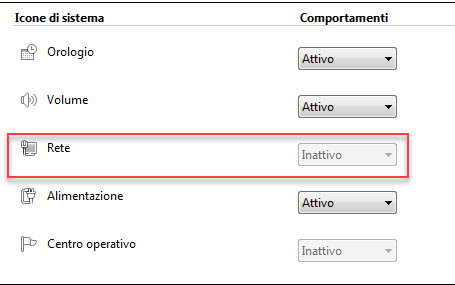
Some time ago, I think because of some updates, the network/wifi icon on tray bar has disappeared. I have tried without luck all tips&tricks and workaorund found on internet (delete registry keys, etc....).
As there a solution to solve this issue ?
Thanks in advance
Best regards
Davide


screenshot.jpg
 

My Computer My Computer

Computer type
PC/Desktop
Computer Manufacturer/Model Number
HP Probook 4540s
OS
Windows 7 Pro 64bit
Memory
8GB
Antivirus
Kaspersky KES 10
Hi and welcome to the Forum
Try this:
Open Control Panel then open All Control Panel Items then click on Notification Area Icons. Then click on Network and adjust what shows in the Behaviors.
 

My Computer My Computer

Computer type
PC/Desktop
OS
Microsoft Windows 7 Home Premium 64-bit 7601 Multiprocessor Free Service Pack 1
CPU
Intel(R) Core(TM) i7-3770 CPU @ 3.40GHz
Motherboard
ASUSTeK COMPUTER INC. P8H77-M
Memory
8.00 GB
Graphics Card(s)
Intel(R) HD Graphics 4000
Sound Card
On Board
Monitor(s) Displays
Dell 24"
Screen Resolution
1920 x 1080
Hard Drives
(1) INTEL SSDSC2CT180A3 ATA Device (2) ST500DM002-1BD142 ATA Device (3) WDC WD3200AAKS-75L9A0 ATA Device (4) Generic- Compact Flash USB Device (5) Generic- MS/MS-Pro USB Device (6) Generic- SD/MMC USB Device (7) Generic- SM/xD-Picture USB
PSU
500w Corsair
Case
Cooler Master
Cooling
3 Fans
Keyboard
Logitech MK300
Mouse
Logitech WOM
Internet Speed
75Mb
Antivirus
Norton 360
Browser
Firefox, Opera, IE
dadep -

Take a look at this site, read the article.

Notification Area Icons - Reset - Windows 7 Help Forums

Once clean, you can easily setup what icons/services you wish to show and those to hide.
Else, you can follow the other steps outlined to correct manually, like mitchell65 said above.

Hope this helps!

:)
 
Last edited by a moderator:

My Computer My Computer

Computer type
PC/Desktop
Computer Manufacturer/Model Number
HP, Dell, Custom Built.
OS
Windows 7 Professional, Ultimate - x64.
CPU
Core i7 Series
Internet Speed
200 Mbps Down, 35 Mbps Up.
Browser
Firefox
Back
Top