Network issues (DNS) failure

Archangel83

New member
Member
Local time
10:07 AM
Messages
83
Location
ohio
I have been to these forums allot along with MS TechNet and have my windows 7 setup stable after weeks of debugging. A thank you too all that helped me here but now I need you're help again with my internet my configuration is this:
Cable Modem -> onbord nic no routers just running windows firewall and MSE now and then every thing goes dead and diagnostics said "DNS server not responding" this is rather annoying as i have to restart my cable modem from the web interface wait 10 seconds or so and the internet is back to normal here are some ipconfig details that might help.

Microsoft Windows [Version 6.1.7600]
Copyright (c) 2009 Microsoft Corporation. All rights reserved.
C:\Windows\system32>ipconfig/all
Windows IP Configuration
Host Name . . . . . . . . . . . . : Archangel-PC
Primary Dns Suffix . . . . . . . :
Node Type . . . . . . . . . . . . : Hybrid
IP Routing Enabled. . . . . . . . : No
WINS Proxy Enabled. . . . . . . . : No
DNS Suffix Search List. . . . . . : neo.rr.com
Ethernet adapter Local Area Connection:
Connection-specific DNS Suffix . : neo.rr.com
Description . . . . . . . . . . . : SiS 900-Based PCI Fast Ethernet Adapter
Physical Address. . . . . . . . . : 00-17-31-77-DE-65
DHCP Enabled. . . . . . . . . . . : Yes
Autoconfiguration Enabled . . . . : Yes
IPv4 Address. . . . . . . . . . . : 76.190.235.248(Preferred)
Subnet Mask . . . . . . . . . . . : 255.255.224.0
Lease Obtained. . . . . . . . . . : Monday, November 02, 2009 6:02:10 PM
Lease Expires . . . . . . . . . . : Tuesday, November 03, 2009 6:02:09 PM
Default Gateway . . . . . . . . . : 76.190.224.1
DHCP Server . . . . . . . . . . . : 10.248.0.1
DNS Servers . . . . . . . . . . . : 208.67.222.222
208.67.220.220
NetBIOS over Tcpip. . . . . . . . : Enabled
Tunnel adapter isatap.neo.rr.com:
Media State . . . . . . . . . . . : Media disconnected
Connection-specific DNS Suffix . :
Description . . . . . . . . . . . : Microsoft ISATAP Adapter
Physical Address. . . . . . . . . : 00-00-00-00-00-00-00-E0
DHCP Enabled. . . . . . . . . . . : No
Autoconfiguration Enabled . . . . : Yes
Tunnel adapter 6TO4 Adapter:
Media State . . . . . . . . . . . : Media disconnected
Connection-specific DNS Suffix . :
Description . . . . . . . . . . . : Microsoft 6to4 Adapter
Physical Address. . . . . . . . . : 00-00-00-00-00-00-00-E0
DHCP Enabled. . . . . . . . . . . : No
Autoconfiguration Enabled . . . . : Yes
Tunnel adapter Teredo Tunneling Pseudo-Interface:
Media State . . . . . . . . . . . : Media disconnected
Connection-specific DNS Suffix . :
Description . . . . . . . . . . . : Teredo Tunneling Pseudo-Interface
Physical Address. . . . . . . . . : 00-00-00-00-00-00-00-E0
DHCP Enabled. . . . . . . . . . . : No
Autoconfiguration Enabled . . . . : Yes
C:\Windows\system32>

Is this a hardware issue if so is their a good nic card out their that will support win7 out of the box or is this isp related? any and all help figuring this last issue out i hope will be very appreciated :)
 

My Computer

Computer Manufacturer/Model Number
Self Built
OS
Win7 RTM
CPU
P4 2.6ghz Hyper Threading
Motherboard
Asus P4S800D-X
Memory
2 GIG
Graphics Card(s)
Nvidia G-Force 6200
Sound Card
Realtek AC'97 Audio
Monitor(s) Displays
Dell IN1910N HD LCD
Screen Resolution
1366x768@60Hz
Hard Drives
Disk0 Seagate ST360015A ATA Device
Disk1 Seagate ST340015A ATA Device
PSU
Custom
Case
Custom
Cooling
fans
Keyboard
IBM
Mouse
Logitech M310
Internet Speed
6mbps DSL Direct AT&T
Remove Bonjour from your system the proper way, if you have that. Check task manager for mdnsresponder.exe is easy way to tell. Also in services.msc for Bonjour or a line at top with random nummers/letters.
 

My Computer

Computer Manufacturer/Model Number
self built
OS
7600.20510 x86
CPU
P4 550 3.4 GHz HT running at 3.5 GHz
Motherboard
MSI PM8M3-V (MS-7211 v1.x) Micro-ATX mainboard
Memory
OCZ 2 GB(2x1GB) DDR400mHz running @ 414 mHz
Graphics Card(s)
HIS Radeon HD 3850 IceQ 3 Turbo HDMI Dual DL-DVI AGP
Sound Card
MOTU Traveler firewire studio interface 192 kHz 24 bit
Monitor(s) Displays
22" widescreen Acer X223W LCD, 17" Compaq P75 CRT
Screen Resolution
1680x1050 and 1280x1024
Hard Drives
SATA I x2 WD, 400 GB and 120 GB, SATA 2 WD Caviar Black 1 TB
PSU
350W generic
Case
Cybertronpc, it glows blue
Cooling
stock cpu fan, Ice-Q 3 gpu and system, many case fans
Keyboard
Logitch Classical Keyboard 200
Mouse
Logitech Mediaplay cordless
Internet Speed
1792/448 kbits/sec
Other Info
SATA II PCI fake RAID adapter, 1 GB Readyboost, original ATI Remote Wonder (even works with WMC perfectly), Logitech Rumblepad 2 game controller x2
Remove Bonjour from your system the proper way, if you have that. Check task manager for mdnsresponder.exe is easy way to tell. Also in services.msc for Bonjour or a line at top with random nummers/letters.
Now that is apple software that comes with itunes if I'm not mistaken correct? I have no itunes or need for that software I use wmp so the question still remains what can be causing this error from time to time? The only other thing I run is Utorrent could that be a cause maybe?
 

My Computer

Computer Manufacturer/Model Number
Self Built
OS
Win7 RTM
CPU
P4 2.6ghz Hyper Threading
Motherboard
Asus P4S800D-X
Memory
2 GIG
Graphics Card(s)
Nvidia G-Force 6200
Sound Card
Realtek AC'97 Audio
Monitor(s) Displays
Dell IN1910N HD LCD
Screen Resolution
1366x768@60Hz
Hard Drives
Disk0 Seagate ST360015A ATA Device
Disk1 Seagate ST340015A ATA Device
PSU
Custom
Case
Custom
Cooling
fans
Keyboard
IBM
Mouse
Logitech M310
Internet Speed
6mbps DSL Direct AT&T
Did you look to see in task manager?
 

My Computer

Computer Manufacturer/Model Number
self built
OS
7600.20510 x86
CPU
P4 550 3.4 GHz HT running at 3.5 GHz
Motherboard
MSI PM8M3-V (MS-7211 v1.x) Micro-ATX mainboard
Memory
OCZ 2 GB(2x1GB) DDR400mHz running @ 414 mHz
Graphics Card(s)
HIS Radeon HD 3850 IceQ 3 Turbo HDMI Dual DL-DVI AGP
Sound Card
MOTU Traveler firewire studio interface 192 kHz 24 bit
Monitor(s) Displays
22" widescreen Acer X223W LCD, 17" Compaq P75 CRT
Screen Resolution
1680x1050 and 1280x1024
Hard Drives
SATA I x2 WD, 400 GB and 120 GB, SATA 2 WD Caviar Black 1 TB
PSU
350W generic
Case
Cybertronpc, it glows blue
Cooling
stock cpu fan, Ice-Q 3 gpu and system, many case fans
Keyboard
Logitch Classical Keyboard 200
Mouse
Logitech Mediaplay cordless
Internet Speed
1792/448 kbits/sec
Other Info
SATA II PCI fake RAID adapter, 1 GB Readyboost, original ATI Remote Wonder (even works with WMC perfectly), Logitech Rumblepad 2 game controller x2
Did you look to see in task manager?
Yes and i also looked in services their is none of these also did a manual search for mdnsresponder.exe nothing and what has led you to beleve it was these services/programs is their an error in the ipconfig?
 

My Computer

Computer Manufacturer/Model Number
Self Built
OS
Win7 RTM
CPU
P4 2.6ghz Hyper Threading
Motherboard
Asus P4S800D-X
Memory
2 GIG
Graphics Card(s)
Nvidia G-Force 6200
Sound Card
Realtek AC'97 Audio
Monitor(s) Displays
Dell IN1910N HD LCD
Screen Resolution
1366x768@60Hz
Hard Drives
Disk0 Seagate ST360015A ATA Device
Disk1 Seagate ST340015A ATA Device
PSU
Custom
Case
Custom
Cooling
fans
Keyboard
IBM
Mouse
Logitech M310
Internet Speed
6mbps DSL Direct AT&T
No error, just experience.

You could try disabling DNS Client service.

services.msc in start menu search box. Hit enter.
 

My Computer

Computer Manufacturer/Model Number
self built
OS
7600.20510 x86
CPU
P4 550 3.4 GHz HT running at 3.5 GHz
Motherboard
MSI PM8M3-V (MS-7211 v1.x) Micro-ATX mainboard
Memory
OCZ 2 GB(2x1GB) DDR400mHz running @ 414 mHz
Graphics Card(s)
HIS Radeon HD 3850 IceQ 3 Turbo HDMI Dual DL-DVI AGP
Sound Card
MOTU Traveler firewire studio interface 192 kHz 24 bit
Monitor(s) Displays
22" widescreen Acer X223W LCD, 17" Compaq P75 CRT
Screen Resolution
1680x1050 and 1280x1024
Hard Drives
SATA I x2 WD, 400 GB and 120 GB, SATA 2 WD Caviar Black 1 TB
PSU
350W generic
Case
Cybertronpc, it glows blue
Cooling
stock cpu fan, Ice-Q 3 gpu and system, many case fans
Keyboard
Logitch Classical Keyboard 200
Mouse
Logitech Mediaplay cordless
Internet Speed
1792/448 kbits/sec
Other Info
SATA II PCI fake RAID adapter, 1 GB Readyboost, original ATI Remote Wonder (even works with WMC perfectly), Logitech Rumblepad 2 game controller x2
No error, just experience.

You could try disabling DNS Client service.

services.msc in start menu search box. Hit enter.

yeah ill try that and that search future is cool I'm always going to control panel administrative tools lol their is so much to know about win 7 i was an xp freak and knew everything to know about that but what windows has done with 7 is awesome their headed in the right direction for the future ;)
 

My Computer

Computer Manufacturer/Model Number
Self Built
OS
Win7 RTM
CPU
P4 2.6ghz Hyper Threading
Motherboard
Asus P4S800D-X
Memory
2 GIG
Graphics Card(s)
Nvidia G-Force 6200
Sound Card
Realtek AC'97 Audio
Monitor(s) Displays
Dell IN1910N HD LCD
Screen Resolution
1366x768@60Hz
Hard Drives
Disk0 Seagate ST360015A ATA Device
Disk1 Seagate ST340015A ATA Device
PSU
Custom
Case
Custom
Cooling
fans
Keyboard
IBM
Mouse
Logitech M310
Internet Speed
6mbps DSL Direct AT&T
I had the same problem as Archangel83. I did a 2nd Windows Critical Update last night and it seems to be working now and connecting ok.

I will check again tonight.

Has anyone else had this 2nd Critical update??
 

My Computer

OS
Windows 7
Nope, still got same issues!

It's driving me mad.

Any more suggestions anyone?

Thanks.
 

My Computer

OS
Windows 7
Nope, still got same issues!

It's driving me mad.

Any more suggestions anyone?

Thanks.

You and me both just driveing me bonkers it's relly anoying issue i hope gets fixed even switching too open dns did not fix it but made surfing mutch faster
 

My Computer

Computer Manufacturer/Model Number
Self Built
OS
Win7 RTM
CPU
P4 2.6ghz Hyper Threading
Motherboard
Asus P4S800D-X
Memory
2 GIG
Graphics Card(s)
Nvidia G-Force 6200
Sound Card
Realtek AC'97 Audio
Monitor(s) Displays
Dell IN1910N HD LCD
Screen Resolution
1366x768@60Hz
Hard Drives
Disk0 Seagate ST360015A ATA Device
Disk1 Seagate ST340015A ATA Device
PSU
Custom
Case
Custom
Cooling
fans
Keyboard
IBM
Mouse
Logitech M310
Internet Speed
6mbps DSL Direct AT&T
"Ethernet adapter Local Area Connection:
Connection-specific DNS Suffix . : neo.rr.com
Description . . . . . . . . . . . : SiS 900-Based PCI Fast Ethernet Adapter
Physical Address. . . . . . . . . : 00-17-31-77-DE-65
DHCP Enabled. . . . . . . . . . . : Yes
Autoconfiguration Enabled . . . . : Yes
IPv4 Address. . . . . . . . . . . : 76.190.235.248(Preferred)
Subnet Mask . . . . . . . . . . . : 255.255.224.0
Lease Obtained. . . . . . . . . . : Monday, November 02, 2009 6:02:10 PM
Lease Expires . . . . . . . . . . : Tuesday, November 03, 2009 6:02:09 PM
Default Gateway . . . . . . . . . : 76.190.224.1
DHCP Server . . . . . . . . . . . : 10.248.0.1
DNS Servers . . . . . . . . . . . : 208.67.222.222
208.67.220.220
NetBIOS over Tcpip. . . . . . . . : Enabled"

I don't see anything wrong with this. I assume you have allowed for autodetection and have not configured anything in addition for ipv4, did you enabled ipv6?
 

My Computer

Computer Manufacturer/Model Number
Lenovo ThinkPad T60
OS
Windows 7 Ultimate 64Bit
CPU
GenuineIntel Intel(R) Core(TM) DuoCore T2400 @ 1.83GHz
Motherboard
Intel(R) 82801G (ICH7 Family)
Memory
2.00 GB
Graphics Card(s)
Mobile Intel(R) 945 Express Chipset
Sound Card
SoundMAX Integrated Digital HD Audio
Monitor(s) Displays
ThinkPad Display
Screen Resolution
1400x1050
Hard Drives
100Gb SATA
Keyboard
Standard Keyboard
Mouse
HID-compliant Mouse
Internet Speed
Cable Broadband - 54Mbps
Other Info
Intel(R) PRO/1000 PL Network Connection
11a/b/g Wireless LAN Mini PCI Express Adapter
No ipv6 is unticked should it be reticked ? What will ipv 6 help me with ?
 

My Computer

Computer Manufacturer/Model Number
Self Built
OS
Win7 RTM
CPU
P4 2.6ghz Hyper Threading
Motherboard
Asus P4S800D-X
Memory
2 GIG
Graphics Card(s)
Nvidia G-Force 6200
Sound Card
Realtek AC'97 Audio
Monitor(s) Displays
Dell IN1910N HD LCD
Screen Resolution
1366x768@60Hz
Hard Drives
Disk0 Seagate ST360015A ATA Device
Disk1 Seagate ST340015A ATA Device
PSU
Custom
Case
Custom
Cooling
fans
Keyboard
IBM
Mouse
Logitech M310
Internet Speed
6mbps DSL Direct AT&T
Sorry i meant disabled. Leave as disabled. I had another read of the first post and you said you are gettn DNS server not responding.

DNS server issue, if you have not manually configured one in your ipv4, than it has to be from your ISP. Your modem does not go out to your ISP to gather details, it's your ISP that propogates the details to your modem.

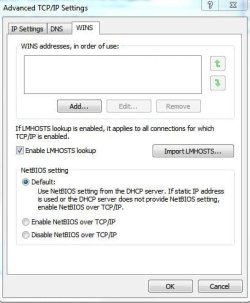
Is your setting set to autodetect and in your WINS, is it Enabled "LMHOSTS lookup"
with Netbios Setting as "Default"?
 

My Computer

Computer Manufacturer/Model Number
Lenovo ThinkPad T60
OS
Windows 7 Ultimate 64Bit
CPU
GenuineIntel Intel(R) Core(TM) DuoCore T2400 @ 1.83GHz
Motherboard
Intel(R) 82801G (ICH7 Family)
Memory
2.00 GB
Graphics Card(s)
Mobile Intel(R) 945 Express Chipset
Sound Card
SoundMAX Integrated Digital HD Audio
Monitor(s) Displays
ThinkPad Display
Screen Resolution
1400x1050
Hard Drives
100Gb SATA
Keyboard
Standard Keyboard
Mouse
HID-compliant Mouse
Internet Speed
Cable Broadband - 54Mbps
Other Info
Intel(R) PRO/1000 PL Network Connection
11a/b/g Wireless LAN Mini PCI Express Adapter
Your modem does not go out to your ISP to gather details, it's your ISP that propogates the details to your modem.

Not true. Modem requests configuration from isp's tftp server.
 

My Computer

Computer Manufacturer/Model Number
self built
OS
7600.20510 x86
CPU
P4 550 3.4 GHz HT running at 3.5 GHz
Motherboard
MSI PM8M3-V (MS-7211 v1.x) Micro-ATX mainboard
Memory
OCZ 2 GB(2x1GB) DDR400mHz running @ 414 mHz
Graphics Card(s)
HIS Radeon HD 3850 IceQ 3 Turbo HDMI Dual DL-DVI AGP
Sound Card
MOTU Traveler firewire studio interface 192 kHz 24 bit
Monitor(s) Displays
22" widescreen Acer X223W LCD, 17" Compaq P75 CRT
Screen Resolution
1680x1050 and 1280x1024
Hard Drives
SATA I x2 WD, 400 GB and 120 GB, SATA 2 WD Caviar Black 1 TB
PSU
350W generic
Case
Cybertronpc, it glows blue
Cooling
stock cpu fan, Ice-Q 3 gpu and system, many case fans
Keyboard
Logitch Classical Keyboard 200
Mouse
Logitech Mediaplay cordless
Internet Speed
1792/448 kbits/sec
Other Info
SATA II PCI fake RAID adapter, 1 GB Readyboost, original ATI Remote Wonder (even works with WMC perfectly), Logitech Rumblepad 2 game controller x2
I have been to these forums allot along with MS TechNet and have my windows 7 setup stable after weeks of debugging. A thank you too all that helped me here but now I need you're help again with my internet my configuration is this:
Cable Modem -> onbord nic no routers just running windows firewall and MSE now and then every thing goes dead and diagnostics said "DNS server not responding" this is rather annoying as i have to restart my cable modem from the web interface wait 10 seconds or so and the internet is back to normal here are some ipconfig details that might help.

Microsoft Windows [Version 6.1.7600]
Copyright (c) 2009 Microsoft Corporation. All rights reserved.
C:\Windows\system32>ipconfig/all
Windows IP Configuration
Host Name . . . . . . . . . . . . : Archangel-PC
Primary Dns Suffix . . . . . . . :
Node Type . . . . . . . . . . . . : Hybrid
IP Routing Enabled. . . . . . . . : No
WINS Proxy Enabled. . . . . . . . : No
DNS Suffix Search List. . . . . . : neo.rr.com
Ethernet adapter Local Area Connection:
Connection-specific DNS Suffix . : neo.rr.com
Description . . . . . . . . . . . : SiS 900-Based PCI Fast Ethernet Adapter
Physical Address. . . . . . . . . : 00-17-31-77-DE-65
DHCP Enabled. . . . . . . . . . . : Yes
Autoconfiguration Enabled . . . . : Yes
IPv4 Address. . . . . . . . . . . : 76.190.235.248(Preferred)
Subnet Mask . . . . . . . . . . . : 255.255.224.0
Lease Obtained. . . . . . . . . . : Monday, November 02, 2009 6:02:10 PM
Lease Expires . . . . . . . . . . : Tuesday, November 03, 2009 6:02:09 PM
Default Gateway . . . . . . . . . : 76.190.224.1
DHCP Server . . . . . . . . . . . : 10.248.0.1
DNS Servers . . . . . . . . . . . : 208.67.222.222
208.67.220.220
NetBIOS over Tcpip. . . . . . . . : Enabled
Tunnel adapter isatap.neo.rr.com:
Media State . . . . . . . . . . . : Media disconnected
Connection-specific DNS Suffix . :
Description . . . . . . . . . . . : Microsoft ISATAP Adapter
Physical Address. . . . . . . . . : 00-00-00-00-00-00-00-E0
DHCP Enabled. . . . . . . . . . . : No
Autoconfiguration Enabled . . . . : Yes
Tunnel adapter 6TO4 Adapter:
Media State . . . . . . . . . . . : Media disconnected
Connection-specific DNS Suffix . :
Description . . . . . . . . . . . : Microsoft 6to4 Adapter
Physical Address. . . . . . . . . : 00-00-00-00-00-00-00-E0
DHCP Enabled. . . . . . . . . . . : No
Autoconfiguration Enabled . . . . : Yes
Tunnel adapter Teredo Tunneling Pseudo-Interface:
Media State . . . . . . . . . . . : Media disconnected
Connection-specific DNS Suffix . :
Description . . . . . . . . . . . : Teredo Tunneling Pseudo-Interface
Physical Address. . . . . . . . . : 00-00-00-00-00-00-00-E0
DHCP Enabled. . . . . . . . . . . : No
Autoconfiguration Enabled . . . . : Yes
C:\Windows\system32>

Is this a hardware issue if so is their a good nic card out their that will support win7 out of the box or is this isp related? any and all help figuring this last issue out i hope will be very appreciated :)

Archangel83,

After the Internet Error, did you try to ping your DNS servers?
Open cmd, Start->type cmd in searchbox, enter.
In the cmd window try this:
ping 208.67.222.222
ping 208.67.220.220

also enter next command:
nslookup <enter>
in nslookup, enter next address:
www.google.com

please copy and paste results to this thread.

Have a nice day!

zx81
 

My Computer

Computer Manufacturer/Model Number
Dell Inpspiron 1720
OS
Windows 7 Home Premium x64
CPU
Intel 1720 Core 2 Duo 2.00GHz,800,2M
Memory
4GB 667MHz DDR2 SDRAM (2x2048)
Graphics Card(s)
NVIDIA Geforce Go 8600M GT 256MB DDR2
Sound Card
SigmaTel
Monitor(s) Displays
17.0" Widescreen WXGA+ (1440x900) TFT with TrueLife
Screen Resolution
1440x900
Hard Drives
2x160GB 5400RPM Serial ATA
Mouse
Logitech
Your modem does not go out to your ISP to gather details, it's your ISP that propogates the details to your modem.

Not true. Modem requests configuration from isp's tftp server.

Hmm I'd like a third opinnion on that if that's ok. Modem by loose term is a device that converts analog signals to digital...when you say requests configuration, i don't agree. The ISP has a open/close "link" to your modem (through their own modem device). The ISP's DHCP is what provides the IP but not in the x.x.x.x format, modems do not go to ISP and specifically asks for IP, it sends a signal of service (not configuration data, just signals) and the ISP reply with signals which the modem "demodulates" to data needed.

Actual configuration of data happens on the machine within the OSI model. From your modem to the ISP's "modem" device that is the internet, there are only 0s and 1s.
 

My Computer

Computer Manufacturer/Model Number
Lenovo ThinkPad T60
OS
Windows 7 Ultimate 64Bit
CPU
GenuineIntel Intel(R) Core(TM) DuoCore T2400 @ 1.83GHz
Motherboard
Intel(R) 82801G (ICH7 Family)
Memory
2.00 GB
Graphics Card(s)
Mobile Intel(R) 945 Express Chipset
Sound Card
SoundMAX Integrated Digital HD Audio
Monitor(s) Displays
ThinkPad Display
Screen Resolution
1400x1050
Hard Drives
100Gb SATA
Keyboard
Standard Keyboard
Mouse
HID-compliant Mouse
Internet Speed
Cable Broadband - 54Mbps
Other Info
Intel(R) PRO/1000 PL Network Connection
11a/b/g Wireless LAN Mini PCI Express Adapter
I used to witness isp hacks when I was a bit wilder back in the days. I know how things work and I do so well. I would see how people's mac addresses could be used when they posted them online.

Hacks/spoofs possible are alterting sync speeds and also outright using others' accounts. Not advisable to post mac addresses online.
 
Last edited:

My Computer

Computer Manufacturer/Model Number
self built
OS
7600.20510 x86
CPU
P4 550 3.4 GHz HT running at 3.5 GHz
Motherboard
MSI PM8M3-V (MS-7211 v1.x) Micro-ATX mainboard
Memory
OCZ 2 GB(2x1GB) DDR400mHz running @ 414 mHz
Graphics Card(s)
HIS Radeon HD 3850 IceQ 3 Turbo HDMI Dual DL-DVI AGP
Sound Card
MOTU Traveler firewire studio interface 192 kHz 24 bit
Monitor(s) Displays
22" widescreen Acer X223W LCD, 17" Compaq P75 CRT
Screen Resolution
1680x1050 and 1280x1024
Hard Drives
SATA I x2 WD, 400 GB and 120 GB, SATA 2 WD Caviar Black 1 TB
PSU
350W generic
Case
Cybertronpc, it glows blue
Cooling
stock cpu fan, Ice-Q 3 gpu and system, many case fans
Keyboard
Logitch Classical Keyboard 200
Mouse
Logitech Mediaplay cordless
Internet Speed
1792/448 kbits/sec
Other Info
SATA II PCI fake RAID adapter, 1 GB Readyboost, original ATI Remote Wonder (even works with WMC perfectly), Logitech Rumblepad 2 game controller x2
@ AEM
Network Connection Details:

Connection-specific DNS Suffix: neo.rr.com
Description: SiS 900-Based PCI Fast Ethernet Adapter
Physical Address: ‎00-17-31-77-DE-65
DHCP Enabled: Yes
IPv4 Address: 76.190.235.248
IPv4 Subnet Mask: 255.255.224.0
Lease Obtained: Wednesday, November 04, 2009 4:14:16 AM
Lease Expires: Thursday, November 05, 2009 6:03:03 AM
IPv4 Default Gateway: 76.190.224.1
IPv4 DHCP Server: 10.248.0.1
IPv4 DNS Servers: 208.67.222.222, 208.67.220.220
IPv4 WINS Server:
NetBIOS over Tcpip Enabled: Yes

@zx81

Microsoft Windows [Version 6.1.7600]
Copyright (c) 2009 Microsoft Corporation. All rights reserved.
C:\Windows\system32>nslookup
Default Server: resolver1.opendns.com
Address: 208.67.222.222
> www.google.com
Server: resolver1.opendns.com
Address: 208.67.222.222
Non-authoritative answer:
Name: www.google.com.neo.rr.com
Address: 208.69.36.132
>
 

My Computer

Computer Manufacturer/Model Number
Self Built
OS
Win7 RTM
CPU
P4 2.6ghz Hyper Threading
Motherboard
Asus P4S800D-X
Memory
2 GIG
Graphics Card(s)
Nvidia G-Force 6200
Sound Card
Realtek AC'97 Audio
Monitor(s) Displays
Dell IN1910N HD LCD
Screen Resolution
1366x768@60Hz
Hard Drives
Disk0 Seagate ST360015A ATA Device
Disk1 Seagate ST340015A ATA Device
PSU
Custom
Case
Custom
Cooling
fans
Keyboard
IBM
Mouse
Logitech M310
Internet Speed
6mbps DSL Direct AT&T
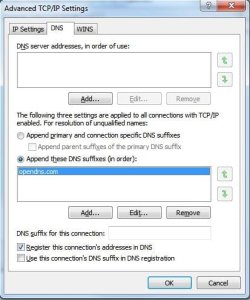
It's weird, your IP is 76.190.235.248, and when you do the nslookup, your default server's IP is 208.67.222.222. So neo.rr.com (your ISP ??) is using opendns.com's service as DNS.

Anyway lets try this.

In your Properties > DNS tab

Append DNS ...
 

Attachments

  • Noname2.jpg
    Noname2.jpg
    32.3 KB · Views: 150

My Computer

Computer Manufacturer/Model Number
Lenovo ThinkPad T60
OS
Windows 7 Ultimate 64Bit
CPU
GenuineIntel Intel(R) Core(TM) DuoCore T2400 @ 1.83GHz
Motherboard
Intel(R) 82801G (ICH7 Family)
Memory
2.00 GB
Graphics Card(s)
Mobile Intel(R) 945 Express Chipset
Sound Card
SoundMAX Integrated Digital HD Audio
Monitor(s) Displays
ThinkPad Display
Screen Resolution
1400x1050
Hard Drives
100Gb SATA
Keyboard
Standard Keyboard
Mouse
HID-compliant Mouse
Internet Speed
Cable Broadband - 54Mbps
Other Info
Intel(R) PRO/1000 PL Network Connection
11a/b/g Wireless LAN Mini PCI Express Adapter
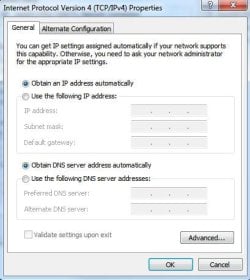
Can you check your WINS tab, does it look like this?

And auto detect settings.
 

Attachments

  • Noname5.jpg
    Noname5.jpg
    28.6 KB · Views: 52
  • Noname6.jpg
    Noname6.jpg
    27.4 KB · Views: 39

My Computer

Computer Manufacturer/Model Number
Lenovo ThinkPad T60
OS
Windows 7 Ultimate 64Bit
CPU
GenuineIntel Intel(R) Core(TM) DuoCore T2400 @ 1.83GHz
Motherboard
Intel(R) 82801G (ICH7 Family)
Memory
2.00 GB
Graphics Card(s)
Mobile Intel(R) 945 Express Chipset
Sound Card
SoundMAX Integrated Digital HD Audio
Monitor(s) Displays
ThinkPad Display
Screen Resolution
1400x1050
Hard Drives
100Gb SATA
Keyboard
Standard Keyboard
Mouse
HID-compliant Mouse
Internet Speed
Cable Broadband - 54Mbps
Other Info
Intel(R) PRO/1000 PL Network Connection
11a/b/g Wireless LAN Mini PCI Express Adapter
Back
Top