Network Location - Set as Home, Work, or Public Network

How to Set the Network Location Type in Windows 7

   Information
This will show you how to change the Windows 7 network location to be either a Home network, Work network (private), or Public network type.


During the installation of Windows 7, or the first time that you connect to a network, you must choose a network location. Based on the network location you choose, Windows automatically assigns a network discovery state to the network and sets the appropriate Windows Firewall and security settings for that type of network location. If you connect to networks in different locations (for example, a network at your home, at a local coffee shop, or at work), choosing a network location can help ensure that your computer is always set to an appropriate security level.
   Note
There are four network locations:
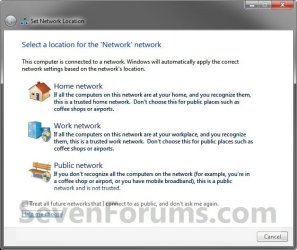
  • Choose Home network for home networks or when you know and trust the people and devices on the network. Computers on a home network can belong to a homegroup. Network discovery is turned on for home networks, which allows you to see other computers and devices on the network and allows other network users to see your computer.
    • Computers on a home network must belong to a workgroup, but they can also belong to a homegroup. A homegroup makes it easy to share pictures, music, videos, documents, and printers with other people on a home network.
    • A homegroup is protected with a password, but you only need to type the password once, when adding your computer to the homegroup
  • Choose Work network (private) for small office or other workplace networks. Network discovery, which allows you to see other computers and devices on a network and allows other network users to see your computer, is on by default, but you can't create or join a homegroup.
    • All computers are peers; no computer has control over another computer.
    • Each computer has a set of user accounts. To log on to any computer in the workgroup, you must have an account on that computer.
    • There are typically no more than twenty computers.
    • A workgroup is not protected by a password.
    • All computers must be on the same local network or subnet.
  • Choose Public network for networks in public places (such as coffee shops or airports). This location is designed to keep your computer from being visible to other computers around you and to help protect your computer from any malicious software from the Internet. HomeGroup is not available on public networks, and network discovery is turned off. You should also choose this option if you're connected directly to the Internet without using a router, or if you have a mobile broadband connection.
  • The Domain network location is used for domain networks such as those at enterprise workplaces. This type of network location is controlled by your network administrator and can't be selected or changed.
    • One or more computers are servers. Network administrators use servers to control the security and permissions for all computers on the domain. This makes it easy to make changes because the changes are automatically made to all computers. Domain users must provide a password or other credentials each time they access the domain.
    • If you have a user account on the domain, you can log on to any computer on the domain without needing an account on that computer.
    • You probably can make only limited changes to a computer's settings because network administrators often want to ensure consistency among computers.
    • There can be thousands of computers in a domain.
    • The computers can be on different local networks.
   Warning
If you know you will not need to share files or printers, the safest choice is public network.


OPTION ONE

To Set Network Location of Unidentified Networks

1. See: How to Set Unidentified Networks to be a Private or Public Network Location


OPTION TWO

To Set Network Location in Network and Sharing Center

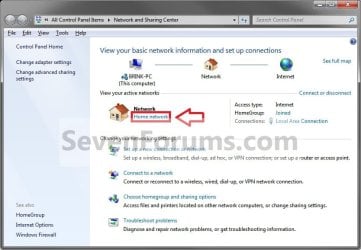
1. Open the Control Panel (icons view), and click on the Network and Sharing Center icon.

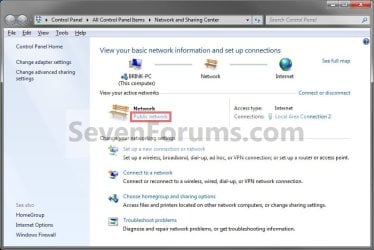
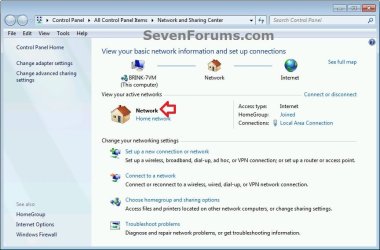
2. Under Network, click on either the Home network, Work network, or Public network link depending on what you currently have selected as your network location. (see screenshot below)Step1.jpg

Work_Step2.jpg

Public_Step2.jpg


3. Select a location that fits your network location needs. (see screenshot below)Step2.jpg

4. If prompted by UAC, then click on Yes.

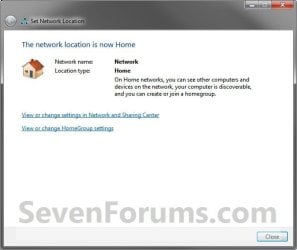
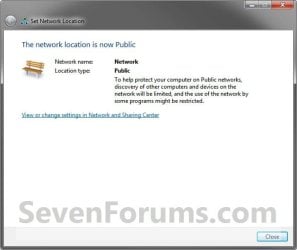
5. The network location has now been changed to what you selected in step 3. Click on Close. (see screenshots below)Step3_Home.jpg

Step3_Work.jpg

Step3_Public.jpg


6. When done, close the Network and Sharing Center.


OPTION THREE

To Set Network Location in Registry Editor

1. Press the Windows + R keys to open the Run dialog, type regedit, and press Enter.

2. If prompted by UAC, then click/tap on Yes.

3. In Registry Editor, navigate to the location below. (see screenshot below)

Code:
HKEY_LOCAL_MACHINE\SOFTWARE\Microsoft\Windows NT\CurrentVersion\NetworkList\Profiles
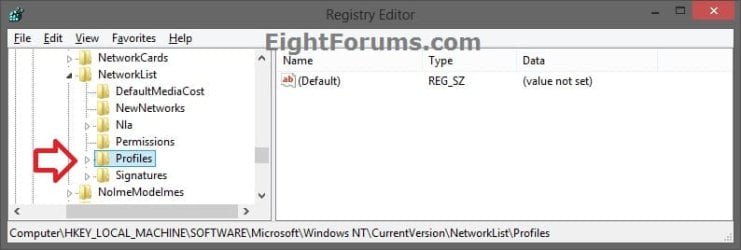
change-network_location_reg-1.jpg

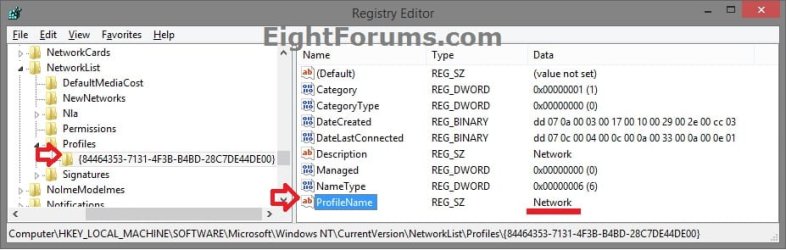
4. Double click/tap on the Profiles key in the left pane to expand it. Click/tap on each long GUID number subkey, and look at it's PofileName string value in the right pane to see if it has the current network name (ex: Network) until found. (see screenshots below)change-network_location_reg-2.jpg

Network_Name.jpg

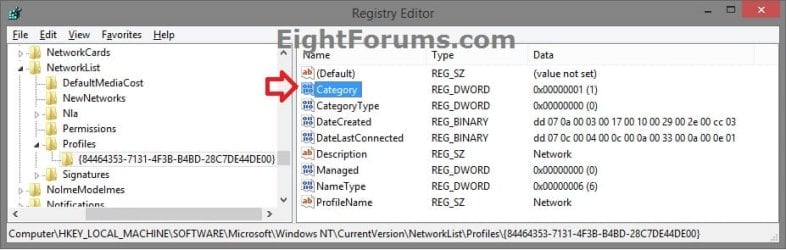
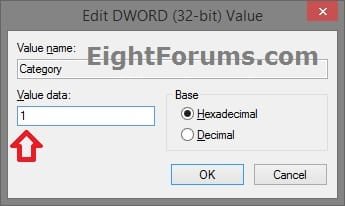
5. When you find the correct PofileName for your network name, double click/tap on the Category DWORD value in the same right pane to modify it. (see screenshot below)change-network_location_reg-3.jpg

6. Type in a new Data value number in the table below for the network location you want, and click/tap on OK. (see screenshot below)
Network LocationData Value
Public0
Home1
Domain2

change-network_location_reg-4.jpg

7. When finished, you can now close Registry Editor if you like.

8. Sometimes you may need to sign out and in of your user account to apply the new network location.


That's it,
Shawn Brink


Last edited:
Looks like when the network location is "public" there is no link under the active network name.

How does one change it then?
 

My Computer My Computer

At a glance

Windows 7 Professional x64Intel Core i7 8604GB DDR3 Mushkin 1600Mhz @ 7-8-7-20MSI GTS250 1GB DDR3 Twin Frozr
Computer Manufacturer/Model Number
Keeps changing - (Custom)
OS
Windows 7 Professional x64
CPU
Intel Core i7 860
Motherboard
Gigabyte GA-P55-UD4P
Memory
4GB DDR3 Mushkin 1600Mhz @ 7-8-7-20
Graphics Card(s)
MSI GTS250 1GB DDR3 Twin Frozr
Sound Card
Onboard realtek
Monitor(s) Displays
Samsung SyncMaster 24" P2450 + Samsung 20" 2033
Screen Resolution
1920 X 1080 and 1600 X 900 (#2 system 1440 X 900)
Hard Drives
Patriot Inferno 120GB SSD + 3 WD Blue 640GB drives
PSU
Corsair 750 HX Modular
Case
Lancool PC-K62
Cooling
Cooler Master TX3 CPU cooler and 4-140mm and 1-120mm case
Keyboard
Gigabyte USB keyboard
Mouse
Microsoft wireless laser mouse 5000
Internet Speed
7 Mb down 1.5 up
Other Info
System #2: AMD Phenom II X6 1055T (Freezer 7 Pro cooler) - Gigabyte 880GMA-UD2H - WD 500GB Black - 9500GT (1GB) 500W OCZ modular PSU - Antec 200 case. System #3 (LapTop) Core 2 Duo T6670 - 320GB 7200RPM HD - 4GB DDR3 RAM.
Hi Nate,

There should be a link under the Public one as well as in the 3rd screenshot under step 2.
 

My Computer My Computer

At a glance

64-bit Windows 11 Pro for WorkstationsIntel i7-8700K OC'd to 5 GHz64 GB (4x16GB) G.SKILL TridentZ RGB DDR4 3600...ASUS ROG-STRIX-GTX1080TI-O11G-GAMING
Computer type
PC/Desktop
Computer Manufacturer/Model Number
Self built custom
OS
64-bit Windows 11 Pro for Workstations
CPU
Intel i7-8700K OC'd to 5 GHz
Motherboard
ASUS ROG Maximus XI Formula Z390
Memory
64 GB (4x16GB) G.SKILL TridentZ RGB DDR4 3600 MHz
Graphics Card(s)
ASUS ROG-STRIX-GTX1080TI-O11G-GAMING
Sound Card
Integrated
Monitor(s) Displays
2 x Samsung Odyssey G7 27"
Screen Resolution
2560x1440
Hard Drives
1TB Samsung 990 PRO M.2,
4TB Samsung 990 PRO PRO M.2,
TerraMaster F8 SSD Plus NAS
PSU
Seasonic Prime Titanium 850W
Case
Thermaltake Core P3
Cooling
Corsair Hydro H115i
Keyboard
Logitech wireless K800
Mouse
Logitech MX Master 4
Internet Speed
2 Gb/s Download and 100 Mb/s Upload
Antivirus
Malwarebyte Anti-Malware Premium
Browser
Google Chrome
Other Info
Logitech Z625 speaker system,
Logitech BRIO 4K Pro webcam,
HP Color LaserJet Pro MFP M477fdn,
APC SMART-UPS RT 1000 XL - SURT1000XLI,
Galaxy S23 Plus phone
Hi Nate,

There should be a link under the Public one as well as in the 3rd screenshot under step 2.

I don't have the machine anymore but there was no link.

This network name was "unidentified network" (no link) and under that was "public network" (no link)

I gave up since I only had 2 hours to get it working. I hope he can connect at home now. Funny it isn't the same as in this tutorial. I wonder what caused the differences....
 

My Computer My Computer

At a glance

Windows 7 Professional x64Intel Core i7 8604GB DDR3 Mushkin 1600Mhz @ 7-8-7-20MSI GTS250 1GB DDR3 Twin Frozr
Computer Manufacturer/Model Number
Keeps changing - (Custom)
OS
Windows 7 Professional x64
CPU
Intel Core i7 860
Motherboard
Gigabyte GA-P55-UD4P
Memory
4GB DDR3 Mushkin 1600Mhz @ 7-8-7-20
Graphics Card(s)
MSI GTS250 1GB DDR3 Twin Frozr
Sound Card
Onboard realtek
Monitor(s) Displays
Samsung SyncMaster 24" P2450 + Samsung 20" 2033
Screen Resolution
1920 X 1080 and 1600 X 900 (#2 system 1440 X 900)
Hard Drives
Patriot Inferno 120GB SSD + 3 WD Blue 640GB drives
PSU
Corsair 750 HX Modular
Case
Lancool PC-K62
Cooling
Cooler Master TX3 CPU cooler and 4-140mm and 1-120mm case
Keyboard
Gigabyte USB keyboard
Mouse
Microsoft wireless laser mouse 5000
Internet Speed
7 Mb down 1.5 up
Other Info
System #2: AMD Phenom II X6 1055T (Freezer 7 Pro cooler) - Gigabyte 880GMA-UD2H - WD 500GB Black - 9500GT (1GB) 500W OCZ modular PSU - Antec 200 case. System #3 (LapTop) Core 2 Duo T6670 - 320GB 7200RPM HD - 4GB DDR3 RAM.

My Computer My Computer

At a glance

64-bit Windows 11 Pro for WorkstationsIntel i7-8700K OC'd to 5 GHz64 GB (4x16GB) G.SKILL TridentZ RGB DDR4 3600...ASUS ROG-STRIX-GTX1080TI-O11G-GAMING
Computer type
PC/Desktop
Computer Manufacturer/Model Number
Self built custom
OS
64-bit Windows 11 Pro for Workstations
CPU
Intel i7-8700K OC'd to 5 GHz
Motherboard
ASUS ROG Maximus XI Formula Z390
Memory
64 GB (4x16GB) G.SKILL TridentZ RGB DDR4 3600 MHz
Graphics Card(s)
ASUS ROG-STRIX-GTX1080TI-O11G-GAMING
Sound Card
Integrated
Monitor(s) Displays
2 x Samsung Odyssey G7 27"
Screen Resolution
2560x1440
Hard Drives
1TB Samsung 990 PRO M.2,
4TB Samsung 990 PRO PRO M.2,
TerraMaster F8 SSD Plus NAS
PSU
Seasonic Prime Titanium 850W
Case
Thermaltake Core P3
Cooling
Corsair Hydro H115i
Keyboard
Logitech wireless K800
Mouse
Logitech MX Master 4
Internet Speed
2 Gb/s Download and 100 Mb/s Upload
Antivirus
Malwarebyte Anti-Malware Premium
Browser
Google Chrome
Other Info
Logitech Z625 speaker system,
Logitech BRIO 4K Pro webcam,
HP Color LaserJet Pro MFP M477fdn,
APC SMART-UPS RT 1000 XL - SURT1000XLI,
Galaxy S23 Plus phone
I had to register just to write this =) :
Actualy there is a bug in windows 7 which prevent you from changing an "unidentified network" in some cases. I had this problem back in beta and RC and it's still there in the released version. Take a look here:
Windows 7 RC - I can't change my network from public to work
 

My Computer My Computer

At a glance

Windows 7 Home Premium 64bitE84004GB Kingston HyperX @1066MhzAsus GF 8800 GTS 512
Computer Manufacturer/Model Number
Self built
OS
Windows 7 Home Premium 64bit
CPU
E8400
Motherboard
Abit IP35 Pro
Memory
4GB Kingston HyperX @1066Mhz
Graphics Card(s)
Asus GF 8800 GTS 512
Monitor(s) Displays
LG TV 42LH7020
Screen Resolution
1920x1080
Internet Speed
24Mbit
Last edited by a moderator:

My Computer My Computer

At a glance

Windows 7 Ult, Windows 8.1 Pro,Q9650-4.275GHz, E8600 4.5GHz, E6750-3.8GHzG.Skill PC2 9600 1200Mhz 5 5 5 15 2TGTX480
Computer type
PC/Desktop
Computer Manufacturer/Model Number
Home built
OS
Windows 7 Ult, Windows 8.1 Pro,
CPU
Q9650-4.275GHz, E8600 4.5GHz, E6750-3.8GHz
Motherboard
Evga 780i FTW
Memory
G.Skill PC2 9600 1200Mhz 5 5 5 15 2T
Graphics Card(s)
GTX480
Sound Card
Asus Xonar D2
Monitor(s) Displays
HannsG
Screen Resolution
1680X1050
Hard Drives
GSkill Phoenix Pro 120GB SSD
PSU
ThermalTake Toughpower 1000Watt modular
Case
ThermalTake XaserV
Cooling
Xigmatek S1283
Keyboard
Logitech G15
Mouse
Logitech G9
Internet Speed
T1
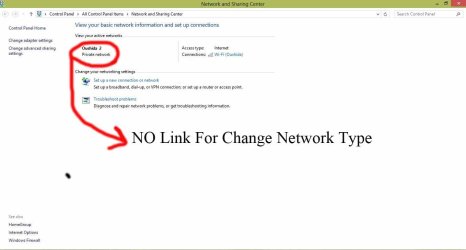
i cant change network location type in windows 7 because there is no link
net.jpg
 

My Computer My Computer

At a glance

windows 7 home preminm x64i7DDR3 4GATI HD 5470 1G
Computer Manufacturer/Model Number
dell 1558
OS
windows 7 home preminm x64
CPU
i7
Motherboard
dell
Memory
DDR3 4G
Graphics Card(s)
ATI HD 5470 1G
Monitor(s) Displays
15.6 LED
Hard Drives
Hitachi 500G
Hello Saeed,

That looks like Windows 8 instead of Windows 7. This tutorial is only for Windows 7, and does not apply to Windows 8.

For Windows 8, you can use the tutorial below instead to change your network location type.

Network Location - Set to Private or Public in Windows 8

Hope this helps, :)
Shawn
 

My Computer My Computer

At a glance

64-bit Windows 11 Pro for WorkstationsIntel i7-8700K OC'd to 5 GHz64 GB (4x16GB) G.SKILL TridentZ RGB DDR4 3600...ASUS ROG-STRIX-GTX1080TI-O11G-GAMING
Computer type
PC/Desktop
Computer Manufacturer/Model Number
Self built custom
OS
64-bit Windows 11 Pro for Workstations
CPU
Intel i7-8700K OC'd to 5 GHz
Motherboard
ASUS ROG Maximus XI Formula Z390
Memory
64 GB (4x16GB) G.SKILL TridentZ RGB DDR4 3600 MHz
Graphics Card(s)
ASUS ROG-STRIX-GTX1080TI-O11G-GAMING
Sound Card
Integrated
Monitor(s) Displays
2 x Samsung Odyssey G7 27"
Screen Resolution
2560x1440
Hard Drives
1TB Samsung 990 PRO M.2,
4TB Samsung 990 PRO PRO M.2,
TerraMaster F8 SSD Plus NAS
PSU
Seasonic Prime Titanium 850W
Case
Thermaltake Core P3
Cooling
Corsair Hydro H115i
Keyboard
Logitech wireless K800
Mouse
Logitech MX Master 4
Internet Speed
2 Gb/s Download and 100 Mb/s Upload
Antivirus
Malwarebyte Anti-Malware Premium
Browser
Google Chrome
Other Info
Logitech Z625 speaker system,
Logitech BRIO 4K Pro webcam,
HP Color LaserJet Pro MFP M477fdn,
APC SMART-UPS RT 1000 XL - SURT1000XLI,
Galaxy S23 Plus phone
Thanks brink
 

My Computer My Computer

At a glance

windows 7 home preminm x64i7DDR3 4GATI HD 5470 1G
Computer Manufacturer/Model Number
dell 1558
OS
windows 7 home preminm x64
CPU
i7
Motherboard
dell
Memory
DDR3 4G
Graphics Card(s)
ATI HD 5470 1G
Monitor(s) Displays
15.6 LED
Hard Drives
Hitachi 500G
You're most welcome. :)
 

My Computer My Computer

At a glance

64-bit Windows 11 Pro for WorkstationsIntel i7-8700K OC'd to 5 GHz64 GB (4x16GB) G.SKILL TridentZ RGB DDR4 3600...ASUS ROG-STRIX-GTX1080TI-O11G-GAMING
Computer type
PC/Desktop
Computer Manufacturer/Model Number
Self built custom
OS
64-bit Windows 11 Pro for Workstations
CPU
Intel i7-8700K OC'd to 5 GHz
Motherboard
ASUS ROG Maximus XI Formula Z390
Memory
64 GB (4x16GB) G.SKILL TridentZ RGB DDR4 3600 MHz
Graphics Card(s)
ASUS ROG-STRIX-GTX1080TI-O11G-GAMING
Sound Card
Integrated
Monitor(s) Displays
2 x Samsung Odyssey G7 27"
Screen Resolution
2560x1440
Hard Drives
1TB Samsung 990 PRO M.2,
4TB Samsung 990 PRO PRO M.2,
TerraMaster F8 SSD Plus NAS
PSU
Seasonic Prime Titanium 850W
Case
Thermaltake Core P3
Cooling
Corsair Hydro H115i
Keyboard
Logitech wireless K800
Mouse
Logitech MX Master 4
Internet Speed
2 Gb/s Download and 100 Mb/s Upload
Antivirus
Malwarebyte Anti-Malware Premium
Browser
Google Chrome
Other Info
Logitech Z625 speaker system,
Logitech BRIO 4K Pro webcam,
HP Color LaserJet Pro MFP M477fdn,
APC SMART-UPS RT 1000 XL - SURT1000XLI,
Galaxy S23 Plus phone
I had to register just to write this =) :
Actually there is a bug in windows 7 which prevent you from changing an "unidentified network" in some cases. I had this problem back in beta and RC and it's still there in the released version. Take a look here:
Windows 7 RC - I can't change my network from public to work

most helpful post IMO

Also, posting a screenshot since you didn't seem to believe us, Brink.

I was having problems with mine, as I used it to run internet connection sharing to my desktop temporarily, but a windows & avast update set me back yet again.

2qsp352.jpg
 

My Computer My Computer

At a glance

windows 7 32 bitIntel U2300 1.2 GHz2.00 GB
Computer type
PC/Desktop
Computer Manufacturer/Model Number
Acer
OS
windows 7 32 bit
CPU
Intel U2300 1.2 GHz
Memory
2.00 GB
Also, posting a screenshot since you didn't seem to believe us, Brink.

Where did you get that from??? I never said or implied that. :huh:
 

My Computer My Computer

At a glance

64-bit Windows 11 Pro for WorkstationsIntel i7-8700K OC'd to 5 GHz64 GB (4x16GB) G.SKILL TridentZ RGB DDR4 3600...ASUS ROG-STRIX-GTX1080TI-O11G-GAMING
Computer type
PC/Desktop
Computer Manufacturer/Model Number
Self built custom
OS
64-bit Windows 11 Pro for Workstations
CPU
Intel i7-8700K OC'd to 5 GHz
Motherboard
ASUS ROG Maximus XI Formula Z390
Memory
64 GB (4x16GB) G.SKILL TridentZ RGB DDR4 3600 MHz
Graphics Card(s)
ASUS ROG-STRIX-GTX1080TI-O11G-GAMING
Sound Card
Integrated
Monitor(s) Displays
2 x Samsung Odyssey G7 27"
Screen Resolution
2560x1440
Hard Drives
1TB Samsung 990 PRO M.2,
4TB Samsung 990 PRO PRO M.2,
TerraMaster F8 SSD Plus NAS
PSU
Seasonic Prime Titanium 850W
Case
Thermaltake Core P3
Cooling
Corsair Hydro H115i
Keyboard
Logitech wireless K800
Mouse
Logitech MX Master 4
Internet Speed
2 Gb/s Download and 100 Mb/s Upload
Antivirus
Malwarebyte Anti-Malware Premium
Browser
Google Chrome
Other Info
Logitech Z625 speaker system,
Logitech BRIO 4K Pro webcam,
HP Color LaserJet Pro MFP M477fdn,
APC SMART-UPS RT 1000 XL - SURT1000XLI,
Galaxy S23 Plus phone
so where do you recommend me setting it at on a college campus with more than 30,000 students and we all have our own username and passphrases to log on
 

My Computer My Computer

At a glance

Windows 7 Pro 64bitIntel(R) Core(TM) i3-2350M CPU @ 2.30 GHZ4.00 GBIntel HD Graphiics
Computer type
Laptop
Computer Manufacturer/Model Number
Toshiba Satellite C655-S5547
OS
Windows 7 Pro 64bit
CPU
Intel(R) Core(TM) i3-2350M CPU @ 2.30 GHZ
Memory
4.00 GB
Graphics Card(s)
Intel HD Graphiics
Sound Card
Conexant HD Audio
Monitor(s) Displays
Generic PnP Monitor
Screen Resolution
1366 x 768 x 32 bits (4294967296 colors) @ 60 Hz
Hard Drives
TI106321W0B(C:) 450GB
Keyboard
Standard PS/2 Keyboard
Mouse
Synaptics Pointing Device
Internet Speed
51.68 mb/s download and 12.08 mb/s upload as of 6/24/15
Antivirus
Webroot Secure Anywhere
Browser
IE11, Mozilla Firefox 41.1.01, and Google Chrome if I must
Hello Sean,

It would be best to check with your college IT department to see what they say to use with their network. :)
 

My Computer My Computer

At a glance

64-bit Windows 11 Pro for WorkstationsIntel i7-8700K OC'd to 5 GHz64 GB (4x16GB) G.SKILL TridentZ RGB DDR4 3600...ASUS ROG-STRIX-GTX1080TI-O11G-GAMING
Computer type
PC/Desktop
Computer Manufacturer/Model Number
Self built custom
OS
64-bit Windows 11 Pro for Workstations
CPU
Intel i7-8700K OC'd to 5 GHz
Motherboard
ASUS ROG Maximus XI Formula Z390
Memory
64 GB (4x16GB) G.SKILL TridentZ RGB DDR4 3600 MHz
Graphics Card(s)
ASUS ROG-STRIX-GTX1080TI-O11G-GAMING
Sound Card
Integrated
Monitor(s) Displays
2 x Samsung Odyssey G7 27"
Screen Resolution
2560x1440
Hard Drives
1TB Samsung 990 PRO M.2,
4TB Samsung 990 PRO PRO M.2,
TerraMaster F8 SSD Plus NAS
PSU
Seasonic Prime Titanium 850W
Case
Thermaltake Core P3
Cooling
Corsair Hydro H115i
Keyboard
Logitech wireless K800
Mouse
Logitech MX Master 4
Internet Speed
2 Gb/s Download and 100 Mb/s Upload
Antivirus
Malwarebyte Anti-Malware Premium
Browser
Google Chrome
Other Info
Logitech Z625 speaker system,
Logitech BRIO 4K Pro webcam,
HP Color LaserJet Pro MFP M477fdn,
APC SMART-UPS RT 1000 XL - SURT1000XLI,
Galaxy S23 Plus phone
I know it's been a long time, but I have just come across this excellent topic!

I'm a bit puzzled in the Registry Change method by your table (Option Three, point 6):
Code:
Network     Data
Location    Value
--------    -----
Public      0
Home        1
Domain      2
What happened about 'Work'?
Inspecting my Windows 7 Pro machines which were all set to Work shows that the Category is set to 1.

Should 'Home' in your table be changed to 'Private - either Home or Work'?

Thanks!
 

My Computer My Computer

At a glance

Windows 7 Pro 64-bit
OS
Windows 7 Pro 64-bit
Hello John, :)

You're correct. "Private" would be a better description since "1" will change it to Home or Work based on your Private network.
 

My Computer My Computer

At a glance

64-bit Windows 11 Pro for WorkstationsIntel i7-8700K OC'd to 5 GHz64 GB (4x16GB) G.SKILL TridentZ RGB DDR4 3600...ASUS ROG-STRIX-GTX1080TI-O11G-GAMING
Computer type
PC/Desktop
Computer Manufacturer/Model Number
Self built custom
OS
64-bit Windows 11 Pro for Workstations
CPU
Intel i7-8700K OC'd to 5 GHz
Motherboard
ASUS ROG Maximus XI Formula Z390
Memory
64 GB (4x16GB) G.SKILL TridentZ RGB DDR4 3600 MHz
Graphics Card(s)
ASUS ROG-STRIX-GTX1080TI-O11G-GAMING
Sound Card
Integrated
Monitor(s) Displays
2 x Samsung Odyssey G7 27"
Screen Resolution
2560x1440
Hard Drives
1TB Samsung 990 PRO M.2,
4TB Samsung 990 PRO PRO M.2,
TerraMaster F8 SSD Plus NAS
PSU
Seasonic Prime Titanium 850W
Case
Thermaltake Core P3
Cooling
Corsair Hydro H115i
Keyboard
Logitech wireless K800
Mouse
Logitech MX Master 4
Internet Speed
2 Gb/s Download and 100 Mb/s Upload
Antivirus
Malwarebyte Anti-Malware Premium
Browser
Google Chrome
Other Info
Logitech Z625 speaker system,
Logitech BRIO 4K Pro webcam,
HP Color LaserJet Pro MFP M477fdn,
APC SMART-UPS RT 1000 XL - SURT1000XLI,
Galaxy S23 Plus phone
Thanks, Shaun - I note that in some replies on 'other' forums the value 2 is assigned (erroneously) to Work, not Domain.

Can you say what is the meaning of the value "CategoryType", which appears in some profiles, please?
I thought this might distinguish between 'Home' and 'Work' networks, but it seems not.
How can these be distinguished (in the registry)?
 
Last edited:

My Computer My Computer

At a glance

Windows 7 Pro 64-bit
OS
Windows 7 Pro 64-bit
Yeah, "CategoryType" doesn't get changed when switching network locations.

I haven't found anything else to distinguish between Home and Work either for the registry, and why Option 1 is the preferred method to use. :(
 

My Computer My Computer

At a glance

64-bit Windows 11 Pro for WorkstationsIntel i7-8700K OC'd to 5 GHz64 GB (4x16GB) G.SKILL TridentZ RGB DDR4 3600...ASUS ROG-STRIX-GTX1080TI-O11G-GAMING
Computer type
PC/Desktop
Computer Manufacturer/Model Number
Self built custom
OS
64-bit Windows 11 Pro for Workstations
CPU
Intel i7-8700K OC'd to 5 GHz
Motherboard
ASUS ROG Maximus XI Formula Z390
Memory
64 GB (4x16GB) G.SKILL TridentZ RGB DDR4 3600 MHz
Graphics Card(s)
ASUS ROG-STRIX-GTX1080TI-O11G-GAMING
Sound Card
Integrated
Monitor(s) Displays
2 x Samsung Odyssey G7 27"
Screen Resolution
2560x1440
Hard Drives
1TB Samsung 990 PRO M.2,
4TB Samsung 990 PRO PRO M.2,
TerraMaster F8 SSD Plus NAS
PSU
Seasonic Prime Titanium 850W
Case
Thermaltake Core P3
Cooling
Corsair Hydro H115i
Keyboard
Logitech wireless K800
Mouse
Logitech MX Master 4
Internet Speed
2 Gb/s Download and 100 Mb/s Upload
Antivirus
Malwarebyte Anti-Malware Premium
Browser
Google Chrome
Other Info
Logitech Z625 speaker system,
Logitech BRIO 4K Pro webcam,
HP Color LaserJet Pro MFP M477fdn,
APC SMART-UPS RT 1000 XL - SURT1000XLI,
Galaxy S23 Plus phone
Thanks, Shaun - I was hoping to add something to assign network location to the end of a BATch file (which interchanges static IP addressing with DHCP, or vice versa), but it already looked a bit difficult. If you say it's impossible to distinguish Work network and Home network in the registry then I can stop right now!
 

My Computer My Computer

At a glance

Windows 7 Pro 64-bit
OS
Windows 7 Pro 64-bit
Back
Top