

- Local time
- 12:58 PM
- Messages
- 178
Hi, I have searched but not found much with what I want to set up. I currently have a wireless connection to the internet for my PC and Laptop. What I would like to do is setup a private LAN with an old router to use but be able to keep the desktop connected to both WiFi and this LAN.
The only way I have managed to do so so far is by manually setting the IP address for the LAN (disable DHCP, change IP address etc) and assigning the LAN IP address manually to my desktop/laptop, leaving the gateway fields blank. I have noticed that doing this makes my network "Unknown" to Windows 7, which then forces it into Public mode, and disables Homegroup.
Is there a way for me to accomplish what I want?
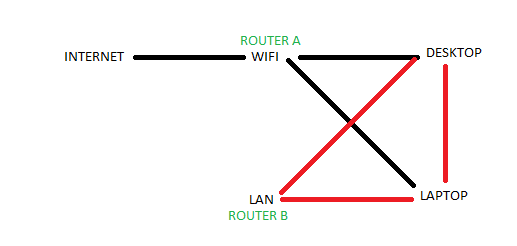
Is pretty much how I want it to work. The desktop has two NICs, the laptop does not, so I realize the laptop would be a one-or-the-other scenario.
The only way I have managed to do so so far is by manually setting the IP address for the LAN (disable DHCP, change IP address etc) and assigning the LAN IP address manually to my desktop/laptop, leaving the gateway fields blank. I have noticed that doing this makes my network "Unknown" to Windows 7, which then forces it into Public mode, and disables Homegroup.
Is there a way for me to accomplish what I want?
Is pretty much how I want it to work. The desktop has two NICs, the laptop does not, so I realize the laptop would be a one-or-the-other scenario.
My Computer
- Computer Manufacturer/Model Number
- Dell 8400
- OS
- Windows 7 Beta 1 b7000
- CPU
- Intel Pentium 4
- Memory
- 4GB
- Graphics Card(s)
- ATI Radeon HD3450
- Sound Card
- Creative SoundBlaster Audigy 2
- Monitor(s) Displays
- Acer AL2016W
- Screen Resolution
- 1680x1050
- Hard Drives
- 1x500GB
1x100GB
- Case
- Dell 8400
- Cooling
- Standard
- Keyboard
- Dell Multimedia Keyboard
- Mouse
- Logitech MediaPlay
- Internet Speed
- Comcastic!

