new build out of range :(

potbelly69

New member
Local time
11:08 PM
Messages
2
my last computer died,so i got one built today,nothing fancy,cheap and cheerful,
when i brought it home and plugged it in,it went great,i never adjusted anything then i restarted and got the dreaded out of range:mad:
i tryed safe mode and changing the resolution but when i restart:out of range
i tryed safe mode and uninstalled drivers,restarted and it installed drivers went ok but when i restarted:out of range:(

i tryed vga mode and it went outa range after a few seconds:(

i'm using an old 17inch beko tv as a monitor :DISCONTINUED BEKO 17WLB450S LCD TELEVISION - available from Superfi UK Visit http://www.superfi.co.uk/index.cfm/page/moreinfo.cfm/product_id/3242 for details
its a 1280x768 pixel.
set up is
asrock n68c-s ucc
amd athlon 7750 duo core 2.51ghz
radeon x 1650 series
radeon x 1650 series secondary

i would be grateful for any help
thanks in advance
potbelly69
 

My Computer My Computer

At a glance

windows 7 home premium 64bitAMD Athlon (tm) 7750 dual core 2.51ghz3gbradeon x1650 series,radeon x1650 secondary
OS
windows 7 home premium 64bit
CPU
AMD Athlon (tm) 7750 dual core 2.51ghz
Motherboard
asrock g68
Memory
3gb
Graphics Card(s)
radeon x1650 series,radeon x1650 secondary
Sound Card
on board
Hard Drives
samsung 1TB
Case
zalman z7
i tryed safe mode and uninstalled drivers,restarted and it installed drivers went ok but when i restarted:out of range:(

Are you using the VGA input on the TV?

Have you tried using the TV's auto config?

After installing the drivers, (downloaded via AMDs site and not the drivers supplied by Windows Update) prior to restarting it may be worth using Catalyst Control Center and making sure you manually enter your TVs resolution and refresh rate.

(you may need to create a custom resolution.)
 

My Computer My Computer

At a glance

8 Pro x64i7 3770K 4.6GHz16GB G.Skill Trident X 2666mhzx2 EVGA 780 Ti Superclocked SLI
Computer type
PC/Desktop
Computer Manufacturer/Model Number
Systems by SmartEyeball
OS
8 Pro x64
CPU
i7 3770K 4.6GHz
Motherboard
ASUS P8Z77 WS
Memory
16GB G.Skill Trident X 2666mhz
Graphics Card(s)
x2 EVGA 780 Ti Superclocked SLI
Sound Card
SB X-FI Surround 5.1 PRO USB / ATH-AD900 Headphones
Monitor(s) Displays
x3 Dell U2410 / 58" Samsung
Screen Resolution
5760*1200/ 1920*1200
Hard Drives
2x Intel 520 240GB (RAID 0) * 2x WD Caviar Blacks 2TB (RAID 0) * 2TB WD Caviar Black * Sony Optirac DVD
PSU
Silverstone Strider Evolution 1200W
Case
Thermaltake Level 10 GT Snow Edition
Cooling
Noctua NH-D14
Keyboard
Topre Realforce // Ducky Shine MX Black // Filco Ninja TKL
Mouse
Thermaltake Theron (Highly Recommended) + Razer Imperator
Antivirus
MSE
Browser
IE, FF, WaterFox
Other Info
GT Extreme V2 Sim Racing Cockpit + 40" LCD and K/B Mouse stand ▼
Fanatec CSR Elite Wheel + Clubsport V1 Pedals + CSR shifter/7G-H ▼Saitek X52 Pro ▼ TrackIR 5 Pro
Buttkicker v2 Seat Rumbler with Dedicated 5.1 and Sub Woofer attached to frame ▼
=
Bloody Big Grin
Last edited:

My Computer My Computer

At a glance

windows 7 home premium 64bitAMD Athlon (tm) 7750 dual core 2.51ghz3gbradeon x1650 series,radeon x1650 secondary
OS
windows 7 home premium 64bit
CPU
AMD Athlon (tm) 7750 dual core 2.51ghz
Motherboard
asrock g68
Memory
3gb
Graphics Card(s)
radeon x1650 series,radeon x1650 secondary
Sound Card
on board
Hard Drives
samsung 1TB
Case
zalman z7
Since the x1650 is an old card, it's no longer supported by newer releases. You will need to download the legacy package:

ATI Catalyst (it says Vista, but will work with 7)

Option 1 - Full Software Suite (which will contain the Catalyst Control Center)

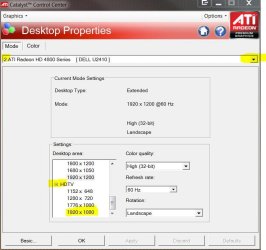
In CCC, you should be looking for "Desktop Properties"


This option is only available in the "Advanced view" - I don't use CCC any more, so unfortunately I can't tell you exactly where the desktop properties are. I believe it's found under "Desktops and Displays" and the desktop properties can be configured by clicking on the trinagle which is a drop down menu)

CCC configure.JPG

CCC Desktop properties.JPG

In the desktop properties section you should be able to select both your resolution and refresh rate.
 

My Computer My Computer

At a glance

8 Pro x64i7 3770K 4.6GHz16GB G.Skill Trident X 2666mhzx2 EVGA 780 Ti Superclocked SLI
Computer type
PC/Desktop
Computer Manufacturer/Model Number
Systems by SmartEyeball
OS
8 Pro x64
CPU
i7 3770K 4.6GHz
Motherboard
ASUS P8Z77 WS
Memory
16GB G.Skill Trident X 2666mhz
Graphics Card(s)
x2 EVGA 780 Ti Superclocked SLI
Sound Card
SB X-FI Surround 5.1 PRO USB / ATH-AD900 Headphones
Monitor(s) Displays
x3 Dell U2410 / 58" Samsung
Screen Resolution
5760*1200/ 1920*1200
Hard Drives
2x Intel 520 240GB (RAID 0) * 2x WD Caviar Blacks 2TB (RAID 0) * 2TB WD Caviar Black * Sony Optirac DVD
PSU
Silverstone Strider Evolution 1200W
Case
Thermaltake Level 10 GT Snow Edition
Cooling
Noctua NH-D14
Keyboard
Topre Realforce // Ducky Shine MX Black // Filco Ninja TKL
Mouse
Thermaltake Theron (Highly Recommended) + Razer Imperator
Antivirus
MSE
Browser
IE, FF, WaterFox
Other Info
GT Extreme V2 Sim Racing Cockpit + 40" LCD and K/B Mouse stand ▼
Fanatec CSR Elite Wheel + Clubsport V1 Pedals + CSR shifter/7G-H ▼Saitek X52 Pro ▼ TrackIR 5 Pro
Buttkicker v2 Seat Rumbler with Dedicated 5.1 and Sub Woofer attached to frame ▼
=
Bloody Big Grin
Back
Top