New computer issues with BSOD

Hjalmer

New member
Local time
10:54 AM
Messages
63
I had several crashes yesterday due to the Norton 360 update and install. Their techs informed me it was a hardware issue. I have swapped out the memory and have run stress tests back in July but these errors came back yesterday. I have uploaded my information in the attached files.

Please help
 

My Computer

Computer type
PC/Desktop
Computer Manufacturer/Model Number
custom
OS
Windows 7 Home Premium 64 bit
CPU
intel I7 4770K 3.50 GHZ
Motherboard
ASUS Sabertooth Z87 Tuff
Memory
Patriot DDR 3 2.4 = 8 GB
Graphics Card(s)
Nvidia Geforce 660 GTX
Sound Card
onboard Realtek
Monitor(s) Displays
Samsung Syncmaster S23B550
Screen Resolution
1920x 1080
Hard Drives
Western Digital SATA 2 TB internal Drive
PSU
Corsair Professional Series Gold
Antivirus
microsoft security essentials
Browser
Microsoft Explorer
Welcome :) .

Would you consider uninstalling Norton?, its activity is reflected in dump files.
I would reset my pagefile after removing it.

Reset your Page File:

1. :orb:Start Menu> Run >type control.exe system
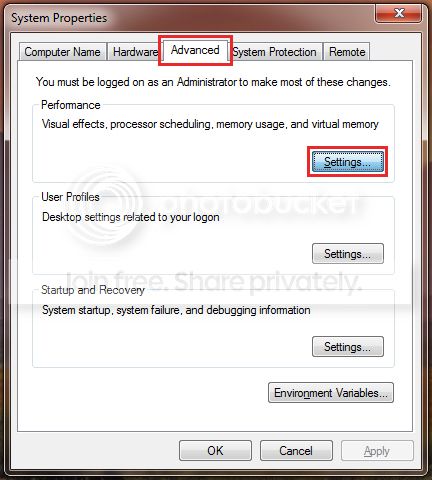
and press the Enter key.
A windows will open and on the Left hand side you will see Advanced system settings, click it.


2.
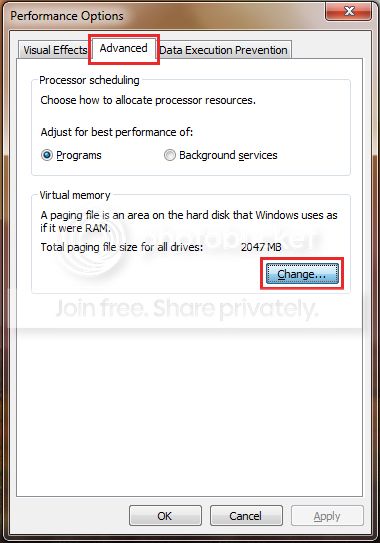
Next click on the Advanced tab and Settings which correspond to the Performance section;


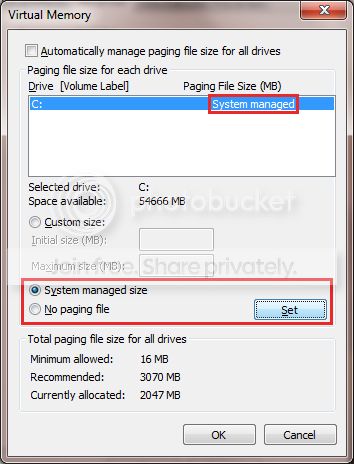
3. Then the Advanced tab once more and click on the Change button;


4. Untick the checkbox next to Automatically manage paging file size for all drives;

Select No paging file and Click on the Set button;


5. Confirm all the windows.

6.
Restart the PC.

7. Reverse the procedure, by following steps 1-3, only this time select System managed size
and click the Set button;


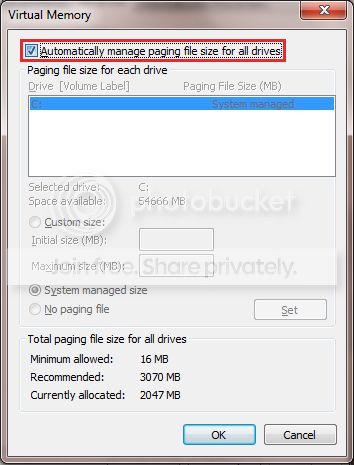
8. Recheck the box next to Automatically manage paging file size for all drives
and exit the windows by clicking the OK button;


9. Confirm all of the remaining windows by click the OK button
and restart the PC once again to take affect.
 

My Computer

Computer type
PC/Desktop
OS
Windows 10
CPU
Intel Core i5 3570K
Motherboard
Asus P8Z77V-PRO
Memory
16GB 1600Mhz G.Skill
Graphics Card(s)
Gigabyte GTX 970 G1-Gaming
PSU
Seasonic 1000W Platinum
Case
Fractal Design Define R4
Cooling
Noctua NH-D14
uninstalled Nortons

I have uninstalled the nortons product and have installed Microsoft Essential security.

I will do your other requests today.

Hjalmer
 

My Computer

Computer type
PC/Desktop
Computer Manufacturer/Model Number
custom
OS
Windows 7 Home Premium 64 bit
CPU
intel I7 4770K 3.50 GHZ
Motherboard
ASUS Sabertooth Z87 Tuff
Memory
Patriot DDR 3 2.4 = 8 GB
Graphics Card(s)
Nvidia Geforce 660 GTX
Sound Card
onboard Realtek
Monitor(s) Displays
Samsung Syncmaster S23B550
Screen Resolution
1920x 1080
Hard Drives
Western Digital SATA 2 TB internal Drive
PSU
Corsair Professional Series Gold
Antivirus
microsoft security essentials
Browser
Microsoft Explorer
I have gone through the process of changing the page flip in advanced settings. Do you see any other issues with the BSOD files? Thanks for the reply.
 

My Computer

Computer type
PC/Desktop
Computer Manufacturer/Model Number
custom
OS
Windows 7 Home Premium 64 bit
CPU
intel I7 4770K 3.50 GHZ
Motherboard
ASUS Sabertooth Z87 Tuff
Memory
Patriot DDR 3 2.4 = 8 GB
Graphics Card(s)
Nvidia Geforce 660 GTX
Sound Card
onboard Realtek
Monitor(s) Displays
Samsung Syncmaster S23B550
Screen Resolution
1920x 1080
Hard Drives
Western Digital SATA 2 TB internal Drive
PSU
Corsair Professional Series Gold
Antivirus
microsoft security essentials
Browser
Microsoft Explorer
Not at moment :) .
Leave the thread open for a couple of days if no new issues arise mark as solved, otherwise, we are here.
 

My Computer

Computer type
PC/Desktop
OS
Windows 10
CPU
Intel Core i5 3570K
Motherboard
Asus P8Z77V-PRO
Memory
16GB 1600Mhz G.Skill
Graphics Card(s)
Gigabyte GTX 970 G1-Gaming
PSU
Seasonic 1000W Platinum
Case
Fractal Design Define R4
Cooling
Noctua NH-D14
Back
Top