Solved "New" CPU installed Win 7 Boots then Comp shuts down

Thorstein

New member
Local time
3:10 AM
Messages
3
Hello all,

I recently bought a new CPU for my computer (I broke the old one because I tried to replace my old heat sink with a new one and the sink had created a vacuum and pulled the old CPU from the MOBO without it unlocking.

So, I can boot everything up. The "new" CPU is an AMD Athlon 64 X2 4800+. The old was similar but slower, no other major difference. I can boot BIOS, I can boot Win7. But then, the comp shuts down and reboots Win7. Sometimes the BIOS shuts down. I watched the CPU Temp for awhile and it reached nigh on 88C. I thought the comp was shutting down to protect that, but it was really rebooting.

Then I got a blue message screen but it reboots too fast too get too much info off of it. However, I got the idea that it realized that the "new" hardware is the problem.

So..... how do I get Win 7 to "recognize" the new CPU...(the BIOS recognizes it no prob.)?

Thank you,
Thor
 

My Computer My Computer

Computer Manufacturer/Model Number
IBUYPOWER
OS
7 Home Premium
CPU
AMD ATHLON 64 X2 4800+
Motherboard
MSI K9 Socket AM2
Memory
Corsaire 2G
Hello Thorstein. Welcome to the Forum.

A few ideas:

Can you be sure you did not damage the CPU socket or the retaining mechanism?

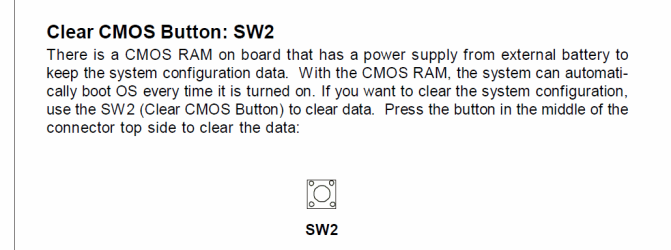
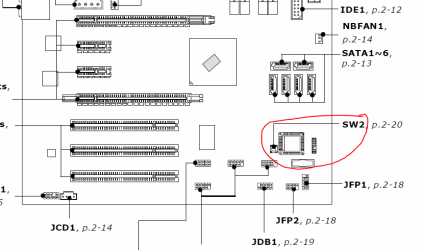
Regardless of that, anytime you change a processor you should always perform a Clear CMOS, or CLR-RTC to refresh the BIOS. On a K9N-Platinum board that is done using the SW2 button (see below).

You could change the setting to automatically reboot upon a Blue Screen event: Start > Control Panel > System > Advanced System Settings > Startup & Recovery > And under "System Failure", uncheck "Automatically Restart". Then you can read the error code.

You can also zip-up, attach, and post the minidump file in the Crashes and Debugging Forum. But I think the cause could be pretty obvious.
 

Attachments

  • Post 1.PNG
    Post 1.PNG
    17.3 KB · Views: 9
  • Post 2.PNG
    Post 2.PNG
    14.6 KB · Views: 20

My Computer My Computer

Computer type
PC/Desktop
Computer Manufacturer/Model Number
Home Built - Jan 2013
OS
Windows 7 64 Bit Home Premium SP1
CPU
i7-3820
Motherboard
Asus P9X79-PRO - Bios 4608
Memory
GSkill F3-14900CL9Q - 16GB
Graphics Card(s)
EVGA GeForce GTX660 - Driver 352.86
Sound Card
On board Realtek ALC898
Monitor(s) Displays
Acer S271HL
Screen Resolution
1920 x 1080
Hard Drives
#1- Samsung 840 Pro Series
#2- Western Digital WD1002FAEX Sata3 Black
#3- Western Digital WD1002FAEX Sata3 Black
PSU
Corsair CMPSU-850TX-V2 - 850 watt (by Seasonic)
Case
Corsair Obsidian 550D
Cooling
Standard 3 120mm case fans, Cooler Master Hyper 212 EVO
Keyboard
MS KC-0405
Mouse
Intellimouse 5-button
Internet Speed
56 Mbits/Sec (on a good day)
Antivirus
Avast & Malwarebytes
Browser
Firefox
Other Info
Asus DVD - DRW-24B1ST 24X
Did you buy only the CPU and then use the old heatsink+fan ? In that case, did you clean the heatsink and remove the old paste? Did you apply a fresh coat of thermal compound before fixing the heat sink?

Improper heatsinking can cause overheating of the CPU which will shutdown to protect itself.

This could be one probable cause of your probem.

Once you make sure this part is OK, go ahead with the expert advice by TVeblen.
 
Last edited:

My Computer My Computer

OS
Windows 7 Home Premium 32 bit
@Jumanji
New CPU, New Heatsink/ Fan, new Thermal Compound...

It was running at @ 88C. I need to check if that is too high.

I will also follow TVeblen's advice.

I appreciate your responses and try to reply if it works.
 

My Computer My Computer

Computer Manufacturer/Model Number
IBUYPOWER
OS
7 Home Premium
CPU
AMD ATHLON 64 X2 4800+
Motherboard
MSI K9 Socket AM2
Memory
Corsaire 2G
That is WAY too high. You definitely need to remove the HSF, check the compound and also make sure the HSF is seated properly.
 

My Computer My Computer

OS
Windows 7 Ultimate x64 SP1
CPU
Intel Core i7-2600
Motherboard
Gigabyte GA-P67A-UD3P-B3
Memory
12 GB Patriot Extreme DDR3-1333
Graphics Card(s)
Nvidia GTX 470
Monitor(s) Displays
Dell UltraSharp 2209WA
Hard Drives
OCZ Agility3 240 GB, WD5001AALS, WD7501AALS
PSU
OCZ ModStream 700W
Case
CoolerMaster HAF 912 Advanced
Cooling
CoolerMaster Hyper 212 Plus
Just a thought...is the heat sink cable attached to mobo and in the correct position. To make sure fan is running.
 

My Computer My Computer

Computer Manufacturer/Model Number
Custom built
OS
Windows 7 Ultimate 64 bit
CPU
AMD Phenom II X4 965 Black Edition
Motherboard
Gigabyte GA-MA790X-DS4
Memory
GSkill 4 X 2 GB PC 8500
Graphics Card(s)
XFX Radeon HD 6790 D
Sound Card
On board RealTek HD
Monitor(s) Displays
Dual monitors:Samsung SyncMaster S20B300
Screen Resolution
1600 X 900
Hard Drives
Seagate Barracuda 1TB (primary)
Seagate Barracuda 2 X 320 GB
PSU
Ultra X4 750 watt fully modular
Case
Thermaltake Overseer RX 1 full tower
Cooling
Core-Contact 92 mm CPU Cooler
Keyboard
Logitech G510
Mouse
Razor DeathAdder
Internet Speed
50/5 Mbps UL/DL
Other Info
Optical: Super Muliti DVD burner w/lightscribe, Hauppauge WinTV HVR-1800
If you are unsure of how to apply thermal paste, maybe this will help.


My Computers My Computers

System One System Two

  • Computer type
    PC/Desktop
    Computer Manufacturer/Model Number
    ALWAYS UNDER CONSTRUCTION
    OS
    Windows 11 Pro
    CPU
    Ryzen 9 5900X
    Motherboard
    Asus X570 Crosshair Viii Hero
    Memory
    32GB G Skill DDR4-3600
    Graphics Card(s)
    EVGA RTX 3080 FTW 3 Ultra
    Sound Card
    On Board/Sennheiser PC37X Headset
    Monitor(s) Displays
    3 X Asus 27"
    Screen Resolution
    2560x1440
    Hard Drives
    2 X 1 TB NVME drives
    PSU
    EVGA 850
    Case
    Phanteks Eclipse P400A
    Cooling
    EVGA 280 AIO
    Keyboard
    Logitech G510s/ Logitech G13
    Mouse
    Logitech G502
    Internet Speed
    24/1
    Antivirus
    ESET/MBAM Pro/SAS Pro
    Browser
    Chrome/ Firefox/ Edge
  • Computer type
    Laptop
    System Manufacturer/Model Number
    Dell 16 Plus
    OS
    Windows 11 Pro
    CPU
    Intel Ultra 9 288V
    Memory
    32 GB LPDDR5X 8533
    Monitor(s) Displays
    16" Mini-LED HDR600 Touch 90 Hz
    Screen Resolution
    2560X1600
    Hard Drives
    1 TB NVME
Thanks to all of you.

It was simple: Too much thermal paste and the heat sink not situated properly.

Runs perfect now.

I really appreciate the help!

Thor
 

My Computer My Computer

Computer Manufacturer/Model Number
IBUYPOWER
OS
7 Home Premium
CPU
AMD ATHLON 64 X2 4800+
Motherboard
MSI K9 Socket AM2
Memory
Corsaire 2G
Good work :party: !
 

My Computer My Computer

Computer type
PC/Desktop
Computer Manufacturer/Model Number
Home Built - Jan 2013
OS
Windows 7 64 Bit Home Premium SP1
CPU
i7-3820
Motherboard
Asus P9X79-PRO - Bios 4608
Memory
GSkill F3-14900CL9Q - 16GB
Graphics Card(s)
EVGA GeForce GTX660 - Driver 352.86
Sound Card
On board Realtek ALC898
Monitor(s) Displays
Acer S271HL
Screen Resolution
1920 x 1080
Hard Drives
#1- Samsung 840 Pro Series
#2- Western Digital WD1002FAEX Sata3 Black
#3- Western Digital WD1002FAEX Sata3 Black
PSU
Corsair CMPSU-850TX-V2 - 850 watt (by Seasonic)
Case
Corsair Obsidian 550D
Cooling
Standard 3 120mm case fans, Cooler Master Hyper 212 EVO
Keyboard
MS KC-0405
Mouse
Intellimouse 5-button
Internet Speed
56 Mbits/Sec (on a good day)
Antivirus
Avast & Malwarebytes
Browser
Firefox
Other Info
Asus DVD - DRW-24B1ST 24X
Good work. I'm glad you have it fixed.
 

My Computers My Computers

System One System Two

  • Computer type
    PC/Desktop
    Computer Manufacturer/Model Number
    ALWAYS UNDER CONSTRUCTION
    OS
    Windows 11 Pro
    CPU
    Ryzen 9 5900X
    Motherboard
    Asus X570 Crosshair Viii Hero
    Memory
    32GB G Skill DDR4-3600
    Graphics Card(s)
    EVGA RTX 3080 FTW 3 Ultra
    Sound Card
    On Board/Sennheiser PC37X Headset
    Monitor(s) Displays
    3 X Asus 27"
    Screen Resolution
    2560x1440
    Hard Drives
    2 X 1 TB NVME drives
    PSU
    EVGA 850
    Case
    Phanteks Eclipse P400A
    Cooling
    EVGA 280 AIO
    Keyboard
    Logitech G510s/ Logitech G13
    Mouse
    Logitech G502
    Internet Speed
    24/1
    Antivirus
    ESET/MBAM Pro/SAS Pro
    Browser
    Chrome/ Firefox/ Edge
  • Computer type
    Laptop
    System Manufacturer/Model Number
    Dell 16 Plus
    OS
    Windows 11 Pro
    CPU
    Intel Ultra 9 288V
    Memory
    32 GB LPDDR5X 8533
    Monitor(s) Displays
    16" Mini-LED HDR600 Touch 90 Hz
    Screen Resolution
    2560X1600
    Hard Drives
    1 TB NVME
If you are unsure of how to apply thermal paste, maybe this will help.

I have used that Articlean. It softens and allows removal of even very old and hardened thermal goop.
 

My Computer My Computer

Computer type
PC/Desktop
Computer Manufacturer/Model Number
Home Built Desktop By DataTech
OS
Windows 7 Ultimate X64 SP1
CPU
Intel i5-2550K, Differing ~4.4-4.8GHz No built in GPU
Motherboard
ASUS P8Z68-V PRO/GEN3
Memory
16GB G.Skill Sniper 1866MHz @ 2133MHz 2x8GB
Graphics Card(s)
ASUS GTX650TIB-DC2OC-2GD5, (650TI Boost)
Sound Card
Onboard Realtek 5-1
Monitor(s) Displays
Samsung P2570HD
Screen Resolution
1920x1080
Hard Drives
Samsung 840 Pro 256GB SSD for OS, 500GB Seagate Constellation (Enterprise drive) for Data
PSU
Corsair HX650W
Case
Inwin Dragon Rider
Cooling
Hyper 212 EVO w/two Noctua fans, push-pull, @1300 RPM
Keyboard
E-Z Eyes, bright yellow keys with large characters
Mouse
steelseries SENSEI Laser Pro Gaming
Internet Speed
48-51Mbs Mbs down, 11 Mbs up Xfinity Cable
Antivirus
Norton Internet Security 2013
Browser
IE 10, Opera, Pale Moon if needed
Other Info
4 case fans, LG BluRay-RE, ASUS DVD-RW, Mr. Fusion power supply, 1.21 gigawatts.
Back
Top