New Cpu (PhII965BE) in HP OEM help!

Rhammstein

Banned
Local time
12:12 PM
Messages
275
New Cpu (PhII965BE) in HP >>UPDATE<<

UPDATED ON PAGE 2

I just put a new Cpu in my HP rig, and it's running very hot. I'll try to be brief. (Specs in sig)

HP HPE-112y with 850W Psu & Radeon 4890.

I just replaced the factory Ph II 925 2.8 with a Ph II 965BE 3.4. Right away the mainboard hit 72*C, so I installed my Antec 120mm 2,000rpm fan (which I intended to do once I finished and knew the setup would work) and temps fell to normal, idle about 41*c/105*f. It warms up quite a bit, but no hotter than it used to with the 925, so I'm sure this is fine.

Here's the thing; The Cpu is idling at 45*C @ 800mhz (It's warm in the room, but not bad, 75*F tops...not warm really heh..) it's hitting 66*C, but in only a 5 minute stress test, I fear testing any longer, AMD says 62*C max, I'm sure it can go higher, but I don't want to risk anything, for now.
How hot is too hot? Also, important, the thermal paste that came with it, which was pre-dabbed onto the bottom of the heat sync, take time to set?

I'm not used to heat like this, my other rig is just so very different, can't compare them, also, this is the very first time I've ever put an enthusiast chip on a OEM board. So yeah, Cpu is too hot(Using the HSF it came with from AMD) motherboard cooled off incredibly with the new fan.
Oh lastly, my Ram, PC3-10700, 667mhz, was always at 533mhz before, 7-7-7, now it's 667mhz, and 9-9-9, perhaps this is normal. I just don't fool around this much with hardware... uhg.. I can't adjust anything in the bios!

Please help me, and sorry for the length guys, I'm so stressed..
 
Last edited:

My Computer My Computer

At a glance

HP Win7 Pro x64 | Custom Win7 Pro x64HP PhII X4 965 Black Ed. 3.4Ghz | PhII X6 110...8GB DDR3 1333 OC Black Edition x2HP XFX Radeon HD4890 1GB | AMD Radeon HD 6990
Computer Manufacturer/Model Number
HPE-112y Custom + Custom Build
OS
HP Win7 Pro x64 | Custom Win7 Pro x64
CPU
HP PhII X4 965 Black Ed. 3.4Ghz | PhII X6 1100T 3.3/3.7
Motherboard
OEM HP | ASUS Crosshair IV Extreme 890FX
Memory
8GB DDR3 1333 OC Black Edition x2
Graphics Card(s)
HP XFX Radeon HD4890 1GB | AMD Radeon HD 6990
Sound Card
Realtek 7.1 Digital HDMI x2
Monitor(s) Displays
HP 20" 1680x1050 LCD | Samsung 23" 2ms 1920x1200 LED
Screen Resolution
1680x1050 + 1920x1200 & HDTV for Gaming/TV
Hard Drives
1TB WD "Green" 5,400 RPM SCSI W/ AMD RAID/Xpert
Custom 2x 128GB OCZ Enyo SSD
PSU
Thermaltake Black Widow 850watt Modular x2
Case
HP HPE- 112y OEM Modded | Custom Xclio A380S
Cooling
HP Antec120mm | Custom Antec 360mm/250mm/200mm/120mm
Keyboard
HP G15 | G19
Mouse
G500 x2
Internet Speed
15mb down, 2mb up
Other Info
2x DVD-RAM | 2x BD-ROM
  • Get some good thermal paste
  • Install an extra case fan
  • Disable energy features that automate your current fan
  • Organize your cables
 

My Computer My Computer

At a glance

Systems 1 and 2: Windows 7 Enterprise x64, Wi...System 1: i7 [email protected], System 2: AMD FX-41...System 1: 8GB System 2: 8GBSystem 1: ATI FirePro V4800 System 2: Radeon ...
Computer Manufacturer/Model Number
Dell and Custom
OS
Systems 1 and 2: Windows 7 Enterprise x64, Win 8 Developer
CPU
System 1: i7 [email protected], System 2: AMD FX-4100 Zambezi 3.6G
Motherboard
System 1:Dell 06NWYK System 2: ASUS M5A97 AM3+
Memory
System 1: 8GB System 2: 8GB
Graphics Card(s)
System 1: ATI FirePro V4800 System 2: Radeon HD 6850
Sound Card
System 1: onboard System 2: onboard
Monitor(s) Displays
System1: Viewsonic HDMI 24"
Screen Resolution
System 1: 1920x1080 System 2: 1920x1080
Hard Drives
System 1: Mirrored .5B drives System 2: Seagate Barracuda ST1000DM003 1TB 7200 RPM 64MB Cache SATA 6.0Gb/s
Case
System 1: Dell System 2: Cooler Master
Internet Speed
10 MBPS
Cables are very neat, using a modular Psu. I have the extra fan in, but I'm curious; I've never tried having a fan blow "in" the case, the reason I'm curious, is the fan just happens to rest directly above the Cpu HSF and NB/chipset, is this worth trying? Because I already have a 92mm exhaust fan, pulling air straight from this area.

I will buy some thermal paste, as for the software controlling the fan, I'll have a look. I've never had an issue leaving it alone, but it really seems to not want to spin up over 3,000rpm, I'm assuming it's capable of 6k or so.

Edit: Also, I just stress tested it, and it gets up to 68*C, and then backs off to around 65*C, and stays there, however the fan certainly isn't running it's highest, I think this may be the software controlling the fan. I'm going to install AMD Overdrive and create a profile.

Should I try reversing the 120mm 2k fan? It's on high, @ 2k.
 

My Computer My Computer

At a glance

HP Win7 Pro x64 | Custom Win7 Pro x64HP PhII X4 965 Black Ed. 3.4Ghz | PhII X6 110...8GB DDR3 1333 OC Black Edition x2HP XFX Radeon HD4890 1GB | AMD Radeon HD 6990
Computer Manufacturer/Model Number
HPE-112y Custom + Custom Build
OS
HP Win7 Pro x64 | Custom Win7 Pro x64
CPU
HP PhII X4 965 Black Ed. 3.4Ghz | PhII X6 1100T 3.3/3.7
Motherboard
OEM HP | ASUS Crosshair IV Extreme 890FX
Memory
8GB DDR3 1333 OC Black Edition x2
Graphics Card(s)
HP XFX Radeon HD4890 1GB | AMD Radeon HD 6990
Sound Card
Realtek 7.1 Digital HDMI x2
Monitor(s) Displays
HP 20" 1680x1050 LCD | Samsung 23" 2ms 1920x1200 LED
Screen Resolution
1680x1050 + 1920x1200 & HDTV for Gaming/TV
Hard Drives
1TB WD "Green" 5,400 RPM SCSI W/ AMD RAID/Xpert
Custom 2x 128GB OCZ Enyo SSD
PSU
Thermaltake Black Widow 850watt Modular x2
Case
HP HPE- 112y OEM Modded | Custom Xclio A380S
Cooling
HP Antec120mm | Custom Antec 360mm/250mm/200mm/120mm
Keyboard
HP G15 | G19
Mouse
G500 x2
Internet Speed
15mb down, 2mb up
Other Info
2x DVD-RAM | 2x BD-ROM
If that HP case looks anything like this,

http://reviews.cnet.com/sc/33968315-2-440-OVI-4.jpg

best I can say is to get a decent sized case with good airflow. You have to remember you just went from a 95W CPU to a 125W CPU, so there is going to be extra heat. Also if it is that case with a 4890 in there, there is even less airflow getting through.
 

My Computer My Computer

At a glance

Win 7 Ultimate x64FX-8350 @ 4.6 GHz so farADATA XPG V1 Series Black 8GB DDR3 1600Sapphire R9 270x Dual-X
Computer type
PC/Desktop
Computer Manufacturer/Model Number
Me
OS
Win 7 Ultimate x64
CPU
FX-8350 @ 4.6 GHz so far
Motherboard
Asus M5A97 EVO
Memory
ADATA XPG V1 Series Black 8GB DDR3 1600
Graphics Card(s)
Sapphire R9 270x Dual-X
Sound Card
Xonar DGX w/ Corsair Vengence 1300
Monitor(s) Displays
Acer S232HL Abid
Screen Resolution
1920x1080
Hard Drives
120 GB OCZ Vertex 3
500 GB Seagate 7200.12
PSU
Antec Earthwatts 650W Green
Case
Antec Three Hundred
Cooling
Cooler Master 212 EVO
Keyboard
Logitech G510
Mouse
Logitech G500s
Internet Speed
35000/3000
That is my identical case, imagine the 4890, and a huge Antec 120mm right on top of the HSF and NB heat sync.

For now I don't mind it hitting 68, however idling at 44 or so bothers me.

One other thing, this I'm very curious about but didn't want to load the earlier posts with even more text; My old Cpu, and this new one, both, run at 2.16V, is this normal, it reads this in every program I can think of. Is this the board just being a bit.. different? CPUID HWMonitor, CPUID PC Wizard, AMD Overdrive, etc etc, all report it this way.

I simply never mess with this type of stuff, I understand many things, but not this heat, and certainly why it says 2.16
 

Attachments

  • Clipboard01.jpg
    Clipboard01.jpg
    179.5 KB · Views: 21

My Computer My Computer

At a glance

HP Win7 Pro x64 | Custom Win7 Pro x64HP PhII X4 965 Black Ed. 3.4Ghz | PhII X6 110...8GB DDR3 1333 OC Black Edition x2HP XFX Radeon HD4890 1GB | AMD Radeon HD 6990
Computer Manufacturer/Model Number
HPE-112y Custom + Custom Build
OS
HP Win7 Pro x64 | Custom Win7 Pro x64
CPU
HP PhII X4 965 Black Ed. 3.4Ghz | PhII X6 1100T 3.3/3.7
Motherboard
OEM HP | ASUS Crosshair IV Extreme 890FX
Memory
8GB DDR3 1333 OC Black Edition x2
Graphics Card(s)
HP XFX Radeon HD4890 1GB | AMD Radeon HD 6990
Sound Card
Realtek 7.1 Digital HDMI x2
Monitor(s) Displays
HP 20" 1680x1050 LCD | Samsung 23" 2ms 1920x1200 LED
Screen Resolution
1680x1050 + 1920x1200 & HDTV for Gaming/TV
Hard Drives
1TB WD "Green" 5,400 RPM SCSI W/ AMD RAID/Xpert
Custom 2x 128GB OCZ Enyo SSD
PSU
Thermaltake Black Widow 850watt Modular x2
Case
HP HPE- 112y OEM Modded | Custom Xclio A380S
Cooling
HP Antec120mm | Custom Antec 360mm/250mm/200mm/120mm
Keyboard
HP G15 | G19
Mouse
G500 x2
Internet Speed
15mb down, 2mb up
Other Info
2x DVD-RAM | 2x BD-ROM
you could have a front fan blowing in and a back fan blowing out. Similar is the PSU fan blowing out the back. And see if your bios is regulating your fan. My Asus has the software option of controlling the fan. Forget that...
 

My Computer My Computer

At a glance

Systems 1 and 2: Windows 7 Enterprise x64, Wi...System 1: i7 [email protected], System 2: AMD FX-41...System 1: 8GB System 2: 8GBSystem 1: ATI FirePro V4800 System 2: Radeon ...
Computer Manufacturer/Model Number
Dell and Custom
OS
Systems 1 and 2: Windows 7 Enterprise x64, Win 8 Developer
CPU
System 1: i7 [email protected], System 2: AMD FX-4100 Zambezi 3.6G
Motherboard
System 1:Dell 06NWYK System 2: ASUS M5A97 AM3+
Memory
System 1: 8GB System 2: 8GB
Graphics Card(s)
System 1: ATI FirePro V4800 System 2: Radeon HD 6850
Sound Card
System 1: onboard System 2: onboard
Monitor(s) Displays
System1: Viewsonic HDMI 24"
Screen Resolution
System 1: 1920x1080 System 2: 1920x1080
Hard Drives
System 1: Mirrored .5B drives System 2: Seagate Barracuda ST1000DM003 1TB 7200 RPM 64MB Cache SATA 6.0Gb/s
Case
System 1: Dell System 2: Cooler Master
Internet Speed
10 MBPS
I've narrowed it down, there's simply no doubt in my mind, that my motherboard is keeping the Fan spinning at far too low RPM. There's no option in the BIOS to change this..uhg. I'm gonna try Overdrive, not used to it, can't find the option yet, otherwise SpeedFan I guess.

Judging by the speed my Cpu fan is capable of (Same fan everyone with a stock 955be/965be has) 1200rpm idle and 3k load is simply uncacceptable.

Perhaps the reason I cannot find a fan speed option in Overdrive is because my BIOS doesn't allow me to change it?

(I should have bought a second Asus board...I know :) )
 

My Computer My Computer

At a glance

HP Win7 Pro x64 | Custom Win7 Pro x64HP PhII X4 965 Black Ed. 3.4Ghz | PhII X6 110...8GB DDR3 1333 OC Black Edition x2HP XFX Radeon HD4890 1GB | AMD Radeon HD 6990
Computer Manufacturer/Model Number
HPE-112y Custom + Custom Build
OS
HP Win7 Pro x64 | Custom Win7 Pro x64
CPU
HP PhII X4 965 Black Ed. 3.4Ghz | PhII X6 1100T 3.3/3.7
Motherboard
OEM HP | ASUS Crosshair IV Extreme 890FX
Memory
8GB DDR3 1333 OC Black Edition x2
Graphics Card(s)
HP XFX Radeon HD4890 1GB | AMD Radeon HD 6990
Sound Card
Realtek 7.1 Digital HDMI x2
Monitor(s) Displays
HP 20" 1680x1050 LCD | Samsung 23" 2ms 1920x1200 LED
Screen Resolution
1680x1050 + 1920x1200 & HDTV for Gaming/TV
Hard Drives
1TB WD "Green" 5,400 RPM SCSI W/ AMD RAID/Xpert
Custom 2x 128GB OCZ Enyo SSD
PSU
Thermaltake Black Widow 850watt Modular x2
Case
HP HPE- 112y OEM Modded | Custom Xclio A380S
Cooling
HP Antec120mm | Custom Antec 360mm/250mm/200mm/120mm
Keyboard
HP G15 | G19
Mouse
G500 x2
Internet Speed
15mb down, 2mb up
Other Info
2x DVD-RAM | 2x BD-ROM

My Computer My Computer

At a glance

Systems 1 and 2: Windows 7 Enterprise x64, Wi...System 1: i7 [email protected], System 2: AMD FX-41...System 1: 8GB System 2: 8GBSystem 1: ATI FirePro V4800 System 2: Radeon ...
Computer Manufacturer/Model Number
Dell and Custom
OS
Systems 1 and 2: Windows 7 Enterprise x64, Win 8 Developer
CPU
System 1: i7 [email protected], System 2: AMD FX-4100 Zambezi 3.6G
Motherboard
System 1:Dell 06NWYK System 2: ASUS M5A97 AM3+
Memory
System 1: 8GB System 2: 8GB
Graphics Card(s)
System 1: ATI FirePro V4800 System 2: Radeon HD 6850
Sound Card
System 1: onboard System 2: onboard
Monitor(s) Displays
System1: Viewsonic HDMI 24"
Screen Resolution
System 1: 1920x1080 System 2: 1920x1080
Hard Drives
System 1: Mirrored .5B drives System 2: Seagate Barracuda ST1000DM003 1TB 7200 RPM 64MB Cache SATA 6.0Gb/s
Case
System 1: Dell System 2: Cooler Master
Internet Speed
10 MBPS
I have a piece of crap HP desktop in my lab at work, and it does have a speed control. You can enable Cool and Quiet in the BIOS (Still need the drivers), and there is another setting for the chassis fan. The CPU fan is under the CPU Config tab, I think, and the chassis fan is in the hardware monitor.

Have you seen either of these options in your BIOS?

And I would turn that fan around so it blows in, if you haven't done that already.

Edit: My Phenom 965 desk PC at work has the fan running at 3300 RPM with the stock cooler. Average idle is 33 to 35 with a room temp of 22 to 25C if that helps any...
 

My Computer My Computer

At a glance

Win 7 Pro x64/Win 10 Pro x64 dual bootAMD FX 8350 Vishera @ 420016 GB Mushkin Blackline DDR3-2400 @ 1866 (9-1...XFX Radeon R9 280 Double D Black Edition
Computer type
PC/Desktop
Computer Manufacturer/Model Number
Mellon Labs (custom build)
OS
Win 7 Pro x64/Win 10 Pro x64 dual boot
CPU
AMD FX 8350 Vishera @ 4200
Motherboard
ASUS M5A97 R2.0
Memory
16 GB Mushkin Blackline DDR3-2400 @ 1866 (9-10-10-10-31)
Graphics Card(s)
XFX Radeon R9 280 Double D Black Edition
Sound Card
Realtek HD Audio on MB. Sounds great.
Monitor(s) Displays
Acer 24", Acer 22"
Screen Resolution
3840 x 1080
Hard Drives
1 x Mushkin Chronos 120 GB SSD (Win 10)
1 x Samsung 850 EVO 250 GB SSD (Win 7)
1 x WD 1TB SATA Blue
1 x WD 1TB SATA Green
PSU
Corsair TX-750
Case
CoolerMaster HAF 912+
Cooling
Coolermaster Seidon 240M Liquid AIO. 6 case fans
Keyboard
Logitech G710+
Mouse
Logitech G500s
Internet Speed
Much better since I got fiber, but still way overpriced.
Antivirus
MSE, Malware Bytes for scanning
Browser
Firefox
Other Info
Corsair VOID USB headphones.

A Mellon Labs X-1 - LCD Smartie driven system status display.

Brought to you by the letter E
Fan is now blowing in, also I have absolutely no options for Fans in my BIOS. Speedfan and Overdrive won't allow me to adjust. The rpm's are just too low, when it heats up under stress, and the fan begins to speed up, it kills off the heat mighty fast, this will be incredibly frustrating if I can't figure out how to adjust it.

Also I don't even see anything about Cool & Quiet in the BIOS.

Edit: I think I'm gonna have to live with the idle temps, until I get a new board, xmas maybe I'll grab one for myself. I've gone over everything I can imagine; If anyone thinks of anything, I'd be glad to hear it!
Otherwise I'll keep an eye that it doesn't run past 65*C or so, for now, and throw some good thermal paste on it tomorrow. I have a feeling I could lose several degrees doing this, since AMD puts a very thin amount.
 

My Computer My Computer

At a glance

HP Win7 Pro x64 | Custom Win7 Pro x64HP PhII X4 965 Black Ed. 3.4Ghz | PhII X6 110...8GB DDR3 1333 OC Black Edition x2HP XFX Radeon HD4890 1GB | AMD Radeon HD 6990
Computer Manufacturer/Model Number
HPE-112y Custom + Custom Build
OS
HP Win7 Pro x64 | Custom Win7 Pro x64
CPU
HP PhII X4 965 Black Ed. 3.4Ghz | PhII X6 1100T 3.3/3.7
Motherboard
OEM HP | ASUS Crosshair IV Extreme 890FX
Memory
8GB DDR3 1333 OC Black Edition x2
Graphics Card(s)
HP XFX Radeon HD4890 1GB | AMD Radeon HD 6990
Sound Card
Realtek 7.1 Digital HDMI x2
Monitor(s) Displays
HP 20" 1680x1050 LCD | Samsung 23" 2ms 1920x1200 LED
Screen Resolution
1680x1050 + 1920x1200 & HDTV for Gaming/TV
Hard Drives
1TB WD "Green" 5,400 RPM SCSI W/ AMD RAID/Xpert
Custom 2x 128GB OCZ Enyo SSD
PSU
Thermaltake Black Widow 850watt Modular x2
Case
HP HPE- 112y OEM Modded | Custom Xclio A380S
Cooling
HP Antec120mm | Custom Antec 360mm/250mm/200mm/120mm
Keyboard
HP G15 | G19
Mouse
G500 x2
Internet Speed
15mb down, 2mb up
Other Info
2x DVD-RAM | 2x BD-ROM
Wow. That BIOS must be locked up tight. I'm not sure if you'll be able to adjust the fan. Have you tried the power plan settings in Windows? You could try changing the system cooling policy. That might help.
 

My Computer My Computer

At a glance

Win 7 Pro x64/Win 10 Pro x64 dual bootAMD FX 8350 Vishera @ 420016 GB Mushkin Blackline DDR3-2400 @ 1866 (9-1...XFX Radeon R9 280 Double D Black Edition
Computer type
PC/Desktop
Computer Manufacturer/Model Number
Mellon Labs (custom build)
OS
Win 7 Pro x64/Win 10 Pro x64 dual boot
CPU
AMD FX 8350 Vishera @ 4200
Motherboard
ASUS M5A97 R2.0
Memory
16 GB Mushkin Blackline DDR3-2400 @ 1866 (9-10-10-10-31)
Graphics Card(s)
XFX Radeon R9 280 Double D Black Edition
Sound Card
Realtek HD Audio on MB. Sounds great.
Monitor(s) Displays
Acer 24", Acer 22"
Screen Resolution
3840 x 1080
Hard Drives
1 x Mushkin Chronos 120 GB SSD (Win 10)
1 x Samsung 850 EVO 250 GB SSD (Win 7)
1 x WD 1TB SATA Blue
1 x WD 1TB SATA Green
PSU
Corsair TX-750
Case
CoolerMaster HAF 912+
Cooling
Coolermaster Seidon 240M Liquid AIO. 6 case fans
Keyboard
Logitech G710+
Mouse
Logitech G500s
Internet Speed
Much better since I got fiber, but still way overpriced.
Antivirus
MSE, Malware Bytes for scanning
Browser
Firefox
Other Info
Corsair VOID USB headphones.

A Mellon Labs X-1 - LCD Smartie driven system status display.

Brought to you by the letter E
Nice to see HP can bugger up an AMD based board's bios just as well as an Intel based one.

With regards to that vcore reading, if that was correct the CPU would have fried itself regardless of what the fan was doing. Not only is the vcore wrong but there are 2 other readings the same. Also if the 12V reading at 8.64V was right, the computer wouldn't even start. Looks like they managed to bugger up most of those readings with their hacked up bios.

As far as not being able to see Cool and Quiet in the bios, probably find that HP in their infinite stupidity have left it enabled (which is the default) and hidden it.
 

My Computer My Computer

At a glance

Win 7 Ultimate x64FX-8350 @ 4.6 GHz so farADATA XPG V1 Series Black 8GB DDR3 1600Sapphire R9 270x Dual-X
Computer type
PC/Desktop
Computer Manufacturer/Model Number
Me
OS
Win 7 Ultimate x64
CPU
FX-8350 @ 4.6 GHz so far
Motherboard
Asus M5A97 EVO
Memory
ADATA XPG V1 Series Black 8GB DDR3 1600
Graphics Card(s)
Sapphire R9 270x Dual-X
Sound Card
Xonar DGX w/ Corsair Vengence 1300
Monitor(s) Displays
Acer S232HL Abid
Screen Resolution
1920x1080
Hard Drives
120 GB OCZ Vertex 3
500 GB Seagate 7200.12
PSU
Antec Earthwatts 650W Green
Case
Antec Three Hundred
Cooling
Cooler Master 212 EVO
Keyboard
Logitech G510
Mouse
Logitech G500s
Internet Speed
35000/3000
Nice to see HP can bugger up an AMD based board's bios just as well as an Intel based one.

With regards to that vcore reading, if that was correct the CPU would have fried itself regardless of what the fan was doing. Not only is the vcore wrong but there are 2 other readings the same. Also if the 12V reading at 8.64V was right, the computer wouldn't even start. Looks like they managed to bugger up most of those readings with their hacked up bios.

As far as not being able to see Cool and Quiet in the bios, probably find that HP in their infinite stupidity have left it enabled (which is the default) and hidden it.

100% correct :)

Well, ambient, mainboard and Gpu temps are all down a good 10-15% with the 120mm at 2k, otherwise everything is good. I'll keep a good eye on the load temps for now, and grab a HSF/MB asap, at least a month tho..

I'm happy with the performance, was 12,140 3DMark06, now 16,380, a solid 26%, was definitely worth it, especially for FSX, which is very important to me.

Thanks again guys.

Edit: Solved, well kind of.. It's fixed, but I'm not certain why.

So I go in to the advanced power options, and for the heck of it, set Processor Cooling from "Active" to "Passive", no changes, I then set it back, and noticed the system start behaving normally! I don't understand this at all, but I'm happy.

The fan rpm actually went down, and the temps, also went down, what in the world was wrong? :)

Perhaps making that change, fixed a bug, because it just.. seems like the system is finally responding properly to the new Cpu. Very strange, but fixed!
 
Last edited:

My Computer My Computer

At a glance

HP Win7 Pro x64 | Custom Win7 Pro x64HP PhII X4 965 Black Ed. 3.4Ghz | PhII X6 110...8GB DDR3 1333 OC Black Edition x2HP XFX Radeon HD4890 1GB | AMD Radeon HD 6990
Computer Manufacturer/Model Number
HPE-112y Custom + Custom Build
OS
HP Win7 Pro x64 | Custom Win7 Pro x64
CPU
HP PhII X4 965 Black Ed. 3.4Ghz | PhII X6 1100T 3.3/3.7
Motherboard
OEM HP | ASUS Crosshair IV Extreme 890FX
Memory
8GB DDR3 1333 OC Black Edition x2
Graphics Card(s)
HP XFX Radeon HD4890 1GB | AMD Radeon HD 6990
Sound Card
Realtek 7.1 Digital HDMI x2
Monitor(s) Displays
HP 20" 1680x1050 LCD | Samsung 23" 2ms 1920x1200 LED
Screen Resolution
1680x1050 + 1920x1200 & HDTV for Gaming/TV
Hard Drives
1TB WD "Green" 5,400 RPM SCSI W/ AMD RAID/Xpert
Custom 2x 128GB OCZ Enyo SSD
PSU
Thermaltake Black Widow 850watt Modular x2
Case
HP HPE- 112y OEM Modded | Custom Xclio A380S
Cooling
HP Antec120mm | Custom Antec 360mm/250mm/200mm/120mm
Keyboard
HP G15 | G19
Mouse
G500 x2
Internet Speed
15mb down, 2mb up
Other Info
2x DVD-RAM | 2x BD-ROM
Leave it to HP to get the cooling parameters backward. I'm surprised your power switch works. :p
 

My Computer My Computer

At a glance

Win 7 Pro x64/Win 10 Pro x64 dual bootAMD FX 8350 Vishera @ 420016 GB Mushkin Blackline DDR3-2400 @ 1866 (9-1...XFX Radeon R9 280 Double D Black Edition
Computer type
PC/Desktop
Computer Manufacturer/Model Number
Mellon Labs (custom build)
OS
Win 7 Pro x64/Win 10 Pro x64 dual boot
CPU
AMD FX 8350 Vishera @ 4200
Motherboard
ASUS M5A97 R2.0
Memory
16 GB Mushkin Blackline DDR3-2400 @ 1866 (9-10-10-10-31)
Graphics Card(s)
XFX Radeon R9 280 Double D Black Edition
Sound Card
Realtek HD Audio on MB. Sounds great.
Monitor(s) Displays
Acer 24", Acer 22"
Screen Resolution
3840 x 1080
Hard Drives
1 x Mushkin Chronos 120 GB SSD (Win 10)
1 x Samsung 850 EVO 250 GB SSD (Win 7)
1 x WD 1TB SATA Blue
1 x WD 1TB SATA Green
PSU
Corsair TX-750
Case
CoolerMaster HAF 912+
Cooling
Coolermaster Seidon 240M Liquid AIO. 6 case fans
Keyboard
Logitech G710+
Mouse
Logitech G500s
Internet Speed
Much better since I got fiber, but still way overpriced.
Antivirus
MSE, Malware Bytes for scanning
Browser
Firefox
Other Info
Corsair VOID USB headphones.

A Mellon Labs X-1 - LCD Smartie driven system status display.

Brought to you by the letter E
This is a pretty old thread, but I wanted to post an update. Maybe those running this type of hardware will be interested in the results I've achieved, which are kind of amazing.

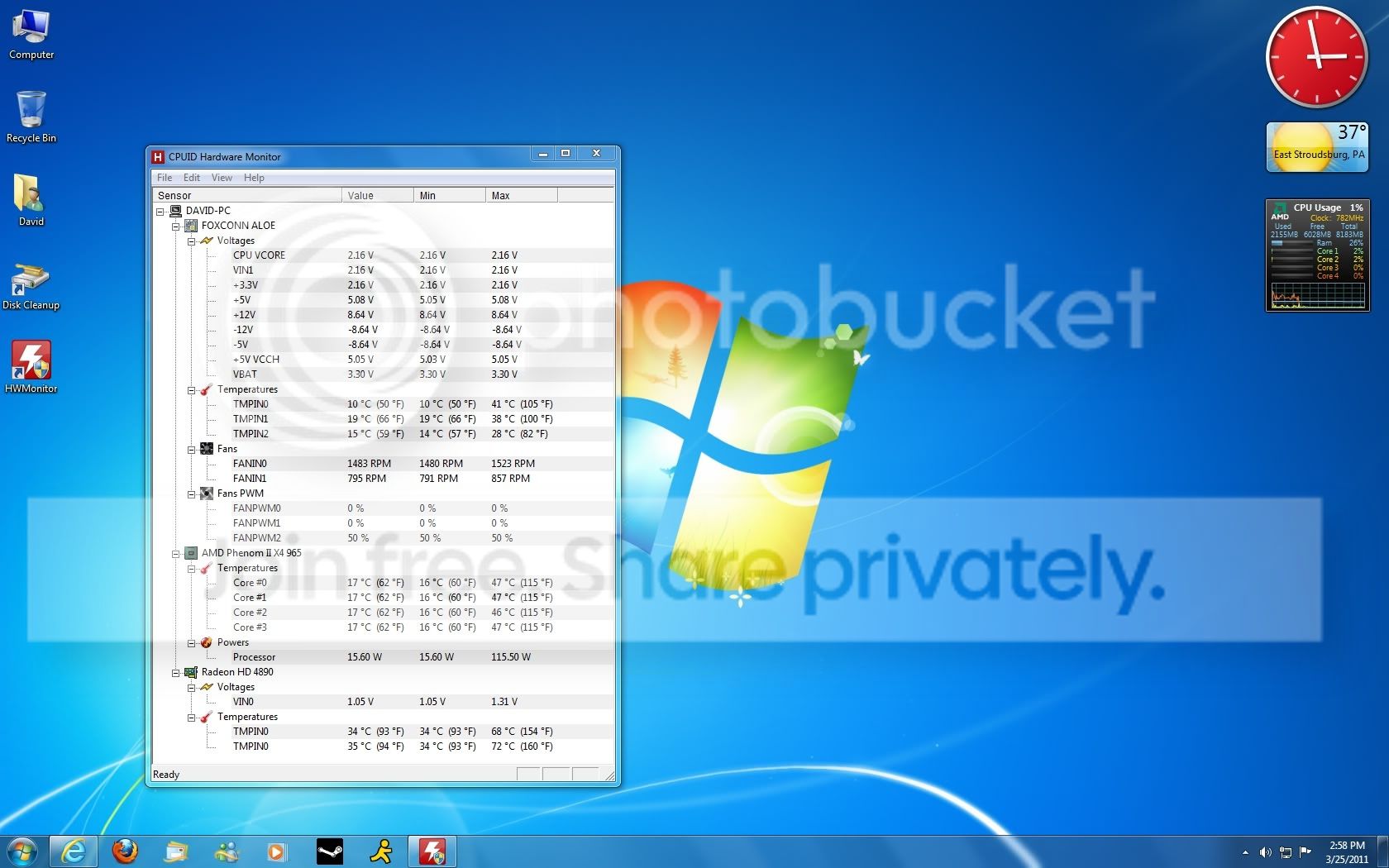
Here's a screenshot from today after running 3DMark Vantage, the AMD Froblins Demo and Crysis 2. These temps in contrast to what I had been getting are just awesome, and I did it without spending more than $20.

[Ignore the voltages, HP's clever engineers made a complete mess of it]

temps_3-25-2011.jpg


I've pretty much reduced all the temps by over 30*C. Rather than spending big cash on a HSF and aftermarket cooler for the Gpu, I decided to look into how different fans work, sizes, speeds, etc etc.

What I wound up doing is picking up two fans that are typically used as exhaust fans for a system chassis, and using one on my stock AMD heat sync, for the Cpu, and the second on the Gpu. I also picked up some Arctic Silver 5 and redid them both. These fans both spin pretty quick even at idle and are probably 3-4X quieter than typical fans for this purpose, which tend to be a bit smaller, and spin at much higher rpm.

The CPU setup looks fairly normal, just with a kind of large fan on it, these fans are both standard 80mm DC Brushless. They both idle at exactly 1,500rpm and spin up no higher than 2,200rpm for me, though I'm sure they could hit 3,500 or so, perhaps more.
As for the GPU, it does look kind of ghetto hehe.. I removed the cover/shroud/fan entirely, all that's left is the PCB and heat sync. I then attached the second 80mm chassis fan(wasn't easy but I figured out a way to do it, being kind of creative and a bit lucky that the shape of the heat sync fit the fan perfectly) to the heat sync, and ran some demanding benchmarks. The CPU fan is hooked up properly to the board just like the standard one would, however the GPU fan has a different connector, and so I tried plugging via an adapter into a 4-pin molex to see how the fan would behave with zero fan control at all. The fan spins at it's minimum RPM, and as the GPU heats up, it speeds up all on its own. Just for kicks I spliced into the GPU's power connector, and the only real difference is the driver controls the speed naturally, however the minimum RPM was too high and noisy for this size fan, so I actually decided to leave the fan powered directly off of a 4-pin molex adapter, and it runs perfectly. I took a lot of precaution obviously and ran a lot of tests.

In the end, this is how I have the HP setup, and it runs ice cold, both idle and under load. It runs cooler than my Gamer rig in every possible way, and the gamer rig has very good cooling hardware. It's also much quieter than my Gamer rig, even tho I'm honestly using fanstastic hardware on it, including a good push/pull setup and an aftermarket cooler on both the Cpu and Gpu. Even with the gamer rig at stock clocks, the HP runs cooler and quieter.

So anyway, I wanted to post this because the cooling performance is kind of amazing considering I spent only $20, and these are the best temps I've seen since running an Athlon Cpu back in the late 90's!

So, am I the only one around here to try doing this? Or am I just lucky, as far as the Gpu go's, that the 4890 just so happens to have a heat sync that seems specifically designed to take one of these fans? I'm curious if anyone else has done this, either by choice, or because they had a fan failure and maybe had to. I should also mention, because of the shape of the 4890's heat sync, the fan is actually cooling the memory as well. The air that gets spun off the side of the blades pushes its way down the sync and across the PCB right over the memory, I even had a look at the memory temps in GPUZ and they're 12.5*C cooler than the best temps I'd even seen using the stock fan/shroud! Because the Gpu runs so cold, there's no negative to not using the cover to push all this air out of the case, it's just never hot enough to really make a difference. Although lately I don't even keep the side panel on anymore, because of the way it's setup and where the tower sits, any noise I would normally hear, I can't, again just a bit of luck in how it's all setup. Really cool stuff.

Notes: Redoing the thermal compound on both the Cpu and Gpu helped quite a bit, I was very surprised. I did this 'after' I finished this entire setup, because I wanted to see just how much a difference it would make. The Cpu came down about 5*c, and the Gpu slightly over 10*c, both idle and load, it was about the same. I should mention the compound on the Cpu was still very much fresh it's not very old, this should say something about how much compound AMD likes to use, which after doing this, I can say without a doubt, is NOT enough. The Gpu looked about right, they were very liberal with it, and the only reason I saw such an improvement was because it was old and just crusty and a bit uneven.

Additionally the Cpu temps above are about the max I get no matter how I stress test it, the Gpu temps are usually slightly less, however the AMD Froblins demo pushes the Gpu harder than anything else I've run (I haven't run furmark which I'm sure would push it just as hard) because it uses lots of tessellation and AI, all on the Gpu.
 

My Computer My Computer

At a glance

HP Win7 Pro x64 | Custom Win7 Pro x64HP PhII X4 965 Black Ed. 3.4Ghz | PhII X6 110...8GB DDR3 1333 OC Black Edition x2HP XFX Radeon HD4890 1GB | AMD Radeon HD 6990
Computer Manufacturer/Model Number
HPE-112y Custom + Custom Build
OS
HP Win7 Pro x64 | Custom Win7 Pro x64
CPU
HP PhII X4 965 Black Ed. 3.4Ghz | PhII X6 1100T 3.3/3.7
Motherboard
OEM HP | ASUS Crosshair IV Extreme 890FX
Memory
8GB DDR3 1333 OC Black Edition x2
Graphics Card(s)
HP XFX Radeon HD4890 1GB | AMD Radeon HD 6990
Sound Card
Realtek 7.1 Digital HDMI x2
Monitor(s) Displays
HP 20" 1680x1050 LCD | Samsung 23" 2ms 1920x1200 LED
Screen Resolution
1680x1050 + 1920x1200 & HDTV for Gaming/TV
Hard Drives
1TB WD "Green" 5,400 RPM SCSI W/ AMD RAID/Xpert
Custom 2x 128GB OCZ Enyo SSD
PSU
Thermaltake Black Widow 850watt Modular x2
Case
HP HPE- 112y OEM Modded | Custom Xclio A380S
Cooling
HP Antec120mm | Custom Antec 360mm/250mm/200mm/120mm
Keyboard
HP G15 | G19
Mouse
G500 x2
Internet Speed
15mb down, 2mb up
Other Info
2x DVD-RAM | 2x BD-ROM
Back
Top