New free imaging program

SIW2

YTS GEEK
Guru
VIP
SF Team
Local time
11:00 PM
Messages
16,784
Aomei just released a new freebie. It is intended for users who just want a one click backup/recovery solution. Free for all uses, works on server os too.

It is aimed at those who want something very simple.

It makes a recovery partition and creates an entire system backup on there. You access that either from winpe it creates, or by pressing f11 after post ( on mbr ), or by the boot shell on uefi systems.

Just had a look and it does what it says on the tin. Similar to oem recovery partition in concept. You can replace the image with a new one when you like, but you do that manually.

Might be useful if you know people who want something straightforward like that. The image format is the same as used by their regular Aomei Backupper.

I think they would be better having it on a hidden f key.

You can give it a whirl:

One Key Recovery - Create a Factory Restore Partition with AOMEI OneKey Recovery
 

My Computers

System One System Two

  • Computer type
    PC/Desktop
    OS
    7 X64
    CPU
    i5 8400
    Motherboard
    gigabyte b365m ds3h
    Memory
    2x8gb 3200mhz
    Hard Drives
    various
    PSU
    pure power 11 400w cm
    Case
    Coolermaster
    Cooling
    cryorig m9i
  • Computer type
    PC/Desktop
    OS
    7x64
    CPU
    g5400
    Motherboard
    ga b365m ds3h
    Memory
    8gb ddr4 2400
    PSU
    xfx pro 450w
Need to test this, looks promising. Thanks for the tip Siw!
 

My Computer

Computer type
Laptop
Computer Manufacturer/Model Number
HP ENVY 17-1150eg
OS
Windows 10 Pro x64 EN-GB
CPU
1.6 GHz Intel Core i7-720QM Processor
Memory
6 GB
Graphics Card(s)
ATI Mobility Radeon HD 5850 Graphics
Sound Card
Beats sound system with integrated subwoofer
Monitor(s) Displays
17" laptop display, 22" LED and 32" Full HD TV through HDMI
Screen Resolution
1600*900 (1), 1920*1080 (2&3)
Hard Drives
Internal: 2 x 500 GB SATA Hard Disk Drive 7200 rpm
External: 2TB for backups, 3TB USB3 network drive for media
Cooling
As Envy runs a bit warm, I have it on a Cooler Master pad
Keyboard
Logitech diNovo Media Desktop Laser (bluetooth)
Mouse
Logitech Performance Mouse MX
Internet Speed
50/10 Mbps VDSL
Antivirus
Windows Defender 4.3.9431.0
Browser
Maxthon 3.5.2., IE11
I has tested it out and liked that it automatically calculate and create a partition designated as recovery partition from the C: drive(No need to manually create a partition to set up as recovery) & it's extremely simply to use.

Unfortunately the Recovery partition can be deleted by a user via disk management as it is not a true recovery partition where the software should set it as an NTFS type 0x27 partition. I examined the MBR and found that it's using Grub4dos to call its winpe.iso in order for it to boot into recovery environment.

The system image is compressed and stored in a single .adi format(Did a lookup and this file is associated with active@disk image).
 

My Computer

Computer type
PC/Desktop
Computer Manufacturer/Model Number
Custom Build
OS
Windows 7 x86
I would say fortunately, the recov partition is hidden from the average user. Slightly above beginners can access it easily if they want by simply adding a drive letter.

.adi is aomei backupper format. Perhaps a different program also has similar extension.

It has been deliberately done that way. Their other product, Aomei Backupper can use the .adi image, if you wish.
 

My Computers

System One System Two

  • Computer type
    PC/Desktop
    OS
    7 X64
    CPU
    i5 8400
    Motherboard
    gigabyte b365m ds3h
    Memory
    2x8gb 3200mhz
    Hard Drives
    various
    PSU
    pure power 11 400w cm
    Case
    Coolermaster
    Cooling
    cryorig m9i
  • Computer type
    PC/Desktop
    OS
    7x64
    CPU
    g5400
    Motherboard
    ga b365m ds3h
    Memory
    8gb ddr4 2400
    PSU
    xfx pro 450w
Thanks, I will have to try this.
 

My Computer

Computer type
PC/Desktop
Computer Manufacturer/Model Number
Custom Build
OS
Win 10 Pro 64
CPU
Intel Core i7 960 @3.20 GHz
Motherboard
MSI MS7522
Memory
24.0 GB DDR3
Graphics Card(s)
EVGA GTX 750Ti
Monitor(s) Displays
LG E2341 23 Inch
Screen Resolution
1920x1080
Hard Drives
1TB Western Dgital 1002FAEX-00Y9A0
1TB Hitachi HDS721010CLA322
PSU
700 Watt
Case
Haf 912
Cooling
Fans
Keyboard
Logitech MK710
Mouse
Logitech M705
Internet Speed
Cable
Antivirus
AIS 2015 .10.0.2225
Browser
Firefox 49
Other Info
MalwareBytes Anti-Rootkit utility
It makes a recovery partition and creates an entire system backup on there
What happens if there are already 4 primary partitions in NTFS - as on many OEM systems off the shelf.
 

My Computer

Computer Manufacturer/Model Number
HP, Dell, Gateway, Toshiba - 4 laptops and 2 desktops
OS
Vista, Windows7, Mint Mate, Zorin, Windows 8
CPU
from 1.6GHz Duo to i7
Monitor(s) Displays
2x HP w2207
Hard Drives
5x HDD, 7x SSD, 12x Externals
Keyboard
with trackball - no mices
Mouse
Trackball mice
Internet Speed
DSL 6000
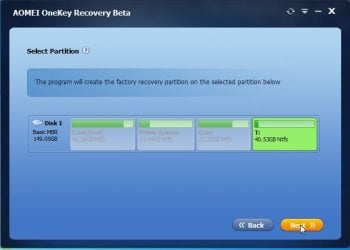
It makes a logical partition.

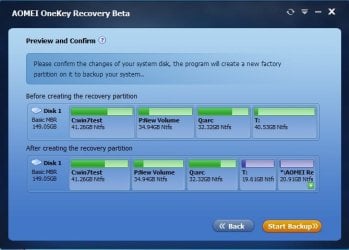
It shows what it is planning to do.

Anything that creates a recov partition would have to do it that way.


Step 3: In this window, the program will show you the changes before and after making a new factory recovery partition, which is labeled with "+" and "AOMEI Recovery Partition". In order to prevent it from being damaged, it will be made as a hidden partition by default. To confirm the changes, please click "Start Backup" to continue.

It is only intended as a very simple solution. My grandma likes it. I would use Aomei Backupper, but some prefer this.


Tips:

If you not only want to backup your system but your entire hard disk, specified partition, or individual files and folders, you can use the complete backup software - AOMEI Backupper, which also supports backing up to external hard disk, USB flash drive, CD/DVD, shared Network or NAS. It is the best and safest way to protect your system and data from losing.
 

My Computers

System One System Two

  • Computer type
    PC/Desktop
    OS
    7 X64
    CPU
    i5 8400
    Motherboard
    gigabyte b365m ds3h
    Memory
    2x8gb 3200mhz
    Hard Drives
    various
    PSU
    pure power 11 400w cm
    Case
    Coolermaster
    Cooling
    cryorig m9i
  • Computer type
    PC/Desktop
    OS
    7x64
    CPU
    g5400
    Motherboard
    ga b365m ds3h
    Memory
    8gb ddr4 2400
    PSU
    xfx pro 450w
Hi there

NO NO NO !!!!!! IMO not really worth the bother -- Imagine your whole HDD had gone south -- it requires use of the Windows boot menu (not available if HDD completetly "Kaput").

I prefer a STAND ALONE recovery program that I can boot from an external device. This program requires that the HDD in the computer is working to the extent that when F11 is pressed there's data on the HDD. If I totally reformat an HDD then there's no data for F11 to operate on.

This one is TOO limited to be of serious use at all. Have a look at the screenshot - it requires some sort of Windows to be working to use it.

I've seen users accidentally get their systems totally in a mess by accidentally pressing these recovery keys at system boot time --it's easier to do than you think.

Most people don't have trouble inserting a small USB stick into a machine and booting from it -- a MUCH SAFER way actually. My advice is DON'T USE. (Nothing against the corporation providing the software - just IMO the way that it's designed to be used will lead to a lot of tears).

Cheers
jimbo
 

Attachments

  • NONONO.png
    NONONO.png
    20.7 KB · Views: 6

My Computer

Computer type
PC/Desktop
Computer Manufacturer/Model Number
Custom built, several laptops HP/ASUS
OS
Linux CENTOS 7 / various Windows OS'es and servers
CPU
Intel i7 Intel i5
Memory
8GB, 16GB
Graphics Card(s)
On Motherboard
Sound Card
Realtek HD audio
Monitor(s) Displays
Apple Cinema display, Samsung LCD
Screen Resolution
1920 X 1080
Hard Drives
4 X 1TB SATA
Mouse
Toshiba wireless laser
Internet Speed
> 20MB up
It makes a logical partition.
Even with a logical partition you can be in trouble. If you add a logical partition (extended partition) to 4 primary partitions in NTFS, you end up with 5 dynamic partitions.
 

My Computer

Computer Manufacturer/Model Number
HP, Dell, Gateway, Toshiba - 4 laptops and 2 desktops
OS
Vista, Windows7, Mint Mate, Zorin, Windows 8
CPU
from 1.6GHz Duo to i7
Monitor(s) Displays
2x HP w2207
Hard Drives
5x HDD, 7x SSD, 12x Externals
Keyboard
with trackball - no mices
Mouse
Trackball mice
Internet Speed
DSL 6000
I can see benefits for certain users I deal with - Function focused users is how I would classify them - those users that have a desktop or laptop that they treat as a tool to do a few or even one particular job.

These users have little general computer knowledge, and to be honest, have no interest, (and never will have) in the technical side of computers, they are interested in just getting work or leisure activities done

Some of these users would not even know what to do with a usb stick, I can remember true incidents where users with under desk located towers were under the impression that the CD drawer was a drinks holder, It was quite amusing when a change to the way systems worked set an auto retract timer as default and a lot of hot drinks ended on the floor.

This may seem like an anathemer to some of us here, but these users are actually the majority of users out in the wild, we as Technical users, either professionally or as the family "Go To Guy" need to consider their needs not ours.

Have used the likes of Acronis to add this type of One Click recovery to user systems in the past, the option for a simple Manual refresh of the system data leads to further possibilities for a User proof system if it is possible to run the creation of image without user interaction a weekly system task could automatically keep the data on the recovery partition current. I take Jimbo's point of the issue of accidental initialisation of the recovery operation and would like to see an option to set the hot key to something more obscure than F11 (Eg, Ctrl-Shift R)

all in all an interesting an interesting possible option.

Another possible benefit is to replace the OEM bloated factory restore, which so many users currently rely on, with a streamlined clean install :)
 

My Computers

System One System Two

  • Computer type
    PC/Desktop
    Computer Manufacturer/Model Number
    ChillBlast - Custom to my design
    OS
    Windows 11 Pro x64 [Latest Release and Release Preview]
    CPU
    Ryzen 9 5950X, 3.8 - 5.2 MHz
    Motherboard
    Asus Prime X570-Pro
    Memory
    64GB [2 x 32GB] DDR4 3200MHz
    Graphics Card(s)
    4GB NVIDIA GEFORCE GTX 1650 Ti
    Sound Card
    On-board SPDIF to 5.1 System + HDMI [5.1 system]
    Monitor(s) Displays
    32" UHD 32 Bit HDR Monitor + 43" UHD 4K 32Bit HDR TV
    Screen Resolution
    2 x 3840 x 2160 @60Hz
    Hard Drives
    1TB M2 SSD OS, 500GB Fast Access SSD, 2 x 8TB Data + Various Externals from 1TB to 4TB, 10TB NAS
    PSU
    NZXT C750 80 PLUS Gold 750W Modular PSU
    Case
    Workstation Case [Matt Black]
    Cooling
    NZXT Kraken X63 280mm CPU Cooler +2x Quiet Case fans
    Keyboard
    Logitech Wireless MX Keys & K400 + others
    Mouse
    Logitech Wireless MX Master 3S
    Internet Speed
    920 MB Down 50 MB Up
    Antivirus
    BitDefender Total Security Pro
    Browser
    Chrome (always run latest Non-Beta)
    Other Info
    Also run ...
    Laptop - Quad 8GB - Windows 10 Pro x64
    Nexus 7 Android tablet x2
    Samsung 10.2" tablet
    Blackview TAB 8 4G Android Tablet c/w Keyboard
    Wacom Intuos Pro Medium Pen Pad
    Wacom Intuos Pro Small Pen Pad
    Wacom Expresskeys Remote
    Loopdeck+ Graphics Controller
    Shuttle Pro v2 Control
  • Computer type
    Laptop
    System Manufacturer/Model Number
    Dell XPS 17 10750H
    OS
    Windows 11 Pro x64 Latest RP
    CPU
    Intel I7 10750H 5.0GHz
    Motherboard
    Dell XPS
    Memory
    32GB [2x16GB] DDR4 2933 MHz
    Graphics Card(s)
    nVidia GTX1650Ti 4 GB GDDR6
    Sound Card
    Stock [Realtek] 4 Speaker
    Monitor(s) Displays
    17" IPS UHD+ Infinity Edge Touchscreen
    Screen Resolution
    3840 x 2400
    Hard Drives
    2TB M2 NVMe, 4TB External + various 500GB & 1TB External NVMe (also have access to spinner HDD from
    PSU
    Stock
    Case
    Stock XPS Aluminium & Carbon Fibre
    Cooling
    Stock - Active Fan Control
    Keyboard
    Backlit + Various Logitech
    Mouse
    Stock Track Pad + Logitech MX Trackball
    Internet Speed
    72 MB Down 18MB Up
    Browser
    Chrome
    Other Info
    Also run ...
    Laptop - Quad 8GB - Windows 10 Pro x64
    Nexus 7 Android tablet x2
    10.2" tablet
    Sony Z3 Android Smartphone
    Wacom Intuos Pro Medium Pen Pad
    Wacom Intuos Pro Small Pen Pad
    Wacom Expresskeys Remote
    Loopdeck+ Graphics Controller
    Shuttle Pro v2 Control Pad
    10TB NAS
Nigel, I agree with you. For the kind of users that you describe (and I guess those are the majority), this can be a useful tool.

I do worry though about this automatic creation of an additional partition. Most OEM NTFS systems are being shipped with 4 primary partitions - System, C, Recovery and Tools. Only the OEMs know why they would do such a stupid setup.

If AOMEI now tries to create an additional logical/extended partition, all 5 partitions will end up as dynamic partitions - and we all know what a pain that is not to speak of the 'simple' user who will be completely lost.

I think that point needs clarification and AOMEI should explain how they prevent this from happening.
 

My Computer

Computer Manufacturer/Model Number
HP, Dell, Gateway, Toshiba - 4 laptops and 2 desktops
OS
Vista, Windows7, Mint Mate, Zorin, Windows 8
CPU
from 1.6GHz Duo to i7
Monitor(s) Displays
2x HP w2207
Hard Drives
5x HDD, 7x SSD, 12x Externals
Keyboard
with trackball - no mices
Mouse
Trackball mice
Internet Speed
DSL 6000
I expect this will happen:

It will need to find enough space, if not - it will just tell there isn't enough space, hard luck.

If there are already 4 primaries, and enough space, it will offer to create an extended partition, resulting in one of the existing primaries, and the recov partition being logical drives.

It will always tell you what the outcome will be before you agree to proceed.

In my case, I already had 4 partitions, one of them extended. So it just created another logical drive inside the existing extended partition. It did not attempt to convert to dynamic.

Nigel is spot on. Very useful for a large category of people.
 

My Computers

System One System Two

  • Computer type
    PC/Desktop
    OS
    7 X64
    CPU
    i5 8400
    Motherboard
    gigabyte b365m ds3h
    Memory
    2x8gb 3200mhz
    Hard Drives
    various
    PSU
    pure power 11 400w cm
    Case
    Coolermaster
    Cooling
    cryorig m9i
  • Computer type
    PC/Desktop
    OS
    7x64
    CPU
    g5400
    Motherboard
    ga b365m ds3h
    Memory
    8gb ddr4 2400
    PSU
    xfx pro 450w
Hi there

Some BIOSES and Laptops use F11 already -- The key should be perhaps say Windows +F11 or another key that isn't used in the BIOS. A compound key (i.e CTRL + H for example) IMO would avoid using BIOS Fn keys or accidental key presses that start the recovery process.

My Dad (who isn't a total newbie in computers) has on more than one occasion accidentally started a Recovery by pressing one of these "One Click Keys" -- and the first thing he thinks of when he sees the Recovery screen is that his computer needs to be fixed -- so instead of cancelling (via ESC - but typical users aren't usually aware of that quick exit) he lets the process continue.

Maybe there should be a "Nag menu" before the process starts : "Are you sure you really want to do this - Press enter to continue or any other key to boot Windows". Can't be difficult to add a few lines of code into the start up script.

Perhaps some of us just never try and logon as a normal user and test stuff assuming we are total idiots -- it's amazing how many shopping web sites I visit where the basic navigation is so hopeless you wonder who passed the site as fit for purpose.

Mind you I'm really GOOD at breaking systems -- even at work if something needs to be tested the I.T lot usually say - let jimbo loose on it - he'll break it before you've had time for a coffee. !!

@WHS the 5 partition thing doesn't have to be an issue - the software can use it's own format -- even a LINUX EXT4 or whatever partition -- since it's reading it's OWN data via it's own "mini-OS" it doesn't have to create a Windows readable partition in the first place - in fact it's better that it DOESN'T create a windows type partition - that way Windows can't hose it up whether intentionally or accidentally.

Linux and other type of partitions can co-exist on the same HDD quite normally.

Cheers
jimbo
 

My Computer

Computer type
PC/Desktop
Computer Manufacturer/Model Number
Custom built, several laptops HP/ASUS
OS
Linux CENTOS 7 / various Windows OS'es and servers
CPU
Intel i7 Intel i5
Memory
8GB, 16GB
Graphics Card(s)
On Motherboard
Sound Card
Realtek HD audio
Monitor(s) Displays
Apple Cinema display, Samsung LCD
Screen Resolution
1920 X 1080
Hard Drives
4 X 1TB SATA
Mouse
Toshiba wireless laser
Internet Speed
> 20MB up
I expect this will happen:

It will need to find enough space, if not - it will just tell there isn't enough space, hard luck.

If there are already 4 primaries, and enough space, it will offer to create an extended partition, resulting in one of the existing primaries, and the recov partition being logical drives.

It will always tell you what the outcome will be before you agree to proceed.

In my case, I already had 4 partitions, one of them extended. So it just created another logical drive inside the existing extended partition. It did not attempt to convert to dynamic.

Nigel is spot on. Very useful for a large category of people.
This is a good scenario. But is it what AOMEI really does.

In your case it was easy. You already had an extended partition. Suggest you try with 4 primaries on the disk.
 

My Computer

Computer Manufacturer/Model Number
HP, Dell, Gateway, Toshiba - 4 laptops and 2 desktops
OS
Vista, Windows7, Mint Mate, Zorin, Windows 8
CPU
from 1.6GHz Duo to i7
Monitor(s) Displays
2x HP w2207
Hard Drives
5x HDD, 7x SSD, 12x Externals
Keyboard
with trackball - no mices
Mouse
Trackball mice
Internet Speed
DSL 6000
Haven't got a spare disk to try it,unfortunately.

Might have a dig around and see if I can rustle one up.
 

My Computers

System One System Two

  • Computer type
    PC/Desktop
    OS
    7 X64
    CPU
    i5 8400
    Motherboard
    gigabyte b365m ds3h
    Memory
    2x8gb 3200mhz
    Hard Drives
    various
    PSU
    pure power 11 400w cm
    Case
    Coolermaster
    Cooling
    cryorig m9i
  • Computer type
    PC/Desktop
    OS
    7x64
    CPU
    g5400
    Motherboard
    ga b365m ds3h
    Memory
    8gb ddr4 2400
    PSU
    xfx pro 450w
I don't think the four primary partition limit should be a major issue - Even in multiboot scenarios.

Since Vista Windows does not require a Primary partition to run - As long as the System Boot partition is a primary partition the actual windows partitions can be a logical partitions

During the beta period of windows 7 I at one time had three different windows installs on a single secondary drive, so I know it's possible ....

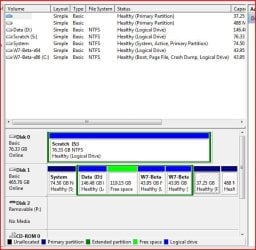
partitions.JPG

Not got a snip of the setup mentioned but have included one which shows an operating multiboot - Drive 1 has the three primaries in use, and is a four OS multiboot

System primary is running Vista, and the other two primaries, (at the far right of the image), are running a Linux (system and scratch), distro, (Ubuntu I think) which still required primary partitions but the two Beta Windows 7 Installs are happily running in logical drives in a secondary partition. Shortly after this snip I did move the system files to a new primary partition,( No4), expanded the secondary partition, into the free space and added another Win7 install. All this ran happily for quite a while - not recommended for the feint hearted but an interesting experiment.

:D
 

My Computers

System One System Two

  • Computer type
    PC/Desktop
    Computer Manufacturer/Model Number
    ChillBlast - Custom to my design
    OS
    Windows 11 Pro x64 [Latest Release and Release Preview]
    CPU
    Ryzen 9 5950X, 3.8 - 5.2 MHz
    Motherboard
    Asus Prime X570-Pro
    Memory
    64GB [2 x 32GB] DDR4 3200MHz
    Graphics Card(s)
    4GB NVIDIA GEFORCE GTX 1650 Ti
    Sound Card
    On-board SPDIF to 5.1 System + HDMI [5.1 system]
    Monitor(s) Displays
    32" UHD 32 Bit HDR Monitor + 43" UHD 4K 32Bit HDR TV
    Screen Resolution
    2 x 3840 x 2160 @60Hz
    Hard Drives
    1TB M2 SSD OS, 500GB Fast Access SSD, 2 x 8TB Data + Various Externals from 1TB to 4TB, 10TB NAS
    PSU
    NZXT C750 80 PLUS Gold 750W Modular PSU
    Case
    Workstation Case [Matt Black]
    Cooling
    NZXT Kraken X63 280mm CPU Cooler +2x Quiet Case fans
    Keyboard
    Logitech Wireless MX Keys & K400 + others
    Mouse
    Logitech Wireless MX Master 3S
    Internet Speed
    920 MB Down 50 MB Up
    Antivirus
    BitDefender Total Security Pro
    Browser
    Chrome (always run latest Non-Beta)
    Other Info
    Also run ...
    Laptop - Quad 8GB - Windows 10 Pro x64
    Nexus 7 Android tablet x2
    Samsung 10.2" tablet
    Blackview TAB 8 4G Android Tablet c/w Keyboard
    Wacom Intuos Pro Medium Pen Pad
    Wacom Intuos Pro Small Pen Pad
    Wacom Expresskeys Remote
    Loopdeck+ Graphics Controller
    Shuttle Pro v2 Control
  • Computer type
    Laptop
    System Manufacturer/Model Number
    Dell XPS 17 10750H
    OS
    Windows 11 Pro x64 Latest RP
    CPU
    Intel I7 10750H 5.0GHz
    Motherboard
    Dell XPS
    Memory
    32GB [2x16GB] DDR4 2933 MHz
    Graphics Card(s)
    nVidia GTX1650Ti 4 GB GDDR6
    Sound Card
    Stock [Realtek] 4 Speaker
    Monitor(s) Displays
    17" IPS UHD+ Infinity Edge Touchscreen
    Screen Resolution
    3840 x 2400
    Hard Drives
    2TB M2 NVMe, 4TB External + various 500GB & 1TB External NVMe (also have access to spinner HDD from
    PSU
    Stock
    Case
    Stock XPS Aluminium & Carbon Fibre
    Cooling
    Stock - Active Fan Control
    Keyboard
    Backlit + Various Logitech
    Mouse
    Stock Track Pad + Logitech MX Trackball
    Internet Speed
    72 MB Down 18MB Up
    Browser
    Chrome
    Other Info
    Also run ...
    Laptop - Quad 8GB - Windows 10 Pro x64
    Nexus 7 Android tablet x2
    10.2" tablet
    Sony Z3 Android Smartphone
    Wacom Intuos Pro Medium Pen Pad
    Wacom Intuos Pro Small Pen Pad
    Wacom Expresskeys Remote
    Loopdeck+ Graphics Controller
    Shuttle Pro v2 Control Pad
    10TB NAS
It is exactly as I outlined.

1) 4 Primaries, but not enough space - hard luck

AOK1.jpg


2) 4 Primaries, there is enough space, so ok it

AOK2.jpg

It shows you the result before you proceed.

AOK6.jpg

If you have 4 primaries, and enough space it creates extended partition. No problem at all.
 

My Computers

System One System Two

  • Computer type
    PC/Desktop
    OS
    7 X64
    CPU
    i5 8400
    Motherboard
    gigabyte b365m ds3h
    Memory
    2x8gb 3200mhz
    Hard Drives
    various
    PSU
    pure power 11 400w cm
    Case
    Coolermaster
    Cooling
    cryorig m9i
  • Computer type
    PC/Desktop
    OS
    7x64
    CPU
    g5400
    Motherboard
    ga b365m ds3h
    Memory
    8gb ddr4 2400
    PSU
    xfx pro 450w
Good, that seems to work. Thanks Simon.
 

My Computer

Computer Manufacturer/Model Number
HP, Dell, Gateway, Toshiba - 4 laptops and 2 desktops
OS
Vista, Windows7, Mint Mate, Zorin, Windows 8
CPU
from 1.6GHz Duo to i7
Monitor(s) Displays
2x HP w2207
Hard Drives
5x HDD, 7x SSD, 12x Externals
Keyboard
with trackball - no mices
Mouse
Trackball mice
Internet Speed
DSL 6000
I can remember true incidents where users with under desk located towers were under the impression that the CD drawer was a drinks holder, It was quite amusing when a change to the way systems worked set an auto retract timer as default and a lot of hot drinks ended on the floor.
:roflmao:
I don't think this is going to help these people. Even this approach requires some backup discipline. I can hear the comments "I didn't do the recovery thingy because it takes too much time".
 

My Computer

Computer type
PC/Desktop
Computer Manufacturer/Model Number
Own build
OS
Windows 7x64 Home Premium SP1
CPU
Intel i7 2600k
Motherboard
ASUS P8Z68 Deluxe
Memory
G.Skill Ripjaws (DDR3-1600) 2x4GB
Graphics Card(s)
Nvidia GeForce GTS 450; Intel HD Graphics 3000(GT2+)
Monitor(s) Displays
Dell Ultrasharp IPS panel U2311H, Samsung SyncMaster P2350
Screen Resolution
1920x1080
Hard Drives
Samsung 850 Pro SSD 256GB, Samsung SSD 840 120GB, Seagates 1TB Barracuda ST31000528AS x2
PSU
Seasonic M12II 520W
Case
Lian Li Lancool PC-K60
Cooling
Case: 1x120mm, 3x140mm CPU: Hyper 212+
Keyboard
Logitech MK520 (wireless)
Mouse
Logitech MK520
Internet Speed
6-7 Mbps
Antivirus
Norton Security Premium, Malwarebytes on 2 (MSE on 3rd PC)
Browser
FireFox
Other Info
Audio: Logitech Z523 2.1
I can remember true incidents where users with under desk located towers were under the impression that the CD drawer was a drinks holder, It was quite amusing when a change to the way systems worked set an auto retract timer as default and a lot of hot drinks ended on the floor.
:roflmao:
I don't think this is going to help these people. Even this approach requires some backup discipline. I can hear the comments "I didn't do the recovery thingy because it takes too much time".

Ain't it the truth! :roflmao:
 

My Computer

Computer type
PC/Desktop
Computer Manufacturer/Model Number
LENOVO K450 @3.0GHZ
OS
64-bit Windows 8.1 Pro
CPU
Core(TM) i5 CPU 4330 Haswell @ 3.20GHz
Motherboard
LENOVO
Memory
12.00 GB
Graphics Card(s)
Intel(R) HD Graphics
Sound Card
Intel HD integtrated
Monitor(s) Displays
HP 25' ISP Monitor
Screen Resolution
1900/1020
Hard Drives
(1) ST1000DM003-1CH162 (2) Generic STORAGE DEVICE USB Device (3) Generic STORAGE DEVICE USB Device
Internet Speed
100mb down/10mb up
Back
Top