New hard drive doesn't boot after disk cloning, error 0xc000000e

FranklinBoyce

New member
Local time
6:19 AM
Messages
11
I have installed a new hard drive in my laptop. I placed the old hard drive in a USB enclosure. I then booted the notebook with EaseUS Todo Backup 4 from CD-ROM and selected to clone the disk from the external to the internal hard drive and choose the option to resize the partitions. After over three hours, the cloning process was complete. However, after the re-start I get error 0xc000000e.

"Windows Boot Manager

Windows failed to start. A recent hardware or software change might be the cause. To fix the problem:

1. Insert your installation disc and restart your computer.
2. Choose your language setting, and then click "Next."
3. Click "Repair your computer."

If you do not have the disc, contact your system administrator or computer manufacturer for assistance.

Status: 0xc000000e

Info: The boot selection failed because a required device is inaccessible.

ENTER=Continue ESC=Exit"

Obviously, the disc cloning was not successful. I am not sure what is the best way to proceed from here. I tried to boot from recovery CD-ROMs in the hope to be able to repair the MBR but it seems that booting from CD currently fails. Hitting ENTER and ESC both restarted the notebook. Shortly afterwards, the same screen message was visible.

Thank you for helping me with this problem.
 

My Computer My Computer

OS
Windows 7 Professional x64
Have quite some experience with the aesus tools, never failed here, but have no idea about what went wrong in your case, can be anything, software or hardware. One thing:
and selected to clone the disk from the external to the internal hard drive
Your process should have worked, but I have mostly done it the other way around > copying from the pc to the external, and then do the switch. Maybe worth a try. First fit the original hd back into the laptop and check it's booting fine and programs etc work well, maybe do a chkdsk, defrag, ccleaner and sfc job, then do the cloning (will clone it without even leaving windows).

(btw, current Todo bu is 5.0. And posting this using a new hd, cloned 10 minutes ago :) happy when all goes well)
 

My Computer My Computer

Computer type
Laptop
Computer Manufacturer/Model Number
Dell \ Lenovo\ HP \ Toshiba
OS
W7, W8.1
Antivirus
MSE, Malwarebytes
Browser
FF
It worked for me with the Repair disc Windows 7 32-bit. However, during start-up it displays a message that this version of Windows 7 is not genuine. I guess this must be done to the new hard drive.

  • Do I need to re-activate it?
  • Where and how could I do that?
  • What information is required to do that?

A big thanks to theog and 4wd for your helpful advice! :)
 

My Computer My Computer

OS
Windows 7 Professional x64
Nice to read that the cloning worked out fine. A very few times I've also come across the need to reactivate after some hd or ssd swapping\cloning\restore. Never figured out why some tasks needed reactivation and some not. Anyway (if I remember correctly, quite some time ago since there was any problem), all that was needed was to enter the key in control panel > system. Good luck.
 

My Computer My Computer

Computer type
Laptop
Computer Manufacturer/Model Number
Dell \ Lenovo\ HP \ Toshiba
OS
W7, W8.1
Antivirus
MSE, Malwarebytes
Browser
FF
I discovered that the new hard drive is misaligned (512 byte instead of advanced format 4K) which negatively impacts the speed of the HDD.

If you know how to fix this issue, I would be glad to hear it.
 

My Computer My Computer

OS
Windows 7 Professional x64
You may be able to do it with Partition Wizard bootable disk:

How to align SSD partition with a free partition manager?

Or you could try this:

Image your C partition with Macrium

Delete C partition with diskpart from Win 7 dvd.

Create new C partition with alignment you want, using Diskpart.

Restore the image you made to that new partition.


Or use Paragon Alignment tool.

Or do a clean install.
 

My Computer My Computer

Computer type
PC/Desktop
Computer Manufacturer/Model Number
Ignatz Special; 4 speed manual gearbox; factory air conditioning; one of one
OS
Windows 7 Home Premium SP1, 64-bit
CPU
Intel Skylake i5-6600K, not overclocked
Motherboard
AsRock Z170M Extreme 4, micro ATX
Memory
8 GB HyperX DDR4-2666 (2 x 4 GB)
Graphics Card(s)
none; graphics are integrated on CPU
Sound Card
onboard: Realtek ALC1150; external: USB Behringer UF0-202
Monitor(s) Displays
Dell S2340M 23 inch IPS
Screen Resolution
1600 x 900
Hard Drives
System: Crucial MX100 series SSD, 128 GB;
Data: Samsung Spinpoint 103SJ, 1 TB;
Backup: WD Caviar Green WD30EZRX-00D8PB0, 3 TB
PSU
Rosewill SilentNight 500 watt fanless, semi-modular
Case
Antec Solo II
Cooling
Noctua NH-U12S; Noctua F12 intake, Noctua S12A exhaust
Keyboard
Microsoft 200 6JH-00001 USB
Mouse
Dell or Microsoft optical wired; USB
Antivirus
Microsoft Security Essentials and Malwarebytes Premium
Browser
Pale Moon
Other Info
All fans PWM; speeds at idle: CPU circa 500 rpm; intake circa 600 rpm; exhaust circa 600 rpm; CPU temps 27 idle and 47 C load in a warm room (27 C/81 F) when running Intel Extreme Tuning Utility stress test.
Partition Wizard failed for me on this task. After 'align all partitions' not even Windows startup repair disc could save the OS from sudden death.
 

My Computer My Computer

OS
Windows 7 Professional x64
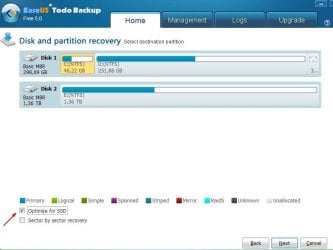
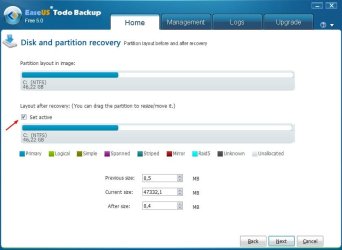
About alignment, easeus todo 5 got 'optimize for ssd' option, works on any hd as well. Tried Partition Wizard for alignment a few times, but did also experience some total failures (no boot, no os, no disc), had to let it go.

My current align process for any hd\ssd that for some reason may need 'postprocessing', using only easeus 5:

Do a partition (or disk) backup to a usb hd, then immediately restore it back to where it came from, ticking 'optimize for ssd' + 'set active' (for os partition, & no need for any cd or usb boot). Works great here (but takes it's time using usb2). Just some info that someone may find useful.
 

Attachments

  • align.jpg
    align.jpg
    40.7 KB · Views: 42
  • align2.jpg
    align2.jpg
    41.9 KB · Views: 37

My Computer My Computer

Computer type
Laptop
Computer Manufacturer/Model Number
Dell \ Lenovo\ HP \ Toshiba
OS
W7, W8.1
Antivirus
MSE, Malwarebytes
Browser
FF
Back
Top