Solved New Hard Drive Not Recognized During Boot-Up or Windows 7 Installation

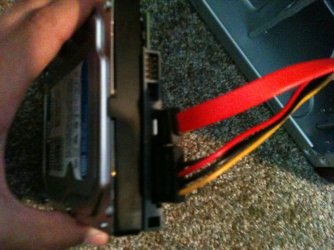
The motherboard is IDE and SATA, and the new hard drives only have SATA connections of course. So, I purchased a power supply SATA adapter and I have a SATA cable running to the motherboard in the first SATA spot (SATA 1 [total of 2 slots]). The BIOS does not tell you which hard drives are recognized, but it allows you to have an initial bootup of first/second/third.

If the mobo has SATA ports why do you need a SATA adapter, and what is a "power Supply SATA adapter?"

Plug the drive you want to install upon directly to SATA1 port alone.

The drive should be detected somewhere in BIOS setup, normally under SATA devices or in the BIOS Boot priority order. It may have its model or serial number to google. If it's now detected then it needs to be reinstalled until it is.

As Doc suggested set SATA controller (where you enabled SATA) to AHCI first to try it.

SATA adapter for the power supply. Look here: COOLMAX SATA POWER ADAPTER 6" Cable - Newegg.com

Apparently, you didn't look at all the BIOS images, there is no section for SATA devices, and the BIOS Boot Priority order only is labelled by HDD-0/HDD-1/HDD-2/HDD-3/CDROM/USB etc. Also, there is no AHCI mode.
 

My Computer My Computer

At a glance

Windows 8.1 64bit
Computer type
Laptop
Computer Manufacturer/Model Number
Asus
OS
Windows 8.1 64bit
You have to keep trying different bios configurations until the hard drive shows up on the list on the last picture you have in post #11.

Start with setting the bios to defaults and go from there.
 

My Computer My Computer

At a glance

Windows 10 Pro x64Intel Core i7 6700KGSkill TridentZ RGB 16GB 3600 16-16-16-36EVGA GTX 980 Ti SC x2
Computer type
PC/Desktop
Computer Manufacturer/Model Number
Skylake Special #666
OS
Windows 10 Pro x64
CPU
Intel Core i7 6700K
Motherboard
Asus Sabertooth Z170 Mark 1
Memory
GSkill TridentZ RGB 16GB 3600 16-16-16-36
Graphics Card(s)
EVGA GTX 980 Ti SC x2
Sound Card
Realtek High Definition
Monitor(s) Displays
AOC G2460PG
Screen Resolution
1920 x 1080 144Hz
Hard Drives
Samsung 860 Pro 256GB, Seagate Barracuda 4TB x2
PSU
EVGA 1000 P2, EVGA White Custom Braided Cables
Case
Corsair Vengeance C70 Gunmetal Black
Cooling
Corsair H100i v2, Corsair ML120 x2, Thermal Grizzly Kryonaut
Keyboard
Logitech G910 Orion Spectrum
Mouse
Logitech G700s
Internet Speed
Verizon Fios Quantum Gateway 75/75
Antivirus
Windows Defender, Malwarebytes Free 3.8.3
Browser
Chrome
Other Info
Corsair SP120 x4, LG Blu-ray Drive, Durabrand HT-395 100 Watt Dolby Digital Amp, Corsair H2100 Wireless 7.1 Headset
You have to keep trying different bios configurations until the hard drive shows up on the list on the last picture you have in post #11.

Start with setting the bios to defaults and go from there.

I will get working on that tomorrow when I have a ton of time. I do appreciate everyone's help, and I will try to resolve this with the combination of everyone's knowledge. I will let you know if I can make something happen!
 

My Computer My Computer

At a glance

Windows 8.1 64bit
Computer type
Laptop
Computer Manufacturer/Model Number
Asus
OS
Windows 8.1 64bit
I just scrolled thru the ECS manual again. What is your DVD drive, IDE or SATA ? What would happen if you disable all the IDE settings ? I just can not find anything about the AHCI in this manual. True this looks like maybe a 1st generation SATA MB connection type. Max of 2gb memory on the MB. Maybe it won't even recognize a 500gb HD ?????? I can't remember what the first SATA HD's were in GB size.
 

My Computer My Computer

At a glance

Win7 Enterprise, Win7 x86 (Ult 7600), Win7 x6...AMD fx8350 4ghz, AMD-32 2400mhz, AMD-64 3200m...2gb, 4gb on the Ult 7600, 4gb on Technet RTM,...Draw my own Graphics, several nVidia cards
Computer type
PC/Desktop
Computer Manufacturer/Model Number
Built them myself, Science Experiments !
OS
Win7 Enterprise, Win7 x86 (Ult 7600), Win7 x64 Ult 7600, TechNet RTM on AMD x64 (2.8Ghz)
CPU
AMD fx8350 4ghz, AMD-32 2400mhz, AMD-64 3200mhz, AMDx64 2.8G
Motherboard
SIS 755, ECS-K8M890M-M (Ult 7600), GigaByte & others
Memory
2gb, 4gb on the Ult 7600, 4gb on Technet RTM, 32gb on FX8350
Graphics Card(s)
Draw my own Graphics, several nVidia cards
Sound Card
on motherboard
Monitor(s) Displays
19" flat scr, 28" I-Inc widescr,22" Emprex Widescr, 23" Acer
Screen Resolution
1280 x 1024, 1440 x 900, 1920 x 1080
Hard Drives
6 pata Ide HD's & 2 Sata HD's
added 80gb external on Ult 7600 computer,
numerous extra 1tb, 2TB, 3Tb SATA HD's
A collection of ext HD Docks w/ HDs
PSU
430w, 550w, 600w, 700, 800, etc
Case
All Generic Full Towers
Cooling
Open Air & a few fans, some w/ colored LEDs
Keyboard
Compaq & Dell recycled from GoodWill
Mouse
Made in China Optical Wired Mouse
Internet Speed
Fast Cable InterNet
Antivirus
AVG Free on 24 different Desktops, NO Problems!
Browser
IE 8 is preferred, but use FireFox sometimes
Other Info
Linksys Routers, switches, & Hubs
Too Many USB Flash Drives to count, Biggest is 64GB !
Eight computers in my home network.
Sixteen computers at my business network.
Linked via TeamViewer !
Lots of old used spare computer parts everywhere!
I just scrolled thru the ECS manual again. What is your DVD drive, IDE or SATA ? What would happen if you disable all the IDE settings ? I just can not find anything about the AHCI in this manual. True this looks like maybe a 1st generation SATA MB connection type. Max of 2gb memory on the MB. Maybe it won't even recognize a 500gb HD ?????? I can't remember what the first SATA HD's were in GB size.

DVD drive is IDE. I tried disabling all the IDE settings before I posted here and nothing happened. Ummmm, maybe first SATA HD's were only 250GB.
 

My Computer My Computer

At a glance

Windows 8.1 64bit
Computer type
Laptop
Computer Manufacturer/Model Number
Asus
OS
Windows 8.1 64bit
I am even thinking back in the early days of win7 there was even trouble installing win7 on MB's withOUT AHCI. I hate OldTimers disease.
 

My Computer My Computer

At a glance

Win7 Enterprise, Win7 x86 (Ult 7600), Win7 x6...AMD fx8350 4ghz, AMD-32 2400mhz, AMD-64 3200m...2gb, 4gb on the Ult 7600, 4gb on Technet RTM,...Draw my own Graphics, several nVidia cards
Computer type
PC/Desktop
Computer Manufacturer/Model Number
Built them myself, Science Experiments !
OS
Win7 Enterprise, Win7 x86 (Ult 7600), Win7 x64 Ult 7600, TechNet RTM on AMD x64 (2.8Ghz)
CPU
AMD fx8350 4ghz, AMD-32 2400mhz, AMD-64 3200mhz, AMDx64 2.8G
Motherboard
SIS 755, ECS-K8M890M-M (Ult 7600), GigaByte & others
Memory
2gb, 4gb on the Ult 7600, 4gb on Technet RTM, 32gb on FX8350
Graphics Card(s)
Draw my own Graphics, several nVidia cards
Sound Card
on motherboard
Monitor(s) Displays
19" flat scr, 28" I-Inc widescr,22" Emprex Widescr, 23" Acer
Screen Resolution
1280 x 1024, 1440 x 900, 1920 x 1080
Hard Drives
6 pata Ide HD's & 2 Sata HD's
added 80gb external on Ult 7600 computer,
numerous extra 1tb, 2TB, 3Tb SATA HD's
A collection of ext HD Docks w/ HDs
PSU
430w, 550w, 600w, 700, 800, etc
Case
All Generic Full Towers
Cooling
Open Air & a few fans, some w/ colored LEDs
Keyboard
Compaq & Dell recycled from GoodWill
Mouse
Made in China Optical Wired Mouse
Internet Speed
Fast Cable InterNet
Antivirus
AVG Free on 24 different Desktops, NO Problems!
Browser
IE 8 is preferred, but use FireFox sometimes
Other Info
Linksys Routers, switches, & Hubs
Too Many USB Flash Drives to count, Biggest is 64GB !
Eight computers in my home network.
Sixteen computers at my business network.
Linked via TeamViewer !
Lots of old used spare computer parts everywhere!
There has to be a way to enable ide and sata in the bios, then the sata drive should show up under the boot page.

I`ve always used ide optical drives along with sata hard drives, in the past, never had an issue.
 

My Computer My Computer

At a glance

Windows 10 Pro x64Intel Core i7 6700KGSkill TridentZ RGB 16GB 3600 16-16-16-36EVGA GTX 980 Ti SC x2
Computer type
PC/Desktop
Computer Manufacturer/Model Number
Skylake Special #666
OS
Windows 10 Pro x64
CPU
Intel Core i7 6700K
Motherboard
Asus Sabertooth Z170 Mark 1
Memory
GSkill TridentZ RGB 16GB 3600 16-16-16-36
Graphics Card(s)
EVGA GTX 980 Ti SC x2
Sound Card
Realtek High Definition
Monitor(s) Displays
AOC G2460PG
Screen Resolution
1920 x 1080 144Hz
Hard Drives
Samsung 860 Pro 256GB, Seagate Barracuda 4TB x2
PSU
EVGA 1000 P2, EVGA White Custom Braided Cables
Case
Corsair Vengeance C70 Gunmetal Black
Cooling
Corsair H100i v2, Corsair ML120 x2, Thermal Grizzly Kryonaut
Keyboard
Logitech G910 Orion Spectrum
Mouse
Logitech G700s
Internet Speed
Verizon Fios Quantum Gateway 75/75
Antivirus
Windows Defender, Malwarebytes Free 3.8.3
Browser
Chrome
Other Info
Corsair SP120 x4, LG Blu-ray Drive, Durabrand HT-395 100 Watt Dolby Digital Amp, Corsair H2100 Wireless 7.1 Headset
I'll bet you could get a clean used 500gb IDE HD for $50 or less off eBay.
 

My Computer My Computer

At a glance

Win7 Enterprise, Win7 x86 (Ult 7600), Win7 x6...AMD fx8350 4ghz, AMD-32 2400mhz, AMD-64 3200m...2gb, 4gb on the Ult 7600, 4gb on Technet RTM,...Draw my own Graphics, several nVidia cards
Computer type
PC/Desktop
Computer Manufacturer/Model Number
Built them myself, Science Experiments !
OS
Win7 Enterprise, Win7 x86 (Ult 7600), Win7 x64 Ult 7600, TechNet RTM on AMD x64 (2.8Ghz)
CPU
AMD fx8350 4ghz, AMD-32 2400mhz, AMD-64 3200mhz, AMDx64 2.8G
Motherboard
SIS 755, ECS-K8M890M-M (Ult 7600), GigaByte & others
Memory
2gb, 4gb on the Ult 7600, 4gb on Technet RTM, 32gb on FX8350
Graphics Card(s)
Draw my own Graphics, several nVidia cards
Sound Card
on motherboard
Monitor(s) Displays
19" flat scr, 28" I-Inc widescr,22" Emprex Widescr, 23" Acer
Screen Resolution
1280 x 1024, 1440 x 900, 1920 x 1080
Hard Drives
6 pata Ide HD's & 2 Sata HD's
added 80gb external on Ult 7600 computer,
numerous extra 1tb, 2TB, 3Tb SATA HD's
A collection of ext HD Docks w/ HDs
PSU
430w, 550w, 600w, 700, 800, etc
Case
All Generic Full Towers
Cooling
Open Air & a few fans, some w/ colored LEDs
Keyboard
Compaq & Dell recycled from GoodWill
Mouse
Made in China Optical Wired Mouse
Internet Speed
Fast Cable InterNet
Antivirus
AVG Free on 24 different Desktops, NO Problems!
Browser
IE 8 is preferred, but use FireFox sometimes
Other Info
Linksys Routers, switches, & Hubs
Too Many USB Flash Drives to count, Biggest is 64GB !
Eight computers in my home network.
Sixteen computers at my business network.
Linked via TeamViewer !
Lots of old used spare computer parts everywhere!
I just bought this hard drive, and I will buy a new Motherboard and CPU before I buy another HD, because IDE is pretty much history, no point in wasting $50 in something old.
 

My Computer My Computer

At a glance

Windows 8.1 64bit
Computer type
Laptop
Computer Manufacturer/Model Number
Asus
OS
Windows 8.1 64bit
"Windows 7" supports both IDE and AHCI mode by default. AHCI offers some performance improvement over IDE and that is why it is preferred- it doesn't means IDE mode won't work with 7 or AHCI is mandatory.


Your issue will be either ;

- SATA data or power cable connection issues.

- Failed HDD

- SATA 1 compatibility issue. This can be solved by adjusting the jumper ( if available ).


I am not sure why you don't want to check for jumper setting to enable SATA 1 mode to rule out that possibility. I can't say for sure that it will be the issue but definitely worth a try - only cost 0$ and two minutes.
 

My Computer My Computer

At a glance

Windows 7 Ultimate x64
Computer type
PC/Desktop
OS
Windows 7 Ultimate x64
"Windows 7" supports both IDE and AHCI mode by default. AHCI offers some performance improvement over IDE and that is why it is preferred- it doesn't means IDE mode won't work with 7 or AHCI is mandatory.


Your issue will be either ;

- SATA data or power cable connection issues.

- Failed HDD

- SATA 1 compatibility issue. This can be solved by adjusting the jumper ( if available ).


I am not sure why you don't want to check for jumper setting to enable SATA 1 mode to rule out that possibility. I can't say for sure that it will be the issue but definitely worth a try - only cost 0$ and two minutes.

The Hard Drive isn't failed because it has Windows 7 installed on it through another computer after I bought it, which I put it on there so when I transfer this Hard Drive to this computer, I didn't have to install it. I have Quad-checked the connections and they are both sound. Do I need to purchase a jumper at a computer store?
 

My Computer My Computer

At a glance

Windows 8.1 64bit
Computer type
Laptop
Computer Manufacturer/Model Number
Asus
OS
Windows 8.1 64bit
A jumper is nothing but a small connector to short two pins. It will look like this ;

jumper.gif


BIOS-CMOS-motherboard-jumper.jpg


You can unplug a jumper from an old IDE HDD/CD or from an old MoBo. Your local computer shop will have plenty of them.

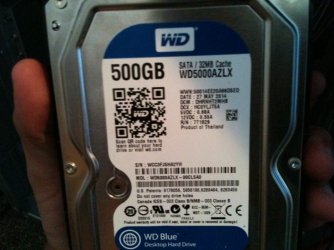
Can you please post a clear screenshot of the HDD label side and it's connector side ?
 

My Computer My Computer

At a glance

Windows 7 Ultimate x64
Computer type
PC/Desktop
OS
Windows 7 Ultimate x64
A jumper is nothing but a small connector to short two pins. It will look like this ;

jumper.gif


BIOS-CMOS-motherboard-jumper.jpg


You can unplug a jumper from an old IDE HDD/CD or from an old MoBo. Your local computer shop will have plenty of them.

Can you please post a clear screenshot of the HDD label side and it's connector side ?

I definitely can, but I am not home currently. I will post one when I can.
 

My Computer My Computer

At a glance

Windows 8.1 64bit
Computer type
Laptop
Computer Manufacturer/Model Number
Asus
OS
Windows 8.1 64bit
Wait,

You already installed win7 to this new HD in a differet computer (different MB) ?

Sometimes that will work, but it could be your BIG Problem.
 

My Computer My Computer

At a glance

Win7 Enterprise, Win7 x86 (Ult 7600), Win7 x6...AMD fx8350 4ghz, AMD-32 2400mhz, AMD-64 3200m...2gb, 4gb on the Ult 7600, 4gb on Technet RTM,...Draw my own Graphics, several nVidia cards
Computer type
PC/Desktop
Computer Manufacturer/Model Number
Built them myself, Science Experiments !
OS
Win7 Enterprise, Win7 x86 (Ult 7600), Win7 x64 Ult 7600, TechNet RTM on AMD x64 (2.8Ghz)
CPU
AMD fx8350 4ghz, AMD-32 2400mhz, AMD-64 3200mhz, AMDx64 2.8G
Motherboard
SIS 755, ECS-K8M890M-M (Ult 7600), GigaByte & others
Memory
2gb, 4gb on the Ult 7600, 4gb on Technet RTM, 32gb on FX8350
Graphics Card(s)
Draw my own Graphics, several nVidia cards
Sound Card
on motherboard
Monitor(s) Displays
19" flat scr, 28" I-Inc widescr,22" Emprex Widescr, 23" Acer
Screen Resolution
1280 x 1024, 1440 x 900, 1920 x 1080
Hard Drives
6 pata Ide HD's & 2 Sata HD's
added 80gb external on Ult 7600 computer,
numerous extra 1tb, 2TB, 3Tb SATA HD's
A collection of ext HD Docks w/ HDs
PSU
430w, 550w, 600w, 700, 800, etc
Case
All Generic Full Towers
Cooling
Open Air & a few fans, some w/ colored LEDs
Keyboard
Compaq & Dell recycled from GoodWill
Mouse
Made in China Optical Wired Mouse
Internet Speed
Fast Cable InterNet
Antivirus
AVG Free on 24 different Desktops, NO Problems!
Browser
IE 8 is preferred, but use FireFox sometimes
Other Info
Linksys Routers, switches, & Hubs
Too Many USB Flash Drives to count, Biggest is 64GB !
Eight computers in my home network.
Sixteen computers at my business network.
Linked via TeamViewer !
Lots of old used spare computer parts everywhere!
Wait,

You already installed win7 to this new HD in a differet computer (different MB) ?

Sometimes that will work, but it could be your BIG Problem.

Hmmmm, I will go to a completely different computer and try and plug in the Hard Drive and sees if it recognizes it.
 

My Computer My Computer

At a glance

Windows 8.1 64bit
Computer type
Laptop
Computer Manufacturer/Model Number
Asus
OS
Windows 8.1 64bit
A jumper is nothing but a small connector to short two pins. It will look like this ;

jumper.gif


BIOS-CMOS-motherboard-jumper.jpg


You can unplug a jumper from an old IDE HDD/CD or from an old MoBo. Your local computer shop will have plenty of them.

Can you please post a clear screenshot of the HDD label side and it's connector side ?

I have a jumper now, and here are the screenshots of my Hard Drive.
 

Attachments

  • photo 5.jpg
    photo 5.jpg
    149.9 KB · Views: 0
  • photo 6.jpg
    photo 6.jpg
    118.1 KB · Views: 0

My Computer My Computer

At a glance

Windows 8.1 64bit
Computer type
Laptop
Computer Manufacturer/Model Number
Asus
OS
Windows 8.1 64bit
Wait,

You already installed win7 to this new HD in a differet computer (different MB) ?

Sometimes that will work, but it could be your BIG Problem.

So, I tried it out on a different computer (the hard drive). It was recognized, but it wouldn't start the windows. Then I inserted windows install disk and formatted/deleted my "New Hard Drive". Then unplugged from that computer and I'm going to try it in the computer we are trying to get to work. I also have a jumper available if all else fails.
 

My Computer My Computer

At a glance

Windows 8.1 64bit
Computer type
Laptop
Computer Manufacturer/Model Number
Asus
OS
Windows 8.1 64bit
Hard Drive still isn't recognized. :/
 

My Computer My Computer

At a glance

Windows 8.1 64bit
Computer type
Laptop
Computer Manufacturer/Model Number
Asus
OS
Windows 8.1 64bit

My Computer My Computer

At a glance

Win7 Enterprise, Win7 x86 (Ult 7600), Win7 x6...AMD fx8350 4ghz, AMD-32 2400mhz, AMD-64 3200m...2gb, 4gb on the Ult 7600, 4gb on Technet RTM,...Draw my own Graphics, several nVidia cards
Computer type
PC/Desktop
Computer Manufacturer/Model Number
Built them myself, Science Experiments !
OS
Win7 Enterprise, Win7 x86 (Ult 7600), Win7 x64 Ult 7600, TechNet RTM on AMD x64 (2.8Ghz)
CPU
AMD fx8350 4ghz, AMD-32 2400mhz, AMD-64 3200mhz, AMDx64 2.8G
Motherboard
SIS 755, ECS-K8M890M-M (Ult 7600), GigaByte & others
Memory
2gb, 4gb on the Ult 7600, 4gb on Technet RTM, 32gb on FX8350
Graphics Card(s)
Draw my own Graphics, several nVidia cards
Sound Card
on motherboard
Monitor(s) Displays
19" flat scr, 28" I-Inc widescr,22" Emprex Widescr, 23" Acer
Screen Resolution
1280 x 1024, 1440 x 900, 1920 x 1080
Hard Drives
6 pata Ide HD's & 2 Sata HD's
added 80gb external on Ult 7600 computer,
numerous extra 1tb, 2TB, 3Tb SATA HD's
A collection of ext HD Docks w/ HDs
PSU
430w, 550w, 600w, 700, 800, etc
Case
All Generic Full Towers
Cooling
Open Air & a few fans, some w/ colored LEDs
Keyboard
Compaq & Dell recycled from GoodWill
Mouse
Made in China Optical Wired Mouse
Internet Speed
Fast Cable InterNet
Antivirus
AVG Free on 24 different Desktops, NO Problems!
Browser
IE 8 is preferred, but use FireFox sometimes
Other Info
Linksys Routers, switches, & Hubs
Too Many USB Flash Drives to count, Biggest is 64GB !
Eight computers in my home network.
Sixteen computers at my business network.
Linked via TeamViewer !
Lots of old used spare computer parts everywhere!
Back
Top