Solved New hardrive trouble.

ShadowFalls

New member
Member
Local time
2:22 PM
Messages
68
Location
Holt, Fl
Hello. I just upgraded all the guts of my computer and I've run into a issue. I bought 2 of these hardrives: Western Digital WD Black WD4001FAEX 4TB 7200 RPM 64MB Cache SATA 6.0Gb/s 3.5" Internal Hard Drive - Newegg.com and just installed them. Originally I didn't want windows to partition them but it went ahead and did it anyway and now here is where the issue starts. A couple of the partitions are showing up as "Unallocated" volumes and I can't seem to create a new volume out of them. Look at the screen shot to see what i mean.
 

Attachments

  • screen1.png
    screen1.png
    47.2 KB · Views: 11

My Computer

Computer type
PC/Desktop
Computer Manufacturer/Model Number
Custom PC
OS
Microsoft Windows 7 Professional 64-bit 7601 Multiprocessor Free Service Pack 1
CPU
Intel(R) Core(TM) i7-3970x CPU @ 3.50GHz 4.00Ghz
Motherboard
Gigabyte Technology X79-UP4
Memory
Total: 12.00 GB
Graphics Card(s)
NVIDIA/EVGA GeForce GTX 690
Sound Card
motherboard
Monitor(s) Displays
Acer HN274Hbmiiid Black
Screen Resolution
1920 x 1080 x 32 bits (4294967296 colors) @ 120 Hz
Hard Drives
X2 Western Digital WD Black WD4001FAEX 4TB
PSU
Corsair AX1200
Case
coolermaster HAFX
Cooling
Intel Thermal Solution RTS2011LC
Keyboard
RAZER DeathStalker
Mouse
Wacom Tablet Intuos 4
Internet Speed
DSL 256k
Antivirus
Kaspersky
Browser
Firefox
That's because the popup partitioner program is dumb and cannot make GPT disks (the max partition size of a MBR disk is 2 TB like the partitions in your screenshot). This tutorial to fix it.

Although I don't know if your motherboard can boot from GPT disks, in theory it should (windows 7 does support GPT disks fine).
 

My Computer

Computer type
PC/Desktop
Computer Manufacturer/Model Number
custom built
OS
Win 7 Pro 64-bit 7601
CPU
AMD Phenom 9650 QuadCore, revision DR-B3
Motherboard
ASUS M4A78
Memory
5 GB yes I run 2x 2GB and 1x 1GB, different brand, spank me.
Graphics Card(s)
NVIDIA GeForce 9800 GT 512 Mb, unknown manufacturer.
Sound Card
Crappy Realtek Integrated Audio
Monitor(s) Displays
Fujitsu Siemens P19-3P
Screen Resolution
1280 x 1024 x 32 bits @ 60 Hz Oh yeah, 4:3 rocks!
Hard Drives
(1) MAXTOR S TM3320613AS SATA Disk Device (2) STM35004 18AS SATA Disk Device (3) TOSHIBA USB 2.5"-HDD
PSU
whatever, around 450w
Case
Scavenged from old company PC, 10+ years old
Cooling
CPU fan, GPU fan, case fan, nothing fancy
Keyboard
Microsoft, PS/2, white.
Mouse
Optical, logitec.
Internet Speed
effective max speeds: 70-ish kB/s down 30-ish kB/s up
Antivirus
Avira, free edition.
Browser
Firefox with FXChrome to make it look like Google Chrome :P
Other Info
Was discarded by previous owner due to "horrible performance".
Was running Win Xp from a IDE drive. Yeah. Was a pain.
SATA II drive and Win7 and it zips away! Yay!
thanks I'll give it a try
 

My Computer

Computer type
PC/Desktop
Computer Manufacturer/Model Number
Custom PC
OS
Microsoft Windows 7 Professional 64-bit 7601 Multiprocessor Free Service Pack 1
CPU
Intel(R) Core(TM) i7-3970x CPU @ 3.50GHz 4.00Ghz
Motherboard
Gigabyte Technology X79-UP4
Memory
Total: 12.00 GB
Graphics Card(s)
NVIDIA/EVGA GeForce GTX 690
Sound Card
motherboard
Monitor(s) Displays
Acer HN274Hbmiiid Black
Screen Resolution
1920 x 1080 x 32 bits (4294967296 colors) @ 120 Hz
Hard Drives
X2 Western Digital WD Black WD4001FAEX 4TB
PSU
Corsair AX1200
Case
coolermaster HAFX
Cooling
Intel Thermal Solution RTS2011LC
Keyboard
RAZER DeathStalker
Mouse
Wacom Tablet Intuos 4
Internet Speed
DSL 256k
Antivirus
Kaspersky
Browser
Firefox
also my goal is to merge the partitions that aren't necessary together
 

My Computer

Computer type
PC/Desktop
Computer Manufacturer/Model Number
Custom PC
OS
Microsoft Windows 7 Professional 64-bit 7601 Multiprocessor Free Service Pack 1
CPU
Intel(R) Core(TM) i7-3970x CPU @ 3.50GHz 4.00Ghz
Motherboard
Gigabyte Technology X79-UP4
Memory
Total: 12.00 GB
Graphics Card(s)
NVIDIA/EVGA GeForce GTX 690
Sound Card
motherboard
Monitor(s) Displays
Acer HN274Hbmiiid Black
Screen Resolution
1920 x 1080 x 32 bits (4294967296 colors) @ 120 Hz
Hard Drives
X2 Western Digital WD Black WD4001FAEX 4TB
PSU
Corsair AX1200
Case
coolermaster HAFX
Cooling
Intel Thermal Solution RTS2011LC
Keyboard
RAZER DeathStalker
Mouse
Wacom Tablet Intuos 4
Internet Speed
DSL 256k
Antivirus
Kaspersky
Browser
Firefox
there is one issue i'm having and that is that I cant delete the volumes that my os is running off of which means i can't convert the drive that the os is running off of. Also it's kind of weird but if you look at my screen shot again I guess the windows 7 install messed up and for some reason put the system reserved memory on the other hardrive rather then the c drive so it wont let me delete that volume either.
 

My Computer

Computer type
PC/Desktop
Computer Manufacturer/Model Number
Custom PC
OS
Microsoft Windows 7 Professional 64-bit 7601 Multiprocessor Free Service Pack 1
CPU
Intel(R) Core(TM) i7-3970x CPU @ 3.50GHz 4.00Ghz
Motherboard
Gigabyte Technology X79-UP4
Memory
Total: 12.00 GB
Graphics Card(s)
NVIDIA/EVGA GeForce GTX 690
Sound Card
motherboard
Monitor(s) Displays
Acer HN274Hbmiiid Black
Screen Resolution
1920 x 1080 x 32 bits (4294967296 colors) @ 120 Hz
Hard Drives
X2 Western Digital WD Black WD4001FAEX 4TB
PSU
Corsair AX1200
Case
coolermaster HAFX
Cooling
Intel Thermal Solution RTS2011LC
Keyboard
RAZER DeathStalker
Mouse
Wacom Tablet Intuos 4
Internet Speed
DSL 256k
Antivirus
Kaspersky
Browser
Firefox
The drives I want to convert are Disk 0 and Disk 1 and my motherboard is a Gigabyte X79-UP4
 

My Computer

Computer type
PC/Desktop
Computer Manufacturer/Model Number
Custom PC
OS
Microsoft Windows 7 Professional 64-bit 7601 Multiprocessor Free Service Pack 1
CPU
Intel(R) Core(TM) i7-3970x CPU @ 3.50GHz 4.00Ghz
Motherboard
Gigabyte Technology X79-UP4
Memory
Total: 12.00 GB
Graphics Card(s)
NVIDIA/EVGA GeForce GTX 690
Sound Card
motherboard
Monitor(s) Displays
Acer HN274Hbmiiid Black
Screen Resolution
1920 x 1080 x 32 bits (4294967296 colors) @ 120 Hz
Hard Drives
X2 Western Digital WD Black WD4001FAEX 4TB
PSU
Corsair AX1200
Case
coolermaster HAFX
Cooling
Intel Thermal Solution RTS2011LC
Keyboard
RAZER DeathStalker
Mouse
Wacom Tablet Intuos 4
Internet Speed
DSL 256k
Antivirus
Kaspersky
Browser
Firefox
also my goal is to merge the partitions that aren't necessary together
If you mean removing the 100 MB system reserved partition, this tutorial. Works regardless of where the 100 mb partition is at the moment, and then you can delete it.

I cant delete the volumes that my os is running off of which means i can't convert the drive that the os is running off of.
Same tutorial linked about converting to GPT, OPTION TWO, step 2. If you do it from the recovery part of the installation disk you are sure it will work.
 

My Computer

Computer type
PC/Desktop
Computer Manufacturer/Model Number
custom built
OS
Win 7 Pro 64-bit 7601
CPU
AMD Phenom 9650 QuadCore, revision DR-B3
Motherboard
ASUS M4A78
Memory
5 GB yes I run 2x 2GB and 1x 1GB, different brand, spank me.
Graphics Card(s)
NVIDIA GeForce 9800 GT 512 Mb, unknown manufacturer.
Sound Card
Crappy Realtek Integrated Audio
Monitor(s) Displays
Fujitsu Siemens P19-3P
Screen Resolution
1280 x 1024 x 32 bits @ 60 Hz Oh yeah, 4:3 rocks!
Hard Drives
(1) MAXTOR S TM3320613AS SATA Disk Device (2) STM35004 18AS SATA Disk Device (3) TOSHIBA USB 2.5"-HDD
PSU
whatever, around 450w
Case
Scavenged from old company PC, 10+ years old
Cooling
CPU fan, GPU fan, case fan, nothing fancy
Keyboard
Microsoft, PS/2, white.
Mouse
Optical, logitec.
Internet Speed
effective max speeds: 70-ish kB/s down 30-ish kB/s up
Antivirus
Avira, free edition.
Browser
Firefox with FXChrome to make it look like Google Chrome :P
Other Info
Was discarded by previous owner due to "horrible performance".
Was running Win Xp from a IDE drive. Yeah. Was a pain.
SATA II drive and Win7 and it zips away! Yay!
I guess I have to restart before I can delete the 100mb system reserve partition, so I'll get back to you tomorrow and let you know if everything works out since I'm in the midst of moving a large amount of files from one hard drive to another
 

My Computer

Computer type
PC/Desktop
Computer Manufacturer/Model Number
Custom PC
OS
Microsoft Windows 7 Professional 64-bit 7601 Multiprocessor Free Service Pack 1
CPU
Intel(R) Core(TM) i7-3970x CPU @ 3.50GHz 4.00Ghz
Motherboard
Gigabyte Technology X79-UP4
Memory
Total: 12.00 GB
Graphics Card(s)
NVIDIA/EVGA GeForce GTX 690
Sound Card
motherboard
Monitor(s) Displays
Acer HN274Hbmiiid Black
Screen Resolution
1920 x 1080 x 32 bits (4294967296 colors) @ 120 Hz
Hard Drives
X2 Western Digital WD Black WD4001FAEX 4TB
PSU
Corsair AX1200
Case
coolermaster HAFX
Cooling
Intel Thermal Solution RTS2011LC
Keyboard
RAZER DeathStalker
Mouse
Wacom Tablet Intuos 4
Internet Speed
DSL 256k
Antivirus
Kaspersky
Browser
Firefox
You should plan on reinstalling Windows 7 fresh. That way you can wipe the disks, initialize them GPT, partition them any way you want, and not have to deal with any Windows file system issues.

If you waited too long before asking this question and you have already spent hours installing programs and configuring, then you could make a disk image of the SR and C drive and restore them to the 'new' disk after you have done the conversion.
 

My Computer

Computer type
PC/Desktop
Computer Manufacturer/Model Number
Home Built - Jan 2013
OS
Windows 7 64 Bit Home Premium SP1
CPU
i7-3820
Motherboard
Asus P9X79-PRO - Bios 4608
Memory
GSkill F3-14900CL9Q - 16GB
Graphics Card(s)
EVGA GeForce GTX660 - Driver 352.86
Sound Card
On board Realtek ALC898
Monitor(s) Displays
Acer S271HL
Screen Resolution
1920 x 1080
Hard Drives
#1- Samsung 840 Pro Series
#2- Western Digital WD1002FAEX Sata3 Black
#3- Western Digital WD1002FAEX Sata3 Black
PSU
Corsair CMPSU-850TX-V2 - 850 watt (by Seasonic)
Case
Corsair Obsidian 550D
Cooling
Standard 3 120mm case fans, Cooler Master Hyper 212 EVO
Keyboard
MS KC-0405
Mouse
Intellimouse 5-button
Internet Speed
56 Mbits/Sec (on a good day)
Antivirus
Avast & Malwarebytes
Browser
Firefox
Other Info
Asus DVD - DRW-24B1ST 24X
Note: Regarding Windows 7 and GPT disks:

  • Any 64-bit version of Windows 7 will boot from a GPT format disk/partition provided it is on a UEFI based system.
  • 32 bit versions of Windows7 will not. Neither will any version of XP.
  • Legacy BIOS systems can read and write to GPT disks, but do not support booting an OS from one.
  • You cannot mix disk formats - have MBR and GPT on the same hard drive. You can have mixed formats on different drives, but the Boot Partition must be on the GPT disk in UEFI systems.
 

My Computer

Computer type
PC/Desktop
Computer Manufacturer/Model Number
Home Built - Jan 2013
OS
Windows 7 64 Bit Home Premium SP1
CPU
i7-3820
Motherboard
Asus P9X79-PRO - Bios 4608
Memory
GSkill F3-14900CL9Q - 16GB
Graphics Card(s)
EVGA GeForce GTX660 - Driver 352.86
Sound Card
On board Realtek ALC898
Monitor(s) Displays
Acer S271HL
Screen Resolution
1920 x 1080
Hard Drives
#1- Samsung 840 Pro Series
#2- Western Digital WD1002FAEX Sata3 Black
#3- Western Digital WD1002FAEX Sata3 Black
PSU
Corsair CMPSU-850TX-V2 - 850 watt (by Seasonic)
Case
Corsair Obsidian 550D
Cooling
Standard 3 120mm case fans, Cooler Master Hyper 212 EVO
Keyboard
MS KC-0405
Mouse
Intellimouse 5-button
Internet Speed
56 Mbits/Sec (on a good day)
Antivirus
Avast & Malwarebytes
Browser
Firefox
Other Info
Asus DVD - DRW-24B1ST 24X
well right now im trying to back up all my important stuff so i can convert without loosing anything. IT should have been done by now but windows keep going blue screen on me so now im doing it in safe mode. Once It's done I will convert using the tutorial linked to me and will see how everything works out. Also quick question. Should I merge partitions or expand and existing one if I want the drives to be whole again. Those are the 2 options given to me.
 

My Computer

Computer type
PC/Desktop
Computer Manufacturer/Model Number
Custom PC
OS
Microsoft Windows 7 Professional 64-bit 7601 Multiprocessor Free Service Pack 1
CPU
Intel(R) Core(TM) i7-3970x CPU @ 3.50GHz 4.00Ghz
Motherboard
Gigabyte Technology X79-UP4
Memory
Total: 12.00 GB
Graphics Card(s)
NVIDIA/EVGA GeForce GTX 690
Sound Card
motherboard
Monitor(s) Displays
Acer HN274Hbmiiid Black
Screen Resolution
1920 x 1080 x 32 bits (4294967296 colors) @ 120 Hz
Hard Drives
X2 Western Digital WD Black WD4001FAEX 4TB
PSU
Corsair AX1200
Case
coolermaster HAFX
Cooling
Intel Thermal Solution RTS2011LC
Keyboard
RAZER DeathStalker
Mouse
Wacom Tablet Intuos 4
Internet Speed
DSL 256k
Antivirus
Kaspersky
Browser
Firefox
Should I merge partitions or expand and existing one if I want the drives to be whole again.
Delete 100 mb one after you did the tutorial to make C bootable, and expand the single partition you have on both disks.

Also, feel free to follow the BSOD posting instructions to post the logs of the bluescreens in the BSOD section.
 

My Computer

Computer type
PC/Desktop
Computer Manufacturer/Model Number
custom built
OS
Win 7 Pro 64-bit 7601
CPU
AMD Phenom 9650 QuadCore, revision DR-B3
Motherboard
ASUS M4A78
Memory
5 GB yes I run 2x 2GB and 1x 1GB, different brand, spank me.
Graphics Card(s)
NVIDIA GeForce 9800 GT 512 Mb, unknown manufacturer.
Sound Card
Crappy Realtek Integrated Audio
Monitor(s) Displays
Fujitsu Siemens P19-3P
Screen Resolution
1280 x 1024 x 32 bits @ 60 Hz Oh yeah, 4:3 rocks!
Hard Drives
(1) MAXTOR S TM3320613AS SATA Disk Device (2) STM35004 18AS SATA Disk Device (3) TOSHIBA USB 2.5"-HDD
PSU
whatever, around 450w
Case
Scavenged from old company PC, 10+ years old
Cooling
CPU fan, GPU fan, case fan, nothing fancy
Keyboard
Microsoft, PS/2, white.
Mouse
Optical, logitec.
Internet Speed
effective max speeds: 70-ish kB/s down 30-ish kB/s up
Antivirus
Avira, free edition.
Browser
Firefox with FXChrome to make it look like Google Chrome :P
Other Info
Was discarded by previous owner due to "horrible performance".
Was running Win Xp from a IDE drive. Yeah. Was a pain.
SATA II drive and Win7 and it zips away! Yay!
Iok. the conversions worked. but now I'm having issues getting Windows to install without converting the drive back to mbr and partitioning it again. would appreciate it if someone walked me through how to install Windows on a gpt with minimal partitions
-my motherboard is a gigabyte x79-up4
PS- I would give you rep for all the useful posts you've given me but my phone makes it extremely difficult
 

My Computer

Computer type
PC/Desktop
Computer Manufacturer/Model Number
Custom PC
OS
Microsoft Windows 7 Professional 64-bit 7601 Multiprocessor Free Service Pack 1
CPU
Intel(R) Core(TM) i7-3970x CPU @ 3.50GHz 4.00Ghz
Motherboard
Gigabyte Technology X79-UP4
Memory
Total: 12.00 GB
Graphics Card(s)
NVIDIA/EVGA GeForce GTX 690
Sound Card
motherboard
Monitor(s) Displays
Acer HN274Hbmiiid Black
Screen Resolution
1920 x 1080 x 32 bits (4294967296 colors) @ 120 Hz
Hard Drives
X2 Western Digital WD Black WD4001FAEX 4TB
PSU
Corsair AX1200
Case
coolermaster HAFX
Cooling
Intel Thermal Solution RTS2011LC
Keyboard
RAZER DeathStalker
Mouse
Wacom Tablet Intuos 4
Internet Speed
DSL 256k
Antivirus
Kaspersky
Browser
Firefox
Connect the hard drive to another PC and make it single-partition and GPT. Move it to the new rig and disconnect all other hard drives before you start installation.
During installation you select Custom (advanced) and then select the partition you created before, and proceed to install.
Don't create/delete partitions from that panel as it's unable to make GPT partitions, and if you don't select a partition to install windows 7 into, it will create that 100 mb system partition alongside C.

When booting make sure that in the BIOS you are booting from UEFI/EFI devices (from the bios screens, look in the boot order list should say UEFI:THE DEVICE NAME), if not, check if there is an option to enable this.

Otherwise, tell more about the issues you are getting.
 

My Computer

Computer type
PC/Desktop
Computer Manufacturer/Model Number
custom built
OS
Win 7 Pro 64-bit 7601
CPU
AMD Phenom 9650 QuadCore, revision DR-B3
Motherboard
ASUS M4A78
Memory
5 GB yes I run 2x 2GB and 1x 1GB, different brand, spank me.
Graphics Card(s)
NVIDIA GeForce 9800 GT 512 Mb, unknown manufacturer.
Sound Card
Crappy Realtek Integrated Audio
Monitor(s) Displays
Fujitsu Siemens P19-3P
Screen Resolution
1280 x 1024 x 32 bits @ 60 Hz Oh yeah, 4:3 rocks!
Hard Drives
(1) MAXTOR S TM3320613AS SATA Disk Device (2) STM35004 18AS SATA Disk Device (3) TOSHIBA USB 2.5"-HDD
PSU
whatever, around 450w
Case
Scavenged from old company PC, 10+ years old
Cooling
CPU fan, GPU fan, case fan, nothing fancy
Keyboard
Microsoft, PS/2, white.
Mouse
Optical, logitec.
Internet Speed
effective max speeds: 70-ish kB/s down 30-ish kB/s up
Antivirus
Avira, free edition.
Browser
Firefox with FXChrome to make it look like Google Chrome :P
Other Info
Was discarded by previous owner due to "horrible performance".
Was running Win Xp from a IDE drive. Yeah. Was a pain.
SATA II drive and Win7 and it zips away! Yay!
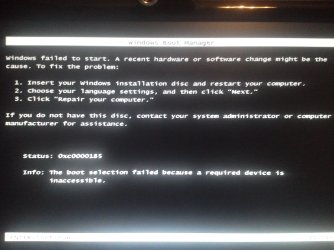
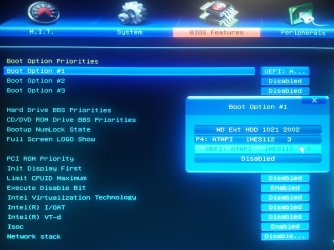
get an error when I try to boot Windows in uefi (look at screen shot)
 

Attachments

  • IMG_20130718_0354531220121246.jpg
    IMG_20130718_0354531220121246.jpg
    342.5 KB · Views: 3
  • IMG_20130718_035920-1915342561.jpg
    IMG_20130718_035920-1915342561.jpg
    399.4 KB · Views: 5

My Computer

Computer type
PC/Desktop
Computer Manufacturer/Model Number
Custom PC
OS
Microsoft Windows 7 Professional 64-bit 7601 Multiprocessor Free Service Pack 1
CPU
Intel(R) Core(TM) i7-3970x CPU @ 3.50GHz 4.00Ghz
Motherboard
Gigabyte Technology X79-UP4
Memory
Total: 12.00 GB
Graphics Card(s)
NVIDIA/EVGA GeForce GTX 690
Sound Card
motherboard
Monitor(s) Displays
Acer HN274Hbmiiid Black
Screen Resolution
1920 x 1080 x 32 bits (4294967296 colors) @ 120 Hz
Hard Drives
X2 Western Digital WD Black WD4001FAEX 4TB
PSU
Corsair AX1200
Case
coolermaster HAFX
Cooling
Intel Thermal Solution RTS2011LC
Keyboard
RAZER DeathStalker
Mouse
Wacom Tablet Intuos 4
Internet Speed
DSL 256k
Antivirus
Kaspersky
Browser
Firefox
I think this may be happening because gpt drive doesn't yet have a new volume. I'm not sure through so I'll do what you said and use another computer to go ahead and create one.
 

My Computer

Computer type
PC/Desktop
Computer Manufacturer/Model Number
Custom PC
OS
Microsoft Windows 7 Professional 64-bit 7601 Multiprocessor Free Service Pack 1
CPU
Intel(R) Core(TM) i7-3970x CPU @ 3.50GHz 4.00Ghz
Motherboard
Gigabyte Technology X79-UP4
Memory
Total: 12.00 GB
Graphics Card(s)
NVIDIA/EVGA GeForce GTX 690
Sound Card
motherboard
Monitor(s) Displays
Acer HN274Hbmiiid Black
Screen Resolution
1920 x 1080 x 32 bits (4294967296 colors) @ 120 Hz
Hard Drives
X2 Western Digital WD Black WD4001FAEX 4TB
PSU
Corsair AX1200
Case
coolermaster HAFX
Cooling
Intel Thermal Solution RTS2011LC
Keyboard
RAZER DeathStalker
Mouse
Wacom Tablet Intuos 4
Internet Speed
DSL 256k
Antivirus
Kaspersky
Browser
Firefox
I'm confused. You say "when I try to boot Windows". That makes me think you are trying to start an existing Windows installation.
Are you trying to start the Windows Installation DVD instead?

I got that message the first time I attempted to install W7 on a UEFI system. In my case it turned out that trying to install from a USB stick that was plugged into a USB 3.0 port (blue) was the problem. I needed to use a USB 2.0 port (black) and then the install went fine. This was because my system' chipset does not support USB3 at the UEFI/BIOS level, it needs drivers to work, and drivers only tale effect in the Windows environment..

Please tell us:

  • The installation media you are using to install Windows
  • What version of Windows (64 bit?)
Also:
I see that you have a WD external hard drive connected from the pic of the UEFI settings. This should be disconnected during the installation. Only the internal hard drive you are installing W7 on should be connected to the system. (And the optical drive if you are installing by DVD)
 

My Computer

Computer type
PC/Desktop
Computer Manufacturer/Model Number
Home Built - Jan 2013
OS
Windows 7 64 Bit Home Premium SP1
CPU
i7-3820
Motherboard
Asus P9X79-PRO - Bios 4608
Memory
GSkill F3-14900CL9Q - 16GB
Graphics Card(s)
EVGA GeForce GTX660 - Driver 352.86
Sound Card
On board Realtek ALC898
Monitor(s) Displays
Acer S271HL
Screen Resolution
1920 x 1080
Hard Drives
#1- Samsung 840 Pro Series
#2- Western Digital WD1002FAEX Sata3 Black
#3- Western Digital WD1002FAEX Sata3 Black
PSU
Corsair CMPSU-850TX-V2 - 850 watt (by Seasonic)
Case
Corsair Obsidian 550D
Cooling
Standard 3 120mm case fans, Cooler Master Hyper 212 EVO
Keyboard
MS KC-0405
Mouse
Intellimouse 5-button
Internet Speed
56 Mbits/Sec (on a good day)
Antivirus
Avast & Malwarebytes
Browser
Firefox
Other Info
Asus DVD - DRW-24B1ST 24X
I'm trying to boot a DVD copy of Windows 7 pro 64 bit in uefi. the drive i'm using is a bd drive. all drives except the bd drive and the internal hard drive I wish to install Windows on are disconnected however I went ahead and left my case's e-sata cable plugged into sata port 7. my bd drive is plugged into sata port 0 and my internal hard drive is connected to sata port 1. message still appears
 

My Computer

Computer type
PC/Desktop
Computer Manufacturer/Model Number
Custom PC
OS
Microsoft Windows 7 Professional 64-bit 7601 Multiprocessor Free Service Pack 1
CPU
Intel(R) Core(TM) i7-3970x CPU @ 3.50GHz 4.00Ghz
Motherboard
Gigabyte Technology X79-UP4
Memory
Total: 12.00 GB
Graphics Card(s)
NVIDIA/EVGA GeForce GTX 690
Sound Card
motherboard
Monitor(s) Displays
Acer HN274Hbmiiid Black
Screen Resolution
1920 x 1080 x 32 bits (4294967296 colors) @ 120 Hz
Hard Drives
X2 Western Digital WD Black WD4001FAEX 4TB
PSU
Corsair AX1200
Case
coolermaster HAFX
Cooling
Intel Thermal Solution RTS2011LC
Keyboard
RAZER DeathStalker
Mouse
Wacom Tablet Intuos 4
Internet Speed
DSL 256k
Antivirus
Kaspersky
Browser
Firefox
I diconnected the esata and still get the error
 

My Computer

Computer type
PC/Desktop
Computer Manufacturer/Model Number
Custom PC
OS
Microsoft Windows 7 Professional 64-bit 7601 Multiprocessor Free Service Pack 1
CPU
Intel(R) Core(TM) i7-3970x CPU @ 3.50GHz 4.00Ghz
Motherboard
Gigabyte Technology X79-UP4
Memory
Total: 12.00 GB
Graphics Card(s)
NVIDIA/EVGA GeForce GTX 690
Sound Card
motherboard
Monitor(s) Displays
Acer HN274Hbmiiid Black
Screen Resolution
1920 x 1080 x 32 bits (4294967296 colors) @ 120 Hz
Hard Drives
X2 Western Digital WD Black WD4001FAEX 4TB
PSU
Corsair AX1200
Case
coolermaster HAFX
Cooling
Intel Thermal Solution RTS2011LC
Keyboard
RAZER DeathStalker
Mouse
Wacom Tablet Intuos 4
Internet Speed
DSL 256k
Antivirus
Kaspersky
Browser
Firefox
Well, you are doing everything correctly. That makes this harder!

When you start the computer there should be a key to press to bring up boot device options. (Sometimes it's the ESC key, or F8. Check your manual for Gigabyte). Then manually select the UEFI DVD drive. (This is not the Windows Startup menu)

If that does not work:

It is possible that the DVD copy is bad (you could try using an original DVD or burn a new copy), but it could also be that the EFI folder is not in the location it needs to be for UEFI install on the original disk. (Deep in the recesses of my dusty brain I seem to recall needing to do deal with this) You could try creating a USB Installation stick and try installing from that. That's what I did.

UEFI Bootable USB Flash Drive - Create in Windows
 

My Computer

Computer type
PC/Desktop
Computer Manufacturer/Model Number
Home Built - Jan 2013
OS
Windows 7 64 Bit Home Premium SP1
CPU
i7-3820
Motherboard
Asus P9X79-PRO - Bios 4608
Memory
GSkill F3-14900CL9Q - 16GB
Graphics Card(s)
EVGA GeForce GTX660 - Driver 352.86
Sound Card
On board Realtek ALC898
Monitor(s) Displays
Acer S271HL
Screen Resolution
1920 x 1080
Hard Drives
#1- Samsung 840 Pro Series
#2- Western Digital WD1002FAEX Sata3 Black
#3- Western Digital WD1002FAEX Sata3 Black
PSU
Corsair CMPSU-850TX-V2 - 850 watt (by Seasonic)
Case
Corsair Obsidian 550D
Cooling
Standard 3 120mm case fans, Cooler Master Hyper 212 EVO
Keyboard
MS KC-0405
Mouse
Intellimouse 5-button
Internet Speed
56 Mbits/Sec (on a good day)
Antivirus
Avast & Malwarebytes
Browser
Firefox
Other Info
Asus DVD - DRW-24B1ST 24X
Back
Top