Solved New HD for Inspiron -Win 7 INSTALL- "No boot sector on IHD..."

thomis

New member
Local time
2:06 PM
Messages
33
New HD for Inspiron -Win 7 INSTALL- "No boot sector on IHD..."

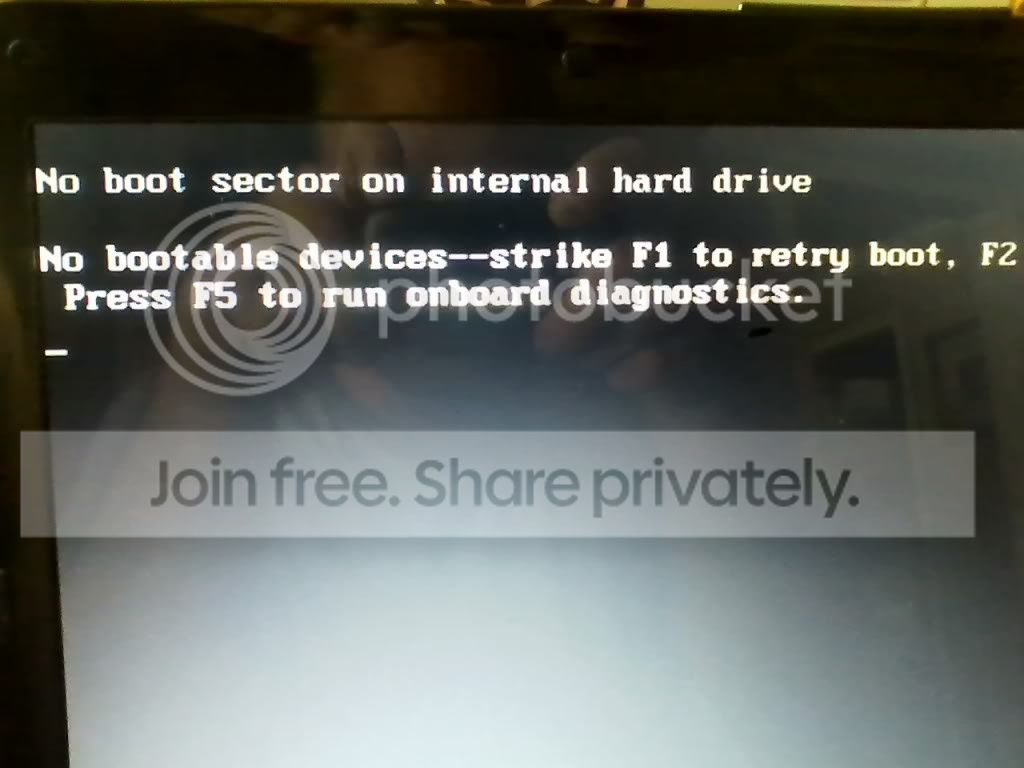
I have a Dell Inspiron 1545 that crashed a couple months ago. I posted several times on these forums trying to fix/ repair/ etc.. It ended up being a toasted HD. So I bought a new 320 GB HD. I just installed the new HD and when I put the flash stick in that has the latest Win 7 Home Premium with SP1 on it to try and do a reinstall, it comes up with the following. I must be missing a step or three. Please advise.
nobootsector.jpg

jtleamer
 

My Computer My Computer

At a glance

Windows 7 Home Premium 64
Computer Manufacturer/Model Number
DELL Inspiron 1545
OS
Windows 7 Home Premium 64
Internet Speed
760
It's not booting the flash stick but trying to boot the unformatted internal HD.

At boot immediately start tapping the F12 key to get a boot menu. The flash stick should be listed under USB, REmovable or HD's - you may need to expand an entry to see it listed. Choose it and it should load files and install.

If not then rewrite your flash stick with the latest official ISO and tool in Steps 1 and 2 of Clean Reinstall - Factory OEM Windows 7
 
Gregrocker-
I started from scratch.
I visited the microsoft support website. I downloaded (to my desktop) the ISO file from here. Then I sent it to a writable dvd (I just right-clicked the file, send to...DVD drive).
When I put the DVD in the broken laptop (remember, new HD) and boot from DVD, it beeps and says:
No boot sector on internal hard drive.
No bootable devices. Strike the F1 key, etc etc.


Also, I tried it another way, using a different source for the latest Windows 7 ISO..
I downloaded (to my desktop) the latest Windows 7 ISO file from here. I then drag it onto the usb flash stick (formatted the stick first). When I put this into the broken laptop, and boot from usb, it says:
Missing operating system_

One thing I have noticed. In the BIOS, I set it up to boot from dvd or flash. When I turn it on I still have to press the f12 key to chooses to boot from dvd or flash stick.

UPDATE: It's actually working now. Don't know how or why. However, it has been stuck on 5% for an hour. Is this normal?
 
Last edited:

My Computer My Computer

At a glance

Windows 7 Home Premium 64
Computer Manufacturer/Model Number
DELL Inspiron 1545
OS
Windows 7 Home Premium 64
Internet Speed
760

My Computer My Computer

At a glance

Microsoft Windows 10 Professional / Windows 7...Intel i5-357016GB DDR3AMD Radeon HD 7850 2GB
Computer type
PC/Desktop
OS
Microsoft Windows 10 Professional / Windows 7 Professional
CPU
Intel i5-3570
Motherboard
Lenovo Mahobay
Memory
16GB DDR3
Graphics Card(s)
AMD Radeon HD 7850 2GB
Sound Card
(1) Realtek HD Audio (2) AMD HD Audio
Monitor(s) Displays
LG LS192WS
Screen Resolution
1440 x 900 @ 32bit color
Hard Drives
(1) SUV300S37A/120G (2) ST3500413AS SATA Disk Device AHCI mode enabled.
PSU
Corsair HX620
Case
Thermaltake V4 Black Edition
Cooling
Cooler Master Hyper 212 + Artic Silver 5 on CPU/GPU
Keyboard
Dell SK-8115
Mouse
Razer Copperhead with MAPED mat (awesome!)
Internet Speed
100 Mbps up/down
Browser
Chrome
Thomis why is it you couldn't follow the steps I gave you two days ago? Instead you went and downloaded the completely wrong file (SP1 itself) and wasted two days. Do you have a problem following clearly written steps? If so ask back to clear up any confusion.:confused:

It's not booting the flash stick but trying to boot the unformatted internal HD.

At boot immediately start tapping the F12 key to get a boot menu. The flash stick should be listed under USB, REmovable or HD's - you may need to expand an entry to see it listed. Choose it and it should load files and install.

If not then rewrite your flash stick with the latest official ISO and tool in Steps 1 and 2 of Clean Reinstall - Factory OEM Windows 7
 
didn't like product key?

OK. I used the tool in step 2 to burn to usb stick the correct, downloaded ISO file from Digital River. The stick booted just fine and installation went well until the end when it asked for the product key. I had already written the Dell product key down from underneath the laptop. After entering the Dell product key, it took almost half an hour "processing" or working.. but came back with the same screen with the boxes blank, as if asking for the product key again. So I thought it didn't like the product key, so I hit "skip" this time. It went to a black screen. In the bottom right of the screen it read:


build 7601
this copy of windows is not genuine
 

My Computer My Computer

At a glance

Windows 7 Home Premium 64
Computer Manufacturer/Model Number
DELL Inspiron 1545
OS
Windows 7 Home Premium 64
Internet Speed
760

My Computer My Computer

At a glance

W 7 64-bit UltimateIntel Q9550 Yorkfield8GB Dominator 8500C5DATI : XFX 5870
Computer Manufacturer/Model Number
* BFK Customs *
OS
W 7 64-bit Ultimate
CPU
Intel Q9550 Yorkfield
Motherboard
ASUS P5Q Pro
Memory
8GB Dominator 8500C5D
Graphics Card(s)
ATI : XFX 5870
Sound Card
Realtek HD Audio 7-1
Monitor(s) Displays
1x 47" LCD HDMI & 3x 26" LCD HDMI
Screen Resolution
1920x1080P & 1920x1200
Hard Drives
1x 80GB Intel X25-M G2 SSD : 1x 500GB & 1x 640GB WD Caviar Black(s)
PSU
Corsair 620HX
Case
Cooler Master RC-690
Cooling
Tuniq Tower 120, 2x 140mm and 3x 120mm case fans
Keyboard
Microsoft 500
Mouse
Razer Diamondback 3G
Internet Speed
14 Mb/s
Other Info
1x Koutech 3Gb/s SATA HDD Hot Swap Rack
Do you have the exact same version as you got from Dell? The Product Key is for a specific version. e.g. if it was delivered with Windows 7 64 bit Home Premium then make sure you are reinstalling that version. I used to do a lot of support on the Dell forums and we didn't have any problems with users using the ISO download and the Dell supplied product key.
 

My Computer My Computer

At a glance

Windows 10 64 bitIntel i7 6700K16GB Corsair DominatorIntel CPU Graphics
Computer type
PC/Desktop
Computer Manufacturer/Model Number
My Own Build
OS
Windows 10 64 bit
CPU
Intel i7 6700K
Motherboard
ASUS ROG Maximus VIII Hero
Memory
16GB Corsair Dominator
Graphics Card(s)
Intel CPU Graphics
Sound Card
RealTek
Monitor(s) Displays
27" Dell S2719dgf
Screen Resolution
2560X1440
Hard Drives
1 TB Samsung 850 EVO SSD for Win 10 Pro
500GB Samsung 850 EVO SSD for Win 10 Insider
2 TB drive for backup
PSU
EVGA Supernova 750G2
Case
BeQuiet Silent Base 600
Cooling
Deepcool Captain 120EX
Keyboard
Microsoft Wireless 2000
Mouse
Microsoft wireless
Internet Speed
100 MB/sec (Cable)
Antivirus
Microsoft Defender and Malwarebytes
Browser
Edge/Firefox
Other Info
Cakewalk (Sonar) by BandLab and Studio One 4.1 Pro recording studio software. MOTU 896Mk3 Hybrid recording interface, Frontier Tranzport wireless control unit, Behringer X-Touch Control Surface.
Five USB connected optical drives for CD Audio production using Nero BurningROM
After what I did last night (Install Win 7 using the usb then failed after the product key problem), I tried turning the computer on. It has the same problem that began the whole thing. I basically have to start from scrath, boot from usb, re-install windows, to get to the product key page, and then have it fail again. I am using the correct product key, that came with the Win 7 home premium 32-bit which is what the download is.
All I know to do now is call the number and try to activate it over the phone like bare foot kid suggests, but if its not connected to the internet, how will the laptop know it was registered?
Honestly, I'm beginning to think there is something wrong with the laptop other than the HD, which is a brand new one I just replaced.
What else could be wrong with he laptop? I mean, the installation is seriously a slow process.
 

My Computer My Computer

At a glance

Windows 7 Home Premium 64
Computer Manufacturer/Model Number
DELL Inspiron 1545
OS
Windows 7 Home Premium 64
Internet Speed
760
Instead of reinstalling to access Product Key box why don't you ask us how to attempt reactivation, which is accessed at the Computer>Properties activation link?

Installation failure is almost always caused a wrong character typed into the box, if you know for sure you're installing the correct version on the Dell COA sticker.

Sometimes a number and letter can appear nearly identical. Use a magnifying glass if necessary. After you're certain of the key, triple check each character that you type in.
 
...it's over. Just when I was about to throw in the towel with this laptop, I got it up and online late last night. Been working on it off and on for two months!

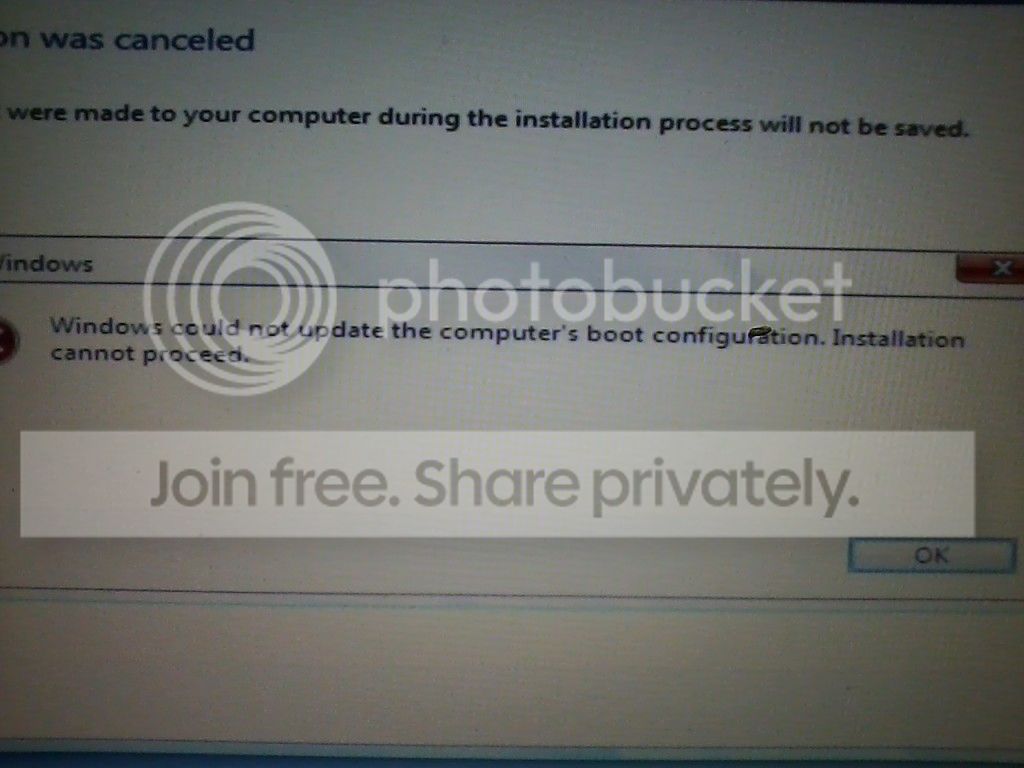
The second time I tried to install Windows the following error box came up:

bootconfig.jpg


I ran startup repair from the newly installed Windows and it let me log on with the product key. All I know is that its working now.

laptopup.jpg
 

My Computer My Computer

At a glance

Windows 7 Home Premium 64
Computer Manufacturer/Model Number
DELL Inspiron 1545
OS
Windows 7 Home Premium 64
Internet Speed
760
Good to see you got it running and thanks for the update.
 

My Computer My Computer

At a glance

W 7 64-bit UltimateIntel Q9550 Yorkfield8GB Dominator 8500C5DATI : XFX 5870
Computer Manufacturer/Model Number
* BFK Customs *
OS
W 7 64-bit Ultimate
CPU
Intel Q9550 Yorkfield
Motherboard
ASUS P5Q Pro
Memory
8GB Dominator 8500C5D
Graphics Card(s)
ATI : XFX 5870
Sound Card
Realtek HD Audio 7-1
Monitor(s) Displays
1x 47" LCD HDMI & 3x 26" LCD HDMI
Screen Resolution
1920x1080P & 1920x1200
Hard Drives
1x 80GB Intel X25-M G2 SSD : 1x 500GB & 1x 640GB WD Caviar Black(s)
PSU
Corsair 620HX
Case
Cooler Master RC-690
Cooling
Tuniq Tower 120, 2x 140mm and 3x 120mm case fans
Keyboard
Microsoft 500
Mouse
Razer Diamondback 3G
Internet Speed
14 Mb/s
Other Info
1x Koutech 3Gb/s SATA HDD Hot Swap Rack
Back
Top