Solved New install of Win 7 Home Prem. 64, driver ?'s

JoeN

New member
Member
Local time
10:12 PM
Messages
68
The install went fine, from XP Pro 32 to Win. 7 64 Home Prem.. I have noticed that MOST drivers (Device Mgr.) are from M$, they are all working fine, NO problems.

I have a Asus P6T motherboard which came w/an Intel X58 / ICH10R chipset, onboard LAN Realtek 8111c and onboard Audio Realtek ACL1200.

In Device Mgr.:
The onboard Audio shows as - High Definition Audio Device, M$ Driver from 2010

The onboard LAN shows as - Realtek PCIe GBE Family Controller, Realtek Driver, ver. 7.46.610.2011

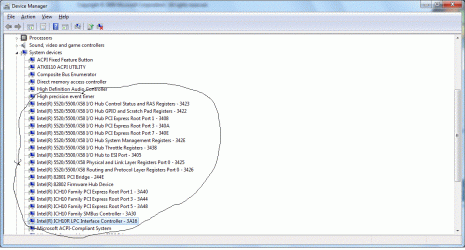
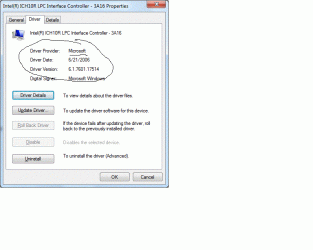
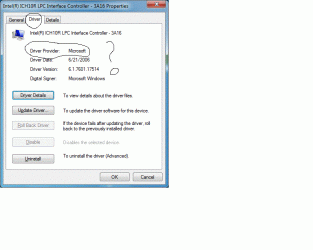
The Intel Chipset shows up under "System Devices" along with many other Intel(R) items, all have M$ drivers from 2006, ver. 6.1.7601.17514

Win 7 seems to work differently than XP pro and I am still getting used to Win 7, even though everything works I would like to install a Realtek driver for the Audio, updated Intel Chipset drivers and possibly updated LAN driver, if possible.

I have found drivers from the Realtek site for Win.7 64 audio and LAN, also from the ASUS site.

The Intel Chipset driver is another story, not sure if I am looking in the right place on the Intel site for the X58

I know "if it ain't broke - don't fix it" this is a computer, you have to "mess" with it :-)

Some help will be appreciated

Joe
 

My Computer My Computer

At a glance

win. 7 64 bit Home PremiumIntel i7 920 overclockedCorsair 6GB overclockedNivida GTX 960
Computer type
PC/Desktop
Computer Manufacturer/Model Number
custom build
OS
win. 7 64 bit Home Premium
CPU
Intel i7 920 overclocked
Motherboard
Asus P6T
Memory
Corsair 6GB overclocked
Graphics Card(s)
Nivida GTX 960
Monitor(s) Displays
ViewSonic 2365 @ 1920 x 1080 DVI
Hard Drives
80 GB Segate
Antivirus
Avast
Browser
IE & Firefox

My Computer My Computer

At a glance

windows 7 home 64bitINTEL-CORE I716GB
Computer Manufacturer/Model Number
W530-3630QM1
OS
windows 7 home 64bit
CPU
INTEL-CORE I7
Memory
16GB
Hard Drives
750GB
Browser
Chrome
Thanks Maxie, I downloaded the .exe file - can I just run the file or is there more to it ??? Joe
 
Last edited:

My Computer My Computer

At a glance

win. 7 64 bit Home PremiumIntel i7 920 overclockedCorsair 6GB overclockedNivida GTX 960
Computer type
PC/Desktop
Computer Manufacturer/Model Number
custom build
OS
win. 7 64 bit Home Premium
CPU
Intel i7 920 overclocked
Motherboard
Asus P6T
Memory
Corsair 6GB overclocked
Graphics Card(s)
Nivida GTX 960
Monitor(s) Displays
ViewSonic 2365 @ 1920 x 1080 DVI
Hard Drives
80 GB Segate
Antivirus
Avast
Browser
IE & Firefox
You should be able to just Run it as normal
 

My Computer My Computer

At a glance

windows 7 home 64bitINTEL-CORE I716GB
Computer Manufacturer/Model Number
W530-3630QM1
OS
windows 7 home 64bit
CPU
INTEL-CORE I7
Memory
16GB
Hard Drives
750GB
Browser
Chrome
Please bare with me here, I am trying to grasp what will happen with this update -

If I just "run" the .exe file will ALL the Intel drivers in "system devices" be changed and updated to Intel ?

or

Do I have to go to the Asus site for my MB Chipset driver 1st, save that driver and use "device mgr" to update all 17 Intel entries, and would I have to do each entry or could I delete all 17, reboot and then install the Asus chipset driver, reboot and then use the link that Maxie referred to ?

I know when I did this with my XP OS I already had the Intel drivers from the beginning

These 2 attachments may help

Thanks again


Joe
 

Attachments

  • device mgr..gif
    device mgr..gif
    84.6 KB · Views: 1
  • intel driver.gif
    intel driver.gif
    39.4 KB · Views: 1

My Computer My Computer

At a glance

win. 7 64 bit Home PremiumIntel i7 920 overclockedCorsair 6GB overclockedNivida GTX 960
Computer type
PC/Desktop
Computer Manufacturer/Model Number
custom build
OS
win. 7 64 bit Home Premium
CPU
Intel i7 920 overclocked
Motherboard
Asus P6T
Memory
Corsair 6GB overclocked
Graphics Card(s)
Nivida GTX 960
Monitor(s) Displays
ViewSonic 2365 @ 1920 x 1080 DVI
Hard Drives
80 GB Segate
Antivirus
Avast
Browser
IE & Firefox
Hi there .. Just run the exe file it will update the Chipset Drivers .. All the Devices you have listed are controlled by the Chipset Driver ...
 

My Computer My Computer

At a glance

windows 7 home 64bitINTEL-CORE I716GB
Computer Manufacturer/Model Number
W530-3630QM1
OS
windows 7 home 64bit
CPU
INTEL-CORE I7
Memory
16GB
Hard Drives
750GB
Browser
Chrome
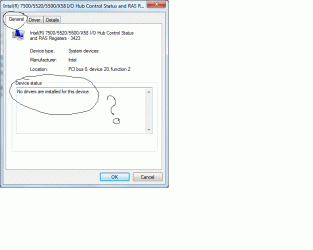
OK, I ran the .exe file from Intel, now in Device Mgr. some of the items I have circled in the above attachment show as Intel drivers and some do not (still M$), also some items under "general" tab show "no drivers installed"

Device Mgr. is clean - nothing red or yellow showing

Could you explain what is going on ?

Sorry if I am being a PITA

Joe
 

My Computer My Computer

At a glance

win. 7 64 bit Home PremiumIntel i7 920 overclockedCorsair 6GB overclockedNivida GTX 960
Computer type
PC/Desktop
Computer Manufacturer/Model Number
custom build
OS
win. 7 64 bit Home Premium
CPU
Intel i7 920 overclocked
Motherboard
Asus P6T
Memory
Corsair 6GB overclocked
Graphics Card(s)
Nivida GTX 960
Monitor(s) Displays
ViewSonic 2365 @ 1920 x 1080 DVI
Hard Drives
80 GB Segate
Antivirus
Avast
Browser
IE & Firefox
Hi Joe .. I am not sure what you mean .. Please post a screenshot of the problem
 

My Computer My Computer

At a glance

windows 7 home 64bitINTEL-CORE I716GB
Computer Manufacturer/Model Number
W530-3630QM1
OS
windows 7 home 64bit
CPU
INTEL-CORE I7
Memory
16GB
Hard Drives
750GB
Browser
Chrome
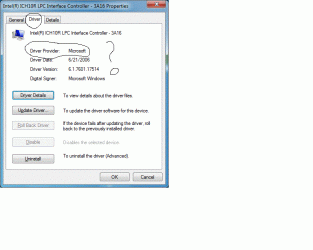
Here are some screenshots, random, from the 17 items circled in device mgr.
 

Attachments

  • Untitled 2.gif
    Untitled 2.gif
    41.4 KB · Views: 1
  • Untitled 3.gif
    Untitled 3.gif
    33.5 KB · Views: 0
  • Untitled.gif
    Untitled.gif
    41.4 KB · Views: 0

My Computer My Computer

At a glance

win. 7 64 bit Home PremiumIntel i7 920 overclockedCorsair 6GB overclockedNivida GTX 960
Computer type
PC/Desktop
Computer Manufacturer/Model Number
custom build
OS
win. 7 64 bit Home Premium
CPU
Intel i7 920 overclocked
Motherboard
Asus P6T
Memory
Corsair 6GB overclocked
Graphics Card(s)
Nivida GTX 960
Monitor(s) Displays
ViewSonic 2365 @ 1920 x 1080 DVI
Hard Drives
80 GB Segate
Antivirus
Avast
Browser
IE & Firefox
Hi again .. Those Devices are linked to the intel management engine .. It is different to Chipset Driver .. There is no point really trying to run an update as it will not improve any thing
 

My Computer My Computer

At a glance

windows 7 home 64bitINTEL-CORE I716GB
Computer Manufacturer/Model Number
W530-3630QM1
OS
windows 7 home 64bit
CPU
INTEL-CORE I7
Memory
16GB
Hard Drives
750GB
Browser
Chrome
Hi Maxie

I really do appreciate your help here, I am still trying to get a grip on what is going on in Device Mgr. with "chipset drivers" -

Am I correct in that the items listed under "system devices" that have the "X58" designation are the only "chipset drivers" all other Intel ICH10 items are as you said " management engine " items ?


Joe
 

My Computer My Computer

At a glance

win. 7 64 bit Home PremiumIntel i7 920 overclockedCorsair 6GB overclockedNivida GTX 960
Computer type
PC/Desktop
Computer Manufacturer/Model Number
custom build
OS
win. 7 64 bit Home Premium
CPU
Intel i7 920 overclocked
Motherboard
Asus P6T
Memory
Corsair 6GB overclocked
Graphics Card(s)
Nivida GTX 960
Monitor(s) Displays
ViewSonic 2365 @ 1920 x 1080 DVI
Hard Drives
80 GB Segate
Antivirus
Avast
Browser
IE & Firefox
Hi Joe ... That is correct your Computer should be working perfectly ..
 

My Computer My Computer

At a glance

windows 7 home 64bitINTEL-CORE I716GB
Computer Manufacturer/Model Number
W530-3630QM1
OS
windows 7 home 64bit
CPU
INTEL-CORE I7
Memory
16GB
Hard Drives
750GB
Browser
Chrome
Thanks Maxie

I decided to leave the LAN driver as is, seeing as it is already a Realtek driver, I updated the Audio driver from the default M$ one to Realtek w/Realtek Control Panel - no problems there.

I still have to give the Chipset drivers some attention, everything seems to be working fine, but I don't like seeing under the "general tab" "no driver installed" then for the same driver under the "driver" tab it shows a Intel or M$ driver is installed, I see this scenario for both the "chipset drivers -x58" and the "management engine" items - stilled confused on this

If you have any thoughts on correcting this - I will try them

Thanks again for all your help

Joe
 
Last edited:

My Computer My Computer

At a glance

win. 7 64 bit Home PremiumIntel i7 920 overclockedCorsair 6GB overclockedNivida GTX 960
Computer type
PC/Desktop
Computer Manufacturer/Model Number
custom build
OS
win. 7 64 bit Home Premium
CPU
Intel i7 920 overclocked
Motherboard
Asus P6T
Memory
Corsair 6GB overclocked
Graphics Card(s)
Nivida GTX 960
Monitor(s) Displays
ViewSonic 2365 @ 1920 x 1080 DVI
Hard Drives
80 GB Segate
Antivirus
Avast
Browser
IE & Firefox
Update:

I found this information here on the Win. 7 forums - followed it exactly and now ALL the Intel Drivers in Device Mgr. - System Devices read Intel Drivers - How to Install Intel INF Drivers | Windows 7 Forums


Thanks again Maxie for all your help -

The more I get into this OS the more ?'s I'll have - GREAT FORUM :D

Joe
 

My Computer My Computer

At a glance

win. 7 64 bit Home PremiumIntel i7 920 overclockedCorsair 6GB overclockedNivida GTX 960
Computer type
PC/Desktop
Computer Manufacturer/Model Number
custom build
OS
win. 7 64 bit Home Premium
CPU
Intel i7 920 overclocked
Motherboard
Asus P6T
Memory
Corsair 6GB overclocked
Graphics Card(s)
Nivida GTX 960
Monitor(s) Displays
ViewSonic 2365 @ 1920 x 1080 DVI
Hard Drives
80 GB Segate
Antivirus
Avast
Browser
IE & Firefox
Hi Joe ... If you have any more questions i will do my best to answer them .. Your Computer is working great just remember if it is not broke does not need fixing ...
 

My Computer My Computer

At a glance

windows 7 home 64bitINTEL-CORE I716GB
Computer Manufacturer/Model Number
W530-3630QM1
OS
windows 7 home 64bit
CPU
INTEL-CORE I7
Memory
16GB
Hard Drives
750GB
Browser
Chrome
If I'm missing a driver after a clean install, first thing I do is check the device properties. Then, Google any missing drivers. Another thing you can do is update them from the update panel. Hopefully all is good :) .
 

My Computer My Computer

At a glance

Windows 7 Ultimate x64Intel Mobile Core 2 Duo T5800 @ 2.00GHz4.00GB Dual-Channel DDR2 @ 398MHz (6-6-6-18)Intel Mobile Intel 4 Series Express Chipset F...
Computer type
Laptop
Computer Manufacturer/Model Number
HP DV5 1132 Entertainment Notebook
OS
Windows 7 Ultimate x64
CPU
Intel Mobile Core 2 Duo T5800 @ 2.00GHz
Motherboard
Quanta 3602
Memory
4.00GB Dual-Channel DDR2 @ 398MHz (6-6-6-18)
Graphics Card(s)
Intel Mobile Intel 4 Series Express Chipset Family (Merom)
Sound Card
IDT High Def
Monitor(s) Displays
Built-in OEM Display, 26" Toshiba External Flatscreen
Screen Resolution
1280x768
Hard Drives
Fujitsu 220GB (SATA-II 3.0Gb/s OEM), Crucial SSD M4 128GB (SATA-III 6.0Gb/s)
PSU
OEM Laptop PSU
Case
OEM
Cooling
OEM
Keyboard
Built-in OEM
Mouse
USB Optical Mouse
Internet Speed
Turtle
Antivirus
Microsoft Secirty Essentials
Browser
Firefox
Other Info
Broadcom 802.11g Network Adapter
Thank you both for the help


Joe
 

My Computer My Computer

At a glance

win. 7 64 bit Home PremiumIntel i7 920 overclockedCorsair 6GB overclockedNivida GTX 960
Computer type
PC/Desktop
Computer Manufacturer/Model Number
custom build
OS
win. 7 64 bit Home Premium
CPU
Intel i7 920 overclocked
Motherboard
Asus P6T
Memory
Corsair 6GB overclocked
Graphics Card(s)
Nivida GTX 960
Monitor(s) Displays
ViewSonic 2365 @ 1920 x 1080 DVI
Hard Drives
80 GB Segate
Antivirus
Avast
Browser
IE & Firefox
Most welcome Joe
 

My Computer My Computer

At a glance

windows 7 home 64bitINTEL-CORE I716GB
Computer Manufacturer/Model Number
W530-3630QM1
OS
windows 7 home 64bit
CPU
INTEL-CORE I7
Memory
16GB
Hard Drives
750GB
Browser
Chrome
Back
Top