
New Installation: How to Create a General System Image in Audit Mode

   Note
Audit Mode is a very practical way to prepare a system image without any user specific information like usernames or computer name. With it you can create a General System Image that gives you always when used a fresh, clean Windows 7 setup as if it were a virgin, fresh install, only difference being your software, drivers and updates are already installed. Using System Image recovery is a much faster method to start fresh than reinstalling everything.

When recovering image created with this method, computer will start in so called First Run OOBE mode without any user accounts but all drivers, software and updates installed, stopping to ask for initial username, computer name, language (if additional languages installed), time zone, network and homegroup settings. An image includes no user accounts, no activation information and no SID so you always start fresh.


This tutorial takes you through following steps:
  1. Installing Windows 7 and entering Audit Mode during first boot after the installation
  2. Installing drivers, software, software updates and additional languages (Ultimate and Enterprise editions only)
  3. Creating a system image
  4. Booting to Windows Welcome (OOBE)

       Note
    Notice that Windows Update does not work in Audit Mode.

Step 1: Install Windows 7

  1. Beginn installation of Windows 7 as told in this tutorial
  2. When you reach step 11 in above mentioned installation tutorial, DO NOT ENTER USERNAME AND COMPUTER NAME! Instead press CTRL + SHIFT + F3:
    .
    183650d1321295239-windows-7-installation-prepare-pc-sold-audit_1.png

    .
  3. This reboots Windows 7 now in so called Audit Mode using built-in administrator profile. There's no need to set up user accounts for now
  4. Continue installation from installation tutorial's step 15
  5. Finally Windows 7 starts in Audit Mode. Click Cancel to close System Preparation Tool for now:
    .
    183652d1321295526-windows-7-installation-prepare-pc-sold-audit_3.png
Step 2: Install drivers, software and updates

  1. Install all third party drivers needed (audio, video etc.)
  2. If using Ultimate or Enterprise editions, install additional language packs if needed
  3. Install your software (third party browsers and mail clients, MsOffice, PhotoShop, Flash Player, PDF reader etc.)
  4. Install software updates
  5. If you want to change where all future User accounts will be located, you can relocate the main Users folder now as told in this tutorial: http://www.sevenforums.com/tutorial...reate-move-during-windows-7-installation.html
  6. When ready, continue from Step 3
Notice: Installing drivers, updates and software might cause your computer to reboot several times. As long as you have not selected to exit Audit Mode, Windows reboots always automatically back to Audit Mode. In this case just close the System Preparation Tool as told above in Step 1.5.

Step 3: Create a System Image

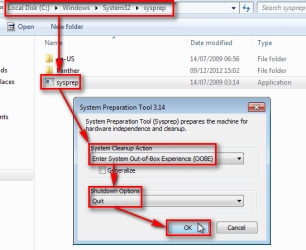
When you are ready with customization, close all open applications and Explorer windows, and open an elevated command prompt. Give the following command:
Code:
%windir%\system32\sysprep\sysprep.exe /oobe /shutdown
Windows will now run the System Preaparation Tool (sysprep) and shut down.

Now the only thing missing is creating the image. Boot the PC with the boot disk of your chosen imaging application and create the image. You can use any third party imaging application, my choice is the free edition of Macrium Reflect. Here you can find an easy to read, complete tutorial showing you how to do it with Macrium


Step 4: First boot (Welcome or OOBE boot)

When image is done, shut down the PC. Remove the boot disk of the imaging application, turn the PC on to start Windows . It will now boot to a so called First Run OOBE (Out-of-Box Experience) boot, stopping to ask initial user profile name and computer name as told in this tutorial, Step 11 and further. If language packs are installed (Ultimate or Enterprise only), initial first boot also asks user in what language he / she wants Windows to be set up.

Now you have your Windows 7 set up, with a System Image that you can use anytime you want to get fast back to fresh Windows.

Have Fun!

Kari


Attachments
  • 2012-12-09_175125.png
    2012-12-09_175125.png
    21.9 KB · Views: 21,304
Last edited:
Very nice tutorial Kari, well done. :thumbsup:
 

My Computer My Computer

At a glance

Windows 7 Ultimate x64/Windows 8 Consumer Pre...Intel Pentium Dual Core E6700 3.2GHzStrontium 8192MB DDR3 1333Mhzmsi GeForce N560GTX-M2D1GD5 1GB
Computer Manufacturer/Model Number
Custom Build
OS
Windows 7 Ultimate x64/Windows 8 Consumer Preview x64/Ubuntu 11.04
CPU
Intel Pentium Dual Core E6700 3.2GHz
Motherboard
ASUS P5G41T-M LX
Memory
Strontium 8192MB DDR3 1333Mhz
Graphics Card(s)
msi GeForce N560GTX-M2D1GD5 1GB
Sound Card
Realtek HD Audio
Monitor(s) Displays
CHIMEI CMV 221D 22"
Screen Resolution
1680x1050
Hard Drives
Seagate Barracuda LP Green 3.5'' 2TB Internal HDD 5900RPM + WD Elements Desktop 1TB External HDD 7200RPM
PSU
SHAW Viper-1500w Gaming PSU
Case
Black eMaxx ATX Mini Tower Case
Keyboard
Microsoft Wireless Keyboard 1000
Mouse
Microsoft Wireless Optical Mouse 2000
Internet Speed
100GB @ 4.76Mbps
Nice!
 

My Computer My Computer

At a glance

Windows 7 Ultimate x64
OS
Windows 7 Ultimate x64
Nice tutorial, Kari. Very useful.
 

My Computers My Computers

  • At a glance

    Windows 11 ProRyzen 9 5900X32GB G Skill DDR4-3600EVGA RTX 3080 FTW 3 Ultra
    Computer type
    PC/Desktop
    Computer Manufacturer/Model Number
    ALWAYS UNDER CONSTRUCTION
    OS
    Windows 11 Pro
    CPU
    Ryzen 9 5900X
    Motherboard
    Asus X570 Crosshair Viii Hero
    Memory
    32GB G Skill DDR4-3600
    Graphics Card(s)
    EVGA RTX 3080 FTW 3 Ultra
    Sound Card
    On Board/Sennheiser PC37X Headset
    Monitor(s) Displays
    3 X Asus 27"
    Screen Resolution
    2560x1440
    Hard Drives
    2 X 1 TB NVME drives
    PSU
    EVGA 850
    Case
    Phanteks Eclipse P400A
    Cooling
    EVGA 280 AIO
    Keyboard
    Logitech G510s/ Logitech G13
    Mouse
    Logitech G502
    Internet Speed
    24/1
    Antivirus
    ESET/MBAM Pro/SAS Pro
    Browser
    Chrome/ Firefox/ Edge
  • At a glance

    Windows 11 ProIntel Ultra 9 288V32 GB LPDDR5X 8533
    Computer type
    Laptop
    System Manufacturer/Model Number
    Dell 16 Plus
    OS
    Windows 11 Pro
    CPU
    Intel Ultra 9 288V
    Memory
    32 GB LPDDR5X 8533
    Monitor(s) Displays
    16" Mini-LED HDR600 Touch 90 Hz
    Screen Resolution
    2560X1600
    Hard Drives
    1 TB NVME
Thanks geeks. I've been using this method to create initial images. It is nice after recovery to be able to start fresh in case you need / want to change your earlier username or computer name and so on. It's like a totally fresh, clean install except all your software is already installed, all drivers updated.
 

My Computer My Computer

At a glance

Windows 10 Pro x64 EN-GB1.6 GHz Intel Core i7-720QM Processor6 GBATI Mobility Radeon HD 5850 Graphics
Computer type
Laptop
Computer Manufacturer/Model Number
HP ENVY 17-1150eg
OS
Windows 10 Pro x64 EN-GB
CPU
1.6 GHz Intel Core i7-720QM Processor
Memory
6 GB
Graphics Card(s)
ATI Mobility Radeon HD 5850 Graphics
Sound Card
Beats sound system with integrated subwoofer
Monitor(s) Displays
17" laptop display, 22" LED and 32" Full HD TV through HDMI
Screen Resolution
1600*900 (1), 1920*1080 (2&3)
Hard Drives
Internal: 2 x 500 GB SATA Hard Disk Drive 7200 rpm
External: 2TB for backups, 3TB USB3 network drive for media
Cooling
As Envy runs a bit warm, I have it on a Cooler Master pad
Keyboard
Logitech diNovo Media Desktop Laser (bluetooth)
Mouse
Logitech Performance Mouse MX
Internet Speed
50/10 Mbps VDSL
Antivirus
Windows Defender 4.3.9431.0
Browser
Maxthon 3.5.2., IE11
Good tute Kari :thumbsup:

A Guy
 

My Computer My Computer

At a glance

Windows 10 Home x64INTEL Core i5-750 Quad-Core 3.37GHzHyperX Fury Black Series 8GB (2 x 4GB) 1866MhzEVGA GeForce GTX 750 Superclocked 1GB 128-Bit...
Computer type
PC/Desktop
OS
Windows 10 Home x64
CPU
INTEL Core i5-750 Quad-Core 3.37GHz
Motherboard
ASUS P7P55D
Memory
HyperX Fury Black Series 8GB (2 x 4GB) 1866Mhz
Graphics Card(s)
EVGA GeForce GTX 750 Superclocked 1GB 128-Bit GDDR5
Monitor(s) Displays
LG 32MA68HY 32" IPS
Screen Resolution
1920 x 1080
Hard Drives
Samsung 840 Evo 120GB, SEAGATE 500GB Barracuda® 7200.12, SATA 3 Gb/s, 7200 RPM, 16MB cache
PSU
ANTEC TruePower New TP-550, 80 PLUS, 550W
Case
ANTEC Three Hundred Illusion
Cooling
COOLER MASTER Hyper 212 Plus, 4 x 120mm 1 x 140mm Noctua's
Internet Speed
85 + Mbps
Antivirus
Avast
Browser
Vivaldi
Thanks geeks. I've been using this method to create initial images. It is nice after recovery to be able to start fresh in case you need / want to change your earlier username or computer name and so on. It's like a totally fresh, clean install except all your software is already installed, all drivers updated.

Just curious. Does changing computername create the same kind of filesystem/registry "mess" that occurs when username is changed?
 

My Computer My Computer

At a glance

Windows 7 Ultimate x64
OS
Windows 7 Ultimate x64
Mannnn Kari,
Thanks for the info. Very informative.
Cheers mate.
Banal
 

My Computer My Computer

At a glance

Windows 7 Home Premium 32bit
OS
Windows 7 Home Premium 32bit
When i get to Part 3: Create a System Image ( while still in audit mode apparently , should i chose the option Quit ? )
i tried to backup the system and i received a message that says something like you can not do a backup in maintenance mode ? Can you please explain how to fix that ? thanks.
 

My Computer My Computer

At a glance

Windows 7 x64
OS
Windows 7 x64
When i get to Part 3: Create a System Image ( while still in audit mode apparently , should i chose the option Quit ? )
i tried to backup the system and i received a message that says something like you can not do a backup in maintenance mode ? Can you please explain how to fix that ? thanks.
I will do some testing, updating tutorial if / when needed. Just give me some time.

Kari
 

My Computer My Computer

At a glance

Windows 10 Pro x64 EN-GB1.6 GHz Intel Core i7-720QM Processor6 GBATI Mobility Radeon HD 5850 Graphics
Computer type
Laptop
Computer Manufacturer/Model Number
HP ENVY 17-1150eg
OS
Windows 10 Pro x64 EN-GB
CPU
1.6 GHz Intel Core i7-720QM Processor
Memory
6 GB
Graphics Card(s)
ATI Mobility Radeon HD 5850 Graphics
Sound Card
Beats sound system with integrated subwoofer
Monitor(s) Displays
17" laptop display, 22" LED and 32" Full HD TV through HDMI
Screen Resolution
1600*900 (1), 1920*1080 (2&3)
Hard Drives
Internal: 2 x 500 GB SATA Hard Disk Drive 7200 rpm
External: 2TB for backups, 3TB USB3 network drive for media
Cooling
As Envy runs a bit warm, I have it on a Cooler Master pad
Keyboard
Logitech diNovo Media Desktop Laser (bluetooth)
Mouse
Logitech Performance Mouse MX
Internet Speed
50/10 Mbps VDSL
Antivirus
Windows Defender 4.3.9431.0
Browser
Maxthon 3.5.2., IE11
OK DjMaj, first I would like to welcome you to the Seven Forums.

I have given you some rep for pointing out a mistake in my tutorial. You are completely right, you need to quit SysPrep tool before creating the image, otherwise the imaging tool sees Audit Mode as Safe Mode thus refusing to create an image.

I edited steps 3 & 4 in tutorial, works now :).

Kari
 

My Computer My Computer

At a glance

Windows 10 Pro x64 EN-GB1.6 GHz Intel Core i7-720QM Processor6 GBATI Mobility Radeon HD 5850 Graphics
Computer type
Laptop
Computer Manufacturer/Model Number
HP ENVY 17-1150eg
OS
Windows 10 Pro x64 EN-GB
CPU
1.6 GHz Intel Core i7-720QM Processor
Memory
6 GB
Graphics Card(s)
ATI Mobility Radeon HD 5850 Graphics
Sound Card
Beats sound system with integrated subwoofer
Monitor(s) Displays
17" laptop display, 22" LED and 32" Full HD TV through HDMI
Screen Resolution
1600*900 (1), 1920*1080 (2&3)
Hard Drives
Internal: 2 x 500 GB SATA Hard Disk Drive 7200 rpm
External: 2TB for backups, 3TB USB3 network drive for media
Cooling
As Envy runs a bit warm, I have it on a Cooler Master pad
Keyboard
Logitech diNovo Media Desktop Laser (bluetooth)
Mouse
Logitech Performance Mouse MX
Internet Speed
50/10 Mbps VDSL
Antivirus
Windows Defender 4.3.9431.0
Browser
Maxthon 3.5.2., IE11
Hi Kari ,

Thank for the fix


Regards.
 

My Computer My Computer

At a glance

Windows 7 x64
OS
Windows 7 x64
hi there.

Is there by any chance i can change the user folder to another location in the audit mode? How can i go on about it?

Thanks
 

My Computer My Computer

At a glance

Windows 7 Enterprise 32bit & Windows 8 Single...Intel E8200 2.66GHzOCZ Reaper 2GB Kit (1200MHz)Asus 8800 Ultra 768MB
OS
Windows 7 Enterprise 32bit & Windows 8 Single Language
CPU
Intel E8200 2.66GHz
Motherboard
Gigabyte EP45-DS4P
Memory
OCZ Reaper 2GB Kit (1200MHz)
Graphics Card(s)
Asus 8800 Ultra 768MB
Sound Card
Built-In
Monitor(s) Displays
Compaq MV740
Hard Drives
WD 320GB

Seagate 250GB (3pcs)
PSU
Gigabyte Ordin (800W)
Case
None
Cooling
Stock
Internet Speed
512MBps
Other Info
Laptop - "Asus K46C" i5-3317U - 1.7Ghz, 10GB DDR3, SANDISK Extreme 120GB SSD, Nvidia GT 635M 2GB, WIN 8 Single Language.

My Computers My Computers

  • At a glance

    Windows 11 ProRyzen 9 5900X32GB G Skill DDR4-3600EVGA RTX 3080 FTW 3 Ultra
    Computer type
    PC/Desktop
    Computer Manufacturer/Model Number
    ALWAYS UNDER CONSTRUCTION
    OS
    Windows 11 Pro
    CPU
    Ryzen 9 5900X
    Motherboard
    Asus X570 Crosshair Viii Hero
    Memory
    32GB G Skill DDR4-3600
    Graphics Card(s)
    EVGA RTX 3080 FTW 3 Ultra
    Sound Card
    On Board/Sennheiser PC37X Headset
    Monitor(s) Displays
    3 X Asus 27"
    Screen Resolution
    2560x1440
    Hard Drives
    2 X 1 TB NVME drives
    PSU
    EVGA 850
    Case
    Phanteks Eclipse P400A
    Cooling
    EVGA 280 AIO
    Keyboard
    Logitech G510s/ Logitech G13
    Mouse
    Logitech G502
    Internet Speed
    24/1
    Antivirus
    ESET/MBAM Pro/SAS Pro
    Browser
    Chrome/ Firefox/ Edge
  • At a glance

    Windows 11 ProIntel Ultra 9 288V32 GB LPDDR5X 8533
    Computer type
    Laptop
    System Manufacturer/Model Number
    Dell 16 Plus
    OS
    Windows 11 Pro
    CPU
    Intel Ultra 9 288V
    Memory
    32 GB LPDDR5X 8533
    Monitor(s) Displays
    16" Mini-LED HDR600 Touch 90 Hz
    Screen Resolution
    2560X1600
    Hard Drives
    1 TB NVME
Sorry about that.. thank you for pointing me to the correct thread.
 

My Computer My Computer

At a glance

Windows 7 Enterprise 32bit & Windows 8 Single...Intel E8200 2.66GHzOCZ Reaper 2GB Kit (1200MHz)Asus 8800 Ultra 768MB
OS
Windows 7 Enterprise 32bit & Windows 8 Single Language
CPU
Intel E8200 2.66GHz
Motherboard
Gigabyte EP45-DS4P
Memory
OCZ Reaper 2GB Kit (1200MHz)
Graphics Card(s)
Asus 8800 Ultra 768MB
Sound Card
Built-In
Monitor(s) Displays
Compaq MV740
Hard Drives
WD 320GB

Seagate 250GB (3pcs)
PSU
Gigabyte Ordin (800W)
Case
None
Cooling
Stock
Internet Speed
512MBps
Other Info
Laptop - "Asus K46C" i5-3317U - 1.7Ghz, 10GB DDR3, SANDISK Extreme 120GB SSD, Nvidia GT 635M 2GB, WIN 8 Single Language.
No problem, hope it helps.
 

My Computers My Computers

  • At a glance

    Windows 11 ProRyzen 9 5900X32GB G Skill DDR4-3600EVGA RTX 3080 FTW 3 Ultra
    Computer type
    PC/Desktop
    Computer Manufacturer/Model Number
    ALWAYS UNDER CONSTRUCTION
    OS
    Windows 11 Pro
    CPU
    Ryzen 9 5900X
    Motherboard
    Asus X570 Crosshair Viii Hero
    Memory
    32GB G Skill DDR4-3600
    Graphics Card(s)
    EVGA RTX 3080 FTW 3 Ultra
    Sound Card
    On Board/Sennheiser PC37X Headset
    Monitor(s) Displays
    3 X Asus 27"
    Screen Resolution
    2560x1440
    Hard Drives
    2 X 1 TB NVME drives
    PSU
    EVGA 850
    Case
    Phanteks Eclipse P400A
    Cooling
    EVGA 280 AIO
    Keyboard
    Logitech G510s/ Logitech G13
    Mouse
    Logitech G502
    Internet Speed
    24/1
    Antivirus
    ESET/MBAM Pro/SAS Pro
    Browser
    Chrome/ Firefox/ Edge
  • At a glance

    Windows 11 ProIntel Ultra 9 288V32 GB LPDDR5X 8533
    Computer type
    Laptop
    System Manufacturer/Model Number
    Dell 16 Plus
    OS
    Windows 11 Pro
    CPU
    Intel Ultra 9 288V
    Memory
    32 GB LPDDR5X 8533
    Monitor(s) Displays
    16" Mini-LED HDR600 Touch 90 Hz
    Screen Resolution
    2560X1600
    Hard Drives
    1 TB NVME
Great tutorial!!!
One question, I have Windows in one HD and the programs installed in another HD.
Is there a way to reinstall Windows and then "reinstall" the programs that are in the other HD? Without having to reinstall everything, that takes a very long time. Sort of linking them back, adding registry information or something.

Thanks!
 

My Computer My Computer

At a glance

Windows 7 x64 UltimateIntel 4770kCorsair Vengance DDR3 (2x8) 16GBZotac 580 GTX (nVidia)
Computer type
PC/Desktop
Computer Manufacturer/Model Number
Custom Build
OS
Windows 7 x64 Ultimate
CPU
Intel 4770k
Motherboard
Asus Maximus VI Formula
Memory
Corsair Vengance DDR3 (2x8) 16GB
Graphics Card(s)
Zotac 580 GTX (nVidia)
Sound Card
Onboard
Monitor(s) Displays
Samsung XL2370
Screen Resolution
1920x1080p
Hard Drives
1 SSD Corsair Neutron
1 WD Blue
1 Seagate
PSU
Thermaltake 1000W
Case
NZXT Phantom 530
Cooling
4 case coolers, Zalman 9900MAX CPU and GPU stock cooler
Keyboard
Microsoft X4 Sidewinder
Mouse
G700 wireless Logitech
Internet Speed
10mb/s
Antivirus
Kaspersky PURE 3
Browser
Firefox and Thor
Other Info
DVD-ROM Sony Opticarc OEM
No, reinstall requires all software to be reinstalled.

There are some third party tools meant to transfer your installed apps from one installation to another, but a skeptic as I am I would not trust them. A correctly installed and registered application can have many entries in registry, ProgramData and AppData that moving / copying them is IMO a doomed project.

Kari
 

My Computer My Computer

At a glance

Windows 10 Pro x64 EN-GB1.6 GHz Intel Core i7-720QM Processor6 GBATI Mobility Radeon HD 5850 Graphics
Computer type
Laptop
Computer Manufacturer/Model Number
HP ENVY 17-1150eg
OS
Windows 10 Pro x64 EN-GB
CPU
1.6 GHz Intel Core i7-720QM Processor
Memory
6 GB
Graphics Card(s)
ATI Mobility Radeon HD 5850 Graphics
Sound Card
Beats sound system with integrated subwoofer
Monitor(s) Displays
17" laptop display, 22" LED and 32" Full HD TV through HDMI
Screen Resolution
1600*900 (1), 1920*1080 (2&3)
Hard Drives
Internal: 2 x 500 GB SATA Hard Disk Drive 7200 rpm
External: 2TB for backups, 3TB USB3 network drive for media
Cooling
As Envy runs a bit warm, I have it on a Cooler Master pad
Keyboard
Logitech diNovo Media Desktop Laser (bluetooth)
Mouse
Logitech Performance Mouse MX
Internet Speed
50/10 Mbps VDSL
Antivirus
Windows Defender 4.3.9431.0
Browser
Maxthon 3.5.2., IE11
I may not be correct here, but I think if you did the sysprep, most, if not all your programs should still work without the other Windows installation. If you moved the user files during a clean install, they will have to be reinstalled. I believe that is correct. If not, I'm sure someone with more knowledge than me will be able to give you a better answer.
 

My Computers My Computers

  • At a glance

    Windows 11 ProRyzen 9 5900X32GB G Skill DDR4-3600EVGA RTX 3080 FTW 3 Ultra
    Computer type
    PC/Desktop
    Computer Manufacturer/Model Number
    ALWAYS UNDER CONSTRUCTION
    OS
    Windows 11 Pro
    CPU
    Ryzen 9 5900X
    Motherboard
    Asus X570 Crosshair Viii Hero
    Memory
    32GB G Skill DDR4-3600
    Graphics Card(s)
    EVGA RTX 3080 FTW 3 Ultra
    Sound Card
    On Board/Sennheiser PC37X Headset
    Monitor(s) Displays
    3 X Asus 27"
    Screen Resolution
    2560x1440
    Hard Drives
    2 X 1 TB NVME drives
    PSU
    EVGA 850
    Case
    Phanteks Eclipse P400A
    Cooling
    EVGA 280 AIO
    Keyboard
    Logitech G510s/ Logitech G13
    Mouse
    Logitech G502
    Internet Speed
    24/1
    Antivirus
    ESET/MBAM Pro/SAS Pro
    Browser
    Chrome/ Firefox/ Edge
  • At a glance

    Windows 11 ProIntel Ultra 9 288V32 GB LPDDR5X 8533
    Computer type
    Laptop
    System Manufacturer/Model Number
    Dell 16 Plus
    OS
    Windows 11 Pro
    CPU
    Intel Ultra 9 288V
    Memory
    32 GB LPDDR5X 8533
    Monitor(s) Displays
    16" Mini-LED HDR600 Touch 90 Hz
    Screen Resolution
    2560X1600
    Hard Drives
    1 TB NVME
As this tutorial is about creating a system image during a clean install before any user accounts are created I understood the question being if he can port installed apps from a backup or other installation to this fresh installation.
 

My Computer My Computer

At a glance

Windows 10 Pro x64 EN-GB1.6 GHz Intel Core i7-720QM Processor6 GBATI Mobility Radeon HD 5850 Graphics
Computer type
Laptop
Computer Manufacturer/Model Number
HP ENVY 17-1150eg
OS
Windows 10 Pro x64 EN-GB
CPU
1.6 GHz Intel Core i7-720QM Processor
Memory
6 GB
Graphics Card(s)
ATI Mobility Radeon HD 5850 Graphics
Sound Card
Beats sound system with integrated subwoofer
Monitor(s) Displays
17" laptop display, 22" LED and 32" Full HD TV through HDMI
Screen Resolution
1600*900 (1), 1920*1080 (2&3)
Hard Drives
Internal: 2 x 500 GB SATA Hard Disk Drive 7200 rpm
External: 2TB for backups, 3TB USB3 network drive for media
Cooling
As Envy runs a bit warm, I have it on a Cooler Master pad
Keyboard
Logitech diNovo Media Desktop Laser (bluetooth)
Mouse
Logitech Performance Mouse MX
Internet Speed
50/10 Mbps VDSL
Antivirus
Windows Defender 4.3.9431.0
Browser
Maxthon 3.5.2., IE11
Back
Top