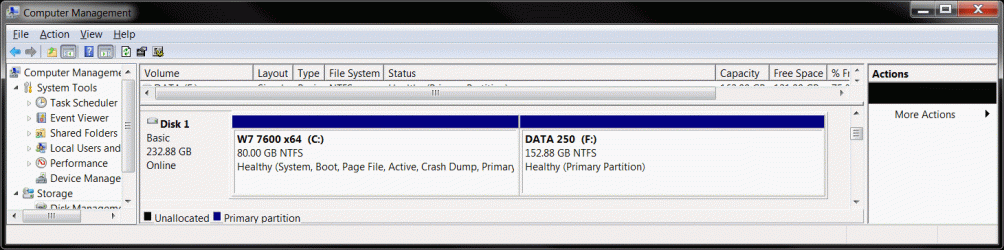
New laptop, should I partition??

maryc

New member
Local time
10:17 PM
Messages
3
Hi, bought new Acer laptop with 320gb hard drive. Still in the box at the moment! Dont want to make a mistake so need to know whether I should partition this drive and if so what size, also if Win 7 is capable of doing this. Havent done this before so simple answer/instructions please! Thanks very much.
 

My Computer My Computer

Computer Manufacturer/Model Number
Acert
OS
win 7 home
CPU
dual core duo T6600
Memory
4gb
Graphics Card(s)
ATI Radeon
Monitor(s) Displays
15.6
Hard Drives
320gb
Hi Maryc and Welcome to the forums. a 320 GB HDD is large In My opinion.
You should create at least 2 partitions: 1 for Windows 7 and other for you personal stuffs like music, movies, photos, etc. Yes Windows 7 has the feature of partitioning the hard drive. Is Windows 7 already installed on your new pc?
 

My Computer My Computer

Computer Manufacturer/Model Number
Samsung NP530U4B-S02IN
OS
Windows® 8 Pro (64-bit)
CPU
Intel® Core™ i5 Processor 2467M (1.60GHz, 3MB L3 Cache)
Motherboard
Samsung Electronics
Memory
6GB DDR3 System Memory at 1,333MHz (on BD 4GB + 2GB x 1)
Graphics Card(s)
AMD Radeon™ HD7550M 1GB DDR3 (Ext. Graphic)
Sound Card
Realtek High Definition Audio
Monitor(s) Displays
35.56cm (14.0) SuperBright 300nit HD LED Display
Screen Resolution
1366x768
Hard Drives
1TB S-ATA II Hard Drive (5400RPM) with ExpressCache 16GB SSD
Internet Speed
sucks
Antivirus
Microsoft Security Essentials
Browser
Google Chrome (Sync enabled)
hi, thanks for the quick reply.
Yes I guess it comes preloaded with Win 7 - havent switched on yet, instructions say allow 30 minutes for setup. Just want to be sure what to do before I start, if I should have a partition especially for program files (how big?) then one for documents, mp3 clips etc. (again how big). Also I use magical defrag on my desktop, if I load this to the laptop is it just the document etc. folders I need to defrag? Thanks
 

My Computer My Computer

Computer Manufacturer/Model Number
Acert
OS
win 7 home
CPU
dual core duo T6600
Memory
4gb
Graphics Card(s)
ATI Radeon
Monitor(s) Displays
15.6
Hard Drives
320gb
As you have a 320 Gb HDD, give 100 Gb to Windows 7. Then make 1 partition of the rest size for data and personal stuffs. In order to create partition, we will 1st need to see some things about your hard drive. Let us know when you are on the main screen so that we can start working on it. :)

Edit: You can use Defraggler - File and Disk Defragmentation - Free Download to defrag the hard drive. You wont need to select any specific folder. This utility will take care of it.
 
Last edited:

My Computer My Computer

Computer Manufacturer/Model Number
Samsung NP530U4B-S02IN
OS
Windows® 8 Pro (64-bit)
CPU
Intel® Core™ i5 Processor 2467M (1.60GHz, 3MB L3 Cache)
Motherboard
Samsung Electronics
Memory
6GB DDR3 System Memory at 1,333MHz (on BD 4GB + 2GB x 1)
Graphics Card(s)
AMD Radeon™ HD7550M 1GB DDR3 (Ext. Graphic)
Sound Card
Realtek High Definition Audio
Monitor(s) Displays
35.56cm (14.0) SuperBright 300nit HD LED Display
Screen Resolution
1366x768
Hard Drives
1TB S-ATA II Hard Drive (5400RPM) with ExpressCache 16GB SSD
Internet Speed
sucks
Antivirus
Microsoft Security Essentials
Browser
Google Chrome (Sync enabled)
No one could tell you how big to make the partitions, because no one else know your needs and habits. I would creat a minimum of 3 partitions. My primary partition is set for 100GB, but I still have 78GBs free, because I haven't installed many games, but I would still recommend a minimum of 50GBs for it. For other purposes...files, etc. You probably could get by with much smaller partitions, unless you use your computer for business, and correspond alot, but I will leave the size up to you. Where many people need the most space is for movie, video and audio files and it wouldn't hurt to have a separate partion for backup, unless you have an external drive for that.
 

My Computer My Computer

Computer Manufacturer/Model Number
DIY
OS
W7x64 Pro, SuSe 12.1/** W7 x64 Pro, XP MCE
CPU
Phenom II 1090T w/Noctua NH-D14 /**4400+ X2 w/CM Hyper TX 3
Motherboard
ASRock 890FX Deluxe 4/**A8N-SLI
Memory
2 x 2GB Patriot PGS34g1600LLKA/**4x1GB Corsair VS
Graphics Card(s)
EVGA GTX460 SC/**EVGA 8800GTS
Sound Card
Asus Xonar D2X/**Xonar D1
Monitor(s) Displays
Acer X233H, Dell E152FPc /**LG M237-WD
Screen Resolution
1920x1080 & 1024x768/**1980x1080
Hard Drives
WDC 2TB, 1.5TB, 1TB, 500GB,Seagate 500GB , Maxtor 80GB /**500GB Seagate & WDC 1TB Black
PSU
CM RS600 w/ APC BX1000G/**Antec 500 TP w/ APC BX1000
Case
HAF922/**Antec 1040IIB
Cooling
3x200mm, 1x140 and 1x120mm/**5x80mm fans
Keyboard
Logitech Media USB/**Saitek Eclipse
Mouse
Cordless Trackman Wheel/**Ditto
Internet Speed
3.3Mbps
Other Info
SB 560 5.1 w/ Sennheiser RS140/**Creative T20 speakers, Dvico FusionHDTV7 Gold RT, Cisco E3000, HP 5510V AIO, Linksys E3000, Belkin F5U237 hub and **F5D8055 adapter
(** = 2nd rig)
Hi, thanks again for reply. Up to my ears in paperwork at the moment so probably won't fire up until this afternoon. If you aren't on line then, could you give me a rough idea of what I need to do, or what info you need? Also thanks for defraggler info.
 

My Computer My Computer

Computer Manufacturer/Model Number
Acert
OS
win 7 home
CPU
dual core duo T6600
Memory
4gb
Graphics Card(s)
ATI Radeon
Monitor(s) Displays
15.6
Hard Drives
320gb
Once you are ready, do these steps:
1: Click Start Button:orb: in the Start Search box, type diskmgmt.msc and press Enter.
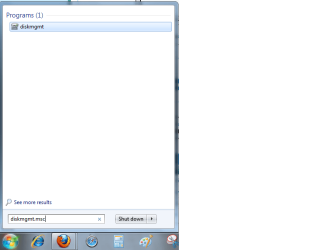
1.png
2: It lists your hard drive and partitions. Now you can follow these tutorials to extend or shrink partition.
http://www.sevenforums.com/tutorials/2670-partition-volume-extend.html
http://www.sevenforums.com/tutorials/2674-partition-volume-create-new.html

Or, if you are not sure about it, just post a screenshot of your Disk Management window and we will be glad to help you create a new partition. :)
 

My Computer My Computer

Computer Manufacturer/Model Number
Samsung NP530U4B-S02IN
OS
Windows® 8 Pro (64-bit)
CPU
Intel® Core™ i5 Processor 2467M (1.60GHz, 3MB L3 Cache)
Motherboard
Samsung Electronics
Memory
6GB DDR3 System Memory at 1,333MHz (on BD 4GB + 2GB x 1)
Graphics Card(s)
AMD Radeon™ HD7550M 1GB DDR3 (Ext. Graphic)
Sound Card
Realtek High Definition Audio
Monitor(s) Displays
35.56cm (14.0) SuperBright 300nit HD LED Display
Screen Resolution
1366x768
Hard Drives
1TB S-ATA II Hard Drive (5400RPM) with ExpressCache 16GB SSD
Internet Speed
sucks
Antivirus
Microsoft Security Essentials
Browser
Google Chrome (Sync enabled)
Seeing as though it is a brand new laptop, I would strongly advise you to be careful what you do. At the very least, you should create the restore disks (see manual for instructions), and I wouldn't consider (at the moment anyway) deleting the hidden restore partition.
 

My Computer My Computer

Computer type
PC/Desktop
Computer Manufacturer/Model Number
Dwarf Dwf/11/2012 r09/2013
OS
Windows 8.1 Pro RTM x64
CPU
Intel Core-i5-3570K 4-core @ 3.4GHz (Ivy Bridge) (OC 4.4GHz)
Motherboard
ASRock Z77 Extreme4-M
Memory
4 x 4GB DDR3-1600 Corsair Vengeance CMZ8GX3M2A1600C9B (16GB)
Graphics Card(s)
MSI GeForce GTX770 Gaming OC 2GB
Sound Card
Realtek High Definition on board solution (ALC 898)
Monitor(s) Displays
ViewSonic VA1912w Widescreen (VGA)
Screen Resolution
1440x900
Hard Drives
OCZ Agility 3 SSD 120GB SATA III x2 (RAID 0)
Samsung HD501LJ 500GB SATA II x2
Hitachi HDS721010CLA332 1TB SATA II
Iomega 1.5TB Ext USB 2.0
WD 2.0TB Ext USB 3.0
PSU
XFX Pro Series 850W Semi-Modular
Case
Gigabyte IF233
Cooling
1 x 120mm Front Inlet 1 x 120mm Rear Exhaust
Keyboard
Microsoft Comfort Curve Keyboard 3000 (USB)
Mouse
Microsoft Comfort Mouse 3000 for Business (USB)
Internet Speed
NetGear DG834Gv3 ADSL Modem/Router (Ethernet) ~4.0 Mb/s (O2)
Antivirus
Avast! 8.0.1497
Browser
IE 11
Other Info
Optical Drive: HL-DT-ST BD-RE BH10LS30 SATA Bluray
Lexmark S305 Printer/Scanner/Copier (USB)
WEI Score: 8.1/8.1/8.5/8.5/8.25
Asus Eee PC 1011PX Netbook (Windows 7 x86 Starter)
I would used a tool like Acronis Disk Director to do the partitioning/resizing. Also create your second partition as another primary partition so to make easier to install dualboot. Not a fan or extended volumes.
 

My Computer My Computer

Computer Manufacturer/Model Number
Lenovo ThinkPad T60
OS
Windows 7 Ultimate 64Bit
CPU
GenuineIntel Intel(R) Core(TM) DuoCore T2400 @ 1.83GHz
Motherboard
Intel(R) 82801G (ICH7 Family)
Memory
2.00 GB
Graphics Card(s)
Mobile Intel(R) 945 Express Chipset
Sound Card
SoundMAX Integrated Digital HD Audio
Monitor(s) Displays
ThinkPad Display
Screen Resolution
1400x1050
Hard Drives
100Gb SATA
Keyboard
Standard Keyboard
Mouse
HID-compliant Mouse
Internet Speed
Cable Broadband - 54Mbps
Other Info
Intel(R) PRO/1000 PL Network Connection
11a/b/g Wireless LAN Mini PCI Express Adapter
To me partitioning is a very important. It allows the computer to act like a file cabinet and I can remember where everything is located with little or no effort.

The partition I made for Win 7 was 50gb which is more than enough. The partition I made for installing software was 20gb and again is plenty because most software installs the bulk of the program on C drive anyway, but it does allow for easy to uninstall if that becomes necessary.

In your case that would leave approximately 250 gb which I would make into two equal partitions for Data and Entertainment. I found that one of these two partitions is a good place to store Acronis images for easy restore.

That is just my way of doing it and you have to decide how you want it setup and go for it. :party:
 

My Computer My Computer

OS
Windows 7 Pro
CPU
Intel(R) Pentium(R) Duel CPU E2200 2.20 Ghz
Motherboard
GA-G41M-ES2L
Memory
4 gb 2.96 Usable
Graphics Card(s)
Onboard
Sound Card
Onboard
Hard Drives
2 - 1TB WD Sata Drives
Hi, bought new Acer laptop with 320gb hard drive. Still in the box at the moment! Dont want to make a mistake so need to know whether I should partition this drive and if so what size, also if Win 7 is capable of doing this. Havent done this before so simple answer/instructions please! Thanks very much.

Hi maryc

Take note of Dwarf & make them Recovery DVD's first.

You will find that Acer's install program will partition your drive on FIRST START UP.

I would say, if it works DO NOT PLAY.
 

My Computer My Computer

OS
ME/XP/Vista/Win7
Using Defraggler ... Defrag the HDD.
Using Shrink in disc management .. I'd shrink the C drive to something like 80 gig for W7
Using Disc management .. Make a new partition in the unallocated space for your data storage.

Any surgery on the HDD is risky .. make sure you have everything backed up first.
 

Attachments

  • Clipboard.gif
    Clipboard.gif
    70.2 KB · Views: 115

My Computer My Computer

Computer Manufacturer/Model Number
HP d4996t (upgraded)
OS
XP MCE .... XP Pro 64 .... W7 U x64
CPU
E6750, 2.67GHz C2D
Memory
4GB, PC2 6400
Graphics Card(s)
GeForce 9400GT
Monitor(s) Displays
Twin Samsung 2443BWT
Screen Resolution
1920x1200
Hard Drives
Many .. 3 Installed
PSU
460W
Internet Speed
Cable
I have always partitioned drives but I never quite know what goes on when you buy "off the shelf" laptops. I intend to partition my new Acer Aspire Timeline but looking at disk management I already have:

12GB Recovery Partition
I assume this is created by Acer and is used if I have to use my recovery CDs in some way?

100MB System Reserved - System, Active, Primary
I have read what this is, seems a waste of space but I can live with it!

221GB Main - Boot, Page File, Crash Dump, Primary
OS and program files etc..

What I would normally do is create a new partition and then image the OS so that I can quickly restore in the event of disaster. However if I run the image application, I only get the option of the main partition C:

If there was ever a problem with the "System Reserved" partition would this prevent the laptop from booting or operating properly? And, do I really need the "Recovery Partition"?

Lastly, is there a minimum recommended size of the OS partition for Win7 to work efficiently. I was thinking 50GB but even that seems quite large seeing as I won't be putting much else on it in terms of games etc?

Hopefully some of these questions will be relevant to the OP too!

Andrew
 
Last edited:

My Computer My Computer

Computer Manufacturer/Model Number
Acer 1810TZ
OS
Windows 7 Home Premium x64
CPU
Intel® Pentium® Dual Core ULV SU4100, 1.3Ghz
Motherboard
Mobile Intel GS45 Express
Memory
3GB
Graphics Card(s)
Intel® GMA X4500MHD
Monitor(s) Displays
11.6" (WXGA LED)
Screen Resolution
1366 x 768
What are you Imaging the HHD with ???
The new Acronis now supports Windows 7.

I'm not sure how it handles the reserved Partition ... I removed it.
 

My Computer My Computer

Computer Manufacturer/Model Number
HP d4996t (upgraded)
OS
XP MCE .... XP Pro 64 .... W7 U x64
CPU
E6750, 2.67GHz C2D
Memory
4GB, PC2 6400
Graphics Card(s)
GeForce 9400GT
Monitor(s) Displays
Twin Samsung 2443BWT
Screen Resolution
1920x1200
Hard Drives
Many .. 3 Installed
PSU
460W
Internet Speed
Cable
What are you Imaging the HHD with ???
The new Acronis now supports Windows 7.

I'm not sure how it handles the reserved Partition ... I removed it.
I read some bad things about Acronis & Windows 7 (although I still use it on my XP & Vista machines) so I have used Partition Wizard 4.1 which seems to have worked flawlessly.

Andrew
 

My Computer My Computer

Computer Manufacturer/Model Number
Acer 1810TZ
OS
Windows 7 Home Premium x64
CPU
Intel® Pentium® Dual Core ULV SU4100, 1.3Ghz
Motherboard
Mobile Intel GS45 Express
Memory
3GB
Graphics Card(s)
Intel® GMA X4500MHD
Monitor(s) Displays
11.6" (WXGA LED)
Screen Resolution
1366 x 768
I wouldn't go less than 50GB on C. And 80 is probably safer.

I don't forsee any need to do more than 2 partitions (C drive for OS and D drive for data, apps, entertainment, music, etc). Often having more than 2 partitions just makes things more complicated unncessarily.
 

My Computer My Computer

Computer Manufacturer/Model Number
Self-Built in July 2009
OS
Windows 7 Ultimate x64
CPU
Intel Q9550 2.83Ghz OC'd to 3.40Ghz
Motherboard
Gigabyte GA-EP45-UD3R rev. 1.1, F12 BIOS
Memory
8GB G.Skill PI DDR2-800, 4-4-4-12 timings
Graphics Card(s)
EVGA 1280MB Nvidia GeForce GTX570
Sound Card
Realtek ALC899A 8 channel onboard audio
Monitor(s) Displays
23" Acer x233H
Screen Resolution
1920x1080
Hard Drives
Intel X25-M 80GB Gen 2 SSD
Western Digital 1TB Caviar Black, 32MB cache. WD1001FALS
PSU
Corsair 620HX modular
Case
Antec P182
Cooling
stock
Keyboard
ABS M1 Mechanical
Mouse
Logitech G9 Laser Mouse
Internet Speed
15/2 cable modem
Other Info
Windows and Linux enthusiast. Logitech G35 Headset.
I agree with PParks about the number of partitions. There is no point to being overly complex with a bunch of partitions. If you get into 4 or 5 partitions, you can pretty much count on running low on space in one of them and then be faced with resizing, reallocating, etc.

If I understand you correctly, your intent is to make an image of your system and place it on another partition on the same drive.

Not a good move.

What happens if that drive fails?

You wouldn't be able to get at your image.

Better than nothing, but far from ideal.

Standard recommendation: get another drive (internal or external) and put images and backed up data in general on it.
 

My Computer My Computer

Computer type
PC/Desktop
Computer Manufacturer/Model Number
Ignatz Special; 4 speed manual gearbox; factory air conditioning; one of one
OS
Windows 7 Home Premium SP1, 64-bit
CPU
Intel Skylake i5-6600K, not overclocked
Motherboard
AsRock Z170M Extreme 4, micro ATX
Memory
8 GB HyperX DDR4-2666 (2 x 4 GB)
Graphics Card(s)
none; graphics are integrated on CPU
Sound Card
onboard: Realtek ALC1150; external: USB Behringer UF0-202
Monitor(s) Displays
Dell S2340M 23 inch IPS
Screen Resolution
1600 x 900
Hard Drives
System: Crucial MX100 series SSD, 128 GB;
Data: Samsung Spinpoint 103SJ, 1 TB;
Backup: WD Caviar Green WD30EZRX-00D8PB0, 3 TB
PSU
Rosewill SilentNight 500 watt fanless, semi-modular
Case
Antec Solo II
Cooling
Noctua NH-U12S; Noctua F12 intake, Noctua S12A exhaust
Keyboard
Microsoft 200 6JH-00001 USB
Mouse
Dell or Microsoft optical wired; USB
Antivirus
Microsoft Security Essentials and Malwarebytes Premium
Browser
Pale Moon
Other Info
All fans PWM; speeds at idle: CPU circa 500 rpm; intake circa 600 rpm; exhaust circa 600 rpm; CPU temps 27 idle and 47 C load in a warm room (27 C/81 F) when running Intel Extreme Tuning Utility stress test.
Hi there

ALWAYS SEPARATE the OS from the data.

1) Easier to backup and restore. You don't lose your data when restoring the OS.
(store the image on a DIFFERENT drive - preferably a network drive so you can restore it if you have to from another machine). A bootable backup is also a good idea.

Even a LARGISH W7 installation shouldn't need more than around 30 GB (and that's a largish installation) for the Windows partition -- but disk space is cheap so give it 40 GB.

2) Easier to MOVE your data to a network / other machine without any probs of having to re-install an OS. Just think what you would have to do if your music for example was on the OS disk and Windows crashed forcing you to re-format the entire drive.

'nuf said.

cheers
jimbo
 

My Computer My Computer

Computer type
PC/Desktop
Computer Manufacturer/Model Number
Custom built, several laptops HP/ASUS
OS
Linux CENTOS 7 / various Windows OS'es and servers
CPU
Intel i7 Intel i5
Memory
8GB, 16GB
Graphics Card(s)
On Motherboard
Sound Card
Realtek HD audio
Monitor(s) Displays
Apple Cinema display, Samsung LCD
Screen Resolution
1920 X 1080
Hard Drives
4 X 1TB SATA
Mouse
Toshiba wireless laser
Internet Speed
> 20MB up
Hi, bought new Acer laptop with 320gb hard drive. Still in the box at the moment! Dont want to make a mistake so need to know whether I should partition this drive and if so what size, also if Win 7 is capable of doing this. Havent done this before so simple answer/instructions please! Thanks very much.
I also have a new laptop and took the plunge. I have a 500GB hard drive and I want to dual boot Linux. I first used Windows 7 defragger; took around fifteen minutes. I backed up everything. I then created an Administrator account. Then I logged on as Administrator and opened up Computer management and Disk Management; right clicked C drive and selected "Shrink" and went for it. It did a default shrink to about half the size. I then created a 160GB partition for backups and the rest for Linux. Haven't loaded Linux yet. All went without a hitch.

Regards, Allan
 

My Computer My Computer

Computer Manufacturer/Model Number
Dell Studio Laptop 1747
OS
Windows 7
CPU
1.6GHz Intel Core i7 720
Motherboard
Dell 0J509P
Memory
6GB
Graphics Card(s)
ATI Radeon HD 4640
Sound Card
ATI High Def
Monitor(s) Displays
Generic PNP 17
Screen Resolution
1600 x 900
Hard Drives
500GB
Case
Laptop
Mouse
Synaptics Touchpad
Internet Speed
Hi Speed Cable
What's the point? That is what libraries are for.
 

My Computer My Computer

Computer Manufacturer/Model Number
Sony Vaio Z46GDU
OS
Windows 7 Ultimate x86-64
CPU
[email protected] 1066MHz FSB
Motherboard
Sony branded
Memory
6GB DDR3 1066MHz
Graphics Card(s)
9300M GS 256MB Dedicated (Speed) + Intel4500MHD (Stamina)
Sound Card
Realtek HD Audio
Monitor(s) Displays
13.1' WXGA
Screen Resolution
1600x900
Hard Drives
320GB 7200RPM w/ 16MB cache
Internet Speed
1MB/s
Back
Top