New/Old Hard Drive Installation Problem

magicapples

New member
Local time
5:19 AM
Messages
5
Hi,

I have purchased a corsair SSD 250 gm hard drive and installed it in my acer lap top.

prior to installing the new hard drive, i created recovery disks so i could easily reload my windows 7 and drivers.

now, when i load windows, it still shows the old 450 gb western digital drive, and shows me how much space is used on it and how much is left. when i install anything, it says it is installing it on the old western digital drive.

when i go to start -> computer -> manage i see the old hard drive and its partitions. i also see the new drive, and it says 240 gb unassigned.

i can see the corsair under my devices. so the computer is seeing it. but windows thinks the old hard drive is still in the computer.

not sure if this is impacting performance or not. is windows utilizing the ssd speed? i have no idea how much space is left on my hard drive.

anybody seen this before?

thanks
 

My Computer

Computer Manufacturer/Model Number
acer aspire 7750g-9656
OS
windows 7 home premium
CPU
intel core i7 2630qm
Motherboard
unknown
Memory
8 gb ddr3
Graphics Card(s)
radeon 6850m
Sound Card
internal
Monitor(s) Displays
17" lcd
Hard Drives
corsair SSD f240 gb2-a
PSU
not sure
Hi,

I have purchased a corsair SSD 250 gm hard drive and installed it in my acer lap top.

prior to installing the new hard drive, i created recovery disks so i could easily reload my windows 7 and drivers.

now, when i load windows, it still shows the old 450 gb western digital drive, and shows me how much space is used on it and how much is left. when i install anything, it says it is installing it on the old western digital drive.

when i go to start -> computer -> manage i see the old hard drive and its partitions. i also see the new drive, and it says 240 gb unassigned.

i can see the corsair under my devices. so the computer is seeing it. but windows thinks the old hard drive is still in the computer.

not sure if this is impacting performance or not. is windows utilizing the ssd speed? i have no idea how much space is left on my hard drive.

anybody seen this before?

thanks

Welcome to SevenForums.

To help us understand, please carefully carry out the following:

HOW TO POST A SNAPSHOT OF DISK MANAGEMENT DISPLAY

Run disk management:
WIN | type DISKMGMT.MSC | ENTER
WIN is the key with the wavy flag.

Maximize the output of Disk Management:
ALT-Spacebar key combo (this pops up a menu) followed by X key (selects Maximize) |
Drag the field separators (such as between Status and Capacity) to show entire field. This is very important, otherwise, needed info is not visible.

Make a snapshot:
WIN | type SNIPPING | ENTER | New
Drag the cursor around the area you want to snip.
File | Save as | select save location and name | Save

Post the snapshot:
· Click on the paperclip icon in that row of icons at the top of the message box.
· BROWSE button. There are 5 choices.
· Navigate to the folder containing the snapshot.
· Click on the snapshot.
· OPEN
· UPLOAD button which is adjacent to the 5th BROWSE button.
· Close the MANAGE ATTACHMENTS window.
· Position the cursor at the spot in the message where you want the
snapshot to appear.
· Click on the PaperClip again.
· Click on the file which you want to insert
· Attach code will be inserted into your message.
 

My Computer

Computer Manufacturer/Model Number
Toshiba Satellite S875D-S7239 laptop
OS
MS Windows 7 Ultimate SP1 64-bit
CPU
AMD A10-4600M
Motherboard
AMD Pumori (Socket FT1)
Memory
6.00 GB Dual-Channel DDR3 @ 798MHz (11-11-12-28)
Graphics Card(s)
AMD Radeon HD 7660G
Sound Card
High Definition Audio Device
Monitor(s) Displays
Generic PnP Monitor (1600x900@60Hz)
Screen Resolution
1600x900@60Hz
Hard Drives
SSD 119GB Corsair CSSD-V128GB2 ATA Device
Keyboard
Standard PS/2 Keyboard
Mouse
HP Wireless Optical Mobile Mouse Model FHA-3410
Internet Speed
What the local pub, local coffee shop offers.
Other Info
Optical Drive:MATSHITA BD-CMB UJ160B ATA Device


Also have an Asus ha1002xp netbook with Win 7 Ultimate installed.
Capture.JPG

thanks karl for that detailed instruction.
i didn't know about snipping! good to have.

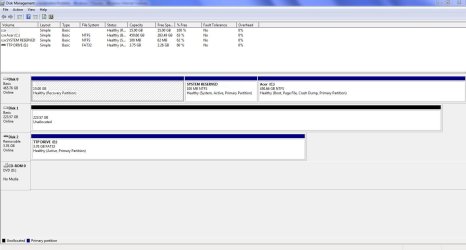
here is the managed window view. you can see that it doesn't name the corsair drive here.

the 450 gb drive, is sitting on my desk, i am looking at it. i know it is no longer in my computer :P
 

My Computer

Computer Manufacturer/Model Number
acer aspire 7750g-9656
OS
windows 7 home premium
CPU
intel core i7 2630qm
Motherboard
unknown
Memory
8 gb ddr3
Graphics Card(s)
radeon 6850m
Sound Card
internal
Monitor(s) Displays
17" lcd
Hard Drives
corsair SSD f240 gb2-a
PSU
not sure
Your SSD is unallocated and needs to be formatted. Easy enough.

But the problem in utilizing it's speed is a bit more complex. You need to get your Acer (SLP:OEM) OS onto your smaller SSD. It can be done or you can clean install but either way it's a bit of work.
Also, the SSD would ideally need to be in disk 0 position.

Someone here would help you but unless I'm missing something you'd have a bit of work ahead.
 

My Computer

Computer type
PC/Desktop
Computer Manufacturer/Model Number
Own build
OS
Windows 7x64 Home Premium SP1
CPU
Intel i7 2600k
Motherboard
ASUS P8Z68 Deluxe
Memory
G.Skill Ripjaws (DDR3-1600) 2x4GB
Graphics Card(s)
Nvidia GeForce GTS 450; Intel HD Graphics 3000(GT2+)
Monitor(s) Displays
Dell Ultrasharp IPS panel U2311H, Samsung SyncMaster P2350
Screen Resolution
1920x1080
Hard Drives
Samsung 850 Pro SSD 256GB, Samsung SSD 840 120GB, Seagates 1TB Barracuda ST31000528AS x2
PSU
Seasonic M12II 520W
Case
Lian Li Lancool PC-K60
Cooling
Case: 1x120mm, 3x140mm CPU: Hyper 212+
Keyboard
Logitech MK520 (wireless)
Mouse
Logitech MK520
Internet Speed
6-7 Mbps
Antivirus
Norton Security Premium, Malwarebytes on 2 (MSE on 3rd PC)
Browser
FireFox
Other Info
Audio: Logitech Z523 2.1
MagicApples,

You can put everything on to your SSD.

Doing such will take a little work and preparation.

The basic idea is that you would clear up as much as you can from your present c simply thru cleaning measures.

If that's not enough, then temporarily some of the info will need to be moved off to an external drive and that stuff would then be restored later.

So let's say that your present disk with C on it has been cleaned up.

You would, using Win 7 Backup and Restore make a system image backup of the drive containing C. The system image backup would be stored on an external usb.

You make a System Repair Disc to be used duing the restore operation.

You physically disconnect the present C drive.

You connect the new ssd drive in the posititon where the old drive was.

You use that system repair disc to prepare the ssd to become a bootable drive.

You restore the image to the new drive.

After verifiying that all is well, then you can reconnect the old drive and wipe iit clean so that it can be used as a data drive.

This procedure works. I've done it, and more than once.

If you find the idea interesting, let me know and we will get down to the nitty gritty. You will be performing this piiece-meal and getting back to me at every step of the way so that we can proceed smoothly with zero loss.
 

My Computer

Computer Manufacturer/Model Number
Toshiba Satellite S875D-S7239 laptop
OS
MS Windows 7 Ultimate SP1 64-bit
CPU
AMD A10-4600M
Motherboard
AMD Pumori (Socket FT1)
Memory
6.00 GB Dual-Channel DDR3 @ 798MHz (11-11-12-28)
Graphics Card(s)
AMD Radeon HD 7660G
Sound Card
High Definition Audio Device
Monitor(s) Displays
Generic PnP Monitor (1600x900@60Hz)
Screen Resolution
1600x900@60Hz
Hard Drives
SSD 119GB Corsair CSSD-V128GB2 ATA Device
Keyboard
Standard PS/2 Keyboard
Mouse
HP Wireless Optical Mobile Mouse Model FHA-3410
Internet Speed
What the local pub, local coffee shop offers.
Other Info
Optical Drive:MATSHITA BD-CMB UJ160B ATA Device


Also have an Asus ha1002xp netbook with Win 7 Ultimate installed.
hi guys. thanks for the responses.

Sorry, I maybe was not clear in my earlier description. Perhaps because this is hard to explain.

I only have one hard drive in my lap top, the only drive physically installed is the SSD drive. I took out the original hard drive and it is sitting on my shelf. yet windows still thinks it is installed.

In the picture, it shows both hard drives. but the 450 GB one no longer is physically in the computer. only the SSD one is.
 

My Computer

Computer Manufacturer/Model Number
acer aspire 7750g-9656
OS
windows 7 home premium
CPU
intel core i7 2630qm
Motherboard
unknown
Memory
8 gb ddr3
Graphics Card(s)
radeon 6850m
Sound Card
internal
Monitor(s) Displays
17" lcd
Hard Drives
corsair SSD f240 gb2-a
PSU
not sure
It's hard to understand for sure.
What's on your SSD and how did you put it there.
What does Disk Management show now.
 

My Computer

Computer type
PC/Desktop
Computer Manufacturer/Model Number
Own build
OS
Windows 7x64 Home Premium SP1
CPU
Intel i7 2600k
Motherboard
ASUS P8Z68 Deluxe
Memory
G.Skill Ripjaws (DDR3-1600) 2x4GB
Graphics Card(s)
Nvidia GeForce GTS 450; Intel HD Graphics 3000(GT2+)
Monitor(s) Displays
Dell Ultrasharp IPS panel U2311H, Samsung SyncMaster P2350
Screen Resolution
1920x1080
Hard Drives
Samsung 850 Pro SSD 256GB, Samsung SSD 840 120GB, Seagates 1TB Barracuda ST31000528AS x2
PSU
Seasonic M12II 520W
Case
Lian Li Lancool PC-K60
Cooling
Case: 1x120mm, 3x140mm CPU: Hyper 212+
Keyboard
Logitech MK520 (wireless)
Mouse
Logitech MK520
Internet Speed
6-7 Mbps
Antivirus
Norton Security Premium, Malwarebytes on 2 (MSE on 3rd PC)
Browser
FireFox
Other Info
Audio: Logitech Z523 2.1
It's hard to understand for sure.
What's on your SSD and how did you put it there.
What does Disk Management show now.

disk management shows what is in that picture i posted.

here is the sequence of events that i performed:

bought lap top and SSD hard drive (not installed yet).
created recovery disks
turned computer off.
took out original hard drive
installed ssd
turned computer on with recovery DVD's in the dvd drive.
initiated recovery
installed recovery on the SSD drive.

now i am experiencing this problem. perhaps it is due to the recovery? but why does windows not detect the original hard drive is no longer installed? and while it shows the SSD drive is connected, why does it not show it as the drive in use?
 

My Computer

Computer Manufacturer/Model Number
acer aspire 7750g-9656
OS
windows 7 home premium
CPU
intel core i7 2630qm
Motherboard
unknown
Memory
8 gb ddr3
Graphics Card(s)
radeon 6850m
Sound Card
internal
Monitor(s) Displays
17" lcd
Hard Drives
corsair SSD f240 gb2-a
PSU
not sure
Physically disconnect the old drive.

Does you system boot?
 

My Computer

Computer Manufacturer/Model Number
Toshiba Satellite S875D-S7239 laptop
OS
MS Windows 7 Ultimate SP1 64-bit
CPU
AMD A10-4600M
Motherboard
AMD Pumori (Socket FT1)
Memory
6.00 GB Dual-Channel DDR3 @ 798MHz (11-11-12-28)
Graphics Card(s)
AMD Radeon HD 7660G
Sound Card
High Definition Audio Device
Monitor(s) Displays
Generic PnP Monitor (1600x900@60Hz)
Screen Resolution
1600x900@60Hz
Hard Drives
SSD 119GB Corsair CSSD-V128GB2 ATA Device
Keyboard
Standard PS/2 Keyboard
Mouse
HP Wireless Optical Mobile Mouse Model FHA-3410
Internet Speed
What the local pub, local coffee shop offers.
Other Info
Optical Drive:MATSHITA BD-CMB UJ160B ATA Device


Also have an Asus ha1002xp netbook with Win 7 Ultimate installed.
Based on what you have said your Diskmanagement screenshot doesn't make sense.

This is a little complicated...
The problem you will have with Windows imaging is the MBR at the front of the HDD you are imaging is always copied and then replaced when reimaging. This MBR contains the partition structure of the original disk. This is why you cannot simply reimage back to a smaller disk.

I think ACER have (or used to have) a special factory recovery procedure when doing a factory recovery/restore to a smaller disk.
 

My Computer

Computer type
PC/Desktop
Computer Manufacturer/Model Number
Own build
OS
Windows 7x64 Home Premium SP1
CPU
Intel i7 2600k
Motherboard
ASUS P8Z68 Deluxe
Memory
G.Skill Ripjaws (DDR3-1600) 2x4GB
Graphics Card(s)
Nvidia GeForce GTS 450; Intel HD Graphics 3000(GT2+)
Monitor(s) Displays
Dell Ultrasharp IPS panel U2311H, Samsung SyncMaster P2350
Screen Resolution
1920x1080
Hard Drives
Samsung 850 Pro SSD 256GB, Samsung SSD 840 120GB, Seagates 1TB Barracuda ST31000528AS x2
PSU
Seasonic M12II 520W
Case
Lian Li Lancool PC-K60
Cooling
Case: 1x120mm, 3x140mm CPU: Hyper 212+
Keyboard
Logitech MK520 (wireless)
Mouse
Logitech MK520
Internet Speed
6-7 Mbps
Antivirus
Norton Security Premium, Malwarebytes on 2 (MSE on 3rd PC)
Browser
FireFox
Other Info
Audio: Logitech Z523 2.1
Is the ssd set to AHCI mode in the bios? Also is the bios showing the original hard drive?
 

My Computer

Computer Manufacturer/Model Number
home built PC. Laptop studio1557
OS
windows 7 64 bit and dual boot Pinguyos
CPU
PC, intel i7 920 2.7ghz, laptop i7 720
Motherboard
PC, Asus P6t .laptop probably rubbish from dell
Memory
PC 6GB, laptop 2GB, me 2 seconds after 6 pints
Graphics Card(s)
PC Asus eah5870,laptop, ati hd 4580
Monitor(s) Displays
Sharp 42" HD TV using HDMI + HDMI to onkyo surround amp
Screen Resolution
1920x1080
Hard Drives
1x ssd OCZ 60GB, 2x250GB raid0, 2x1TB (storage),2TB
PSU
OCZ 700w
Case
antec 902
Cooling
antec khuler h20 920
Keyboard
logitek wave
Mouse
x8 sidewinder
Internet Speed
dog slow
karl: yes, my system reboots fine. i am in windows right now, loaded on the SSD drive... but windows thinks it is the old hard drive. And because of that, i have no information about the SSD drive.

MJF:
no, the disk management screen doesn't make sense at all. it is like windows is loading some old cache file and won't reexamine my hdd.

so you think the root of the problem is reimaging onto a new hard drive that is smaller than the original hard drive?

will windows figure out what is wrong if the disk is full 200 gb too early?
 

My Computer

Computer Manufacturer/Model Number
acer aspire 7750g-9656
OS
windows 7 home premium
CPU
intel core i7 2630qm
Motherboard
unknown
Memory
8 gb ddr3
Graphics Card(s)
radeon 6850m
Sound Card
internal
Monitor(s) Displays
17" lcd
Hard Drives
corsair SSD f240 gb2-a
PSU
not sure
The bigger to smaller isn't the problem. I've done that with no difficulties.

If you do the following:
Go to an elevated command prompt.
Diskpart
list volume

do you still see the wrong information?

Do NOT have the hard disk connected when you do this.
 

My Computer

Computer Manufacturer/Model Number
Toshiba Satellite S875D-S7239 laptop
OS
MS Windows 7 Ultimate SP1 64-bit
CPU
AMD A10-4600M
Motherboard
AMD Pumori (Socket FT1)
Memory
6.00 GB Dual-Channel DDR3 @ 798MHz (11-11-12-28)
Graphics Card(s)
AMD Radeon HD 7660G
Sound Card
High Definition Audio Device
Monitor(s) Displays
Generic PnP Monitor (1600x900@60Hz)
Screen Resolution
1600x900@60Hz
Hard Drives
SSD 119GB Corsair CSSD-V128GB2 ATA Device
Keyboard
Standard PS/2 Keyboard
Mouse
HP Wireless Optical Mobile Mouse Model FHA-3410
Internet Speed
What the local pub, local coffee shop offers.
Other Info
Optical Drive:MATSHITA BD-CMB UJ160B ATA Device


Also have an Asus ha1002xp netbook with Win 7 Ultimate installed.
The bigger to smaller isn't the problem.
Whatever you say.

Magicapples,
A stab at explaining what went on. ACER did a factory recovery including the original MBR which is what Windows Disk Management is picking up. For some reason it's also seeing another disk, your physical SSD. Basically Disk Management is totally confused.

You could try to download Partition Wizard (see free programs area) and see what it says.

What I would do is use Macrium Reflect for this exercise.

I'll leave my input to you at that for the time being so as not to confuse things with too many inputs.

Edit: deleted some comments
 
Last edited:

My Computer

Computer type
PC/Desktop
Computer Manufacturer/Model Number
Own build
OS
Windows 7x64 Home Premium SP1
CPU
Intel i7 2600k
Motherboard
ASUS P8Z68 Deluxe
Memory
G.Skill Ripjaws (DDR3-1600) 2x4GB
Graphics Card(s)
Nvidia GeForce GTS 450; Intel HD Graphics 3000(GT2+)
Monitor(s) Displays
Dell Ultrasharp IPS panel U2311H, Samsung SyncMaster P2350
Screen Resolution
1920x1080
Hard Drives
Samsung 850 Pro SSD 256GB, Samsung SSD 840 120GB, Seagates 1TB Barracuda ST31000528AS x2
PSU
Seasonic M12II 520W
Case
Lian Li Lancool PC-K60
Cooling
Case: 1x120mm, 3x140mm CPU: Hyper 212+
Keyboard
Logitech MK520 (wireless)
Mouse
Logitech MK520
Internet Speed
6-7 Mbps
Antivirus
Norton Security Premium, Malwarebytes on 2 (MSE on 3rd PC)
Browser
FireFox
Other Info
Audio: Logitech Z523 2.1

My Computer

Computer Manufacturer/Model Number
Toshiba Satellite S875D-S7239 laptop
OS
MS Windows 7 Ultimate SP1 64-bit
CPU
AMD A10-4600M
Motherboard
AMD Pumori (Socket FT1)
Memory
6.00 GB Dual-Channel DDR3 @ 798MHz (11-11-12-28)
Graphics Card(s)
AMD Radeon HD 7660G
Sound Card
High Definition Audio Device
Monitor(s) Displays
Generic PnP Monitor (1600x900@60Hz)
Screen Resolution
1600x900@60Hz
Hard Drives
SSD 119GB Corsair CSSD-V128GB2 ATA Device
Keyboard
Standard PS/2 Keyboard
Mouse
HP Wireless Optical Mobile Mouse Model FHA-3410
Internet Speed
What the local pub, local coffee shop offers.
Other Info
Optical Drive:MATSHITA BD-CMB UJ160B ATA Device


Also have an Asus ha1002xp netbook with Win 7 Ultimate installed.
I'll come back into the discussion again rather than leave things hanging.
Can we define your end goal.

Is it to have your new 240GB SSD replace your existing spinning 500GB HDD as your one and only HDD?
If so you then have 2 options:
1) Retain the Acer OEM OS or
2) Do a clean install of Windows using the COA sticker key which should be on your notebook. This will require access to Windows installation disks.
 

My Computer

Computer type
PC/Desktop
Computer Manufacturer/Model Number
Own build
OS
Windows 7x64 Home Premium SP1
CPU
Intel i7 2600k
Motherboard
ASUS P8Z68 Deluxe
Memory
G.Skill Ripjaws (DDR3-1600) 2x4GB
Graphics Card(s)
Nvidia GeForce GTS 450; Intel HD Graphics 3000(GT2+)
Monitor(s) Displays
Dell Ultrasharp IPS panel U2311H, Samsung SyncMaster P2350
Screen Resolution
1920x1080
Hard Drives
Samsung 850 Pro SSD 256GB, Samsung SSD 840 120GB, Seagates 1TB Barracuda ST31000528AS x2
PSU
Seasonic M12II 520W
Case
Lian Li Lancool PC-K60
Cooling
Case: 1x120mm, 3x140mm CPU: Hyper 212+
Keyboard
Logitech MK520 (wireless)
Mouse
Logitech MK520
Internet Speed
6-7 Mbps
Antivirus
Norton Security Premium, Malwarebytes on 2 (MSE on 3rd PC)
Browser
FireFox
Other Info
Audio: Logitech Z523 2.1
Back
Top