
New OS SSD won't boot on its own, tried everything

meneldor

New member
Local time
12:17 PM
Messages
4
Hi guys, first time in the forum, wish me luck!

I have installed W7 on a new samsung SSD, but it will only boot if it's the secondary option next to my old system. If it's on its own, it gets stuck on the "loading operating system..." screen.
This is what I have tried so far:

-Have used the tuts on this site to put it in AHCI mode, post install (with the registry and BIOS change).

-Have set the SSD as active in Computer mgmnt and the old drive as inactive, then running the startup tool with the system recovery disc several times. It fixes some stuff the first couple of times, then claims there is no problem. I also tried this with just plugging out the old drive while I ran the tests.

- Since the sys recovery tests claim all is OK, I have tried just setting the SSD before the old system in boot order, but alas, it gets stuck on "loading operating system" again. I have to trick it by putting the old OS first in line.

-Both MoBo and OS and all seems to support Trim, checked with your tutorial

- All the latest drivers and firmware should be loaded up in MoBo and the HDDs/SSD.

More detail on my system should be in my profile. Does anyone have any idea what the heck is going on?
 

Attachments
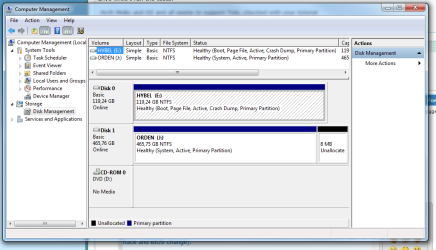
  • Capture.PNG
    Capture.PNG
    35.7 KB · Views: 50

My Computer My Computer

At a glance

W7 ultimate x64AMD FX -8120 Eight-Core Processor, 3100 Mhz16GB venegance
OS
W7 ultimate x64
CPU
AMD FX -8120 Eight-Core Processor, 3100 Mhz
Motherboard
Gigabyte GA-990FXA-UD3
Memory
16GB venegance
Hard Drives
samsung 128GB SSD
++
Did you install the OS with both of the drives plugged in?
 

My Computer My Computer

At a glance

MS Windows 7 Professional 64-bit SP1Intel(R) Core(TM) i5-2400 CPU @ 3.10GHzG.SKILL Ares 8GB (2x4GB)EVGA nVidia GeForce GTX 760 Superclocked
Computer type
PC/Desktop
Computer Manufacturer/Model Number
Custom Built
OS
MS Windows 7 Professional 64-bit SP1
CPU
Intel(R) Core(TM) i5-2400 CPU @ 3.10GHz
Motherboard
Asus P8Z77-V LK
Memory
G.SKILL Ares 8GB (2x4GB)
Graphics Card(s)
EVGA nVidia GeForce GTX 760 Superclocked
Sound Card
Realtek High Definition Audio
Monitor(s) Displays
ASUS VN247 24" 1ms
Screen Resolution
1920x1080
Hard Drives
Mushkin Chronos 120GB SSD (OS), 1TB Seagate HDD (Data)
PSU
XFX Pro Series 850w P1-850B-BEFX
Case
Corsair Obsidian 750D
Cooling
Corsair H100i (cpu) and case fans
Keyboard
Corsair Vengeance K70
Mouse
Corsair Vengeance M60
Internet Speed
1.14 MB/s (9.6 mbps)
Browser
Google Chrome
Yes, I did!
I did assume this is why I've got the stuff needed to boot on just the first one, which makes sense, but the startup fixer in the system recovery should have taken care of that, no?
 

My Computer My Computer

At a glance

W7 ultimate x64AMD FX -8120 Eight-Core Processor, 3100 Mhz16GB venegance
OS
W7 ultimate x64
CPU
AMD FX -8120 Eight-Core Processor, 3100 Mhz
Motherboard
Gigabyte GA-990FXA-UD3
Memory
16GB venegance
Hard Drives
samsung 128GB SSD
++
Yes, I did!
I did assume this is why I've got the stuff needed to boot on just the first one, which makes sense, but the startup fixer in the system recovery should have taken care of that, no?

Not necessarily. It could have installed some of the things you need on the other drive. It's best to install the OS with just the drive you want it on plugged in.
 

My Computer My Computer

At a glance

MS Windows 7 Professional 64-bit SP1Intel(R) Core(TM) i5-2400 CPU @ 3.10GHzG.SKILL Ares 8GB (2x4GB)EVGA nVidia GeForce GTX 760 Superclocked
Computer type
PC/Desktop
Computer Manufacturer/Model Number
Custom Built
OS
MS Windows 7 Professional 64-bit SP1
CPU
Intel(R) Core(TM) i5-2400 CPU @ 3.10GHz
Motherboard
Asus P8Z77-V LK
Memory
G.SKILL Ares 8GB (2x4GB)
Graphics Card(s)
EVGA nVidia GeForce GTX 760 Superclocked
Sound Card
Realtek High Definition Audio
Monitor(s) Displays
ASUS VN247 24" 1ms
Screen Resolution
1920x1080
Hard Drives
Mushkin Chronos 120GB SSD (OS), 1TB Seagate HDD (Data)
PSU
XFX Pro Series 850w P1-850B-BEFX
Case
Corsair Obsidian 750D
Cooling
Corsair H100i (cpu) and case fans
Keyboard
Corsair Vengeance K70
Mouse
Corsair Vengeance M60
Internet Speed
1.14 MB/s (9.6 mbps)
Browser
Google Chrome
Ok, so what do you recommend doing? Is re-installing the OS the only way?
 

My Computer My Computer

At a glance

W7 ultimate x64AMD FX -8120 Eight-Core Processor, 3100 Mhz16GB venegance
OS
W7 ultimate x64
CPU
AMD FX -8120 Eight-Core Processor, 3100 Mhz
Motherboard
Gigabyte GA-990FXA-UD3
Memory
16GB venegance
Hard Drives
samsung 128GB SSD
++
Did you use the startup recovery while both drives were connected? If so, it would have messed with the files on both the drives. You could try doing the recovery while one drive is unplugged and see if that works. If not, then I'd try reinstalling with the drive you want the OS on only plugged in.
 

My Computer My Computer

At a glance

MS Windows 7 Professional 64-bit SP1Intel(R) Core(TM) i5-2400 CPU @ 3.10GHzG.SKILL Ares 8GB (2x4GB)EVGA nVidia GeForce GTX 760 Superclocked
Computer type
PC/Desktop
Computer Manufacturer/Model Number
Custom Built
OS
MS Windows 7 Professional 64-bit SP1
CPU
Intel(R) Core(TM) i5-2400 CPU @ 3.10GHz
Motherboard
Asus P8Z77-V LK
Memory
G.SKILL Ares 8GB (2x4GB)
Graphics Card(s)
EVGA nVidia GeForce GTX 760 Superclocked
Sound Card
Realtek High Definition Audio
Monitor(s) Displays
ASUS VN247 24" 1ms
Screen Resolution
1920x1080
Hard Drives
Mushkin Chronos 120GB SSD (OS), 1TB Seagate HDD (Data)
PSU
XFX Pro Series 850w P1-850B-BEFX
Case
Corsair Obsidian 750D
Cooling
Corsair H100i (cpu) and case fans
Keyboard
Corsair Vengeance K70
Mouse
Corsair Vengeance M60
Internet Speed
1.14 MB/s (9.6 mbps)
Browser
Google Chrome
No, I did the startup recovery tool with only the right drive plugged in. Also tried setting the other as inactive, but still no go.
 

My Computer My Computer

At a glance

W7 ultimate x64AMD FX -8120 Eight-Core Processor, 3100 Mhz16GB venegance
OS
W7 ultimate x64
CPU
AMD FX -8120 Eight-Core Processor, 3100 Mhz
Motherboard
Gigabyte GA-990FXA-UD3
Memory
16GB venegance
Hard Drives
samsung 128GB SSD
++
Have you tried reinstalling with just the SSD plugged in?
 

My Computer My Computer

At a glance

MS Windows 7 Professional 64-bit SP1Intel(R) Core(TM) i5-2400 CPU @ 3.10GHzG.SKILL Ares 8GB (2x4GB)EVGA nVidia GeForce GTX 760 Superclocked
Computer type
PC/Desktop
Computer Manufacturer/Model Number
Custom Built
OS
MS Windows 7 Professional 64-bit SP1
CPU
Intel(R) Core(TM) i5-2400 CPU @ 3.10GHz
Motherboard
Asus P8Z77-V LK
Memory
G.SKILL Ares 8GB (2x4GB)
Graphics Card(s)
EVGA nVidia GeForce GTX 760 Superclocked
Sound Card
Realtek High Definition Audio
Monitor(s) Displays
ASUS VN247 24" 1ms
Screen Resolution
1920x1080
Hard Drives
Mushkin Chronos 120GB SSD (OS), 1TB Seagate HDD (Data)
PSU
XFX Pro Series 850w P1-850B-BEFX
Case
Corsair Obsidian 750D
Cooling
Corsair H100i (cpu) and case fans
Keyboard
Corsair Vengeance K70
Mouse
Corsair Vengeance M60
Internet Speed
1.14 MB/s (9.6 mbps)
Browser
Google Chrome
Your HDD is still marked 'Active'.

First make a restore point: How to Create a System Restore Point in Windows 7

If you don't have a recent Image Backup, to be safe you should make one before you proceed.
Imaging with free Macrium

To mark it as inactive:
1. Open Command Prompt as Administrator, start menu then right click the Command Prompt and click 'Run as Administrator'.

2. Type: diskpart

3. At the DISKPART prompt, type: list disk
- This will list all the disks in your system

4. In the next prompt, type: select disk #
- # means the number of the disk which has the wrong active designated partition

5. At the DISKPART prompt, type: list partition

6. Use the command: select partition #
- # means the number of the partition that you want to mark as inactive

7. Inactive the active partition with command: inactive

How to Mark a Partition as Inactive in Windows 7

Then disconnect the HDD.
With the SSD connected only: Startup Repair - Run 3 Separate Times
 

My Computer My Computer

At a glance

Windows 7 Ult x64 - SP1/ Windows 8 Pro x64Intel Core i5-3570K 4.6GHz8GB (2X4GB) DDR3 1600 Corsair Vengeance CL8 1.5vSapphire HD 7770 Vapor-X OC 1GB DDR5
Computer type
PC/Desktop
Computer Manufacturer/Model Number
76~2.0
OS
Windows 7 Ult x64 - SP1/ Windows 8 Pro x64
CPU
Intel Core i5-3570K 4.6GHz
Motherboard
Gigabyte GA-Z77X UD3H, f18
Memory
8GB (2X4GB) DDR3 1600 Corsair Vengeance CL8 1.5v
Graphics Card(s)
Sapphire HD 7770 Vapor-X OC 1GB DDR5
Sound Card
Onboard VIA VT2021
Monitor(s) Displays
22" LCD Dell
Screen Resolution
1680x1050
Hard Drives
Samsung 840Pro 128GB SSD,
Seagate Barracuda 500GB SATA2 7200rpm 32MB cache, Seagate Barracuda 1TB SATA2 7200rpm 32MB cache,
PSU
Corsair HX650W
Case
Cooler Master Storm Scout
Cooling
Corsair H80 2x12cm Noctua NF P12 , 2x14cm case fans
Keyboard
Logitech Wave
Mouse
CM Sentinel
Internet Speed
Dismal
Antivirus
Avast
Browser
Opera Next
Other Info
Haswell laptop: HP Envy 17t-j, i7-4700MQ, GeForce 740M 2GB DDR3, 17.3" Full HD 1920x1080, 16GB RAM, Samsung 840 Pro 128GB, 1TB Hitachi 7200 HDD,
Desktop: eSATA ports,
External eSATA Seagate 500GB SATA2 7200rpm,
External WD USB 500GB
I just joined this thread, but the only two drives I see are E: and J:. The SSD should have come out as the C: drive. It seems to me that once diskpart is run to deactivate the HD, you need to have Win 7 installed again on the SSD and be sure and only have the SSD plugged in to the Motherboard. This way your SSD will be the C: drive.
 

My Computer My Computer

At a glance

Windows 7 Home Premium 32-Bit - Build 7600 SP1Intel Core i3-2120 3.30GhzKingston 4 GB DDR3 1333 mhzAMD Radeon HD6670
Computer type
PC/Desktop
Computer Manufacturer/Model Number
Custom Build
OS
Windows 7 Home Premium 32-Bit - Build 7600 SP1
CPU
Intel Core i3-2120 3.30Ghz
Motherboard
Asus P8Z68-V LX Intel Z68 Socket H2 ATX
Memory
Kingston 4 GB DDR3 1333 mhz
Graphics Card(s)
AMD Radeon HD6670
Sound Card
Sound Blaster Audigy SE 24-Bit
Monitor(s) Displays
Asus VE228
Screen Resolution
1440 X 900
Hard Drives
OCZ Vertex 3 120 GB Sata 3 SSD ==
Kingston SH103/S3 120 G Hyper X 120 GB SSD ==
Western Digital 500 GB Caviar Green 7200 RPM ==
PSU
Corsair CX600M == 600 Watt
Case
NZXT Apollo - Silver with Clear Side Panel
Cooling
Three 120 mm Fans
Keyboard
Microsoft Natural 4000
Mouse
Microsoft Custom Optical 3000
Internet Speed
AT&T Fiber Optic Wireless Network
Antivirus
Microsoft Security Essentials
Browser
Chrome
Other Info
120 mm Blue LED Fan -- Three Blue LED Lazer Light Sticks
Back
Top