Solved Windows Won't Boot on SSD. Please help

Does that mean you got the installation media from the source for the official W7 iso available at that time ?
 

My Computer

Computer type
PC/Desktop
Computer Manufacturer/Model Number
home built
OS
Multi-Boot W7_Pro_x64 W8.1_Pro_x64 W10_Pro_x64 +Linux_VMs +Chromium_VM
CPU
AMD Athlon II x4 620
Motherboard
Gigabyte GA-MA785G-UD3H
Memory
6GB GSkill DDR2 800
Graphics Card(s)
AMD 4670 GPU + AMD 4200 IGP
Sound Card
on board Realtek ALC889A
Monitor(s) Displays
RCA 40" LCD TV, Insignia 32" LCD TV, HP 15" LCD monitor
Screen Resolution
1680 x 1050
Hard Drives
OCZ Vertex 3 120GB,
Samsung F3 1TB (3),
Several others - WD, Seagate, Hitachi, ...
PSU
Corsair 500 W
Case
Rosewill mid tower
Cooling
CM 90mm rifle
Keyboard
Gyration wireless, Logitech wireless, Dell USB wired
Mouse
Gyration wireless, Logitech wireless, V7 USB wired
Internet Speed
Spectrum - 100Mbps D / 10Mbps U
Antivirus
Avast, MBAM3, EMET, WinPatrol
Browser
Pale Moon, Firefox, IE
Other Info
2 multi-boot PC's
Mainly HTPC/Office/Gen purpose (no gaming).
Trendnet USB KVM.
LG DVD burner/Blue Ray Player.
Tray system for removable SATA backup drives.

Not currently OCd, under-volted.
I use Hybrid sleep, rarely re-boot or shutdown.

Hauppauge HD-PVR, Avermedia PCIe TV Tuner, Hauppauge PCI TV Tuner.
Does that mean you got the installation media from the source for the official W7 iso available at that time ?
I believe it was an official iso. It was verified as good by multiple admins and others at the time
 

My Computer

OS
Windows 7 Home Premium 64 Bit
When your wife arbitrarily unplugged the computer, something might have happened to the controller of the SSD. Do you have any other disk lying around (can be a HDD too) on which you can try to install and boot from - just as a test to rule out problems with the SSD.
 

My Computer

Computer Manufacturer/Model Number
HP, Dell, Gateway, Toshiba - 4 laptops and 2 desktops
OS
Vista, Windows7, Mint Mate, Zorin, Windows 8
CPU
from 1.6GHz Duo to i7
Monitor(s) Displays
2x HP w2207
Hard Drives
5x HDD, 7x SSD, 12x Externals
Keyboard
with trackball - no mices
Mouse
Trackball mice
Internet Speed
DSL 6000
When your wife arbitrarily unplugged the computer, something might have happened to the controller of the SSD. Do you have any other disk lying around (can be a HDD too) on which you can try to install and boot from - just as a test to rule out problems with the SSD.

Yes. It's already installed in my computer and formatted. I'll install tonight (about ten hours from now when I get home)
 

My Computer

OS
Windows 7 Home Premium 64 Bit
Windows did the same exact thing. So both hard drives are having the same issue the second I restart Windows AFTER I do my graphics driver update.

Any ideas

EDIT:

Just reseated video card and all ram just in case. Same issue

EDIT:
Did system restore. Now I'm going to do several windows updates and not do the driver update. I'm going the updates can install and somehow offset any issue. Just another test though to see if updating windows and leaving the graphics driver alone will work
 
Last edited:

My Computer

OS
Windows 7 Home Premium 64 Bit
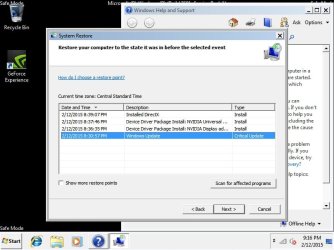
I started in safe mode and this is what system restore says has happened. All I technically did is do the driver update. I turned off automatic updates. But thought this might be useful.
 

Attachments

  • pic 1.jpg
    pic 1.jpg
    122.2 KB · Views: 0

My Computer

OS
Windows 7 Home Premium 64 Bit
Okay so my computer runs perfectly as long as I don't install driver updates for my video card. I have the GTX 760

Amazon.com: EVGA GeForce GTX 760 Super Clocked ACX 2GB GDDR5 SLI Ready Graphics Card: Computers & Accessories

Coincidentally I see someone who posted below with the same issue.


Windows 7 won't boot after installing drivers for graphics card - Microsoft Community


Any suggestions on ways to fix this? Or do you think my video card somehow is causing these issues and I just need a new video card?
 

My Computer

OS
Windows 7 Home Premium 64 Bit
If the video card went south, there is not much you can do short of replacing it. Just disable it in the BIOS and run with the on-board chip.
 

My Computer

Computer Manufacturer/Model Number
HP, Dell, Gateway, Toshiba - 4 laptops and 2 desktops
OS
Vista, Windows7, Mint Mate, Zorin, Windows 8
CPU
from 1.6GHz Duo to i7
Monitor(s) Displays
2x HP w2207
Hard Drives
5x HDD, 7x SSD, 12x Externals
Keyboard
with trackball - no mices
Mouse
Trackball mice
Internet Speed
DSL 6000
Just curious.

What driver version does your video card work and what driver version does your video card not work?
 

My Computer

Computer type
PC/Desktop
Computer Manufacturer/Model Number
Home made Desktop
OS
Windows 10 Pro. 64/ version 1709 Windows 7 Pro/64
CPU
Intel i7-6800K @ 4.3
Motherboard
ASUS X-99 Deluxe II
Memory
Corsair Platinum 16 gig @2400
Graphics Card(s)
EVGA GTX 1070 OC
Monitor(s) Displays
Asus 27" LED LCD/VE278Q
Screen Resolution
1920-1080 or 1280-720 HDMI
Hard Drives
INTEL SSD 730-240 Gb Sata 3.0/
PSU
EVGA Platium 1200W
Case
Phanteks Luxe Tempered Glass 8 fans/ one radiator
Cooling
XSPC/ Water Cooled CPU
Keyboard
Das 4 Professional
Mouse
Logitech M705/MX Anywhere 2-S
Internet Speed
100 mbits
Antivirus
Microsoft Security Essentials/ Malwarebytes Premium 3.0/ SAS
Browser
I.E. 11 default/Firefox/ ISP Time Warner Cable/Spectrum
Other Info
LG BluRay Burner/
Sound system-KLipsch-THX/
Icy Dock ssd Hot Swap bays.
Just curious.

What driver version does your video card work and what driver version does your video card not work?

It doesn't work on anything but generic.

I was using the disc to install and that's what was causing the issues.

Also keep in mind the original issue happened with the newest drivers
 

My Computer

OS
Windows 7 Home Premium 64 Bit
I notice this in post #25.

Windows did the same exact thing. So both hard drives are having the same issue the second I restart Windows AFTER I do my graphics driver update.
Will your graphics card work if you don't do the Update?

Could you let us know exactly what Drivers did and did NOT work?
 

My Computer

Computer type
PC/Desktop
Computer Manufacturer/Model Number
Home made Desktop
OS
Windows 10 Pro. 64/ version 1709 Windows 7 Pro/64
CPU
Intel i7-6800K @ 4.3
Motherboard
ASUS X-99 Deluxe II
Memory
Corsair Platinum 16 gig @2400
Graphics Card(s)
EVGA GTX 1070 OC
Monitor(s) Displays
Asus 27" LED LCD/VE278Q
Screen Resolution
1920-1080 or 1280-720 HDMI
Hard Drives
INTEL SSD 730-240 Gb Sata 3.0/
PSU
EVGA Platium 1200W
Case
Phanteks Luxe Tempered Glass 8 fans/ one radiator
Cooling
XSPC/ Water Cooled CPU
Keyboard
Das 4 Professional
Mouse
Logitech M705/MX Anywhere 2-S
Internet Speed
100 mbits
Antivirus
Microsoft Security Essentials/ Malwarebytes Premium 3.0/ SAS
Browser
I.E. 11 default/Firefox/ ISP Time Warner Cable/Spectrum
Other Info
LG BluRay Burner/
Sound system-KLipsch-THX/
Icy Dock ssd Hot Swap bays.
I notice this in post #25.

Windows did the same exact thing. So both hard drives are having the same issue the second I restart Windows AFTER I do my graphics driver update.
Will your graphics card work if you don't do the Update?

Could you let us know exactly what Drivers did and did NOT work?

I used the drivers that came on the disc. My geforce experience let's me know when the newest drivers are out and the newest drivers were installed when I originally had the issue.

I also tried updating through Windows update which also crashed.

And it may work but it will work like a $2 video card instead of a $200 video card
 

My Computer

OS
Windows 7 Home Premium 64 Bit
Why don't you answer my questions?
I asked what driver version works and what driver version doesn't work.

Just because a driver is new doesn't mean you need or want it.

Where did you get this little bit of wisdom?

And it may work but it will work like a $2 video card instead of a $200 video card
 

My Computer

Computer type
PC/Desktop
Computer Manufacturer/Model Number
Home made Desktop
OS
Windows 10 Pro. 64/ version 1709 Windows 7 Pro/64
CPU
Intel i7-6800K @ 4.3
Motherboard
ASUS X-99 Deluxe II
Memory
Corsair Platinum 16 gig @2400
Graphics Card(s)
EVGA GTX 1070 OC
Monitor(s) Displays
Asus 27" LED LCD/VE278Q
Screen Resolution
1920-1080 or 1280-720 HDMI
Hard Drives
INTEL SSD 730-240 Gb Sata 3.0/
PSU
EVGA Platium 1200W
Case
Phanteks Luxe Tempered Glass 8 fans/ one radiator
Cooling
XSPC/ Water Cooled CPU
Keyboard
Das 4 Professional
Mouse
Logitech M705/MX Anywhere 2-S
Internet Speed
100 mbits
Antivirus
Microsoft Security Essentials/ Malwarebytes Premium 3.0/ SAS
Browser
I.E. 11 default/Firefox/ ISP Time Warner Cable/Spectrum
Other Info
LG BluRay Burner/
Sound system-KLipsch-THX/
Icy Dock ssd Hot Swap bays.
Why don't you answer my questions?
I asked what driver version works and what driver version doesn't work.

Just because a driver is new doesn't mean you need or want it.

Because I don't know what exact version was installed. I would think by process of elimination, if the first driver that worked just fine won't work anymore, and the last driver that worked just fine won't work anymore, I would suppose that it's not the a driver issue.

Regardless I didn't remember an exact driver number since I always just update my driver through their program
 

My Computer

OS
Windows 7 Home Premium 64 Bit
A suggestion that works for me.

Install what ever driver that worked. If you can use your video card just use it. Allow Windows Updates to check for drivers. Then just check Windows Updates a couple of times a day and see if it offers you a video card driver update.

If Windows Update offers you a new driver take it.
These drivers will be a little old because not only has the video card manufacture checked the driver but Microsoft has also checked the driver to make sure it works well with Windows 7 and that takes time.

This method works quite well for me on two systems.
 

My Computer

Computer type
PC/Desktop
Computer Manufacturer/Model Number
Home made Desktop
OS
Windows 10 Pro. 64/ version 1709 Windows 7 Pro/64
CPU
Intel i7-6800K @ 4.3
Motherboard
ASUS X-99 Deluxe II
Memory
Corsair Platinum 16 gig @2400
Graphics Card(s)
EVGA GTX 1070 OC
Monitor(s) Displays
Asus 27" LED LCD/VE278Q
Screen Resolution
1920-1080 or 1280-720 HDMI
Hard Drives
INTEL SSD 730-240 Gb Sata 3.0/
PSU
EVGA Platium 1200W
Case
Phanteks Luxe Tempered Glass 8 fans/ one radiator
Cooling
XSPC/ Water Cooled CPU
Keyboard
Das 4 Professional
Mouse
Logitech M705/MX Anywhere 2-S
Internet Speed
100 mbits
Antivirus
Microsoft Security Essentials/ Malwarebytes Premium 3.0/ SAS
Browser
I.E. 11 default/Firefox/ ISP Time Warner Cable/Spectrum
Other Info
LG BluRay Burner/
Sound system-KLipsch-THX/
Icy Dock ssd Hot Swap bays.
To me this sounds like a Power Supply issue, the moment you engage the graphics card driver and draw some current , poof the system reboots and crashes the causing corruption. What kind of power supply do you have and how old is it?
 

My Computer

Computer type
PC/Desktop
Computer Manufacturer/Model Number
Bluethunder II
OS
Windows 7 x64 Ultimate and numerous virtual machines
CPU
AMD FX-8350 Vishera 32nm Technology @ 4.2 GHz default
Motherboard
ASUSTeK COMPUTER INC. SABERTOOTH 990FX R2.0 (Socket 942)
Memory
G Skill 32.0GB Dual-Channel DDR3 @ 1204MHz (11-13-13-31)
Graphics Card(s)
EVGA GeForce GTX 960 4GB Super SC ACX 2.0+ with Back Plate
Sound Card
Creative X-Fi Titanium HD Audiophile PCIe
Monitor(s) Displays
LG L227WTG x 3
Screen Resolution
1680 x 1050 16:10
Hard Drives
238GB Samsung850 PRO SATA Disk Device (SSD)
1863GB Seagate ST2000DM 001-1CH164 (SATA)
1397GB Seagate ST1500DL 003-9VT16L(SATA)
466GB Western Digital WDC WD50 03AZEX-00K1GA0 (SATA) x 2
932GB Seagate ST310005 28AS SATA Disk Device (SATA)
PSU
Enermax Revolution87+ 1000 Watts Gold Certified Power Supply
Case
Rocketfish Full Tower
Cooling
Cooler Master Hyper 212 EVO Push Pull 120mm Fans
Keyboard
Logitech K740
Mouse
Logitech G100S Laser LED + Logitech Gamepad F310
Internet Speed
500 mbs down and 30mbs up
Antivirus
Malwarebytes Pro & Avast and MSE on certain Virtual Machines
Browser
Firefox (Main) Chrome, Internet Explorer (Back Up)
Other Info
Logitech X 230 2.1 Stereo System and 5.1 Yamaha RX V2090
B&W DM6 Monitor Speakers + Center and Surround Speakers
Using Mouse Without Borders (Google it)
I have officially solved my issue on my own!

At first I narrowed it down to the video card itself. Of course since I already re-seated it and reinstalled several drivers I thought it was defective.

However I read of one other person who had an issue with a different card. Not only did he reseat his video card but also re-plugged in his hard drives and other cords.

Just in case I took out both of my hard drives, switched them sides. Re-plugged in the sata cables/power.

Re-seated my video card again.

Also just for organizational purposes I had to unplug and re-plug a few other cables so I could make them fit in my case well.

After that I booted back up, re-installed my old driver from a disc and it worked!!!!!!

One other great thing was because of the order of my hard drives my SSD was actually listed as like J or something. But because I switched it positions it is C now. Since it's my primary drive that was a little bonus :)

Thanks for all the help!!!!! I appreciate it from all of you
 

My Computer

OS
Windows 7 Home Premium 64 Bit
Thanks for reporting back. Now who would have thunk. This is one of those circumstances that is hard to diagnose remotely.
 

My Computer

Computer Manufacturer/Model Number
HP, Dell, Gateway, Toshiba - 4 laptops and 2 desktops
OS
Vista, Windows7, Mint Mate, Zorin, Windows 8
CPU
from 1.6GHz Duo to i7
Monitor(s) Displays
2x HP w2207
Hard Drives
5x HDD, 7x SSD, 12x Externals
Keyboard
with trackball - no mices
Mouse
Trackball mice
Internet Speed
DSL 6000
Thanks for reporting back. Now who would have thunk. This is one of those circumstances that is hard to diagnose remotely.
Definitely strange. My video card was only two months old. They would have given me a refurbished one for my warranty, and still probably would have had the same issue. So good thing I tried one last thing on my day off.
 

My Computer

OS
Windows 7 Home Premium 64 Bit
@Wolfgang
I have no idea how we would be able to tell if the cables and harness were plugged into the proper place correctly. We have to depend on the person building the system.

@zomboromano I'm glad you got it figured out.
Happy computing.
 

My Computer

Computer type
PC/Desktop
Computer Manufacturer/Model Number
Home made Desktop
OS
Windows 10 Pro. 64/ version 1709 Windows 7 Pro/64
CPU
Intel i7-6800K @ 4.3
Motherboard
ASUS X-99 Deluxe II
Memory
Corsair Platinum 16 gig @2400
Graphics Card(s)
EVGA GTX 1070 OC
Monitor(s) Displays
Asus 27" LED LCD/VE278Q
Screen Resolution
1920-1080 or 1280-720 HDMI
Hard Drives
INTEL SSD 730-240 Gb Sata 3.0/
PSU
EVGA Platium 1200W
Case
Phanteks Luxe Tempered Glass 8 fans/ one radiator
Cooling
XSPC/ Water Cooled CPU
Keyboard
Das 4 Professional
Mouse
Logitech M705/MX Anywhere 2-S
Internet Speed
100 mbits
Antivirus
Microsoft Security Essentials/ Malwarebytes Premium 3.0/ SAS
Browser
I.E. 11 default/Firefox/ ISP Time Warner Cable/Spectrum
Other Info
LG BluRay Burner/
Sound system-KLipsch-THX/
Icy Dock ssd Hot Swap bays.
Back
Top