
Solved New PC sometimes freezes after Welcome screen

pooksahib

New member
Member
VIP
Local time
5:42 PM
Messages
149
Location
Scotland
Hi. I've just put a new PC together (my first self-build) but I have a problem, one of those annoying ones where sometimes it happens, sometimes it doesn't. It concerns the 'input password' screen just after bootup - when this appears, both mouse and keyboard are frozen even although the cursor is blinking away in the password box. Sometimes it unfreezes after a few seconds, other times I just give up and reboot. And sometimes there's no problem at all... Very irritating. Can anyone suggest what the problem/cure is? Thanks in advance.
 

My Computer My Computer

Computer type
PC/Desktop
Computer Manufacturer/Model Number
self build
OS
Microsoft Windows 7 Ultimate 64-bit 7601 Multiprocessor Free Service Pack 1
CPU
Intel(R) Core(TM) i3-4150 CPU @ 3.50GHz
Motherboard
ASUSTeK COMPUTER INC. H97M-PLUS
Memory
8.00 GB
Graphics Card(s)
Intel(R) HD Graphics 4400
Sound Card
(1) High Definition Audio Device (2) USB Audio Device
Screen Resolution
1024 x 768 x 32 bits (4294967296 colors) @ 75 Hz
Hard Drives
(1) SAMSUNG HD103SI ATA Device (2) Samsung SSD 840 EVO 120GB ATA Device (3) ST31000528AS ATA Device (4) GENERIC USB Storage-CFC USB Device (5) GENERIC USB Storage-MSC USB Device (6) GENERIC USB Storage-SDC USB Device (7) GENERIC USB Stora
PSU
Corsair CXM 430W Modular 80 PLUS Bronze
Antivirus
Panda Free
Browser
Firefox+NoScript, AdBlockPlus, Disconnect

My Computer My Computer

Computer type
PC/Desktop
Computer Manufacturer/Model Number
Skylake Special #666
OS
Windows 10 Pro x64
CPU
Intel Core i7 6700K
Motherboard
Asus Sabertooth Z170 Mark 1
Memory
GSkill TridentZ RGB 16GB 3600 16-16-16-36
Graphics Card(s)
EVGA GTX 980 Ti SC x2
Sound Card
Realtek High Definition
Monitor(s) Displays
AOC G2460PG
Screen Resolution
1920 x 1080 144Hz
Hard Drives
Samsung 860 Pro 256GB, Seagate Barracuda 4TB x2
PSU
EVGA 1000 P2, EVGA White Custom Braided Cables
Case
Corsair Vengeance C70 Gunmetal Black
Cooling
Corsair H100i v2, Corsair ML120 x2, Thermal Grizzly Kryonaut
Keyboard
Logitech G910 Orion Spectrum
Mouse
Logitech G700s
Internet Speed
Verizon Fios Quantum Gateway 75/75
Antivirus
Windows Defender, Malwarebytes Free 3.8.3
Browser
Chrome
Other Info
Corsair SP120 x4, LG Blu-ray Drive, Durabrand HT-395 100 Watt Dolby Digital Amp, Corsair H2100 Wireless 7.1 Headset
Hi addRAM, and thanks for that. I used a virgin SSD – scannow found nothing wrong. I use the password feature as it's not just me who uses the PC. If the problem persists then a reinstall is probably a good idea.
 

My Computer My Computer

Computer type
PC/Desktop
Computer Manufacturer/Model Number
self build
OS
Microsoft Windows 7 Ultimate 64-bit 7601 Multiprocessor Free Service Pack 1
CPU
Intel(R) Core(TM) i3-4150 CPU @ 3.50GHz
Motherboard
ASUSTeK COMPUTER INC. H97M-PLUS
Memory
8.00 GB
Graphics Card(s)
Intel(R) HD Graphics 4400
Sound Card
(1) High Definition Audio Device (2) USB Audio Device
Screen Resolution
1024 x 768 x 32 bits (4294967296 colors) @ 75 Hz
Hard Drives
(1) SAMSUNG HD103SI ATA Device (2) Samsung SSD 840 EVO 120GB ATA Device (3) ST31000528AS ATA Device (4) GENERIC USB Storage-CFC USB Device (5) GENERIC USB Storage-MSC USB Device (6) GENERIC USB Storage-SDC USB Device (7) GENERIC USB Stora
PSU
Corsair CXM 430W Modular 80 PLUS Bronze
Antivirus
Panda Free
Browser
Firefox+NoScript, AdBlockPlus, Disconnect
Use Win7 password created during install or at Control Panel>User Accounts, but not BIOS password.


Compare the install you did with the same one here in Clean Reinstall - Factory OEM Windows 7 which compiles everything that works best in tens of thousands of install we've helped with here since beta.
 
Hi gregrocker and thanks for that. I'm using the correct password (never had one solely for BIOS, can't recall being given the option to set one.). My BIOS screen mentions 'UEFI' and I see from your (excellent) link there's a specific install method for that. But the mobo manual just says 'install your OS' so I can't imagine a 'normal' install causes problems...
 

My Computer My Computer

Computer type
PC/Desktop
Computer Manufacturer/Model Number
self build
OS
Microsoft Windows 7 Ultimate 64-bit 7601 Multiprocessor Free Service Pack 1
CPU
Intel(R) Core(TM) i3-4150 CPU @ 3.50GHz
Motherboard
ASUSTeK COMPUTER INC. H97M-PLUS
Memory
8.00 GB
Graphics Card(s)
Intel(R) HD Graphics 4400
Sound Card
(1) High Definition Audio Device (2) USB Audio Device
Screen Resolution
1024 x 768 x 32 bits (4294967296 colors) @ 75 Hz
Hard Drives
(1) SAMSUNG HD103SI ATA Device (2) Samsung SSD 840 EVO 120GB ATA Device (3) ST31000528AS ATA Device (4) GENERIC USB Storage-CFC USB Device (5) GENERIC USB Storage-MSC USB Device (6) GENERIC USB Storage-SDC USB Device (7) GENERIC USB Stora
PSU
Corsair CXM 430W Modular 80 PLUS Bronze
Antivirus
Panda Free
Browser
Firefox+NoScript, AdBlockPlus, Disconnect
Hello again gregrocker. Latest Disk Management snapshot attached. Since doing this, things have improved but I'm going to install a few programs before I declare 'fixed'. The problem seemed to be related to 'restart' – there were a couple of Windows Updates this morning and when they were done, I noticed it was clicking 'restart now' that led to a subsequent freezeup.


Although I deleted all the Windows-related files on the old HDD (including hidden), it looks like some element of the old HDDs configuration was fooling the new OS on my SSD.


Anyway, fingers crossed and I'll report back.


I'll not report the UEFI, CSM, Legacy BIOS settings in BIOS for now (I'd need to teach myself to do that for a start...)
 

Attachments

  • New Capture.PNG
    New Capture.PNG
    7.9 KB · Views: 2

My Computer My Computer

Computer type
PC/Desktop
Computer Manufacturer/Model Number
self build
OS
Microsoft Windows 7 Ultimate 64-bit 7601 Multiprocessor Free Service Pack 1
CPU
Intel(R) Core(TM) i3-4150 CPU @ 3.50GHz
Motherboard
ASUSTeK COMPUTER INC. H97M-PLUS
Memory
8.00 GB
Graphics Card(s)
Intel(R) HD Graphics 4400
Sound Card
(1) High Definition Audio Device (2) USB Audio Device
Screen Resolution
1024 x 768 x 32 bits (4294967296 colors) @ 75 Hz
Hard Drives
(1) SAMSUNG HD103SI ATA Device (2) Samsung SSD 840 EVO 120GB ATA Device (3) ST31000528AS ATA Device (4) GENERIC USB Storage-CFC USB Device (5) GENERIC USB Storage-MSC USB Device (6) GENERIC USB Storage-SDC USB Device (7) GENERIC USB Stora
PSU
Corsair CXM 430W Modular 80 PLUS Bronze
Antivirus
Panda Free
Browser
Firefox+NoScript, AdBlockPlus, Disconnect
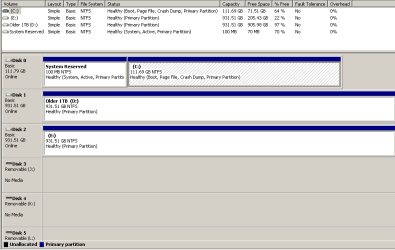
The configuration looks correct.

You can read about the BIOS settings choices in your Manual on the mobo's Support Downloads webpage.

Every mobo has a BIOS hotkey usually given on Splash Screen at boot. Tap that key to enter BIOS setup. Tell us what settings you have for UEFI, Legacy BIOS, CSM. One of those being set slightly wrong could be a problem.
 
Hi. The ASUS Bios has loads of info but nothing resembling UEFI, CSM or Legacy.
I took a couple of new programs out of 'startup' (via msconfig) this morning which generated the 'restart now' button (which I believe was the action which preceded the freezing). The PC powered down and when the password page returned I was able to input it with no problem. Nice.

The only minor downside was that, on reboot itself, it hung on the 'press F2 to enter BIOS' for more time than it did with my old PC. I imagined it would be super-fast with an SSD...

So, all in all, things look good. I'll wait a day or two before marking the thread solved, though.
 

My Computer My Computer

Computer type
PC/Desktop
Computer Manufacturer/Model Number
self build
OS
Microsoft Windows 7 Ultimate 64-bit 7601 Multiprocessor Free Service Pack 1
CPU
Intel(R) Core(TM) i3-4150 CPU @ 3.50GHz
Motherboard
ASUSTeK COMPUTER INC. H97M-PLUS
Memory
8.00 GB
Graphics Card(s)
Intel(R) HD Graphics 4400
Sound Card
(1) High Definition Audio Device (2) USB Audio Device
Screen Resolution
1024 x 768 x 32 bits (4294967296 colors) @ 75 Hz
Hard Drives
(1) SAMSUNG HD103SI ATA Device (2) Samsung SSD 840 EVO 120GB ATA Device (3) ST31000528AS ATA Device (4) GENERIC USB Storage-CFC USB Device (5) GENERIC USB Storage-MSC USB Device (6) GENERIC USB Storage-SDC USB Device (7) GENERIC USB Stora
PSU
Corsair CXM 430W Modular 80 PLUS Bronze
Antivirus
Panda Free
Browser
Firefox+NoScript, AdBlockPlus, Disconnect
Look for a setting in BIOS for Fast Boot or similar, to bypass or speed up the BIOS splash screen which sometimes has a delay so you can tap an Fkey.

If you haven't already, read your Mobo Manual on Asus Support Downloads webpage to understand better the BIOS settings as this can be a real eye opener to features.
 
Hi. I can't imagine it's a 'Fast Boot' issue - a normal bootup is fine, it's just when restarting after a prompt from a new program or update that the 'BIOS splash' stays longer. But I'll check the BIOS setting for such a feature.

The rest of the BIOS seems fine - I've selected 'normal' performance. Most other things seem to be 'enabled'.

Many thanks for all your time.
 

My Computer My Computer

Computer type
PC/Desktop
Computer Manufacturer/Model Number
self build
OS
Microsoft Windows 7 Ultimate 64-bit 7601 Multiprocessor Free Service Pack 1
CPU
Intel(R) Core(TM) i3-4150 CPU @ 3.50GHz
Motherboard
ASUSTeK COMPUTER INC. H97M-PLUS
Memory
8.00 GB
Graphics Card(s)
Intel(R) HD Graphics 4400
Sound Card
(1) High Definition Audio Device (2) USB Audio Device
Screen Resolution
1024 x 768 x 32 bits (4294967296 colors) @ 75 Hz
Hard Drives
(1) SAMSUNG HD103SI ATA Device (2) Samsung SSD 840 EVO 120GB ATA Device (3) ST31000528AS ATA Device (4) GENERIC USB Storage-CFC USB Device (5) GENERIC USB Storage-MSC USB Device (6) GENERIC USB Storage-SDC USB Device (7) GENERIC USB Stora
PSU
Corsair CXM 430W Modular 80 PLUS Bronze
Antivirus
Panda Free
Browser
Firefox+NoScript, AdBlockPlus, Disconnect
Tell us what settings you have for UEFI, Legacy BIOS, CSM. One of those being set slightly wrong could be a problem.

I finally found this section of the BIOS. Here's what's onscreen:
Launch CSM - Enabled
Boot Device Control - UEFI and Legacy OPROM
Boot from storage devices - Legacy OPROM First*

*the alternatives are 'UEFI First' or 'Ignore'.

Should I be happy with these settings? I'd expect so as everything's been working fine.
 

My Computer My Computer

Computer type
PC/Desktop
Computer Manufacturer/Model Number
self build
OS
Microsoft Windows 7 Ultimate 64-bit 7601 Multiprocessor Free Service Pack 1
CPU
Intel(R) Core(TM) i3-4150 CPU @ 3.50GHz
Motherboard
ASUSTeK COMPUTER INC. H97M-PLUS
Memory
8.00 GB
Graphics Card(s)
Intel(R) HD Graphics 4400
Sound Card
(1) High Definition Audio Device (2) USB Audio Device
Screen Resolution
1024 x 768 x 32 bits (4294967296 colors) @ 75 Hz
Hard Drives
(1) SAMSUNG HD103SI ATA Device (2) Samsung SSD 840 EVO 120GB ATA Device (3) ST31000528AS ATA Device (4) GENERIC USB Storage-CFC USB Device (5) GENERIC USB Storage-MSC USB Device (6) GENERIC USB Storage-SDC USB Device (7) GENERIC USB Stora
PSU
Corsair CXM 430W Modular 80 PLUS Bronze
Antivirus
Panda Free
Browser
Firefox+NoScript, AdBlockPlus, Disconnect
This looks correct, too. I avoid UEFI due to all the problems we see here but you may have had and Updates reboot issue that sorted itself.

Since you're interested, going through the Troubleshooting steps in my signature pic below will familiarize you
Better with Win7 and offer optimizations which work best.
 
Back
Top