New pc trouble

Direct X11 is all you get with Windows 7. Direct X 11.1 is not availably for Windows 7 to the best of my knowledge.
Now lets see how Windows 7 is seeing and using your ram. Using Resource Monitor give us a picture like this for your computer.
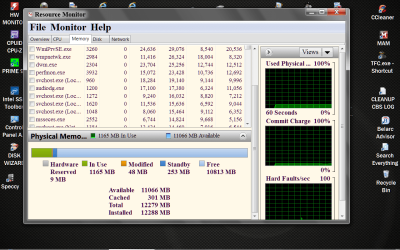
Resource Monitor RAM.PNG

I think you can see I'm doing this step at a time. If you get stuck on a step just post back. No hurry it's nap time. Love my medication.
 

My Computer

Computer type
PC/Desktop
Computer Manufacturer/Model Number
Home made Desktop
OS
Windows 10 Pro. 64/ version 1709 Windows 7 Pro/64
CPU
Intel i7-6800K @ 4.3
Motherboard
ASUS X-99 Deluxe II
Memory
Corsair Platinum 16 gig @2400
Graphics Card(s)
EVGA GTX 1070 OC
Monitor(s) Displays
Asus 27" LED LCD/VE278Q
Screen Resolution
1920-1080 or 1280-720 HDMI
Hard Drives
INTEL SSD 730-240 Gb Sata 3.0/
PSU
EVGA Platium 1200W
Case
Phanteks Luxe Tempered Glass 8 fans/ one radiator
Cooling
XSPC/ Water Cooled CPU
Keyboard
Das 4 Professional
Mouse
Logitech M705/MX Anywhere 2-S
Internet Speed
100 mbits
Antivirus
Microsoft Security Essentials/ Malwarebytes Premium 3.0/ SAS
Browser
I.E. 11 default/Firefox/ ISP Time Warner Cable/Spectrum
Other Info
LG BluRay Burner/
Sound system-KLipsch-THX/
Icy Dock ssd Hot Swap bays.
lol, heres my printscreen:
 

Attachments

  • pf2.png
    pf2.png
    40.9 KB · Views: 17

My Computer

Computer Manufacturer/Model Number
desktop self built
OS
Microsoft Windows 7 Ultimate 64-bit 7601 Multiprocessor Free Service Pack 1
CPU
Intel(R) Core(TM) i7-3960X CPU @ 3.30GHz
Motherboard
ASRock X79 Extreme11
Memory
64.00 GB
Graphics Card(s)
(1) NVIDIA GeForce GTX 580 (2) NVIDIA GeForce GTX 580
Sound Card
(1) SB Recon3Di (2) High Definition Audio Device (3) Hig
Monitor(s) Displays
dell 3008wfp
Screen Resolution
2560 x 1600 x 32 bits (4294967296 colors) @ 59 Hz
Hard Drives
(1) ATA OCZ-VECTOR SCSI Disk Device
PSU
platimax 1500 watt

My Computer

Computer type
PC/Desktop
Computer Manufacturer/Model Number
Skylake Special #666
OS
Windows 10 Pro x64
CPU
Intel Core i7 6700K
Motherboard
Asus Sabertooth Z170 Mark 1
Memory
GSkill TridentZ RGB 16GB 3600 16-16-16-36
Graphics Card(s)
EVGA GTX 980 Ti SC x2
Sound Card
Realtek High Definition
Monitor(s) Displays
AOC G2460PG
Screen Resolution
1920 x 1080 144Hz
Hard Drives
Samsung 860 Pro 256GB, Seagate Barracuda 4TB x2
PSU
EVGA 1000 P2, EVGA White Custom Braided Cables
Case
Corsair Vengeance C70 Gunmetal Black
Cooling
Corsair H100i v2, Corsair ML120 x2, Thermal Grizzly Kryonaut
Keyboard
Logitech G910 Orion Spectrum
Mouse
Logitech G700s
Internet Speed
Verizon Fios Quantum Gateway 75/75
Antivirus
Windows Defender, Malwarebytes Free 3.8.3
Browser
Chrome
Other Info
Corsair SP120 x4, LG Blu-ray Drive, Durabrand HT-395 100 Watt Dolby Digital Amp, Corsair H2100 Wireless 7.1 Headset
What about this:

"Some computers have a powerful graphics card and a weak integrated graphics chip, and some PC games do not auto-run on the card. Try right-clicking the EXE file and selecting "Run with graphics processor..." and then selecting your graphics card. This happens to me a lot".

I don't know if this will help but its worth giving it a shot
I can't find this option anywhere??
 

My Computer

Computer Manufacturer/Model Number
desktop self built
OS
Microsoft Windows 7 Ultimate 64-bit 7601 Multiprocessor Free Service Pack 1
CPU
Intel(R) Core(TM) i7-3960X CPU @ 3.30GHz
Motherboard
ASRock X79 Extreme11
Memory
64.00 GB
Graphics Card(s)
(1) NVIDIA GeForce GTX 580 (2) NVIDIA GeForce GTX 580
Sound Card
(1) SB Recon3Di (2) High Definition Audio Device (3) Hig
Monitor(s) Displays
dell 3008wfp
Screen Resolution
2560 x 1600 x 32 bits (4294967296 colors) @ 59 Hz
Hard Drives
(1) ATA OCZ-VECTOR SCSI Disk Device
PSU
platimax 1500 watt
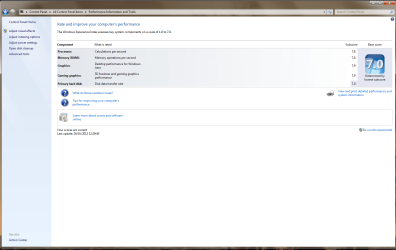
Well Windows seem to see all your ram. Your reserved for hardware is a bit high but I wouldn't worry about it because you have a lot of hard ware. Here is a little built in Windows 7 test you can do. This will tell you how Windows 7 judges your system.
Press the Windows 7 key and the pause key on your keyboard. Then in the lower left of that screen tick on Performance and Information Tools. Then tick on
Advanced Tools. Tick on the top line.
Clear all Windows experience index and re rate this system.
Let it complete and post a picture of the results.
Here is the best way to post a picture on this Forum.

http://www.sevenforums.com/tutorials/9733-screenshots-files-upload-post-seven-forums.html

WEI.PNG

Don't mess with your ram setting at this time.
 

My Computer

Computer type
PC/Desktop
Computer Manufacturer/Model Number
Home made Desktop
OS
Windows 10 Pro. 64/ version 1709 Windows 7 Pro/64
CPU
Intel i7-6800K @ 4.3
Motherboard
ASUS X-99 Deluxe II
Memory
Corsair Platinum 16 gig @2400
Graphics Card(s)
EVGA GTX 1070 OC
Monitor(s) Displays
Asus 27" LED LCD/VE278Q
Screen Resolution
1920-1080 or 1280-720 HDMI
Hard Drives
INTEL SSD 730-240 Gb Sata 3.0/
PSU
EVGA Platium 1200W
Case
Phanteks Luxe Tempered Glass 8 fans/ one radiator
Cooling
XSPC/ Water Cooled CPU
Keyboard
Das 4 Professional
Mouse
Logitech M705/MX Anywhere 2-S
Internet Speed
100 mbits
Antivirus
Microsoft Security Essentials/ Malwarebytes Premium 3.0/ SAS
Browser
I.E. 11 default/Firefox/ ISP Time Warner Cable/Spectrum
Other Info
LG BluRay Burner/
Sound system-KLipsch-THX/
Icy Dock ssd Hot Swap bays.
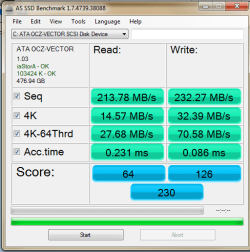
Here are my results. p.s why do i only get 7.0 on a brand new 512gb ocz vector?
Isn't this supposed to be the fastest ssd ever made??
 

Attachments

  • pf3.png
    pf3.png
    74 KB · Views: 19

My Computer

Computer Manufacturer/Model Number
desktop self built
OS
Microsoft Windows 7 Ultimate 64-bit 7601 Multiprocessor Free Service Pack 1
CPU
Intel(R) Core(TM) i7-3960X CPU @ 3.30GHz
Motherboard
ASRock X79 Extreme11
Memory
64.00 GB
Graphics Card(s)
(1) NVIDIA GeForce GTX 580 (2) NVIDIA GeForce GTX 580
Sound Card
(1) SB Recon3Di (2) High Definition Audio Device (3) Hig
Monitor(s) Displays
dell 3008wfp
Screen Resolution
2560 x 1600 x 32 bits (4294967296 colors) @ 59 Hz
Hard Drives
(1) ATA OCZ-VECTOR SCSI Disk Device
PSU
platimax 1500 watt
A few things could cause that score to show. What controller are you using (curious, because your specs identify it as a SCSI device)? What drivers for that controller are you using...Microsoft or OEM? Is the drive aligned properly?
 

My Computer

OS
Windows 7 Ultimate x64 SP1
CPU
Intel Core i7-2600
Motherboard
Gigabyte GA-P67A-UD3P-B3
Memory
12 GB Patriot Extreme DDR3-1333
Graphics Card(s)
Nvidia GTX 470
Monitor(s) Displays
Dell UltraSharp 2209WA
Hard Drives
OCZ Agility3 240 GB, WD5001AALS, WD7501AALS
PSU
OCZ ModStream 700W
Case
CoolerMaster HAF 912 Advanced
Cooling
CoolerMaster Hyper 212 Plus
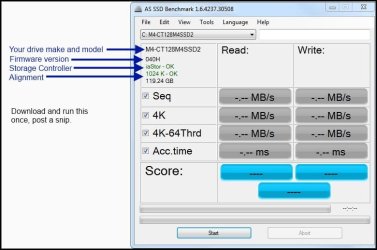
Download AS SSD and see the snip. The DL link is on the top right. Some SSDs will gain performance after several hours/days of initial start up. My M4 scored a 7.5 at first.

assd ex.JPG


My Computer

Computer type
PC/Desktop
Computer Manufacturer/Model Number
Home Built Desktop By DataTech
OS
Windows 7 Ultimate X64 SP1
CPU
Intel i5-2550K, Differing ~4.4-4.8GHz No built in GPU
Motherboard
ASUS P8Z68-V PRO/GEN3
Memory
16GB G.Skill Sniper 1866MHz @ 2133MHz 2x8GB
Graphics Card(s)
ASUS GTX650TIB-DC2OC-2GD5, (650TI Boost)
Sound Card
Onboard Realtek 5-1
Monitor(s) Displays
Samsung P2570HD
Screen Resolution
1920x1080
Hard Drives
Samsung 840 Pro 256GB SSD for OS, 500GB Seagate Constellation (Enterprise drive) for Data
PSU
Corsair HX650W
Case
Inwin Dragon Rider
Cooling
Hyper 212 EVO w/two Noctua fans, push-pull, @1300 RPM
Keyboard
E-Z Eyes, bright yellow keys with large characters
Mouse
steelseries SENSEI Laser Pro Gaming
Internet Speed
48-51Mbs Mbs down, 11 Mbs up Xfinity Cable
Antivirus
Norton Internet Security 2013
Browser
IE 10, Opera, Pale Moon if needed
Other Info
4 case fans, LG BluRay-RE, ASUS DVD-RW, Mr. Fusion power supply, 1.21 gigawatts.
sequential writes are only 200mb/s when i should get 550mb/s im also concerned why i cant overclock my ram to stock setting or overclocing my cpu one bit without BLOD but one setpo at a time i guess.
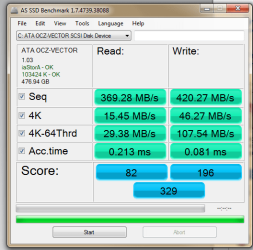
using a sata 3 port im getting 370mb and 400mb, still not 550mb i need sata 6gb right?
 

Attachments

  • pf4.png
    pf4.png
    17.5 KB · Views: 3
Last edited:

My Computer

Computer Manufacturer/Model Number
desktop self built
OS
Microsoft Windows 7 Ultimate 64-bit 7601 Multiprocessor Free Service Pack 1
CPU
Intel(R) Core(TM) i7-3960X CPU @ 3.30GHz
Motherboard
ASRock X79 Extreme11
Memory
64.00 GB
Graphics Card(s)
(1) NVIDIA GeForce GTX 580 (2) NVIDIA GeForce GTX 580
Sound Card
(1) SB Recon3Di (2) High Definition Audio Device (3) Hig
Monitor(s) Displays
dell 3008wfp
Screen Resolution
2560 x 1600 x 32 bits (4294967296 colors) @ 59 Hz
Hard Drives
(1) ATA OCZ-VECTOR SCSI Disk Device
PSU
platimax 1500 watt
Sequential read/write isn't too consequential for the OS. The 4K numbers are and yours look pretty good although the read is a bit slow. Also access times are important and yours look good. Yes you want the SSD on a SATA III port. Did you have only the SSD installed when you installed w7?

how have you tried to set your RAM and what are its specs: volts, frequency, timings?
 

My Computer

Computer type
PC/Desktop
Computer Manufacturer/Model Number
Home Built Desktop By DataTech
OS
Windows 7 Ultimate X64 SP1
CPU
Intel i5-2550K, Differing ~4.4-4.8GHz No built in GPU
Motherboard
ASUS P8Z68-V PRO/GEN3
Memory
16GB G.Skill Sniper 1866MHz @ 2133MHz 2x8GB
Graphics Card(s)
ASUS GTX650TIB-DC2OC-2GD5, (650TI Boost)
Sound Card
Onboard Realtek 5-1
Monitor(s) Displays
Samsung P2570HD
Screen Resolution
1920x1080
Hard Drives
Samsung 840 Pro 256GB SSD for OS, 500GB Seagate Constellation (Enterprise drive) for Data
PSU
Corsair HX650W
Case
Inwin Dragon Rider
Cooling
Hyper 212 EVO w/two Noctua fans, push-pull, @1300 RPM
Keyboard
E-Z Eyes, bright yellow keys with large characters
Mouse
steelseries SENSEI Laser Pro Gaming
Internet Speed
48-51Mbs Mbs down, 11 Mbs up Xfinity Cable
Antivirus
Norton Internet Security 2013
Browser
IE 10, Opera, Pale Moon if needed
Other Info
4 case fans, LG BluRay-RE, ASUS DVD-RW, Mr. Fusion power supply, 1.21 gigawatts.
timz your system looks pretty good from the pictures you have posted. I wouldn't recommend at this time to over clock. Like you said Step at a Time. Sometimes just using your system a while will help your ssd scores. Please work with the good friends that dropped by to help you. I'm not a gamer but we do have many here. I don't see anything that would cause gaming problems but the gamers might. You have a very nice system. Thanks for working with me and following instructions.
 

My Computer

Computer type
PC/Desktop
Computer Manufacturer/Model Number
Home made Desktop
OS
Windows 10 Pro. 64/ version 1709 Windows 7 Pro/64
CPU
Intel i7-6800K @ 4.3
Motherboard
ASUS X-99 Deluxe II
Memory
Corsair Platinum 16 gig @2400
Graphics Card(s)
EVGA GTX 1070 OC
Monitor(s) Displays
Asus 27" LED LCD/VE278Q
Screen Resolution
1920-1080 or 1280-720 HDMI
Hard Drives
INTEL SSD 730-240 Gb Sata 3.0/
PSU
EVGA Platium 1200W
Case
Phanteks Luxe Tempered Glass 8 fans/ one radiator
Cooling
XSPC/ Water Cooled CPU
Keyboard
Das 4 Professional
Mouse
Logitech M705/MX Anywhere 2-S
Internet Speed
100 mbits
Antivirus
Microsoft Security Essentials/ Malwarebytes Premium 3.0/ SAS
Browser
I.E. 11 default/Firefox/ ISP Time Warner Cable/Spectrum
Other Info
LG BluRay Burner/
Sound system-KLipsch-THX/
Icy Dock ssd Hot Swap bays.
Thanks, and all for your trial and error methods, hopefully we can fix this pc to running as it should:
upon that ssd read/writes increased but not fully.


Downloading the latest direct x and framework.net gives me a max of 30 fps in farcry which is better than recently but prior to my ssd change i was getting over 60fps.So we can hopefully change that.
 

Attachments

  • pf5.png
    pf5.png
    19.7 KB · Views: 2

My Computer

Computer Manufacturer/Model Number
desktop self built
OS
Microsoft Windows 7 Ultimate 64-bit 7601 Multiprocessor Free Service Pack 1
CPU
Intel(R) Core(TM) i7-3960X CPU @ 3.30GHz
Motherboard
ASRock X79 Extreme11
Memory
64.00 GB
Graphics Card(s)
(1) NVIDIA GeForce GTX 580 (2) NVIDIA GeForce GTX 580
Sound Card
(1) SB Recon3Di (2) High Definition Audio Device (3) Hig
Monitor(s) Displays
dell 3008wfp
Screen Resolution
2560 x 1600 x 32 bits (4294967296 colors) @ 59 Hz
Hard Drives
(1) ATA OCZ-VECTOR SCSI Disk Device
PSU
platimax 1500 watt
I'm not sure what this means could you explain.
Thanks, and all for your trial and error methods, hopefully we can fix this pc to running as it should:
 

My Computer

Computer type
PC/Desktop
Computer Manufacturer/Model Number
Home made Desktop
OS
Windows 10 Pro. 64/ version 1709 Windows 7 Pro/64
CPU
Intel i7-6800K @ 4.3
Motherboard
ASUS X-99 Deluxe II
Memory
Corsair Platinum 16 gig @2400
Graphics Card(s)
EVGA GTX 1070 OC
Monitor(s) Displays
Asus 27" LED LCD/VE278Q
Screen Resolution
1920-1080 or 1280-720 HDMI
Hard Drives
INTEL SSD 730-240 Gb Sata 3.0/
PSU
EVGA Platium 1200W
Case
Phanteks Luxe Tempered Glass 8 fans/ one radiator
Cooling
XSPC/ Water Cooled CPU
Keyboard
Das 4 Professional
Mouse
Logitech M705/MX Anywhere 2-S
Internet Speed
100 mbits
Antivirus
Microsoft Security Essentials/ Malwarebytes Premium 3.0/ SAS
Browser
I.E. 11 default/Firefox/ ISP Time Warner Cable/Spectrum
Other Info
LG BluRay Burner/
Sound system-KLipsch-THX/
Icy Dock ssd Hot Swap bays.
basically thanks to you and everyone for trying to help but let's hope my pc gets fixed, because it is still not running properly on games. :)
 

My Computer

Computer Manufacturer/Model Number
desktop self built
OS
Microsoft Windows 7 Ultimate 64-bit 7601 Multiprocessor Free Service Pack 1
CPU
Intel(R) Core(TM) i7-3960X CPU @ 3.30GHz
Motherboard
ASRock X79 Extreme11
Memory
64.00 GB
Graphics Card(s)
(1) NVIDIA GeForce GTX 580 (2) NVIDIA GeForce GTX 580
Sound Card
(1) SB Recon3Di (2) High Definition Audio Device (3) Hig
Monitor(s) Displays
dell 3008wfp
Screen Resolution
2560 x 1600 x 32 bits (4294967296 colors) @ 59 Hz
Hard Drives
(1) ATA OCZ-VECTOR SCSI Disk Device
PSU
platimax 1500 watt
trial and error methods
Have a nice day.
 

My Computer

Computer type
PC/Desktop
Computer Manufacturer/Model Number
Home made Desktop
OS
Windows 10 Pro. 64/ version 1709 Windows 7 Pro/64
CPU
Intel i7-6800K @ 4.3
Motherboard
ASUS X-99 Deluxe II
Memory
Corsair Platinum 16 gig @2400
Graphics Card(s)
EVGA GTX 1070 OC
Monitor(s) Displays
Asus 27" LED LCD/VE278Q
Screen Resolution
1920-1080 or 1280-720 HDMI
Hard Drives
INTEL SSD 730-240 Gb Sata 3.0/
PSU
EVGA Platium 1200W
Case
Phanteks Luxe Tempered Glass 8 fans/ one radiator
Cooling
XSPC/ Water Cooled CPU
Keyboard
Das 4 Professional
Mouse
Logitech M705/MX Anywhere 2-S
Internet Speed
100 mbits
Antivirus
Microsoft Security Essentials/ Malwarebytes Premium 3.0/ SAS
Browser
I.E. 11 default/Firefox/ ISP Time Warner Cable/Spectrum
Other Info
LG BluRay Burner/
Sound system-KLipsch-THX/
Icy Dock ssd Hot Swap bays.
Playing the crysis 3 beta im getting 2fps on max settings. installed new drivers so i doubt thats the problem.
have directx 11, but it may be an issue.
Any ideas???
far cry 3 is slow no matter what i do now. Seriously I just want this fixed.
 
Last edited:

My Computer

Computer Manufacturer/Model Number
desktop self built
OS
Microsoft Windows 7 Ultimate 64-bit 7601 Multiprocessor Free Service Pack 1
CPU
Intel(R) Core(TM) i7-3960X CPU @ 3.30GHz
Motherboard
ASRock X79 Extreme11
Memory
64.00 GB
Graphics Card(s)
(1) NVIDIA GeForce GTX 580 (2) NVIDIA GeForce GTX 580
Sound Card
(1) SB Recon3Di (2) High Definition Audio Device (3) Hig
Monitor(s) Displays
dell 3008wfp
Screen Resolution
2560 x 1600 x 32 bits (4294967296 colors) @ 59 Hz
Hard Drives
(1) ATA OCZ-VECTOR SCSI Disk Device
PSU
platimax 1500 watt
Anyone?
 

My Computer

Computer Manufacturer/Model Number
desktop self built
OS
Microsoft Windows 7 Ultimate 64-bit 7601 Multiprocessor Free Service Pack 1
CPU
Intel(R) Core(TM) i7-3960X CPU @ 3.30GHz
Motherboard
ASRock X79 Extreme11
Memory
64.00 GB
Graphics Card(s)
(1) NVIDIA GeForce GTX 580 (2) NVIDIA GeForce GTX 580
Sound Card
(1) SB Recon3Di (2) High Definition Audio Device (3) Hig
Monitor(s) Displays
dell 3008wfp
Screen Resolution
2560 x 1600 x 32 bits (4294967296 colors) @ 59 Hz
Hard Drives
(1) ATA OCZ-VECTOR SCSI Disk Device
PSU
platimax 1500 watt
I think i may have discovered one MAIN problem:
only one gtx 580 is detected in my mars 2 thats since the new ssd, any solutions??
 

My Computer

Computer Manufacturer/Model Number
desktop self built
OS
Microsoft Windows 7 Ultimate 64-bit 7601 Multiprocessor Free Service Pack 1
CPU
Intel(R) Core(TM) i7-3960X CPU @ 3.30GHz
Motherboard
ASRock X79 Extreme11
Memory
64.00 GB
Graphics Card(s)
(1) NVIDIA GeForce GTX 580 (2) NVIDIA GeForce GTX 580
Sound Card
(1) SB Recon3Di (2) High Definition Audio Device (3) Hig
Monitor(s) Displays
dell 3008wfp
Screen Resolution
2560 x 1600 x 32 bits (4294967296 colors) @ 59 Hz
Hard Drives
(1) ATA OCZ-VECTOR SCSI Disk Device
PSU
platimax 1500 watt
Look in Disk Mgmt under Display adapters. What is there now? What was there on your previous install?

If there is no second card detected in Disk Mgmt, check in BIOS setup to see what the GPU settings are.

You may need to physically reinstall the missing card to force it to be detected.
 
I`m sure you`ve enabled SLI, correct ?
 

My Computer

Computer type
PC/Desktop
Computer Manufacturer/Model Number
Skylake Special #666
OS
Windows 10 Pro x64
CPU
Intel Core i7 6700K
Motherboard
Asus Sabertooth Z170 Mark 1
Memory
GSkill TridentZ RGB 16GB 3600 16-16-16-36
Graphics Card(s)
EVGA GTX 980 Ti SC x2
Sound Card
Realtek High Definition
Monitor(s) Displays
AOC G2460PG
Screen Resolution
1920 x 1080 144Hz
Hard Drives
Samsung 860 Pro 256GB, Seagate Barracuda 4TB x2
PSU
EVGA 1000 P2, EVGA White Custom Braided Cables
Case
Corsair Vengeance C70 Gunmetal Black
Cooling
Corsair H100i v2, Corsair ML120 x2, Thermal Grizzly Kryonaut
Keyboard
Logitech G910 Orion Spectrum
Mouse
Logitech G700s
Internet Speed
Verizon Fios Quantum Gateway 75/75
Antivirus
Windows Defender, Malwarebytes Free 3.8.3
Browser
Chrome
Other Info
Corsair SP120 x4, LG Blu-ray Drive, Durabrand HT-395 100 Watt Dolby Digital Amp, Corsair H2100 Wireless 7.1 Headset
Back
Top