- Local time
- 4:24 AM
- Messages
- 306
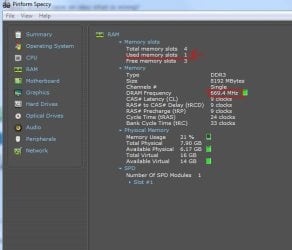
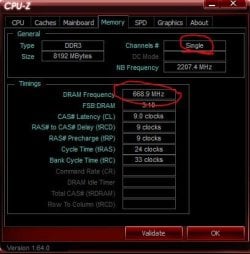
i just installed my replacement FX-8350 because the first one i had was causing BSOD's. while i was waiting on the replacement CPU, my new RAM got here. after doing my research, i've found that that new 8350's memory controller should handle stock ram speeds of 1866. i didnt want to spend too much, so i just got a single, 8Gb stick of DDR3 1866 RAM by G.Skill.
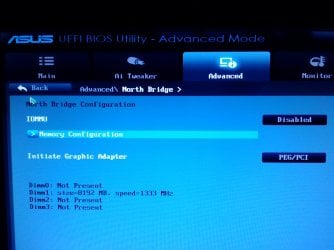
when the computer started up, i had to go into the bios because of the hardware change. i had to manually set the old ram at 1333 because that was the maximum speed my old cpu could handle. i set the ram speed to AUTO and saved and rebooted. the ram is still running at 1333. i tried manually setting it to 1866. as soon as i hit save and enter after that, the computer actually turned off fully, turned back on, and then i had to hard restart by holding the power button down. when i got it back on, it said "overclocking failed" and prompted me to enter the bios to reset the settings.
i'm not sure what's happening. my mobo supports 1866 ram, my processor supports 1866 ram, my ram IS 1866 ram, but it doesnt seem to be working.
does anyone have an idea what is wrong?
my motherboard: ASUS M5A99X EVO R2.0 ATX AMD Motherboard with UEFI BIOS - Newegg.com
my new cpu: AMD FX-8350 Vishera 4.0GHz (4.2GHz Turbo) Socket AM3+ 125W Eight-Core Desktop Processor FD8350FRHKBOX - Newegg.com
my new ram: G.SKILL Ripjaws X Series 8GB 240-Pin DDR3 SDRAM DDR3 1866 (PC3 14900) Desktop Memory Model F3-14900CL10S-8GBXL - Newegg.com
when the computer started up, i had to go into the bios because of the hardware change. i had to manually set the old ram at 1333 because that was the maximum speed my old cpu could handle. i set the ram speed to AUTO and saved and rebooted. the ram is still running at 1333. i tried manually setting it to 1866. as soon as i hit save and enter after that, the computer actually turned off fully, turned back on, and then i had to hard restart by holding the power button down. when i got it back on, it said "overclocking failed" and prompted me to enter the bios to reset the settings.
i'm not sure what's happening. my mobo supports 1866 ram, my processor supports 1866 ram, my ram IS 1866 ram, but it doesnt seem to be working.
does anyone have an idea what is wrong?
my motherboard: ASUS M5A99X EVO R2.0 ATX AMD Motherboard with UEFI BIOS - Newegg.com
my new cpu: AMD FX-8350 Vishera 4.0GHz (4.2GHz Turbo) Socket AM3+ 125W Eight-Core Desktop Processor FD8350FRHKBOX - Newegg.com
my new ram: G.SKILL Ripjaws X Series 8GB 240-Pin DDR3 SDRAM DDR3 1866 (PC3 14900) Desktop Memory Model F3-14900CL10S-8GBXL - Newegg.com
My Computer
At a glance
windows 7 64bit on bothAMD FX-8350 @4.6GHz/Intel Core i7-3610QM @2.3GHz16GB G.Skill 1866MHz/8GB dual channel 1600MHztwo Sapphire HD7970 OC 3Gb in crossfire/GTX66...
- Computer type
- PC/Desktop
- Computer Manufacturer/Model Number
- Custom Build and MSI GE60 0ND laptop
- OS
- windows 7 64bit on both
- CPU
- AMD FX-8350 @4.6GHz/Intel Core i7-3610QM @2.3GHz
- Motherboard
- ASUS M5A99X EVO R2.0/MS-16GA
- Memory
- 16GB G.Skill 1866MHz/8GB dual channel 1600MHz
- Graphics Card(s)
- two Sapphire HD7970 OC 3Gb in crossfire/GTX660M 2Gb
- Sound Card
- Realtek HD Audio/Realtek HD Audio with THX TruStudio Pro
- Monitor(s) Displays
- Hanns-G 27" 1080p /Generic PnP Monitor
- Screen Resolution
- both 1920x1080p 60Hz
- Hard Drives
- 250GB Samsung 840 EVO SSD,
1TB WD Blue
3x2TB WD Greens
/Samsung 840 EVO mSATA
- PSU
- Corsair HX750/laptop psu
- Case
- NZXT Source 530
- Cooling
- CoolerMaster Hyper 212 Evo
- Keyboard
- Logitech G710+/laptop keyboard by steelseries
- Mouse
- Logitec G500s/Logitec G500
- Internet Speed
- 50Mbps down/1-3 Mbps up
- Other Info
- Scythe Kaze Master Pro 5.25 fan controller; APC Back-UPS XS 1500