
Solved new ram is acting strange. will not go to stock speed

socrgy9

New member
Power User
Local time
6:46 AM
Messages
306
i just installed my replacement FX-8350 because the first one i had was causing BSOD's. while i was waiting on the replacement CPU, my new RAM got here. after doing my research, i've found that that new 8350's memory controller should handle stock ram speeds of 1866. i didnt want to spend too much, so i just got a single, 8Gb stick of DDR3 1866 RAM by G.Skill.

when the computer started up, i had to go into the bios because of the hardware change. i had to manually set the old ram at 1333 because that was the maximum speed my old cpu could handle. i set the ram speed to AUTO and saved and rebooted. the ram is still running at 1333. i tried manually setting it to 1866. as soon as i hit save and enter after that, the computer actually turned off fully, turned back on, and then i had to hard restart by holding the power button down. when i got it back on, it said "overclocking failed" and prompted me to enter the bios to reset the settings.

i'm not sure what's happening. my mobo supports 1866 ram, my processor supports 1866 ram, my ram IS 1866 ram, but it doesnt seem to be working.

does anyone have an idea what is wrong?

my motherboard: ASUS M5A99X EVO R2.0 ATX AMD Motherboard with UEFI BIOS - Newegg.com

my new cpu: AMD FX-8350 Vishera 4.0GHz (4.2GHz Turbo) Socket AM3+ 125W Eight-Core Desktop Processor FD8350FRHKBOX - Newegg.com

my new ram: G.SKILL Ripjaws X Series 8GB 240-Pin DDR3 SDRAM DDR3 1866 (PC3 14900) Desktop Memory Model F3-14900CL10S-8GBXL - Newegg.com
 

My Computer My Computer

At a glance

windows 7 64bit on bothAMD FX-8350 @4.6GHz/Intel Core i7-3610QM @2.3GHz16GB G.Skill 1866MHz/8GB dual channel 1600MHztwo Sapphire HD7970 OC 3Gb in crossfire/GTX66...
Computer type
PC/Desktop
Computer Manufacturer/Model Number
Custom Build and MSI GE60 0ND laptop
OS
windows 7 64bit on both
CPU
AMD FX-8350 @4.6GHz/Intel Core i7-3610QM @2.3GHz
Motherboard
ASUS M5A99X EVO R2.0/MS-16GA
Memory
16GB G.Skill 1866MHz/8GB dual channel 1600MHz
Graphics Card(s)
two Sapphire HD7970 OC 3Gb in crossfire/GTX660M 2Gb
Sound Card
Realtek HD Audio/Realtek HD Audio with THX TruStudio Pro
Monitor(s) Displays
Hanns-G 27" 1080p /Generic PnP Monitor
Screen Resolution
both 1920x1080p 60Hz
Hard Drives
250GB Samsung 840 EVO SSD,
1TB WD Blue
3x2TB WD Greens
/Samsung 840 EVO mSATA
PSU
Corsair HX750/laptop psu
Case
NZXT Source 530
Cooling
CoolerMaster Hyper 212 Evo
Keyboard
Logitech G710+/laptop keyboard by steelseries
Mouse
Logitec G500s/Logitec G500
Internet Speed
50Mbps down/1-3 Mbps up
Other Info
Scythe Kaze Master Pro 5.25 fan controller; APC Back-UPS XS 1500
Set the power profile to High Performance and see if it makes a difference. :cool:
 

My Computer My Computer

At a glance

Win7 Home Premium x64 W10Pro&HomeA12 9720p 4+8 TurionII M5206GB 8GBR7
Computer type
Laptop
Computer Manufacturer/Model Number
HP 17-ak0xx, dv7 3173nr
OS
Win7 Home Premium x64 W10Pro&Home
CPU
A12 9720p 4+8 TurionII M520
Motherboard
HP 3839
Memory
6GB 8GB
Graphics Card(s)
R7
Monitor(s) Displays
24" sa550
Screen Resolution
1600x900 1920x1080
Mouse
Logitechx2
Internet Speed
120Mb/s down 12up
do you mean in windows? or in the bios? i already always run high performance power profile in windows because i've tweaked it the way i like it.
 

My Computer My Computer

At a glance

windows 7 64bit on bothAMD FX-8350 @4.6GHz/Intel Core i7-3610QM @2.3GHz16GB G.Skill 1866MHz/8GB dual channel 1600MHztwo Sapphire HD7970 OC 3Gb in crossfire/GTX66...
Computer type
PC/Desktop
Computer Manufacturer/Model Number
Custom Build and MSI GE60 0ND laptop
OS
windows 7 64bit on both
CPU
AMD FX-8350 @4.6GHz/Intel Core i7-3610QM @2.3GHz
Motherboard
ASUS M5A99X EVO R2.0/MS-16GA
Memory
16GB G.Skill 1866MHz/8GB dual channel 1600MHz
Graphics Card(s)
two Sapphire HD7970 OC 3Gb in crossfire/GTX660M 2Gb
Sound Card
Realtek HD Audio/Realtek HD Audio with THX TruStudio Pro
Monitor(s) Displays
Hanns-G 27" 1080p /Generic PnP Monitor
Screen Resolution
both 1920x1080p 60Hz
Hard Drives
250GB Samsung 840 EVO SSD,
1TB WD Blue
3x2TB WD Greens
/Samsung 840 EVO mSATA
PSU
Corsair HX750/laptop psu
Case
NZXT Source 530
Cooling
CoolerMaster Hyper 212 Evo
Keyboard
Logitech G710+/laptop keyboard by steelseries
Mouse
Logitec G500s/Logitec G500
Internet Speed
50Mbps down/1-3 Mbps up
Other Info
Scythe Kaze Master Pro 5.25 fan controller; APC Back-UPS XS 1500
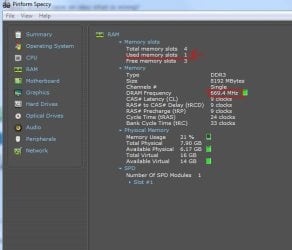
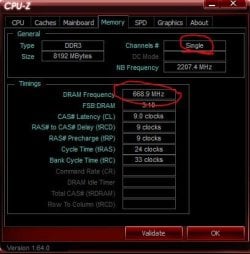
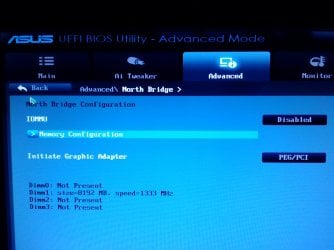
here's some of the odd things i'm finding. its supposed to be single channel, but even if its a single ram stick, its not supposed to be that slow right?
 

Attachments

  • Capture.JPG
    Capture.JPG
    40 KB · Views: 3
  • Capture4.JPG
    Capture4.JPG
    32.8 KB · Views: 0
  • 0617131446.jpg
    0617131446.jpg
    275.6 KB · Views: 2
Last edited:

My Computer My Computer

At a glance

windows 7 64bit on bothAMD FX-8350 @4.6GHz/Intel Core i7-3610QM @2.3GHz16GB G.Skill 1866MHz/8GB dual channel 1600MHztwo Sapphire HD7970 OC 3Gb in crossfire/GTX66...
Computer type
PC/Desktop
Computer Manufacturer/Model Number
Custom Build and MSI GE60 0ND laptop
OS
windows 7 64bit on both
CPU
AMD FX-8350 @4.6GHz/Intel Core i7-3610QM @2.3GHz
Motherboard
ASUS M5A99X EVO R2.0/MS-16GA
Memory
16GB G.Skill 1866MHz/8GB dual channel 1600MHz
Graphics Card(s)
two Sapphire HD7970 OC 3Gb in crossfire/GTX660M 2Gb
Sound Card
Realtek HD Audio/Realtek HD Audio with THX TruStudio Pro
Monitor(s) Displays
Hanns-G 27" 1080p /Generic PnP Monitor
Screen Resolution
both 1920x1080p 60Hz
Hard Drives
250GB Samsung 840 EVO SSD,
1TB WD Blue
3x2TB WD Greens
/Samsung 840 EVO mSATA
PSU
Corsair HX750/laptop psu
Case
NZXT Source 530
Cooling
CoolerMaster Hyper 212 Evo
Keyboard
Logitech G710+/laptop keyboard by steelseries
Mouse
Logitec G500s/Logitec G500
Internet Speed
50Mbps down/1-3 Mbps up
Other Info
Scythe Kaze Master Pro 5.25 fan controller; APC Back-UPS XS 1500
Hi socrgy9,

The things in your screenshots are totally normal. You only have 1 stick installed so it will only run in single channel mode.
And it's DDR (Double Data Rate) memory so it is running at twice the speed shown in the shots (1333).

I can't help you with how to get it running correctly at 1866 I'm afraid as I am not very experience with AMD platforms.

Paul.
 

My Computer My Computer

At a glance

Windows 7 Professional 64 bit
OS
Windows 7 Professional 64 bit
ok thanks
 

My Computer My Computer

At a glance

windows 7 64bit on bothAMD FX-8350 @4.6GHz/Intel Core i7-3610QM @2.3GHz16GB G.Skill 1866MHz/8GB dual channel 1600MHztwo Sapphire HD7970 OC 3Gb in crossfire/GTX66...
Computer type
PC/Desktop
Computer Manufacturer/Model Number
Custom Build and MSI GE60 0ND laptop
OS
windows 7 64bit on both
CPU
AMD FX-8350 @4.6GHz/Intel Core i7-3610QM @2.3GHz
Motherboard
ASUS M5A99X EVO R2.0/MS-16GA
Memory
16GB G.Skill 1866MHz/8GB dual channel 1600MHz
Graphics Card(s)
two Sapphire HD7970 OC 3Gb in crossfire/GTX660M 2Gb
Sound Card
Realtek HD Audio/Realtek HD Audio with THX TruStudio Pro
Monitor(s) Displays
Hanns-G 27" 1080p /Generic PnP Monitor
Screen Resolution
both 1920x1080p 60Hz
Hard Drives
250GB Samsung 840 EVO SSD,
1TB WD Blue
3x2TB WD Greens
/Samsung 840 EVO mSATA
PSU
Corsair HX750/laptop psu
Case
NZXT Source 530
Cooling
CoolerMaster Hyper 212 Evo
Keyboard
Logitech G710+/laptop keyboard by steelseries
Mouse
Logitec G500s/Logitec G500
Internet Speed
50Mbps down/1-3 Mbps up
Other Info
Scythe Kaze Master Pro 5.25 fan controller; APC Back-UPS XS 1500
Ok First things first

#1 Ram stick is in the Wrong slot it is supposed to be in #0

#2 even if you are running 1866 it will default to 1333

#3 you will have to manually adjust ram to 1866 also doing so should correct this by using XMP

Now if this doesn't work you might have to use FSB to adjust it to the rated speed but that would mean over clocking and you would have to down clock the multi in order to keep the ram with in range of the target also the HT would have to be adjust to 2600 or below to insure stability

All done in the Bios in the memory settings
 

My Computer My Computer

At a glance

Windows 10 Home Premium 64bit sp1Intel I7-6700K @ 4.6 Ghz 1.344 volts everyday OC32GB G-Skill TridentZ 3200mhz 16-18-18-38 DDR4Sli Gigabyte Windforce GTX 980 G1
Computer type
PC/Desktop
Computer Manufacturer/Model Number
CoreI7-6700K MrFingerIII Special Builds
OS
Windows 10 Home Premium 64bit sp1
CPU
Intel I7-6700K @ 4.6 Ghz 1.344 volts everyday OC
Motherboard
Asrock Fatality K6 Z170 Socket 1151
Memory
32GB G-Skill TridentZ 3200mhz 16-18-18-38 DDR4
Graphics Card(s)
Sli Gigabyte Windforce GTX 980 G1
Sound Card
AC97 Creative Rage Tactic 3D Headphones Bluetooth
Monitor(s) Displays
27" Asus ROG Swift PG278Q G-Sync 48" Vizio Smart HD TV
Screen Resolution
2560x1440p 27"- 48" Currently Gaming at 2560x1440p Res 2K
Hard Drives
250GB Samsung Evo840SSD Seagate baracuda 500 GB WD Mybook 500Gb 1TB Seagate Barracuda
PSU
HX1050w Corsair Silver 80plus certified crosfire/sli
Case
Enthod Pro Full Tower
Cooling
Corsair H110i GT 280 mm High Performance WaterBlock
Keyboard
Logitech wireless keyboard
Mouse
Logitech wireless mouse
Internet Speed
Cox Cable 100+ mb
Antivirus
WebRoot Spysweeper with Antivirus
Browser
IE-10, Chrome, Opera
Other Info
My Other Rig is a AMD FX8320E @4.6Ghz 16GB Ballistic Sport Ram
Mobo Asrock Fatality 990FX 120GB OCZ SSD 1TB Seagate Barracuda Corsair H75 Cooling PSU Corsair CX750
GPU GTX Gigabyte 970G1
well, actually its in the right slot. i looked in my motherboard manual and it suggests putting it in slot A2 if using a single stick. i went in the bios and looked around a bit and found the SPD information page. using what that suggested, i went in and set the ram speed to 1866, and set the timings to 10-11-10-30 and a tRC of 40 with a command rate of 2T and it seems that did the trick. i did a little digging and apparently many new high performance memories boot initially at a slower speed and you have to go in and set the higher speed manually. my thing is, why? why is it advertised as being a stock speed of 1866 when, to get that speed, i have to manually set it up? IMO, if it says that's what speed it is, that's what it should be when i plug it in.
 

My Computer My Computer

At a glance

windows 7 64bit on bothAMD FX-8350 @4.6GHz/Intel Core i7-3610QM @2.3GHz16GB G.Skill 1866MHz/8GB dual channel 1600MHztwo Sapphire HD7970 OC 3Gb in crossfire/GTX66...
Computer type
PC/Desktop
Computer Manufacturer/Model Number
Custom Build and MSI GE60 0ND laptop
OS
windows 7 64bit on both
CPU
AMD FX-8350 @4.6GHz/Intel Core i7-3610QM @2.3GHz
Motherboard
ASUS M5A99X EVO R2.0/MS-16GA
Memory
16GB G.Skill 1866MHz/8GB dual channel 1600MHz
Graphics Card(s)
two Sapphire HD7970 OC 3Gb in crossfire/GTX660M 2Gb
Sound Card
Realtek HD Audio/Realtek HD Audio with THX TruStudio Pro
Monitor(s) Displays
Hanns-G 27" 1080p /Generic PnP Monitor
Screen Resolution
both 1920x1080p 60Hz
Hard Drives
250GB Samsung 840 EVO SSD,
1TB WD Blue
3x2TB WD Greens
/Samsung 840 EVO mSATA
PSU
Corsair HX750/laptop psu
Case
NZXT Source 530
Cooling
CoolerMaster Hyper 212 Evo
Keyboard
Logitech G710+/laptop keyboard by steelseries
Mouse
Logitec G500s/Logitec G500
Internet Speed
50Mbps down/1-3 Mbps up
Other Info
Scythe Kaze Master Pro 5.25 fan controller; APC Back-UPS XS 1500
well, actually its in the right slot. i looked in my motherboard manual and it suggests putting it in slot A2 if using a single stick. i went in the bios and looked around a bit and found the SPD information page. using what that suggested, i went in and set the ram speed to 1866, and set the timings to 10-11-10-30 and a tRC of 40 with a command rate of 2T and it seems that did the trick. i did a little digging and apparently many new high performance memories boot initially at a slower speed and you have to go in and set the higher speed manually. my thing is, why? why is it advertised as being a stock speed of 1866 when, to get that speed, i have to manually set it up? IMO, if it says that's what speed it is, that's what it should be when i plug it in.
Yeah unfortunately that is how it is for both intel and AMD
 

My Computer My Computer

At a glance

Windows 10 Home Premium 64bit sp1Intel I7-6700K @ 4.6 Ghz 1.344 volts everyday OC32GB G-Skill TridentZ 3200mhz 16-18-18-38 DDR4Sli Gigabyte Windforce GTX 980 G1
Computer type
PC/Desktop
Computer Manufacturer/Model Number
CoreI7-6700K MrFingerIII Special Builds
OS
Windows 10 Home Premium 64bit sp1
CPU
Intel I7-6700K @ 4.6 Ghz 1.344 volts everyday OC
Motherboard
Asrock Fatality K6 Z170 Socket 1151
Memory
32GB G-Skill TridentZ 3200mhz 16-18-18-38 DDR4
Graphics Card(s)
Sli Gigabyte Windforce GTX 980 G1
Sound Card
AC97 Creative Rage Tactic 3D Headphones Bluetooth
Monitor(s) Displays
27" Asus ROG Swift PG278Q G-Sync 48" Vizio Smart HD TV
Screen Resolution
2560x1440p 27"- 48" Currently Gaming at 2560x1440p Res 2K
Hard Drives
250GB Samsung Evo840SSD Seagate baracuda 500 GB WD Mybook 500Gb 1TB Seagate Barracuda
PSU
HX1050w Corsair Silver 80plus certified crosfire/sli
Case
Enthod Pro Full Tower
Cooling
Corsair H110i GT 280 mm High Performance WaterBlock
Keyboard
Logitech wireless keyboard
Mouse
Logitech wireless mouse
Internet Speed
Cox Cable 100+ mb
Antivirus
WebRoot Spysweeper with Antivirus
Browser
IE-10, Chrome, Opera
Other Info
My Other Rig is a AMD FX8320E @4.6Ghz 16GB Ballistic Sport Ram
Mobo Asrock Fatality 990FX 120GB OCZ SSD 1TB Seagate Barracuda Corsair H75 Cooling PSU Corsair CX750
GPU GTX Gigabyte 970G1
Yes, it's the motherboards that default ram to 1333mhz.

Glad you got it working any way.

Paul.
 

My Computer My Computer

At a glance

Windows 7 Professional 64 bit
OS
Windows 7 Professional 64 bit
Back
Top