
JimmyLuong
New member
- Local time
- 10:42 AM
- Messages
- 2
Hi everyone,
As the title suggest I just upgraded my RAM memory. Specifically, I bought a Corsair XMS2 DHX TwinX 4GB package. This include double 2 GB corsair RAM. Just this afternoon I installed the Rams after purchase. I previously had 2 A-Data 1GB ram(totaling 2GB) but as I'm a gamer the demands for RAM from new games has increased dramatically in the last year. With the new Corsair Ram i expected that I would have 6GB of RAM to play around with.
But when I checked under my Computer Proprieties

As you can see from the picture I can only use 3.25 GB of the total 6GB Ram. I tried to google and search around a bit and found a huge list of problems that could cause this for me.
The usable memory may be less than the installed memory on Windows 7-based computers
This was particularly helpful in listing all type of problems, but there are so many of them that it was hard to pinpoint which one affect me.
(quoting from the Microsoft link)
I checked my BIOS settings, following the Microsoft guide I had memory remapping enable in BIOS setting. But it still doesn't work. so I guess that it isn't the only problem.
I used CPU-Z to check Motherboard and BIOS information from my PC and my BIOS was heavily outdated.
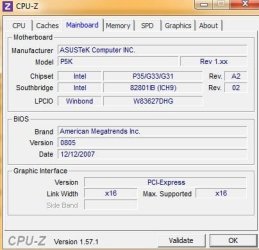
This might be another problem. But I also heard that updating your BIOS is a very risky and dangerous work unless must.I found my motherboard (the P5K) on Asus website and they also provided me with the newest version of BIOS and AFUDOS utilities to update my BIOS. Though I'm still very scarred about the damage that this can cause if it go wrong, plus it might not be the actual problem as none of the update log mentioned anything about fixing RAM problems.
Just to be sure I take some specification of my Motherboard from Asus website for someone more knowledgeable to analyze
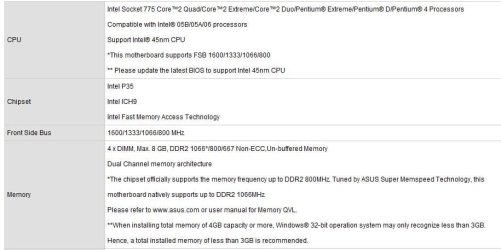
Before I bought my Ram I made sure to check from Crucial detect my RAM settings. So when I bought my Corsair ram I made sure it was a DDR2 and PC6400 . Plus my motherboard can only handle maximum 2GB per slot .
In conclusion, I would like to get some helps,tips, recommendation, anything that help me to deal with the current situations. Should I upgrade my Window from 32 to 64? or should I update my BIOS. As of right now I have 3,25 GB of RAM to use, is a small improvement over my previous 2GB. But does the risk/cost to update my BIOS/Window outweigh it benefits?.
I know that most of my computer needs can be run under 2GB RAM. The only things that need a lot of RAM for me are Higher spec games. So if the risk outweigh the benefit I might as well be content with 3,25 GB of RAM until I can get enough money to buy an entirely new PC plus Win 64
As the title suggest I just upgraded my RAM memory. Specifically, I bought a Corsair XMS2 DHX TwinX 4GB package. This include double 2 GB corsair RAM. Just this afternoon I installed the Rams after purchase. I previously had 2 A-Data 1GB ram(totaling 2GB) but as I'm a gamer the demands for RAM from new games has increased dramatically in the last year. With the new Corsair Ram i expected that I would have 6GB of RAM to play around with.
But when I checked under my Computer Proprieties
As you can see from the picture I can only use 3.25 GB of the total 6GB Ram. I tried to google and search around a bit and found a huge list of problems that could cause this for me.
The usable memory may be less than the installed memory on Windows 7-based computers
This was particularly helpful in listing all type of problems, but there are so many of them that it was hard to pinpoint which one affect me.
(quoting from the Microsoft link)
- The devices that are installed in the computer and the memory that is reserved by those devices
- The ability of the motherboard to handle memory
- The System BIOS version and settings
- The version of Windows 7 that is installed (For example, Windows 7 Starter Edition only supports 2 GB of installed memory.)
- Other system settings
I checked my BIOS settings, following the Microsoft guide I had memory remapping enable in BIOS setting. But it still doesn't work. so I guess that it isn't the only problem.
I used CPU-Z to check Motherboard and BIOS information from my PC and my BIOS was heavily outdated.
This might be another problem. But I also heard that updating your BIOS is a very risky and dangerous work unless must.I found my motherboard (the P5K) on Asus website and they also provided me with the newest version of BIOS and AFUDOS utilities to update my BIOS. Though I'm still very scarred about the damage that this can cause if it go wrong, plus it might not be the actual problem as none of the update log mentioned anything about fixing RAM problems.
Just to be sure I take some specification of my Motherboard from Asus website for someone more knowledgeable to analyze
Before I bought my Ram I made sure to check from Crucial detect my RAM settings. So when I bought my Corsair ram I made sure it was a DDR2 and PC6400 . Plus my motherboard can only handle maximum 2GB per slot .
In conclusion, I would like to get some helps,tips, recommendation, anything that help me to deal with the current situations. Should I upgrade my Window from 32 to 64? or should I update my BIOS. As of right now I have 3,25 GB of RAM to use, is a small improvement over my previous 2GB. But does the risk/cost to update my BIOS/Window outweigh it benefits?.
I know that most of my computer needs can be run under 2GB RAM. The only things that need a lot of RAM for me are Higher spec games. So if the risk outweigh the benefit I might as well be content with 3,25 GB of RAM until I can get enough money to buy an entirely new PC plus Win 64
My Computer
At a glance
Window 7 Professional 32bit
- OS
- Window 7 Professional 32bit


 ,
,

