

Hi there
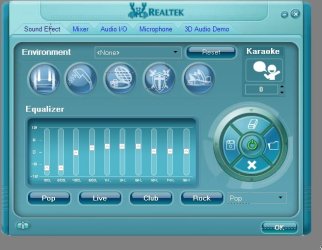
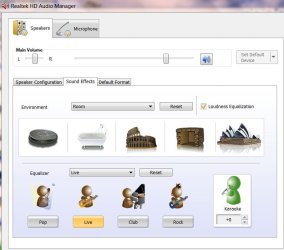
It's a pity but the new realtek HD sound driver (2.33) whilst has "preset" equalisations for a lot of options but there's NO custom setting where you can set your own equalisation. (You used to be able to set this in XP)
I'm not a big fan of "Canned" effects -- I prefer to set my own.
This was available in the XP driver --removing this in the latest W7 version seems to be a BIG mistake. I suppose this is all in the modern nature of "dumbing down" everything.
I hope the "custom" feature will be re-instated in a later version.
Cheers
jimbo
It's a pity but the new realtek HD sound driver (2.33) whilst has "preset" equalisations for a lot of options but there's NO custom setting where you can set your own equalisation. (You used to be able to set this in XP)
I'm not a big fan of "Canned" effects -- I prefer to set my own.
This was available in the XP driver --removing this in the latest W7 version seems to be a BIG mistake. I suppose this is all in the modern nature of "dumbing down" everything.
I hope the "custom" feature will be re-instated in a later version.
Cheers
jimbo
Attachments
Last edited:
My Computer
At a glance
Linux CENTOS 7 / various Windows OS'es and se...Intel i7 Intel i58GB, 16GBOn Motherboard
- Computer type
- PC/Desktop
- Computer Manufacturer/Model Number
- Custom built, several laptops HP/ASUS
- OS
- Linux CENTOS 7 / various Windows OS'es and servers
- CPU
- Intel i7 Intel i5
- Memory
- 8GB, 16GB
- Graphics Card(s)
- On Motherboard
- Sound Card
- Realtek HD audio
- Monitor(s) Displays
- Apple Cinema display, Samsung LCD
- Screen Resolution
- 1920 X 1080
- Hard Drives
- 4 X 1TB SATA
- Mouse
- Toshiba wireless laser
- Internet Speed
- > 20MB up


