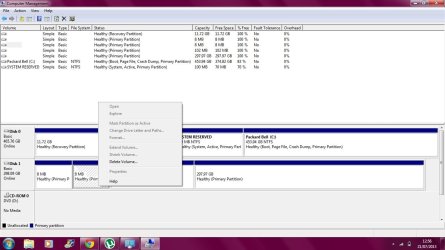
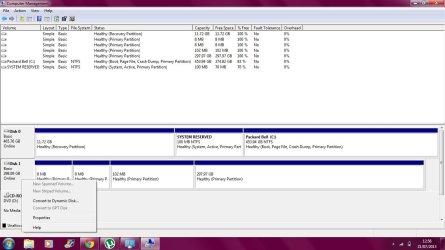
I bought my new Seagate expansion drive last week and put a lot of my files in it to back them up.
There must be more to this story that you haven't told us yet.
This was a brand new 300GB(?) that you bought last week??
What computer did you initially connect it to that you apparently were able to then "put a lot of my files in it" successfully? Same laptop as you used today when these new problems began, or some other computer? Was it a Windows PC that you used, or a MAC?
Did you create a partition on the drive first, including giving it a drive letter? If so, how did you do this? Exactly what steps did you take from opening the carton on your new drive until you were then able to use it and started copying files to it? Without doing something first don't know how you could possibly have copied anything to any brand new drive, and exactly what you did at that time is crucial to our understanding how the drive might have reached the state now shown in your screenshots.
Ive seen some people talking about the Disc Management ad changing letters, but I don't know how to do this, because when I right click on the disk, it does not allow me to click on the 'change drive letters and paths....'
Well, the 8MB areas (which are not actually lettered partitions) often is the size associated with creating a "logical" partition on a brand new drive.
A "logical" partition (one or more of them, each of which get their own drive letter assigned by Windows) is created by DISKMGMT inside of one "primary" partition on the drive. Whichever primary partition you decide to use for this purpose is then separated out for this special use of holding one or more "logical" partitions inside of it and is given a name of "extended partition", just so that we can talk about it properly.
There are a maximum of four primary partitions allowed to be created on a drive (each of which gets its own drive letter assigned by Windows), any one of which can be used for the purpose of becoming an "extended partition" inside of which one or more "logical" partitions can be sub-defined. But when the first logical partition is defined, the conversion of the associated host primary partition into its nature as the "extended partition" on the drive is typically associated with an 8MB "overhead". This 8MB area is used to keep track of the size/location of the one or more logical partitions and any other free space that is contained inside of the "extended partition".
So... the number 8MB isn't entirely a random number to me. It suggests you might have done some partitioning to your brand new drive first... perhaps involving creating logical partitions rather than primary partitions, not realizing that there was a true difference in terms of how many of each you are allowed. But these 8MB areas would never get their own drive letter under any circumstances. Only the logical partitions inside the extended partition would get a drive letter, in any event.
Anyway, your 297GB partition would have been given a drive letter by your laptop's Windows if it had a file system on it that was either FAT32 or NTFS or something recognizable by Windows. The fact that it didn't automatically get a drive letter tells me it has no Windows-recognizable file system on it, at least not at the moment.
So... please fill in the missing details about the early history of this drive, and how you first used it when taking it out of its carton. What did you do to make us of it, and was that with Windows or MAC?