New Seagate Expansion External Drive not showing up in 'My Computer'

External disk set up as GPT rather than MBR? Do you know why?

Do you know why it has the EFI system partition?

Have you tried running Seatools on it?

Can you post a screenshot of the results from a partition details rather than a volume details?
 

My Computer My Computer

At a glance

Windows 7 Ultimate x64
OS
Windows 7 Ultimate x64
Issue Fix for me

G'day,
I have a brand new 2TB Seagate External Desk Drive. it only worked once before it stopped appearing (less than 5 mins). I was having the same issues as above (not accessible on my computer, can't change driver letter because view not up to date ect.). Mine works on my laptop but not on my desktop both are Win 7 home prem 64 i seem to have found a solution to my issue by uninstalling and re-installing it.

Start -> Control Panel -> Hardware And Sound -> click Device Manager under devices and printers -> expand Disk Drives -> right click on hard drive and select properties -> select Driver tab -> Uninstall. after i uninstalled it i removed the usb and reinserted it i let it re-install itself and from there it seemed to work fine although i have noticed that my anti-virus was blocking setup.exe but other than that it works after i reinsert it into other USB ports and after restarting the computer.

Hope this helps I've sent 3 days of pain and a useless phone call to the manufacturer.
Cheers,
Ben :party:
 

My Computer My Computer

At a glance

Windows 7 Home Premium 64
Computer type
PC/Desktop
OS
Windows 7 Home Premium 64
Hi Ben,

Thanks for your update on how you fixed the problem. I tried something similar but after many other attempts I just got rid of it and bought another external.

Later ...

2harts4ever
 

My Computer My Computer

At a glance

Windows 7 Pro x64 SP1AMD A6-36008 GBsAMD Radeon HD
Computer Manufacturer/Model Number
HP Pavilion p7-1157c
OS
Windows 7 Pro x64 SP1
CPU
AMD A6-3600
Motherboard
Pagatron 2ACF 1.01
Memory
8 GBs
Graphics Card(s)
AMD Radeon HD
Sound Card
Realtec High Definition Audio
Monitor(s) Displays
HP 2311 Wide LCD
Screen Resolution
1920 x 1080
Keyboard
HID Keyboard Device
Mouse
Microsoft USB Wireless Mouse (IntelliPoint)
Other Info
BIOS: AMI 7.06
I need help as my seagate expansion drive isnt showing in My Computer

I bought my new Seagate expansion drive last week and put a lot of my files in it to back them up. I just plugged it into my laptop today and the green light is on, and the icon is there to safely eject it, but it is not showing in My Computer, does anyone know how I can get it to show? ps I have tried this on 2 of my laptops and its doing the same on both.

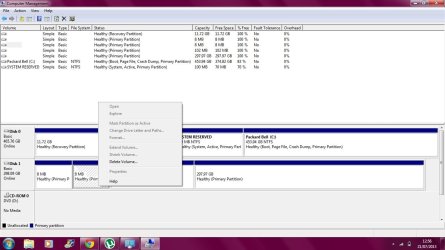
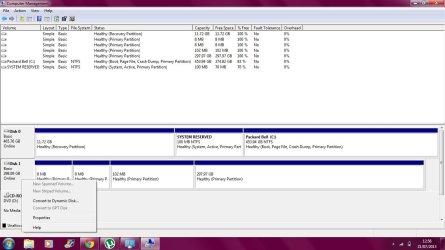
Ive seen some people talking about the Disc Management ad changing letters, but I don't know how to do this, because when I right click on the disk, it does not allow me to click on the 'change drive letters and paths....'

Ive took a screenshot of the Disc management window.....


Thanks, Lynne
 

Attachments

  • Untitled.png
    Untitled.png
    47.9 KB · Views: 7
Last edited:

My Computer My Computer

At a glance

Windows 7 64bit
Computer type
Laptop
Computer Manufacturer/Model Number
Packard Bell
OS
Windows 7 64bit
Browser
Internet Explorer
In Disk management, on the bottom portion of the page you see the drive and 4 Partitions on it. I'm not sure wht there are 2 8MB partitions there, but right click with your cursor inside each of those partioions, select 'change drive letter or path', on the nect screen select 'Add'. In the next screen pick a drive letter for the partition from the drop down list and OK your way out. The partition should have a drive letter now and can be seen in Windows explorer. If it wants to format any partition, you will lose any data on that partition. if there is any.

If there is not, I would delete all the partitions and start over with how many partitions you want. In that case right click each partition and select delete, delteing all of them, then right click it and select new simple partition and create it following the wizard allocating the amount of space you want it to be in MB. 1024 MB = 1GB. So when it asks the size, if you wanted a 100GB partition the size woud be 102400Mb (1024MB X 100 GB =102400 MB) or any size you would like.
 
Last edited:

My Computers My Computers

  • At a glance

    Windows 11 ProRyzen 9 5900X32GB G Skill DDR4-3600EVGA RTX 3080 FTW 3 Ultra
    Computer type
    PC/Desktop
    Computer Manufacturer/Model Number
    ALWAYS UNDER CONSTRUCTION
    OS
    Windows 11 Pro
    CPU
    Ryzen 9 5900X
    Motherboard
    Asus X570 Crosshair Viii Hero
    Memory
    32GB G Skill DDR4-3600
    Graphics Card(s)
    EVGA RTX 3080 FTW 3 Ultra
    Sound Card
    On Board/Sennheiser PC37X Headset
    Monitor(s) Displays
    3 X Asus 27"
    Screen Resolution
    2560x1440
    Hard Drives
    2 X 1 TB NVME drives
    PSU
    EVGA 850
    Case
    Phanteks Eclipse P400A
    Cooling
    EVGA 280 AIO
    Keyboard
    Logitech G510s/ Logitech G13
    Mouse
    Logitech G502
    Internet Speed
    24/1
    Antivirus
    ESET/MBAM Pro/SAS Pro
    Browser
    Chrome/ Firefox/ Edge
  • At a glance

    Windows 11 ProIntel Ultra 9 288V32 GB LPDDR5X 8533
    Computer type
    Laptop
    System Manufacturer/Model Number
    Dell 16 Plus
    OS
    Windows 11 Pro
    CPU
    Intel Ultra 9 288V
    Memory
    32 GB LPDDR5X 8533
    Monitor(s) Displays
    16" Mini-LED HDR600 Touch 90 Hz
    Screen Resolution
    2560X1600
    Hard Drives
    1 TB NVME
Thanks very much for your advice, but when i right click on any of the partitions, everything is grayed out apart from the 'delete volumes' and 'help'.....
 

My Computer My Computer

At a glance

Windows 7 64bit
Computer type
Laptop
Computer Manufacturer/Model Number
Packard Bell
OS
Windows 7 64bit
Browser
Internet Explorer
This may help....
 

Attachments

  • 1.jpg
    1.jpg
    95.9 KB · Views: 6
  • 2.jpg
    2.jpg
    95.3 KB · Views: 2

My Computer My Computer

At a glance

Windows 7 64bit
Computer type
Laptop
Computer Manufacturer/Model Number
Packard Bell
OS
Windows 7 64bit
Browser
Internet Explorer
I bought my new Seagate expansion drive last week and put a lot of my files in it to back them up.
There must be more to this story that you haven't told us yet.

This was a brand new 300GB(?) that you bought last week??

What computer did you initially connect it to that you apparently were able to then "put a lot of my files in it" successfully? Same laptop as you used today when these new problems began, or some other computer? Was it a Windows PC that you used, or a MAC?

Did you create a partition on the drive first, including giving it a drive letter? If so, how did you do this? Exactly what steps did you take from opening the carton on your new drive until you were then able to use it and started copying files to it? Without doing something first don't know how you could possibly have copied anything to any brand new drive, and exactly what you did at that time is crucial to our understanding how the drive might have reached the state now shown in your screenshots.


Ive seen some people talking about the Disc Management ad changing letters, but I don't know how to do this, because when I right click on the disk, it does not allow me to click on the 'change drive letters and paths....'
Well, the 8MB areas (which are not actually lettered partitions) often is the size associated with creating a "logical" partition on a brand new drive.

A "logical" partition (one or more of them, each of which get their own drive letter assigned by Windows) is created by DISKMGMT inside of one "primary" partition on the drive. Whichever primary partition you decide to use for this purpose is then separated out for this special use of holding one or more "logical" partitions inside of it and is given a name of "extended partition", just so that we can talk about it properly.

There are a maximum of four primary partitions allowed to be created on a drive (each of which gets its own drive letter assigned by Windows), any one of which can be used for the purpose of becoming an "extended partition" inside of which one or more "logical" partitions can be sub-defined. But when the first logical partition is defined, the conversion of the associated host primary partition into its nature as the "extended partition" on the drive is typically associated with an 8MB "overhead". This 8MB area is used to keep track of the size/location of the one or more logical partitions and any other free space that is contained inside of the "extended partition".

So... the number 8MB isn't entirely a random number to me. It suggests you might have done some partitioning to your brand new drive first... perhaps involving creating logical partitions rather than primary partitions, not realizing that there was a true difference in terms of how many of each you are allowed. But these 8MB areas would never get their own drive letter under any circumstances. Only the logical partitions inside the extended partition would get a drive letter, in any event.


Anyway, your 297GB partition would have been given a drive letter by your laptop's Windows if it had a file system on it that was either FAT32 or NTFS or something recognizable by Windows. The fact that it didn't automatically get a drive letter tells me it has no Windows-recognizable file system on it, at least not at the moment.

So... please fill in the missing details about the early history of this drive, and how you first used it when taking it out of its carton. What did you do to make us of it, and was that with Windows or MAC?

 

My Computer My Computer

At a glance

Windows 7 Pro x64 (1), Win7 Pro X64 (2)i5-3350p 3.1Ghz/6MB-cache (1); E8400 3.0Ghz/6...8GB PC3-12800 DDR3 (1); 4GB PC3-10600 DDR3 (2)ATI HD7750 (1), (see TV cards); ATI R7 250 (2)
Computer type
PC/Desktop
Computer Manufacturer/Model Number
Home-built, two systems (1) and (2)
OS
Windows 7 Pro x64 (1), Win7 Pro X64 (2)
CPU
i5-3350p 3.1Ghz/6MB-cache (1); E8400 3.0Ghz/6MB-cache (2)
Motherboard
ASUS P8Z77-V Pro (1); ASUS P5Q3 (2)
Memory
8GB PC3-12800 DDR3 (1); 4GB PC3-10600 DDR3 (2)
Graphics Card(s)
ATI HD7750 (1), (see TV cards); ATI R7 250 (2)
Sound Card
Realtek ALC892 HD Audio (1); Realtek ALC1200 HD Audio (2)
Monitor(s) Displays
Eizo HD2441W LCD, Eizo S2433W (1); Eizo 24" S2433W (2)
Screen Resolution
1920x1200, 1920x1200 (1); 1920x1200 (2)
Hard Drives
(1) 1TB SATA-II (7200RPM), 2x2TB SATA-III (7200RPM), 250GB SATA-III (10000RPM) for OS; 2x2TB external USB 3.0

(2) 320GB SATA-II (7200RPM), 750GB SATA-II (7200RPM), 150GB SATA-II (10000RPM) for OS; 2TB external USB 3.0
PSU
Nesteq ECS-6001 600W (1); Nesteq ECS-5001 500W (2)
Case
Acousti-Case 360 (1) and (2)
Cooling
Noctua NH-U12P SE2 for CPU, 2x120mm case fans (1) and (2)
Keyboard
IBM PS/2 (1) and (2)
Mouse
Logitech MX Revolution wireless (1); Microsoft wired (2)
Internet Speed
100mbps down / 10mbps up
Antivirus
Microsoft Security Essentials; Malwarebyte Anti-Malware Pro
Browser
Firefox
Other Info
Ceton InfiniTV 4-tuner cablecard-enabled TV card as well as Hauppauge HVR-2250 OTA/ATSC 2-tuner TV card in (1), running under Win7 WMC
Sorry, ill reply in the other thread.....no more on this one
 

My Computer My Computer

At a glance

Windows 7 64bit
Computer type
Laptop
Computer Manufacturer/Model Number
Packard Bell
OS
Windows 7 64bit
Browser
Internet Explorer
Try right clicking on computer in the start menu, and select manage. In the window that opens after giving admin approval, selece disk management in the left column. It should show every hard drive connected to your computer. In the lower portion of the window, look for your Seagate, right click it and select change drive letter or path, in the next window click add and choosed a drive letter. Click OK. after the drive letter is assigned, you will be able to see the drive in explorer.


From the Master the Apprentice learns, thanks essenbe.
 

My Computer My Computer

At a glance

Windows 7 Home Premium 64bit3.30 gigahertz Intel Core i3-2120
Computer type
PC/Desktop
Computer Manufacturer/Model Number
Dell
OS
Windows 7 Home Premium 64bit
CPU
3.30 gigahertz Intel Core i3-2120
Motherboard
Alienware 06G6JW A00
You're quite welcome, but I'm a Master of nothing. I'm happy it worked for you though.
 

My Computers My Computers

  • At a glance

    Windows 11 ProRyzen 9 5900X32GB G Skill DDR4-3600EVGA RTX 3080 FTW 3 Ultra
    Computer type
    PC/Desktop
    Computer Manufacturer/Model Number
    ALWAYS UNDER CONSTRUCTION
    OS
    Windows 11 Pro
    CPU
    Ryzen 9 5900X
    Motherboard
    Asus X570 Crosshair Viii Hero
    Memory
    32GB G Skill DDR4-3600
    Graphics Card(s)
    EVGA RTX 3080 FTW 3 Ultra
    Sound Card
    On Board/Sennheiser PC37X Headset
    Monitor(s) Displays
    3 X Asus 27"
    Screen Resolution
    2560x1440
    Hard Drives
    2 X 1 TB NVME drives
    PSU
    EVGA 850
    Case
    Phanteks Eclipse P400A
    Cooling
    EVGA 280 AIO
    Keyboard
    Logitech G510s/ Logitech G13
    Mouse
    Logitech G502
    Internet Speed
    24/1
    Antivirus
    ESET/MBAM Pro/SAS Pro
    Browser
    Chrome/ Firefox/ Edge
  • At a glance

    Windows 11 ProIntel Ultra 9 288V32 GB LPDDR5X 8533
    Computer type
    Laptop
    System Manufacturer/Model Number
    Dell 16 Plus
    OS
    Windows 11 Pro
    CPU
    Intel Ultra 9 288V
    Memory
    32 GB LPDDR5X 8533
    Monitor(s) Displays
    16" Mini-LED HDR600 Touch 90 Hz
    Screen Resolution
    2560X1600
    Hard Drives
    1 TB NVME
Back
Top