New ssd drive showing unallocated space

Good you avoided UEFI crap because it apparently was Legscy from factory.

SATA is already optimal setting. No IRST choice to confirm the net book even has it?

What made you think it had only a 30gb SATA drive? It would have had to be MSATA to be that small and unlikely the OS with all those programs would fit. What is the image size?

I have never seen a 30 gb SSD that wasn't MSATA raided with IRST. But maybe its a first.

That's reassuring, thanks! I think maybe it was MSATA - had problems finding out what it was because the disk was obsolete, no longer made. Sandisk U100 apparently.
 

My Computer My Computer

At a glance

W7 HP 64 bitCore i3 1st gen8gbNvidia 330M
Computer type
Laptop
Computer Manufacturer/Model Number
Sony Vaio VPCCW2S1E
OS
W7 HP 64 bit
CPU
Core i3 1st gen
Memory
8gb
Graphics Card(s)
Nvidia 330M
Internet Speed
8 mbps
Browser
Firefox
Current used space since reinstalling and doing Windows updates is showing 17.3GB used. Same programs as before plus Norton 360. No documents, pictures etc stored on it at the moment.
 

My Computer My Computer

At a glance

W7 HP 64 bitCore i3 1st gen8gbNvidia 330M
Computer type
Laptop
Computer Manufacturer/Model Number
Sony Vaio VPCCW2S1E
OS
W7 HP 64 bit
CPU
Core i3 1st gen
Memory
8gb
Graphics Card(s)
Nvidia 330M
Internet Speed
8 mbps
Browser
Firefox
From your description it sounds like entirely an SSD so maybe it was that small. Given its a kid book there really wouldn't need to be much storage.

You can tell your son that you impressed us with your tech abilities! You are more advanced than most we help here.

:thumbsup:

I would uninstall Norton including the Norton removal tool then install MSE for best performance, unless you like Norton. Other tips in Bloatware tutorial below.
 
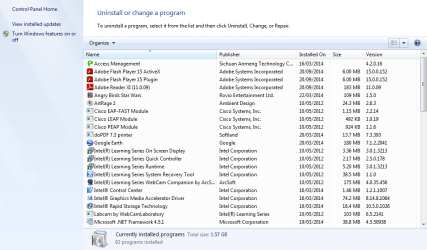
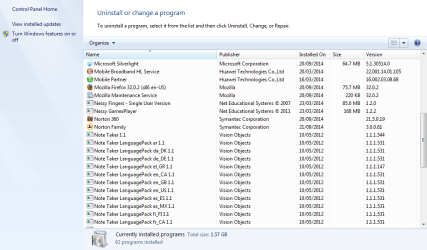
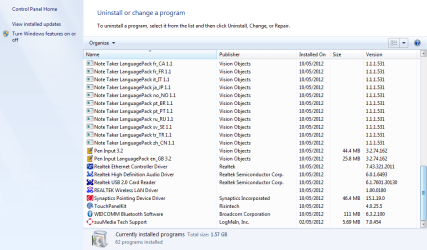
There is a great big long list of programs but says total used for programs is 1.57GB.
 

Attachments

  • Currently installed programs 1.png
    Currently installed programs 1.png
    41.2 KB · Views: 0
  • Currently installed programs 2.png
    Currently installed programs 2.png
    34.8 KB · Views: 0
  • Currently installed programs 3.png
    Currently installed programs 3.png
    34.9 KB · Views: 0

My Computer My Computer

At a glance

W7 HP 64 bitCore i3 1st gen8gbNvidia 330M
Computer type
Laptop
Computer Manufacturer/Model Number
Sony Vaio VPCCW2S1E
OS
W7 HP 64 bit
CPU
Core i3 1st gen
Memory
8gb
Graphics Card(s)
Nvidia 330M
Internet Speed
8 mbps
Browser
Firefox
You have IRST installed. I wonder what size the old HDD was if there was one?? IRST that I know raids an SSD with HDD. But this may be a different type.

There looks like way more than 1.5 gb so test some if those to see they're there. I'll look over the list closer when I have a chance and ask colleagues to look in now since I'm traveling.
 
From your description it sounds like entirely an SSD so maybe it was that small, given its a kid book there really wouldn't need to be much storage.

You can tell your son that you impressed us with your tech abilities! You are more advanced than most we help here.

:thumbsup:

I would uninstall Norton including the Norton removal tool then install MSE for best performance, unless you like Norton. Other tips in Bloatware tutorial below.

Thanks! I always did like taking things to bits. I'm the geek in the family - other half is the diy person. I knew nothing about computers until 6 years ago when I got an Asus Eee PC netbook - I had so many horrible things happened I learned a lot! Then when I got broken I bought another one second hand, then that got a drink spilt on it and got a third,which also came to a sticky end (trouble with small netbooks, they are so portable they get left lying around in unsuitable places). When I went to get a new one, to my horror netbooks weren't made any more and worse, Windows XP was due to expire. The good news was they were going for peanuts on ebay, so I bought 2 and a spares one, pulled the spares one to bits so I knew what was what, upgraded the SSD in one and installed Windows 7 - which might have been when I joined on here because I was so chuffed I had installed Windows 7 on a 7" Eee Pc. After that it became a bit of a hobby (ie addiction). Buying them for £15, fixing them, installing Linux and selling them for £60. Had to give up doing it when the house became a tip and family complained my cooking had gone down the tubes. I think of the original Eee PC's as like working on an old mini car - simple, cheap spares, everything easy to get at. Most of the ones I 'fixed' had nothing wrong with them except got too full of Windows updates and crashed. Some I'd get for scrap and use the parts for another one,which was great when they came with a fully working 8GB ssd inside and 2GB of ram. I kept a 904HA though and might put Windows 7 on that because it has such a nice keyboard. So I have a spare room full of computer bits. I like installing Linux but prefer using Windows 7. Little boy preferred Windows 7 because he likes Chess Titans and wanted Angry Birds on it,so the Fizzbook was a lucky find. But apart from Eee 7" netbooks and changing the odd hard drive - I don't know much about the technicalities. I know I never want to take one of these apart again! Sorry I'll stop rambling on - I have flu so a bit delirious lol.
 

My Computer My Computer

At a glance

W7 HP 64 bitCore i3 1st gen8gbNvidia 330M
Computer type
Laptop
Computer Manufacturer/Model Number
Sony Vaio VPCCW2S1E
OS
W7 HP 64 bit
CPU
Core i3 1st gen
Memory
8gb
Graphics Card(s)
Nvidia 330M
Internet Speed
8 mbps
Browser
Firefox
Yeah I know Norton 360 is a bit of bloat but I really like the registry scan.
 

My Computer My Computer

At a glance

W7 HP 64 bitCore i3 1st gen8gbNvidia 330M
Computer type
Laptop
Computer Manufacturer/Model Number
Sony Vaio VPCCW2S1E
OS
W7 HP 64 bit
CPU
Core i3 1st gen
Memory
8gb
Graphics Card(s)
Nvidia 330M
Internet Speed
8 mbps
Browser
Firefox
You have IRST installed. I wonder what size the old HDD was if there was one?? IRST that I know raids an SSD with HDD. But this may be a different type.

There looks like way more than 1.5 gb so test some if those to see they're there. I'll look over the list closer when I have a chance and ask colleagues to look in now since I'm traveling.

Thanks. I don't know what IRST is. There was no hard drive - just the 32GB mSata. Safe travel.
 

My Computer My Computer

At a glance

W7 HP 64 bitCore i3 1st gen8gbNvidia 330M
Computer type
Laptop
Computer Manufacturer/Model Number
Sony Vaio VPCCW2S1E
OS
W7 HP 64 bit
CPU
Core i3 1st gen
Memory
8gb
Graphics Card(s)
Nvidia 330M
Internet Speed
8 mbps
Browser
Firefox
I originally gave you two tutorials which show how MSATA drives are reinstalled, one with IRST. I thought you ha already read these so were up on IRST.
 
Oops. Will have a look.
 

My Computer My Computer

At a glance

W7 HP 64 bitCore i3 1st gen8gbNvidia 330M
Computer type
Laptop
Computer Manufacturer/Model Number
Sony Vaio VPCCW2S1E
OS
W7 HP 64 bit
CPU
Core i3 1st gen
Memory
8gb
Graphics Card(s)
Nvidia 330M
Internet Speed
8 mbps
Browser
Firefox
Yeah I know Norton 360 is a bit of bloat but I really like the registry scan.
....and that's the worrying bit. ALL registry cleaners are dangerous. Some worse than others, but I have little confidence in Norton software anyhow, so view their registry cleaner with horror ;)
 

My Computer My Computer

At a glance

Win 7 x64 Home Premium (and x86 VirtualBox VM...i3 370M/i7 6500U8GB - finally :)/8GBit's an i3, dude!/dual Intel&nVidia
Computer type
Laptop
Computer Manufacturer/Model Number
Asus K52F or Lenovo B51-80
OS
Win 7 x64 Home Premium (and x86 VirtualBox VM)/Win10
CPU
i3 370M/i7 6500U
Motherboard
Asus/Lenovo
Memory
8GB - finally :)/8GB
Graphics Card(s)
it's an i3, dude!/dual Intel&nVidia
Sound Card
onboard
Monitor(s) Displays
15.6" built-in
Screen Resolution
1366x768/1920x1080
Hard Drives
750GB Seagate internal
Sundry external drives attached to other computers on the local network
1TB SSD on the Lenovo
PSU
n/a
Internet Speed
as much as I can get - usually on a dongle/phone, so <1MB/s
Antivirus
MSE/Defender
Browser
IE11/12/Edge/Chrome/FF(if I must)
For some reason I have never had a problem with Norton 360 - had it on all our laptops for the last 10 years and the registry scan has never caused an issue and has solved a few - so I just stick with what we're used to! I have used another registry cleaner that was a total disaster though, so I know what you mean. The Norton one is good when you have just installed or uninstalled something and it has left rubbish behind (usually Adobe rubbish). So I can recommend it! I believe it is a lot better than it used to be, from what I have heard of past Norton stuff. We never pay full price for it though.
 

My Computer My Computer

At a glance

W7 HP 64 bitCore i3 1st gen8gbNvidia 330M
Computer type
Laptop
Computer Manufacturer/Model Number
Sony Vaio VPCCW2S1E
OS
W7 HP 64 bit
CPU
Core i3 1st gen
Memory
8gb
Graphics Card(s)
Nvidia 330M
Internet Speed
8 mbps
Browser
Firefox
The Forums has several Norton users who swear by it. But there are still times when problems are solved by uninstalling it. So keep that in mind going forward. A good free replacement is MSE which also offers the best performance with no throttling.

The only registry scan I'd use is CCleaner's since it has no documented cases of causing problems. Most Registry Cleaner's are scamware without any genius like CCleaner.
 
Well for my two cents worth I always back the registry up when I first get a machine , do a clean install or are contemplating changing the registry. It is a good safety net as far as I am concerned, and like the other am impressed though not surprised at being able to fit that amount of programs and what is essentially one of those very small netbooks.

Personally I cannot see the problem with fitting whatever size SSD in the machine the only thing that is limiting the machine would be the amount of RAM which I cannot find any info on how much can be installed, and the small L2 cache. But I would not be surprised if the RAM could not be raised to 2GB as some of the netbooks are able to take.

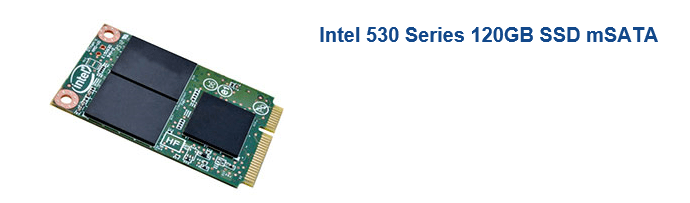
Just as a matter of curiosity the SSD was it a normal one or one of those card like SSD's? as in my pic
 

Attachments

  • CARD SSD.PNG
    CARD SSD.PNG
    22 KB · Views: 23

My Computer My Computer

At a glance

Desk1 7 Home Prem / Desk2 10 Pro / Main lap A...Desk1 i5 3750K / Laptop i7 GTX 860M / Desk2 i...Desk1 8GB (1866) / Desk2 16GB (1333) / Laptop...Desk 1& 2NVidia GTX 650 & Laptops on board Intel
Computer type
PC/Desktop
Computer Manufacturer/Model Number
Own build (new) Desk1 / Asus ROG Win 7 / Desk2 1st build
OS
Desk1 7 Home Prem / Desk2 10 Pro / Main lap Asus ROG 10 Pro 2 laptop Toshiba 7 Pro Asus P2520 7 & 10
CPU
Desk1 i5 3750K / Laptop i7 GTX 860M / Desk2 i5 2500
Motherboard
Desk1 Asus P877-V / Desk2 Gigabyte H67 UD3H / Laptop ?
Memory
Desk1 8GB (1866) / Desk2 16GB (1333) / Laptop 8Gb DDR3
Graphics Card(s)
Desk 1& 2NVidia GTX 650 & Laptops on board Intel
Sound Card
Desk 1 & 2 -XONAR DG Realtek High Def audio Laptop
Monitor(s) Displays
Desk 1 Benq HD 2450 / Desk2 Philips 24" / Laptop 17.5"
Screen Resolution
1920x1080 D1 & D2 & Laptop 1
Hard Drives
Desk1 Samsung 120GB 830 SSD
Asus ROG 256GB 850 Pro SSD
Desk2 Samsung 840 256 SSD
Toshiba 120GB EVO
PSU
Desk 1 Corsair HX 1050/ Laptop ? / Desk 2 Corsair HX 650
Case
Desk 1 Cooler HAF XM ? Toshiba laptop / Desk2 Coolermaster
Cooling
Fans on all Desk1 -2 Desk2 - all Coolermasters 5 Laptop ?
Keyboard
Desk 1 MS Sidewinder X6 Desk 2 MS Sidewinder X 4
Mouse
Desk 1&2 - Gigabyte MS 900 gamer - laptop - Logitec wireless
Internet Speed
ADSL2+
Other Info
One other Desktop (tester) and spare Toshba laptop both with SSD's
Running Kaspersky 2016 ISS on all machines config'd identically
Logitec audio stereo systems on each machine (x3)
Canon MG5250MFC
Router/modem TP-Link running WPA2SK
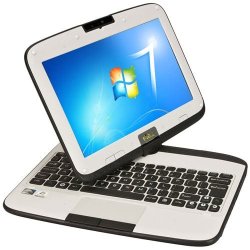
Yes it was very similar to that. I think the Fizzbook is basically a netbook with a robust outer covering (which is quite nice). The one we have came with 2GB RAM factory fitted but they normally came with 1GB. Although the ssd was the card type one, it was sitting in a full 2.5" drive space. I just plugged the new drive into the same connector but I think there may have been a slot for some kind of adapter at the other end of the drive slot too. I think it was a standard inner case for the two different models - one model with a 32GB ssd like the one above, the other model with a 320GB hard drive, hence space for a standard hard drive/ssd. The best thing I did when it was new, was upgrade it to Home Premium - the Windows 7 Starter combined with the Intel software was very glitchy. I couldn't do a full clean install due to the software and drivers for the pen touch screen being a problem to get (I was told by an education site who had some of these netbooks), so tried an inplace upgrade to Home Premium via download, and it was like a different machine after that (ie much better).

Here it is if you are interested:

https://shop.qacomputing.co.uk/prod...1-1GB-32GB-Windows-7-Starter-1-Year-Warranty/

Unfortunately they don't make them any more.
 

Attachments

  • Zoostorm Fizzbook Spin.jpg
    Zoostorm Fizzbook Spin.jpg
    30.2 KB · Views: 21

My Computer My Computer

At a glance

W7 HP 64 bitCore i3 1st gen8gbNvidia 330M
Computer type
Laptop
Computer Manufacturer/Model Number
Sony Vaio VPCCW2S1E
OS
W7 HP 64 bit
CPU
Core i3 1st gen
Memory
8gb
Graphics Card(s)
Nvidia 330M
Internet Speed
8 mbps
Browser
Firefox

My Computer My Computer

At a glance

Desk1 7 Home Prem / Desk2 10 Pro / Main lap A...Desk1 i5 3750K / Laptop i7 GTX 860M / Desk2 i...Desk1 8GB (1866) / Desk2 16GB (1333) / Laptop...Desk 1& 2NVidia GTX 650 & Laptops on board Intel
Computer type
PC/Desktop
Computer Manufacturer/Model Number
Own build (new) Desk1 / Asus ROG Win 7 / Desk2 1st build
OS
Desk1 7 Home Prem / Desk2 10 Pro / Main lap Asus ROG 10 Pro 2 laptop Toshiba 7 Pro Asus P2520 7 & 10
CPU
Desk1 i5 3750K / Laptop i7 GTX 860M / Desk2 i5 2500
Motherboard
Desk1 Asus P877-V / Desk2 Gigabyte H67 UD3H / Laptop ?
Memory
Desk1 8GB (1866) / Desk2 16GB (1333) / Laptop 8Gb DDR3
Graphics Card(s)
Desk 1& 2NVidia GTX 650 & Laptops on board Intel
Sound Card
Desk 1 & 2 -XONAR DG Realtek High Def audio Laptop
Monitor(s) Displays
Desk 1 Benq HD 2450 / Desk2 Philips 24" / Laptop 17.5"
Screen Resolution
1920x1080 D1 & D2 & Laptop 1
Hard Drives
Desk1 Samsung 120GB 830 SSD
Asus ROG 256GB 850 Pro SSD
Desk2 Samsung 840 256 SSD
Toshiba 120GB EVO
PSU
Desk 1 Corsair HX 1050/ Laptop ? / Desk 2 Corsair HX 650
Case
Desk 1 Cooler HAF XM ? Toshiba laptop / Desk2 Coolermaster
Cooling
Fans on all Desk1 -2 Desk2 - all Coolermasters 5 Laptop ?
Keyboard
Desk 1 MS Sidewinder X6 Desk 2 MS Sidewinder X 4
Mouse
Desk 1&2 - Gigabyte MS 900 gamer - laptop - Logitec wireless
Internet Speed
ADSL2+
Other Info
One other Desktop (tester) and spare Toshba laptop both with SSD's
Running Kaspersky 2016 ISS on all machines config'd identically
Logitec audio stereo systems on each machine (x3)
Canon MG5250MFC
Router/modem TP-Link running WPA2SK
Yes I wanted to do a clean install but then the tablet and pen touch stuff wouldn't have worked. I number of IT people in schools have a forum and they were tearing their hair out trying to get things to work after a clean install and someone suggested an in place upgrade so I did that. Seems to be fine. Yes 250GB is overkill and wanted the drive for my laptop but rushed to get it fixed to save sobs!
 

My Computer My Computer

At a glance

W7 HP 64 bitCore i3 1st gen8gbNvidia 330M
Computer type
Laptop
Computer Manufacturer/Model Number
Sony Vaio VPCCW2S1E
OS
W7 HP 64 bit
CPU
Core i3 1st gen
Memory
8gb
Graphics Card(s)
Nvidia 330M
Internet Speed
8 mbps
Browser
Firefox
Hazel, we specialize in http://www.sevenforums.com/tutorials/219487-clean-reinstall-factory-oem-windows-7-a.html#post1839164 which has had over a million users without a single complaint. We've never not been able to find a driver if that is required because Win7 doesn't provide it in the installer or via Windows Update.

As to the suspected elusive touch/pen driver look in Device Manager for the exact make/model of the device which provides this, post back this along with the driver's version and date, and we will find the software for that device for you so you can share it with others even if you decide not to Clean Reinstall.

Have you looked for the PC's Support Downloads webpage, to see what software and drivers are posted there?
 
Thanks Greg - support site has not been able to help others, but I did buy a recovering disc on - not sure if you could get all the drivers etc off that separately. But have paid for my downloaded Home Premium upgrade now so might as well just lump it!
 

My Computer My Computer

At a glance

W7 HP 64 bitCore i3 1st gen8gbNvidia 330M
Computer type
Laptop
Computer Manufacturer/Model Number
Sony Vaio VPCCW2S1E
OS
W7 HP 64 bit
CPU
Core i3 1st gen
Memory
8gb
Graphics Card(s)
Nvidia 330M
Internet Speed
8 mbps
Browser
Firefox
Is that an Anytime Upgrade or retail copy of Win7 Upgrade? Either one will unlock the higher version just by inserting the key into http://www.sevenforums.com/tutorials/95744-windows-anytime-upgrade-how.html. So you can run Factory Recovery to Basic and then unlock Home Premium that way.

If its retail you can also use the disk to http://www.sevenforums.com/tutorials/219487-clean-reinstall-factory-oem-windows-7-a.html#post1839164. When you boot the installer it will see an OS on the drive to allow upgrade key. For a new or wiped HD it requires doing the quick Option 3 workaround in http://www.sevenforums.com/tutorials/31402-clean-install-upgrade-windows-7-version.html.

Hope I haven't confused you. If youre happy with the install you have, then you can certainly stick with it. Having the backup image means you never have to reinstall or Factory Recover again.
 
Back
Top