New To Overclocking help!

ya im not OCing with this PSU. just trying to learn. i can turn off cool and quiet along with all other power saving features.

playing BF3 for an hour, the hottest it got was 53C thats all 4 cores at 80+% ussage

Wow. Isn't 53 kind of high for AMD?
 

My Computer

Computer type
PC/Desktop
ya im not OCing with this PSU. just trying to learn. i can turn off cool and quiet along with all other power saving features.

playing BF3 for an hour, the hottest it got was 53C thats all 4 cores at 80+% ussage

Wow. Isn't 53 kind of high for AMD?
considering my intel cpu in my laptop hit 71C i call it a win!
 

My Computer

Computer type
PC/Desktop
Computer Manufacturer/Model Number
Custom Build
OS
Windows 7 Professional x64
CPU
AMD FX 4300 @ 4.2 GHZ
Motherboard
MSI 970A-G43
Memory
G.SKILL Ripjaws X Series 8GB
Graphics Card(s)
PNY GTX 560 Ti OC
Sound Card
Realtek ALC892
Monitor(s) Displays
20" Hanns-G HL203
Screen Resolution
1600x900
Hard Drives
WD Caviar Black 500GB 7200RPM
PSU
Corsair CX500M
Case
Athena Power- Black Widow
Cooling
Cooler Master GeminII S524
Keyboard
Logitech K360 LE
Mouse
Rocketfish Nano
Internet Speed
60Mbps Down 8Mbps Up
Other Info
Dell Studio 1458 Laptop Setup:

Windows 7 Home Premium~
Intel Core i5 560M @3.2GHZ~
6GB DDR3 RAM~
ATI Mobility Radeon 540v 512MB~
Intel 330 Sata III 120GB SSD~
Illuminated Keyboard
ok so whats the difference between turbo core ratio and max turbo core ratio?

my guess is that turbo core ratio will set turbo to that but it wont scale from base to turbo, and max turb it will allow scaling from base to max turbo so as long as turbo core ratio is set to auto?
 

My Computer

Computer type
PC/Desktop
Computer Manufacturer/Model Number
Custom Build
OS
Windows 7 Professional x64
CPU
AMD FX 4300 @ 4.2 GHZ
Motherboard
MSI 970A-G43
Memory
G.SKILL Ripjaws X Series 8GB
Graphics Card(s)
PNY GTX 560 Ti OC
Sound Card
Realtek ALC892
Monitor(s) Displays
20" Hanns-G HL203
Screen Resolution
1600x900
Hard Drives
WD Caviar Black 500GB 7200RPM
PSU
Corsair CX500M
Case
Athena Power- Black Widow
Cooling
Cooler Master GeminII S524
Keyboard
Logitech K360 LE
Mouse
Rocketfish Nano
Internet Speed
60Mbps Down 8Mbps Up
Other Info
Dell Studio 1458 Laptop Setup:

Windows 7 Home Premium~
Intel Core i5 560M @3.2GHZ~
6GB DDR3 RAM~
ATI Mobility Radeon 540v 512MB~
Intel 330 Sata III 120GB SSD~
Illuminated Keyboard
ya im not OCing with this PSU. just trying to learn. i can turn off cool and quiet along with all other power saving features.

playing BF3 for an hour, the hottest it got was 53C thats all 4 cores at 80+% ussage

Wow. Isn't 53 kind of high for AMD?
considering my intel cpu in my laptop hit 71C i call it a win!

But I think the maximum safe temperature for AMD's CPUs are still much lower than Intel's.


ok so whats the difference between turbo core ratio and max turbo core ratio?

my guess is that turbo core ratio will set turbo to that but it wont scale from base to turbo, and max turb it will allow scaling from base to max turbo so as long as turbo core ratio is set to auto?

I'm not quite sure. I'm only replying so that you know I'm not ignoring this post.
 

My Computer

Computer type
PC/Desktop
Wow. Isn't 53 kind of high for AMD?
considering my intel cpu in my laptop hit 71C i call it a win!

But I think the maximum safe temperature for AMD's CPUs are still much lower than Intel's.


ok so whats the difference between turbo core ratio and max turbo core ratio?

my guess is that turbo core ratio will set turbo to that but it wont scale from base to turbo, and max turb it will allow scaling from base to max turbo so as long as turbo core ratio is set to auto?

I'm not quite sure. I'm only replying so that you know I'm not ignoring this post.

well i huess ill figure it out later lol. the manuael probs has it in there

ive read on a forum that the cores should not go over 62c and cpu 70c


btw i can not change the fsb in bios..... it will not let me select anyting other than 200mhz. maybe its locked in the settings somewhere?
 

My Computer

Computer type
PC/Desktop
Computer Manufacturer/Model Number
Custom Build
OS
Windows 7 Professional x64
CPU
AMD FX 4300 @ 4.2 GHZ
Motherboard
MSI 970A-G43
Memory
G.SKILL Ripjaws X Series 8GB
Graphics Card(s)
PNY GTX 560 Ti OC
Sound Card
Realtek ALC892
Monitor(s) Displays
20" Hanns-G HL203
Screen Resolution
1600x900
Hard Drives
WD Caviar Black 500GB 7200RPM
PSU
Corsair CX500M
Case
Athena Power- Black Widow
Cooling
Cooler Master GeminII S524
Keyboard
Logitech K360 LE
Mouse
Rocketfish Nano
Internet Speed
60Mbps Down 8Mbps Up
Other Info
Dell Studio 1458 Laptop Setup:

Windows 7 Home Premium~
Intel Core i5 560M @3.2GHZ~
6GB DDR3 RAM~
ATI Mobility Radeon 540v 512MB~
Intel 330 Sata III 120GB SSD~
Illuminated Keyboard
so increasing the cpu frequency WITHOUT increasing the voltage will NOT increase heat?
 

My Computer

Computer type
PC/Desktop
Computer Manufacturer/Model Number
Custom Build
OS
Windows 7 Professional x64
CPU
AMD FX 4300 @ 4.2 GHZ
Motherboard
MSI 970A-G43
Memory
G.SKILL Ripjaws X Series 8GB
Graphics Card(s)
PNY GTX 560 Ti OC
Sound Card
Realtek ALC892
Monitor(s) Displays
20" Hanns-G HL203
Screen Resolution
1600x900
Hard Drives
WD Caviar Black 500GB 7200RPM
PSU
Corsair CX500M
Case
Athena Power- Black Widow
Cooling
Cooler Master GeminII S524
Keyboard
Logitech K360 LE
Mouse
Rocketfish Nano
Internet Speed
60Mbps Down 8Mbps Up
Other Info
Dell Studio 1458 Laptop Setup:

Windows 7 Home Premium~
Intel Core i5 560M @3.2GHZ~
6GB DDR3 RAM~
ATI Mobility Radeon 540v 512MB~
Intel 330 Sata III 120GB SSD~
Illuminated Keyboard
btw i can not change the fsb in bios..... it will not let me select anyting other than 200mhz. maybe its locked in the settings somewhere?
I know you say you're not overclocking but it sounds like you're getting very tempted to try and bump it that little bit.
You should leave it alone untill you get a psu that not gonna kill your NEW rig.
 

My Computer

Computer type
PC/Desktop
Computer Manufacturer/Model Number
Custom build
OS
Win7 Home Premium x64 SP1
CPU
i7 4770k
Motherboard
Asus maximus VI Hero
Memory
8Gb Kingston HyperX Beast 2400MHz @2133MHz 11-12-11-30
Graphics Card(s)
MSI GTX 780ti Gaming Oc x2
Sound Card
Onboard ROG SupremeFX
Monitor(s) Displays
Asus VG248QE
Screen Resolution
3840X1080 144Hz
Hard Drives
Samung Evo 256Gb, OCZ Agility4 128Gb
1x1TB hitachi storage
PSU
EVGA Supernova 1000w Platinum
Case
Corsair Air 540
Cooling
Corsair H100i
Keyboard
Coolermaster Quickfire Pro
Mouse
Corsair M65 RGB
Internet Speed
74mb dwn/16up
Antivirus
MSE,Malwarebytes
Browser
Chrome
btw i can not change the fsb in bios..... it will not let me select anyting other than 200mhz. maybe its locked in the settings somewhere?
I know you say you're not overclocking but it sounds like you're getting very tempted to try and bump it that little bit.
You should leave it alone untill you get a psu that not gonna kill your NEW rig.

Exactly what I was thinking. There is no reason to rush into overclocking. Part of the fun is going slow, testing, tweaking, fine-tuning until you get it as perfect as you can. Doing research is fine, just wait until you have a better PSU before you make any changes.
 

My Computer

Computer type
PC/Desktop
Computer Manufacturer/Model Number
Custom Built
OS
Windows 7 Professional 64bit SP1
CPU
Intel Core i5-3570K @ 4.5GHz
Motherboard
Asus Sabertooth Z77
Memory
Corsair Vengeance 16GB (4x4) @1866MHz CL 9-9-9-24 1T
Graphics Card(s)
EVGA GTX 750 Ti FTW
Sound Card
Onboard Audio
Monitor(s) Displays
Dell S2309W
Screen Resolution
1920x1080
Hard Drives
Samsung 830 128GB SSD - OS
(4) Seagate 5TB HDD
(1) Seagate 2TB HDD
PSU
Seasonic X750 80+ Gold Full Modular
Case
Antec Eleven Hundred Super Mid Tower
Cooling
Intel Liquid Cooler
Keyboard
Max Nighthawk X8 Mechanical keyboard
Mouse
Mionix Naos 7000
Internet Speed
50 Mbps Down / 10 Mbps Up
Antivirus
Microsoft Security Essentials/Malwarebytes Anti-Malware
Browser
Chrome/Firefox
Other Info
Klipsch ProMedia 2.1's
Asus RT-N66R Wireless Router
ya im not OCing with this PSU. just trying to learn. i can turn off cool and quiet along with all other power saving features.

playing BF3 for an hour, the hottest it got was 53C thats all 4 cores at 80+% ussage

Wow. Isn't 53 kind of high for AMD?

it is when gaming for a hour im hitting high 30's or even low 40' s but he is using a stock cooler and fan so that is why if he used an aftermarket it would be much better
 

My Computer

Computer type
PC/Desktop
Computer Manufacturer/Model Number
CoreI7-6700K MrFingerIII Special Builds
OS
Windows 10 Home Premium 64bit sp1
CPU
Intel I7-6700K @ 4.6 Ghz 1.344 volts everyday OC
Motherboard
Asrock Fatality K6 Z170 Socket 1151
Memory
32GB G-Skill TridentZ 3200mhz 16-18-18-38 DDR4
Graphics Card(s)
Sli Gigabyte Windforce GTX 980 G1
Sound Card
AC97 Creative Rage Tactic 3D Headphones Bluetooth
Monitor(s) Displays
27" Asus ROG Swift PG278Q G-Sync 48" Vizio Smart HD TV
Screen Resolution
2560x1440p 27"- 48" Currently Gaming at 2560x1440p Res 2K
Hard Drives
250GB Samsung Evo840SSD Seagate baracuda 500 GB WD Mybook 500Gb 1TB Seagate Barracuda
PSU
HX1050w Corsair Silver 80plus certified crosfire/sli
Case
Enthod Pro Full Tower
Cooling
Corsair H110i GT 280 mm High Performance WaterBlock
Keyboard
Logitech wireless keyboard
Mouse
Logitech wireless mouse
Internet Speed
Cox Cable 100+ mb
Antivirus
WebRoot Spysweeper with Antivirus
Browser
IE-10, Chrome, Opera
Other Info
My Other Rig is a AMD FX8320E @4.6Ghz 16GB Ballistic Sport Ram
Mobo Asrock Fatality 990FX 120GB OCZ SSD 1TB Seagate Barracuda Corsair H75 Cooling PSU Corsair CX750
GPU GTX Gigabyte 970G1
so increasing the cpu frequency WITHOUT increasing the voltage will NOT increase heat?
Yes it will. If the chip clocks faster it will pull more power. But without a small Vcore and maybe CPU/NB bump it may be real unstable.
If you're going to OC much, get an aftermarket cooler, AMD's is better than Intel's, but weak for OCing.
 

My Computer

Computer type
PC/Desktop
Computer Manufacturer/Model Number
Home Built Desktop By DataTech
OS
Windows 7 Ultimate X64 SP1
CPU
Intel i5-2550K, Differing ~4.4-4.8GHz No built in GPU
Motherboard
ASUS P8Z68-V PRO/GEN3
Memory
16GB G.Skill Sniper 1866MHz @ 2133MHz 2x8GB
Graphics Card(s)
ASUS GTX650TIB-DC2OC-2GD5, (650TI Boost)
Sound Card
Onboard Realtek 5-1
Monitor(s) Displays
Samsung P2570HD
Screen Resolution
1920x1080
Hard Drives
Samsung 840 Pro 256GB SSD for OS, 500GB Seagate Constellation (Enterprise drive) for Data
PSU
Corsair HX650W
Case
Inwin Dragon Rider
Cooling
Hyper 212 EVO w/two Noctua fans, push-pull, @1300 RPM
Keyboard
E-Z Eyes, bright yellow keys with large characters
Mouse
steelseries SENSEI Laser Pro Gaming
Internet Speed
48-51Mbs Mbs down, 11 Mbs up Xfinity Cable
Antivirus
Norton Internet Security 2013
Browser
IE 10, Opera, Pale Moon if needed
Other Info
4 case fans, LG BluRay-RE, ASUS DVD-RW, Mr. Fusion power supply, 1.21 gigawatts.
ya im not OCing with this PSU. just trying to learn. i can turn off cool and quiet along with all other power saving features.

playing BF3 for an hour, the hottest it got was 53C thats all 4 cores at 80+% ussage

Wow. Isn't 53 kind of high for AMD?

it is when gaming for a hour im hitting high 30's or even low 40' s but he is using a stock cooler and fan so that is why if he used an aftermarket it would be much better

Yeah, but yours is overclocked with a high voltage and his is still at 100% stock. I dunno, I just don't know if I can believe that 53°C for 80% load or higher in BF3 is normal for the FX-4300 at stock with stock cooling.
 

My Computer

Computer type
PC/Desktop
Wow. Isn't 53 kind of high for AMD?

it is when gaming for a hour im hitting high 30's or even low 40' s but he is using a stock cooler and fan so that is why if he used an aftermarket it would be much better

Yeah, but yours is overclocked with a high voltage and his is still at 100% stock. I dunno, I just don't know if I can believe that 53°C for 80% load or higher in BF3 is normal for the FX-4300 at stock with stock cooling.

I also do believe from his screen shots as well he just has the cpu heatsink cooler an exhaust fan and Gpu fan he needs a few more fans as well pretty much he needs to fix his cooling and power needs then he will be able to get a better grasp on what he is trying to do
 

My Computer

Computer type
PC/Desktop
Computer Manufacturer/Model Number
CoreI7-6700K MrFingerIII Special Builds
OS
Windows 10 Home Premium 64bit sp1
CPU
Intel I7-6700K @ 4.6 Ghz 1.344 volts everyday OC
Motherboard
Asrock Fatality K6 Z170 Socket 1151
Memory
32GB G-Skill TridentZ 3200mhz 16-18-18-38 DDR4
Graphics Card(s)
Sli Gigabyte Windforce GTX 980 G1
Sound Card
AC97 Creative Rage Tactic 3D Headphones Bluetooth
Monitor(s) Displays
27" Asus ROG Swift PG278Q G-Sync 48" Vizio Smart HD TV
Screen Resolution
2560x1440p 27"- 48" Currently Gaming at 2560x1440p Res 2K
Hard Drives
250GB Samsung Evo840SSD Seagate baracuda 500 GB WD Mybook 500Gb 1TB Seagate Barracuda
PSU
HX1050w Corsair Silver 80plus certified crosfire/sli
Case
Enthod Pro Full Tower
Cooling
Corsair H110i GT 280 mm High Performance WaterBlock
Keyboard
Logitech wireless keyboard
Mouse
Logitech wireless mouse
Internet Speed
Cox Cable 100+ mb
Antivirus
WebRoot Spysweeper with Antivirus
Browser
IE-10, Chrome, Opera
Other Info
My Other Rig is a AMD FX8320E @4.6Ghz 16GB Ballistic Sport Ram
Mobo Asrock Fatality 990FX 120GB OCZ SSD 1TB Seagate Barracuda Corsair H75 Cooling PSU Corsair CX750
GPU GTX Gigabyte 970G1
alright let me clear up a few things lol im not OCing with that PSU.... i was just in bios looking and clicking the settings. also my vcore is set at 1.400v and thats because of the turbo speed i believe. again, i only have 1 exhaust fan at the time. i just ordered an intake fan and it is in the mail as we speak. should be getting it tomorrow.

but I HAVENT TOUCHED ANY OC SETTINGS YET! just messing and learning.

but if i have to increase voltage, i increase the cpu voltage. not the ND or SD voltage because im not changing the FSB ratio. rite?
 

My Computer

Computer type
PC/Desktop
Computer Manufacturer/Model Number
Custom Build
OS
Windows 7 Professional x64
CPU
AMD FX 4300 @ 4.2 GHZ
Motherboard
MSI 970A-G43
Memory
G.SKILL Ripjaws X Series 8GB
Graphics Card(s)
PNY GTX 560 Ti OC
Sound Card
Realtek ALC892
Monitor(s) Displays
20" Hanns-G HL203
Screen Resolution
1600x900
Hard Drives
WD Caviar Black 500GB 7200RPM
PSU
Corsair CX500M
Case
Athena Power- Black Widow
Cooling
Cooler Master GeminII S524
Keyboard
Logitech K360 LE
Mouse
Rocketfish Nano
Internet Speed
60Mbps Down 8Mbps Up
Other Info
Dell Studio 1458 Laptop Setup:

Windows 7 Home Premium~
Intel Core i5 560M @3.2GHZ~
6GB DDR3 RAM~
ATI Mobility Radeon 540v 512MB~
Intel 330 Sata III 120GB SSD~
Illuminated Keyboard
alright let me clear up a few things lol im not OCing with that PSU.... i was just in bios looking and clicking the settings. also my vcore is set at 1.400v and thats because of the turbo speed i believe. again, i only have 1 exhaust fan at the time. i just ordered an intake fan and it is in the mail as we speak. should be getting it tomorrow.

but I HAVENT TOUCHED ANY OC SETTINGS YET! just messing and learning.

but if i have to increase voltage, i increase the cpu voltage. not the ND or SD voltage because im not changing the FSB ratio. rite?

well you said you have no fsb available to use which means that board is limited and not able to oc well

let me look up your board and see what I can find out for you first I can't say till I see your features because everyone is different
 

My Computer

Computer type
PC/Desktop
Computer Manufacturer/Model Number
CoreI7-6700K MrFingerIII Special Builds
OS
Windows 10 Home Premium 64bit sp1
CPU
Intel I7-6700K @ 4.6 Ghz 1.344 volts everyday OC
Motherboard
Asrock Fatality K6 Z170 Socket 1151
Memory
32GB G-Skill TridentZ 3200mhz 16-18-18-38 DDR4
Graphics Card(s)
Sli Gigabyte Windforce GTX 980 G1
Sound Card
AC97 Creative Rage Tactic 3D Headphones Bluetooth
Monitor(s) Displays
27" Asus ROG Swift PG278Q G-Sync 48" Vizio Smart HD TV
Screen Resolution
2560x1440p 27"- 48" Currently Gaming at 2560x1440p Res 2K
Hard Drives
250GB Samsung Evo840SSD Seagate baracuda 500 GB WD Mybook 500Gb 1TB Seagate Barracuda
PSU
HX1050w Corsair Silver 80plus certified crosfire/sli
Case
Enthod Pro Full Tower
Cooling
Corsair H110i GT 280 mm High Performance WaterBlock
Keyboard
Logitech wireless keyboard
Mouse
Logitech wireless mouse
Internet Speed
Cox Cable 100+ mb
Antivirus
WebRoot Spysweeper with Antivirus
Browser
IE-10, Chrome, Opera
Other Info
My Other Rig is a AMD FX8320E @4.6Ghz 16GB Ballistic Sport Ram
Mobo Asrock Fatality 990FX 120GB OCZ SSD 1TB Seagate Barracuda Corsair H75 Cooling PSU Corsair CX750
GPU GTX Gigabyte 970G1
Ok this is one New egg review that I thought gave a clearer idea about what the potential your board has

I read through at least 10 reviews and most of them weren't good but with that being said here is a clip from a person that I think knows what he is talking about and what it's capable of http://www.newegg.com/Product/Product.aspx?Item=N82E16813130679
 

Attachments

  • newegg review.PNG
    newegg review.PNG
    59.6 KB · Views: 6

My Computer

Computer type
PC/Desktop
Computer Manufacturer/Model Number
CoreI7-6700K MrFingerIII Special Builds
OS
Windows 10 Home Premium 64bit sp1
CPU
Intel I7-6700K @ 4.6 Ghz 1.344 volts everyday OC
Motherboard
Asrock Fatality K6 Z170 Socket 1151
Memory
32GB G-Skill TridentZ 3200mhz 16-18-18-38 DDR4
Graphics Card(s)
Sli Gigabyte Windforce GTX 980 G1
Sound Card
AC97 Creative Rage Tactic 3D Headphones Bluetooth
Monitor(s) Displays
27" Asus ROG Swift PG278Q G-Sync 48" Vizio Smart HD TV
Screen Resolution
2560x1440p 27"- 48" Currently Gaming at 2560x1440p Res 2K
Hard Drives
250GB Samsung Evo840SSD Seagate baracuda 500 GB WD Mybook 500Gb 1TB Seagate Barracuda
PSU
HX1050w Corsair Silver 80plus certified crosfire/sli
Case
Enthod Pro Full Tower
Cooling
Corsair H110i GT 280 mm High Performance WaterBlock
Keyboard
Logitech wireless keyboard
Mouse
Logitech wireless mouse
Internet Speed
Cox Cable 100+ mb
Antivirus
WebRoot Spysweeper with Antivirus
Browser
IE-10, Chrome, Opera
Other Info
My Other Rig is a AMD FX8320E @4.6Ghz 16GB Ballistic Sport Ram
Mobo Asrock Fatality 990FX 120GB OCZ SSD 1TB Seagate Barracuda Corsair H75 Cooling PSU Corsair CX750
GPU GTX Gigabyte 970G1
but my cpu is 95tdp. not 125. also whats a VRM?
 

My Computer

Computer type
PC/Desktop
Computer Manufacturer/Model Number
Custom Build
OS
Windows 7 Professional x64
CPU
AMD FX 4300 @ 4.2 GHZ
Motherboard
MSI 970A-G43
Memory
G.SKILL Ripjaws X Series 8GB
Graphics Card(s)
PNY GTX 560 Ti OC
Sound Card
Realtek ALC892
Monitor(s) Displays
20" Hanns-G HL203
Screen Resolution
1600x900
Hard Drives
WD Caviar Black 500GB 7200RPM
PSU
Corsair CX500M
Case
Athena Power- Black Widow
Cooling
Cooler Master GeminII S524
Keyboard
Logitech K360 LE
Mouse
Rocketfish Nano
Internet Speed
60Mbps Down 8Mbps Up
Other Info
Dell Studio 1458 Laptop Setup:

Windows 7 Home Premium~
Intel Core i5 560M @3.2GHZ~
6GB DDR3 RAM~
ATI Mobility Radeon 540v 512MB~
Intel 330 Sata III 120GB SSD~
Illuminated Keyboard
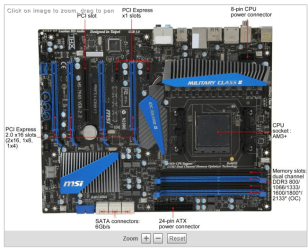
mosfets the little black heatsinks around the ram area northbridge there the black aluminum pieces you see soldered to the board

looks like there not that good either on my mainboard I had huge blue /grey one's
 

Attachments

  • mb.PNG
    mb.PNG
    166.8 KB · Views: 7

My Computer

Computer type
PC/Desktop
Computer Manufacturer/Model Number
CoreI7-6700K MrFingerIII Special Builds
OS
Windows 10 Home Premium 64bit sp1
CPU
Intel I7-6700K @ 4.6 Ghz 1.344 volts everyday OC
Motherboard
Asrock Fatality K6 Z170 Socket 1151
Memory
32GB G-Skill TridentZ 3200mhz 16-18-18-38 DDR4
Graphics Card(s)
Sli Gigabyte Windforce GTX 980 G1
Sound Card
AC97 Creative Rage Tactic 3D Headphones Bluetooth
Monitor(s) Displays
27" Asus ROG Swift PG278Q G-Sync 48" Vizio Smart HD TV
Screen Resolution
2560x1440p 27"- 48" Currently Gaming at 2560x1440p Res 2K
Hard Drives
250GB Samsung Evo840SSD Seagate baracuda 500 GB WD Mybook 500Gb 1TB Seagate Barracuda
PSU
HX1050w Corsair Silver 80plus certified crosfire/sli
Case
Enthod Pro Full Tower
Cooling
Corsair H110i GT 280 mm High Performance WaterBlock
Keyboard
Logitech wireless keyboard
Mouse
Logitech wireless mouse
Internet Speed
Cox Cable 100+ mb
Antivirus
WebRoot Spysweeper with Antivirus
Browser
IE-10, Chrome, Opera
Other Info
My Other Rig is a AMD FX8320E @4.6Ghz 16GB Ballistic Sport Ram
Mobo Asrock Fatality 990FX 120GB OCZ SSD 1TB Seagate Barracuda Corsair H75 Cooling PSU Corsair CX750
GPU GTX Gigabyte 970G1
mosfets the little black heatsinks around the ram area northbridge there the black aluminum pieces you see soldered to the board

looks like there not that good either on my mainboard I had huge blue /grey one's

ohh gotcha!

but how does that effect the cpu? if im only increasing CPU voltage and CPU ratio, how come the NB and SB are effected?
 

My Computer

Computer type
PC/Desktop
Computer Manufacturer/Model Number
Custom Build
OS
Windows 7 Professional x64
CPU
AMD FX 4300 @ 4.2 GHZ
Motherboard
MSI 970A-G43
Memory
G.SKILL Ripjaws X Series 8GB
Graphics Card(s)
PNY GTX 560 Ti OC
Sound Card
Realtek ALC892
Monitor(s) Displays
20" Hanns-G HL203
Screen Resolution
1600x900
Hard Drives
WD Caviar Black 500GB 7200RPM
PSU
Corsair CX500M
Case
Athena Power- Black Widow
Cooling
Cooler Master GeminII S524
Keyboard
Logitech K360 LE
Mouse
Rocketfish Nano
Internet Speed
60Mbps Down 8Mbps Up
Other Info
Dell Studio 1458 Laptop Setup:

Windows 7 Home Premium~
Intel Core i5 560M @3.2GHZ~
6GB DDR3 RAM~
ATI Mobility Radeon 540v 512MB~
Intel 330 Sata III 120GB SSD~
Illuminated Keyboard
mosfets the little black heatsinks around the ram area northbridge there the black aluminum pieces you see soldered to the board

looks like there not that good either on my mainboard I had huge blue /grey one's

ohh gotcha!

but how does that effect the cpu? if im only increasing CPU voltage and CPU ratio, how come the NB and SB are effected?

They heat up and if they get to hot they explode and can catch fire and were not talking about Bob Marley to catch a fire either it will do what it did to me and pop and burn up

they say high class military but seems MSI is just talking nonsense because this board im using now by ASUS boast the same thing and doesn't even get close to the temps the MSI board had me at so that made me believe that MSI is just saying it is Military but really being cheap on the consumer
 

My Computer

Computer type
PC/Desktop
Computer Manufacturer/Model Number
CoreI7-6700K MrFingerIII Special Builds
OS
Windows 10 Home Premium 64bit sp1
CPU
Intel I7-6700K @ 4.6 Ghz 1.344 volts everyday OC
Motherboard
Asrock Fatality K6 Z170 Socket 1151
Memory
32GB G-Skill TridentZ 3200mhz 16-18-18-38 DDR4
Graphics Card(s)
Sli Gigabyte Windforce GTX 980 G1
Sound Card
AC97 Creative Rage Tactic 3D Headphones Bluetooth
Monitor(s) Displays
27" Asus ROG Swift PG278Q G-Sync 48" Vizio Smart HD TV
Screen Resolution
2560x1440p 27"- 48" Currently Gaming at 2560x1440p Res 2K
Hard Drives
250GB Samsung Evo840SSD Seagate baracuda 500 GB WD Mybook 500Gb 1TB Seagate Barracuda
PSU
HX1050w Corsair Silver 80plus certified crosfire/sli
Case
Enthod Pro Full Tower
Cooling
Corsair H110i GT 280 mm High Performance WaterBlock
Keyboard
Logitech wireless keyboard
Mouse
Logitech wireless mouse
Internet Speed
Cox Cable 100+ mb
Antivirus
WebRoot Spysweeper with Antivirus
Browser
IE-10, Chrome, Opera
Other Info
My Other Rig is a AMD FX8320E @4.6Ghz 16GB Ballistic Sport Ram
Mobo Asrock Fatality 990FX 120GB OCZ SSD 1TB Seagate Barracuda Corsair H75 Cooling PSU Corsair CX750
GPU GTX Gigabyte 970G1
mosfets the little black heatsinks around the ram area northbridge there the black aluminum pieces you see soldered to the board

looks like there not that good either on my mainboard I had huge blue /grey one's

ohh gotcha!

but how does that effect the cpu? if im only increasing CPU voltage and CPU ratio, how come the NB and SB are effected?

They heat up and if they get to hot they explode and can catch fire and were not talking about Bob Marley to catch a fire either it will do what it did to me and pop and burn up

they say high class military but seems MSI is just talking nonsense because this board im using now by ASUS boast the same thing and doesn't even get close to the temps the MSI board had me at so that made me believe that MSI is just saying it is Military but really being cheap on the consumer

thats messed up. well as long as i keep my eye on tems, and maybe add another fan blowing on the heat syncs il lbe ok with a mild OC
 

My Computer

Computer type
PC/Desktop
Computer Manufacturer/Model Number
Custom Build
OS
Windows 7 Professional x64
CPU
AMD FX 4300 @ 4.2 GHZ
Motherboard
MSI 970A-G43
Memory
G.SKILL Ripjaws X Series 8GB
Graphics Card(s)
PNY GTX 560 Ti OC
Sound Card
Realtek ALC892
Monitor(s) Displays
20" Hanns-G HL203
Screen Resolution
1600x900
Hard Drives
WD Caviar Black 500GB 7200RPM
PSU
Corsair CX500M
Case
Athena Power- Black Widow
Cooling
Cooler Master GeminII S524
Keyboard
Logitech K360 LE
Mouse
Rocketfish Nano
Internet Speed
60Mbps Down 8Mbps Up
Other Info
Dell Studio 1458 Laptop Setup:

Windows 7 Home Premium~
Intel Core i5 560M @3.2GHZ~
6GB DDR3 RAM~
ATI Mobility Radeon 540v 512MB~
Intel 330 Sata III 120GB SSD~
Illuminated Keyboard
Back
Top