New user needs help; numerous issues with Windows 7

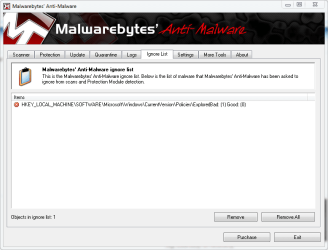
That is a false positive, put that in your ignore list.
 

Attachments

  • ignore.PNG
    ignore.PNG
    28.2 KB · Views: 11

My Computer

Computer type
PC/Desktop
Computer Manufacturer/Model Number
Self Built
OS
Win 10 Pro x64
CPU
Intel I5-2500K @3.3GHz
Motherboard
Asrock P67 Extreme4
Memory
16GB G.Skill Ripjaws X (4x4GB)
Graphics Card(s)
EVGA GeForce 750 Ti SC 2GB
Sound Card
ASUS Xonar DG 5.1 Channels 24-bit 96KHz PCI Interface Sound
Monitor(s) Displays
auria eq2367
Screen Resolution
1920 x 1080
Hard Drives
250GB Samsung 850 EVO SSD
1TB WD Blue
1TB Hitachi
PSU
SeaSonic X 650W 80 Plus Gold
Case
Corsair Obsidian 750D
Cooling
Corsair H60, Three 140mm case fans
Keyboard
Logitech Wireless Keyboard K520
Mouse
Logitech Wireless Mouse M310
Internet Speed
Wave Broadband ~ 100 dn 5 up
Antivirus
Windows Defender, Malwarebytes Premium
Browser
Edge, IE11, Chrome
Other Info
Laptop specs: HP g7-1365dx /
CPU: AMD A6-3420M APU with Radeon(tm) HD Graphics /
RAM: Crucial 8Gb (2x4Gb) /
SSD: Crucial M4-CT128M4SSD2 ATA Device/ FW 000F /
GFX: AMD Radeon HD 6520G /
OS: Windows 10 Pro x64
That is a false positive, put that in your ignore list.

All the tabs other than "Scanner" are disabled, I can't click on the the "Ignore List" tab and open it.
 

My Computer

Computer Manufacturer/Model Number
Lenovo T400 Thinkpad
OS
Windows 7 Home Premium
CPU
no idea _
Memory
2GBPC#-8500 1067MHzMem QTY - 2
Monitor(s) Displays
14.1WXGA TFT,w/LD Bcklt,Cm QTY - 1
Hard Drives
320GbHardDiskDrive,7200rpm QTY - 1

My Computer

Computer type
PC/Desktop
Computer Manufacturer/Model Number
Self Built
OS
Win 10 Pro x64
CPU
Intel I5-2500K @3.3GHz
Motherboard
Asrock P67 Extreme4
Memory
16GB G.Skill Ripjaws X (4x4GB)
Graphics Card(s)
EVGA GeForce 750 Ti SC 2GB
Sound Card
ASUS Xonar DG 5.1 Channels 24-bit 96KHz PCI Interface Sound
Monitor(s) Displays
auria eq2367
Screen Resolution
1920 x 1080
Hard Drives
250GB Samsung 850 EVO SSD
1TB WD Blue
1TB Hitachi
PSU
SeaSonic X 650W 80 Plus Gold
Case
Corsair Obsidian 750D
Cooling
Corsair H60, Three 140mm case fans
Keyboard
Logitech Wireless Keyboard K520
Mouse
Logitech Wireless Mouse M310
Internet Speed
Wave Broadband ~ 100 dn 5 up
Antivirus
Windows Defender, Malwarebytes Premium
Browser
Edge, IE11, Chrome
Other Info
Laptop specs: HP g7-1365dx /
CPU: AMD A6-3420M APU with Radeon(tm) HD Graphics /
RAM: Crucial 8Gb (2x4Gb) /
SSD: Crucial M4-CT128M4SSD2 ATA Device/ FW 000F /
GFX: AMD Radeon HD 6520G /
OS: Windows 10 Pro x64

Uninstalled and clicked on your link, which took me to a page that looked exactly like the one I DLed from first. Apparently CNET and download.com are the same site. I thought maybe it was a different copy, so DLed and ran scan. Got same results, and again every tab other than "Scanner" is disabled.

One thing I did notice while watching the files being scanned, they went by really fast, but I could see that a ton of the files started C:\Windows\System32... I am running Windows 7 Home Premium 64, but never saw any system files with a 64, just 32. Could this indicate a factory software installation screw-up? I should see a 64 on the system files, shouldn't I?
 

My Computer

Computer Manufacturer/Model Number
Lenovo T400 Thinkpad
OS
Windows 7 Home Premium
CPU
no idea _
Memory
2GBPC#-8500 1067MHzMem QTY - 2
Monitor(s) Displays
14.1WXGA TFT,w/LD Bcklt,Cm QTY - 1
Hard Drives
320GbHardDiskDrive,7200rpm QTY - 1

My Computer

Computer Manufacturer/Model Number
Lenovo T400 Thinkpad
OS
Windows 7 Home Premium
CPU
no idea _
Memory
2GBPC#-8500 1067MHzMem QTY - 2
Monitor(s) Displays
14.1WXGA TFT,w/LD Bcklt,Cm QTY - 1
Hard Drives
320GbHardDiskDrive,7200rpm QTY - 1
No it is a free program which you can get a key by quick registration on the Registration window which pops up.

When it starts up, there will be two blue balls in systray. RightClick on the V one and disable that add-on service which isn't needed, then rightclick again and merge with main Icon. Now you have almost no resource hit.

When you open the program, after it runs the memory scan, you can browse to Tools>Schedule Boot Scan and schedule it for restart if you didn't do it when offered during install.

Once it's done, as long as you don't turn off Real Time Protection, then nothing will get in.
 
Last edited:
No it is a free program which you can get a key by quick registration on the key window which pops up.

When it starts up, there will be two blue balls in systray. RightClick on the V one and disable that add-on service which isn't needed, then rightclick again and merge with main Icon. Now you have almost no resource hit.

When you open the program, after it runs the memory scan, you can browse to the Boot Scan and schedule it for restart if you didn't do it when offered during install. Once it's done, as long as you don't turn off Real Time Protection, then nothing will get in.

I've never heard of needing a registration key for a free application before, and I don't see how to get it. There is a box to type the registration key into, with 2 buttons that say register and cancel. Do you have a link?

When people having been telling me to right or left click on something, I can never get a clear answer on which right or left key is being referred to. My mousepad has 5 buttons: top left, top center, top right, bottom right, and bottom left. Would it be the top right or bottom right button?

Sorry, I apparently have no idea what a "systray" is. I thought it maybe meant "system tray", but the only result in searching for that in the Help and Support feature, has to do with burning a CD or DVD, and searching for "systray" produces no results.

Sorry, maybe the computer lingo/slang has changed way more than I realized in 5 years; I have no clue what having "almost no resource hit" means.

When you say "merge," is that like a drag-and-drop action?
 

My Computer

Computer Manufacturer/Model Number
Lenovo T400 Thinkpad
OS
Windows 7 Home Premium
CPU
no idea _
Memory
2GBPC#-8500 1067MHzMem QTY - 2
Monitor(s) Displays
14.1WXGA TFT,w/LD Bcklt,Cm QTY - 1
Hard Drives
320GbHardDiskDrive,7200rpm QTY - 1
Click the Avast Register link on activation key window to get your key by email.

The right click button is the one on the right.

System Tray: WHen you rightclick on V Avast icon you will see Disable and Merge. Do in that order.

Almost no resource hit means low CPU and RAM usage.
 
Last edited:
Click the Register link on activation key window to get your key by email.

The right click button is the one on the right.

System Tray. WHen you rightclick on V Avast icon you will see Disable and Merge. Do in that order.

Almost no resource hit means low CPU and RAM usage.

I don't see any link, just a text box with 2 buttons: "register" and "cancel." Perhaps the possible factory installation screw-up (files reading C:/Windows/System32, when I am running 64) I mentioned earlier is preventing any of these programs from installing properly or fully? Do you have a copy of the link or know where else I could find it?

Top right button or bottom right button?

Where is the system tray? What does it look like? There is no info about it in the Windows Help and Support files.

 
Last edited:

My Computer

Computer Manufacturer/Model Number
Lenovo T400 Thinkpad
OS
Windows 7 Home Premium
CPU
no idea _
Memory
2GBPC#-8500 1067MHzMem QTY - 2
Monitor(s) Displays
14.1WXGA TFT,w/LD Bcklt,Cm QTY - 1
Hard Drives
320GbHardDiskDrive,7200rpm QTY - 1
You wrote quite a bit I will answer as many points as I can one at at Time

Go to windows security essentials and download the great, but free A/V

http://www.microsoft.com/Security_Essentials/

The installation video for this says to uninstall all the other security programs I already DLed: AVG, Avast (still not able to register this yet), and Malwarebyte (Scanner only function, can't afford to purchase the license to enable the other functions). Since I can't seem to use them, Avast and Malwarebyte can be dropped, but I am wondering if there is some kind of incompatibility between WSE and AVG, or if it is safe to have both installed? Do they each have a virus database that may be significantly different from each other? Like, can one protect against viruses that the other can't and vice versa? If they are incompatible, which one offers the most security and largest/most comprehensive virus database?
 

My Computer

Computer Manufacturer/Model Number
Lenovo T400 Thinkpad
OS
Windows 7 Home Premium
CPU
no idea _
Memory
2GBPC#-8500 1067MHzMem QTY - 2
Monitor(s) Displays
14.1WXGA TFT,w/LD Bcklt,Cm QTY - 1
Hard Drives
320GbHardDiskDrive,7200rpm QTY - 1
Click the Register link on activation key window to get your key by email.

The right click button is the one on the right.

System Tray. WHen you rightclick on V Avast icon you will see Disable and Merge. Do in that order.

Almost no resource hit means low CPU and RAM usage.

I don't see any link, just a text box with 2 buttons: "register" and "cancel." Perhaps the possible factory installation screw-up (files reading C:/Windows/System32, when I am running 64) I mentioned earlier is preventing any of these programs from installing properly or fully? Do you have a copy of the link or know where else I could find it?

Top right button or bottom right button?

Where is the system tray? What does it look like? There is no info about it in the Windows Help and Support files.

The systray is in the bottom right corner of your taskbar. You should see two revolving blue balls which are Avast icons.

Try clicking either right button on the Avast V icon to get context menu to choose from, select Disable Recovery Database, then right click again to Merge with Main Icon.

Click the Register button on key window to register.
 
Last edited:
Thanks guys for the help attempts. I have been working on this for 43 hours straight since 10am Tuesday, but don't seem to have made any progess. The only way I have been able to keep up with responses here without having to be on this site only and constantly refreshing to see if there had been a new response; or having to have 2 open WIE windows, one for here, and one for gmail, and constantly refreshing each to check responses; is because my Blackberry notifies me whenever I receive an email telling me there is a new post. So far, the only real advantage of the PC over my Blackberry is being able to access Flash Media, but I am having a really hard time justifying letting my mom spend so much money for one feature. Anyone know if mini-netbooks can access Flash Media?
Anyone in the market for a new Thinkpad? :sarc:
I think I need to to put my hair up so I don't end up pulling it out, and take a nap for a few hours. :(
 

My Computer

Computer Manufacturer/Model Number
Lenovo T400 Thinkpad
OS
Windows 7 Home Premium
CPU
no idea _
Memory
2GBPC#-8500 1067MHzMem QTY - 2
Monitor(s) Displays
14.1WXGA TFT,w/LD Bcklt,Cm QTY - 1
Hard Drives
320GbHardDiskDrive,7200rpm QTY - 1
Ann,
general word of advice [since its been 5 yrs since your last new PC] on obtaining "free" software. There are MANY sites that have programs like AVG, Avast and other such free [versions of] software available to install... for a FEE !!! That may be where some of your confusion is coming from.

Make sure that when you obtain these install packages, that you get them from the original vendors web site. They should be safe and virus free.. after all their reputation depends on it being so :)

This may have been your issue with Thunderbird ... only get it from Mozilla site.
for example.. the free version of AVG is here..
AVG Free - Upgrade Free Antivirus

but strangely enough NOT here !!
http://www.avg.com

Apologies if this is old news to you, but the internet world is now fraught with traps for the unwary.. like the popup window that says your machine is infected with everything under the sun [its really not] and and click here to clean.. That actually installs what we call malware... REALLY ANNOYING software that essentially forces you to their website to buy a key which will turn off those annoyances - like being unable to browse.. 'cus the site your are going to is "infected" and you are blocked for your own safety. Yeah, like microsoft.com has viruses.!!???? These programs re very difficult to remove, and the average person will NOT be successful in doing so.. requires a level of tech skill available to those who work in the industry ["geeks"] :D
 

My Computer

OS
Win7 x64 Ultimate
Last edited:
The link provided to Avast is from the most reputable download/review site on the web, CNET:


I posted it so she could read the rave reviews of the program and have a safe download which is FREE and has always been FREE.

She only needs to click the "Register" button on the activation windows.

Apparently it is not DLing properly. I couldn't get the button to do anything, so I tried uninstalling it, which took a few tries, kept getting an "error in uninstallation" msg. I thought I finally got the uninstall to work, but after restarting, I went to your link and tryied DLing again, and the first problem I noticed, was a msg that said the Avast file already existed, and asked if I wanted to replace it, so the unistall all components apparently didn't work like I thought it had. I went ahead and clicked yes to replace and re-DLed, but now the opening box has a text window to enter registration key and two buttons: open and cancel. The registration button is now gone.
Like I mentioned earlier, when I ran Malwarebytes's lone Scanner option, I noticed that a ton of files started with C:\Windows\System32, but I am supposedly running W7 Home Premium *64*, but I did not see anything labeled 64 in the system files. Could this indicate a factory OS installation screw-up that is preventing me from DLing these programs properly?
 

My Computer

Computer Manufacturer/Model Number
Lenovo T400 Thinkpad
OS
Windows 7 Home Premium
CPU
no idea _
Memory
2GBPC#-8500 1067MHzMem QTY - 2
Monitor(s) Displays
14.1WXGA TFT,w/LD Bcklt,Cm QTY - 1
Hard Drives
320GbHardDiskDrive,7200rpm QTY - 1
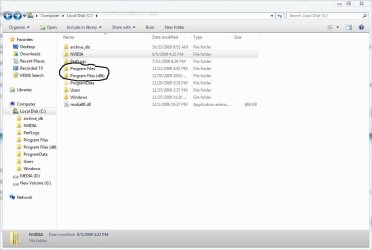
First, you don't have to register avast right away but it is free, they just email you a reg key, next your 64 bit system still has 32 bit files that is part of a 64 bit system.
edit: the program files are 64 bit and the x86 are 32 bit.
 

Attachments

  • new.jpg
    new.jpg
    53.7 KB · Views: 3

My Computer

Computer type
PC/Desktop
Computer Manufacturer/Model Number
Self Built
OS
Win 10 Pro x64
CPU
Intel I5-2500K @3.3GHz
Motherboard
Asrock P67 Extreme4
Memory
16GB G.Skill Ripjaws X (4x4GB)
Graphics Card(s)
EVGA GeForce 750 Ti SC 2GB
Sound Card
ASUS Xonar DG 5.1 Channels 24-bit 96KHz PCI Interface Sound
Monitor(s) Displays
auria eq2367
Screen Resolution
1920 x 1080
Hard Drives
250GB Samsung 850 EVO SSD
1TB WD Blue
1TB Hitachi
PSU
SeaSonic X 650W 80 Plus Gold
Case
Corsair Obsidian 750D
Cooling
Corsair H60, Three 140mm case fans
Keyboard
Logitech Wireless Keyboard K520
Mouse
Logitech Wireless Mouse M310
Internet Speed
Wave Broadband ~ 100 dn 5 up
Antivirus
Windows Defender, Malwarebytes Premium
Browser
Edge, IE11, Chrome
Other Info
Laptop specs: HP g7-1365dx /
CPU: AMD A6-3420M APU with Radeon(tm) HD Graphics /
RAM: Crucial 8Gb (2x4Gb) /
SSD: Crucial M4-CT128M4SSD2 ATA Device/ FW 000F /
GFX: AMD Radeon HD 6520G /
OS: Windows 10 Pro x64
Ann:

The answer to your last question is no.

On a 64 bit system:

32 bit application files are installed into C:\Program Files(x86)

32 bit system files are installed into C:\WINDOWS\SysWOW64

64 bit application files are installed to C:\Program Files and C:\WINDOWS\SYSTEM32
 

My Computer

Computer type
PC/Desktop
Computer Manufacturer/Model Number
Ignatz Special; 4 speed manual gearbox; factory air conditioning; one of one
OS
Windows 7 Home Premium SP1, 64-bit
CPU
Intel Skylake i5-6600K, not overclocked
Motherboard
AsRock Z170M Extreme 4, micro ATX
Memory
8 GB HyperX DDR4-2666 (2 x 4 GB)
Graphics Card(s)
none; graphics are integrated on CPU
Sound Card
onboard: Realtek ALC1150; external: USB Behringer UF0-202
Monitor(s) Displays
Dell S2340M 23 inch IPS
Screen Resolution
1600 x 900
Hard Drives
System: Crucial MX100 series SSD, 128 GB;
Data: Samsung Spinpoint 103SJ, 1 TB;
Backup: WD Caviar Green WD30EZRX-00D8PB0, 3 TB
PSU
Rosewill SilentNight 500 watt fanless, semi-modular
Case
Antec Solo II
Cooling
Noctua NH-U12S; Noctua F12 intake, Noctua S12A exhaust
Keyboard
Microsoft 200 6JH-00001 USB
Mouse
Dell or Microsoft optical wired; USB
Antivirus
Microsoft Security Essentials and Malwarebytes Premium
Browser
Pale Moon
Other Info
All fans PWM; speeds at idle: CPU circa 500 rpm; intake circa 600 rpm; exhaust circa 600 rpm; CPU temps 27 idle and 47 C load in a warm room (27 C/81 F) when running Intel Extreme Tuning Utility stress test.
Ann:

The answer to your last question is no.

On a 64 bit system:

32 bit applications files are installed into C:\Program Files(x86)

32 bit system files are installed into C:\WINDOWS\SysWOW64

64 bit application files are installed to C:\Program Files and C:\WINDOWS\SYSTEM32

Thank you ignatzasonic for explaining that better.:)
 

My Computer

Computer type
PC/Desktop
Computer Manufacturer/Model Number
Self Built
OS
Win 10 Pro x64
CPU
Intel I5-2500K @3.3GHz
Motherboard
Asrock P67 Extreme4
Memory
16GB G.Skill Ripjaws X (4x4GB)
Graphics Card(s)
EVGA GeForce 750 Ti SC 2GB
Sound Card
ASUS Xonar DG 5.1 Channels 24-bit 96KHz PCI Interface Sound
Monitor(s) Displays
auria eq2367
Screen Resolution
1920 x 1080
Hard Drives
250GB Samsung 850 EVO SSD
1TB WD Blue
1TB Hitachi
PSU
SeaSonic X 650W 80 Plus Gold
Case
Corsair Obsidian 750D
Cooling
Corsair H60, Three 140mm case fans
Keyboard
Logitech Wireless Keyboard K520
Mouse
Logitech Wireless Mouse M310
Internet Speed
Wave Broadband ~ 100 dn 5 up
Antivirus
Windows Defender, Malwarebytes Premium
Browser
Edge, IE11, Chrome
Other Info
Laptop specs: HP g7-1365dx /
CPU: AMD A6-3420M APU with Radeon(tm) HD Graphics /
RAM: Crucial 8Gb (2x4Gb) /
SSD: Crucial M4-CT128M4SSD2 ATA Device/ FW 000F /
GFX: AMD Radeon HD 6520G /
OS: Windows 10 Pro x64
I think you should uninstall Avast in Programs and Features, then restart your computer and download/install again..

When it brings up the box to insert activation key, just click on Register there.

They will email you a key to cut and paste in the box. Then you can forget about it.
 
Back
Top