New user needs help; numerous issues with Windows 7

This is the most insane thread I've seen since I've been on this board. There is no way the problems on this computer are going to be resolved without a COMPLETE wipe and reload. Any further pursuit of these issues is entirely futile. Layer on layer of problems has been added, numerous programs added and removed, settings changed, etc. It is a waste of time to continue to "poke" at this problem. The OP needs to get the recovery discs and get going on a reinstall ASAP.
 

My Computer

Computer Manufacturer/Model Number
Custom
OS
Windows 7 Ultimate RTM (Technet)
CPU
3.00 gigahertz Intel Core2 Duo E8400
Motherboard
ASUSTeK Computer INC. P5K/EPU Rev 1.xx
Memory
4GB
Graphics Card(s)
ATI Radeon X1950 Pro
Sound Card
Built in HD Audio
Monitor(s) Displays
22" Gateway LCD
Screen Resolution
1920 x 1200
Hard Drives
ST3160023A [Hard drive] (160.04 GB) -- drive 0, rev 8.01, ST3500630AS [Hard drive] (500.11 GB) -- drive 2, rev 3.AAK
ST3500630AS [Hard drive] (500.11 GB) -- drive 1, rev 3.AAK
Keyboard
Logitech G11
Mouse
Microsoft Wireless Laser Mouse 5000
Internet Speed
13.44 Mbps

There seems to be a step missing in the tutuorial. I understand I would need to convert what's on the clipboard to an image file, but finding no info on how to do this. Searched clipboard in Programs and Help and Support with no results. On my BB I have a menu option, when you want to do a screen capture, select it and it automatically creates a jpg image of the screen capture in my picture folder. I checked my media library and the screen capture is not showing up there. How do I access the clipboard to save the image?
 

My Computer

Computer Manufacturer/Model Number
Lenovo T400 Thinkpad
OS
Windows 7 Home Premium
CPU
no idea _
Memory
2GBPC#-8500 1067MHzMem QTY - 2
Monitor(s) Displays
14.1WXGA TFT,w/LD Bcklt,Cm QTY - 1
Hard Drives
320GbHardDiskDrive,7200rpm QTY - 1
Anna try using the Snipping Tool in the Start Menu, attaching it's file using the paper clip in reply box.

Please also take some time when you have a chance to look this over: http://www.sevenforums.com/tutorials/1649-clean-install-windows-7-a.html


I checked that clean install W7 tutorial, but the first step says I have to have a Windows installation DVD first, which Lenovo "forgot" to send with my mom's order.
She is so pissed right now, she wants me to stop using it and box it up, and she wants to call Lenovo on Monday to have it returned. I keep teeling her that Levono's Warranty and return policy only covers hardware, not software installation screw-ups, and once the box has been opened, it must have a factory physical problem in order to return it. The only physical problem with it (besides not appearing to at all meet the claims I read in repeated reviews and articles that Thinkpads met Military specs for ruggedness and toughness, and, other that the HD airbag, it seems just as fragile as any other laptop I've tried; and since I have a disability that makes me very clumsy, those claims of ruggedness were the top reason I picked it, otherwise I would have chosen something much cheaper), is a tiny white spot under the screen in one spot, about the size of a pinhole, where it looks like a few pixels are missing, but I don't know if that would constitute enough of a physical problem to return it to Lenovo. If it is enough, can someone tell me if the scaled-down Windows 7 on a mini-netbook supports Adobe Flash Media, and being able to use Flash Media sites like Hulu?

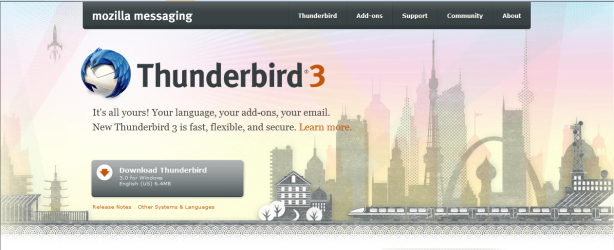
Snipping tool appears to work; automatically saves it as a png, rather than a jpg, wasn't sure if that would matter in trying to post it? For future referrence, how would I go about accessing the clipboard to create an image file from a full screen capture?
 

Attachments

  • Mozilla Messaging.PNG
    Mozilla Messaging.PNG
    228.6 KB · Views: 22

My Computer

Computer Manufacturer/Model Number
Lenovo T400 Thinkpad
OS
Windows 7 Home Premium
CPU
no idea _
Memory
2GBPC#-8500 1067MHzMem QTY - 2
Monitor(s) Displays
14.1WXGA TFT,w/LD Bcklt,Cm QTY - 1
Hard Drives
320GbHardDiskDrive,7200rpm QTY - 1
I have no idea about your Flash Media question.

I have no idea why the screen you see at the Thunderbird site is not what I see.

I see your options at this point as (assuming you keep the machine):

Continuing to try to get to the bottom of security issues related to Thunderbird download.

Preparing to do a reinstallation. Read through your manuals looking for information about "recovery" or "restoring". It may be deliberate that you don't have disks from Lenovo. It may be that you are expected to MAKE your own discs using a partition on your hard drive.

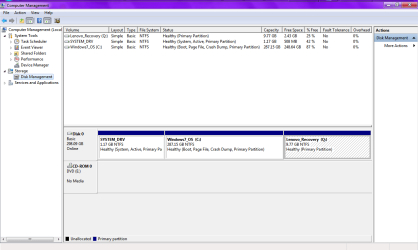
Can you go to control panel/administrative tools/computer management/disk management and take another screen shot so we can get a look at your partitions. You may well have a partition intended for recovery.

I am assuming this Lenovo has a DVD drive. If I am wrong, then you couldn't burn your own disks.

Have you recently attempted the Thunderbird download?

Have you uninstalled unneeded anti-virus and settled on just one?
 

My Computer

Computer type
PC/Desktop
Computer Manufacturer/Model Number
Ignatz Special; 4 speed manual gearbox; factory air conditioning; one of one
OS
Windows 7 Home Premium SP1, 64-bit
CPU
Intel Skylake i5-6600K, not overclocked
Motherboard
AsRock Z170M Extreme 4, micro ATX
Memory
8 GB HyperX DDR4-2666 (2 x 4 GB)
Graphics Card(s)
none; graphics are integrated on CPU
Sound Card
onboard: Realtek ALC1150; external: USB Behringer UF0-202
Monitor(s) Displays
Dell S2340M 23 inch IPS
Screen Resolution
1600 x 900
Hard Drives
System: Crucial MX100 series SSD, 128 GB;
Data: Samsung Spinpoint 103SJ, 1 TB;
Backup: WD Caviar Green WD30EZRX-00D8PB0, 3 TB
PSU
Rosewill SilentNight 500 watt fanless, semi-modular
Case
Antec Solo II
Cooling
Noctua NH-U12S; Noctua F12 intake, Noctua S12A exhaust
Keyboard
Microsoft 200 6JH-00001 USB
Mouse
Dell or Microsoft optical wired; USB
Antivirus
Microsoft Security Essentials and Malwarebytes Premium
Browser
Pale Moon
Other Info
All fans PWM; speeds at idle: CPU circa 500 rpm; intake circa 600 rpm; exhaust circa 600 rpm; CPU temps 27 idle and 47 C load in a warm room (27 C/81 F) when running Intel Extreme Tuning Utility stress test.
Installing that antivirus in the first place probably broke something - if you reinstall you'll still get all of Lenovo's preinstalled software. I'd clean install 7 and then use the 2 guides in my sig to slap it into shape.
 

My Computer

Computer Manufacturer/Model Number
Sony Vaio Z46GDU
OS
Windows 7 Ultimate x86-64
CPU
[email protected] 1066MHz FSB
Motherboard
Sony branded
Memory
6GB DDR3 1066MHz
Graphics Card(s)
9300M GS 256MB Dedicated (Speed) + Intel4500MHD (Stamina)
Sound Card
Realtek HD Audio
Monitor(s) Displays
13.1' WXGA
Screen Resolution
1600x900
Hard Drives
320GB 7200RPM w/ 16MB cache
Internet Speed
1MB/s
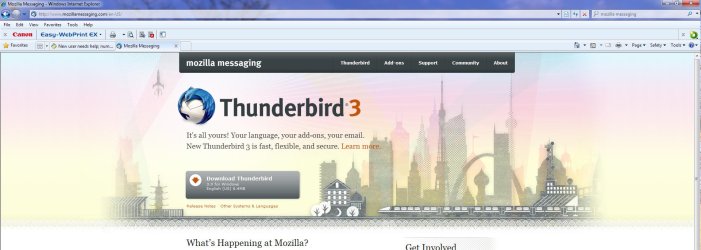
Ann in your post with the sceen shot you only show part of the web page. If you would show the whole page or at least what is in the address bar that would be most helpful.
 

My Computer

Computer type
PC/Desktop
Computer Manufacturer/Model Number
Dell OP7010
OS
Windows 7 Enterprise (x64); Windows Server 2008 R2 (x64)
Memory
16GB
Monitor(s) Displays
4 Dell 24" LCD
Screen Resolution
1280x1024
Keyboard
Dell
Mouse
Dell Optical
Internet Speed
40meg
I have no idea about your Flash Media question.

I have no idea why the screen you see at the Thunderbird site is not what I see.

I see your options at this point as (assuming you keep the machine):

Continuing to try to get to the bottom of security issues related to Thunderbird download.

Preparing to do a reinstallation. Read through your manuals looking for information about "recovery" or "restoring". It may be deliberate that you don't have disks from Lenovo. It may be that you are expected to MAKE your own discs using a partition on your hard drive.

Can you go to control panel/administrative tools/computer management/disk management and take another screen shot so we can get a look at your partitions. You may well have a partition intended for recovery.

I am assuming this Lenovo has a DVD drive. If I am wrong, then you couldn't burn your own disks.

Have you recently attempted the Thunderbird download?

Have you uninstalled unneeded anti-virus and settled on just one?

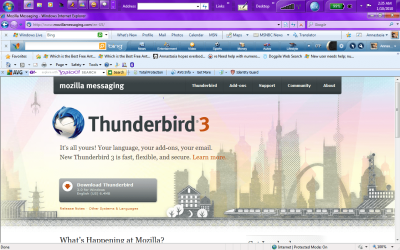
Strange, I'm getting the same window she's getting.
 

Attachments

  • 2010-01-10_022224.jpg
    2010-01-10_022224.jpg
    132.3 KB · Views: 6

My Computer

Computer type
PC/Desktop
Computer Manufacturer/Model Number
Self build
OS
Windows 10 Home
CPU
Intel Core i5 3550
Motherboard
ASUS P8Z77-V LX (LGA1155)
Memory
Corsair Vengeance DDR3 16GB
Graphics Card(s)
Nvidia GEForce GTX 970 SSC
Monitor(s) Displays
Hanns-G 23.6", Acer 17"
Screen Resolution
1920x1080, 1440x900
Hard Drives
Sandisk SSD 256 GB
WD500GB
WD640GB
Seagage Ultra + 1TB ext.
BWD 800GB
WD 1TB ext
PSU
Antec 650w
Case
Cooler Master Centurion 534
Cooling
COOLER MASTER GeminII S524, 3 120 mm case fans.
Keyboard
Logitech MK300
Mouse
Logitech MK300
Internet Speed
Cable
Antivirus
MSSE, Malwarebytes
Browser
IE 10, Chrome
I have no idea about your Flash Media question.
I have no idea why the screen you see at the Thunderbird site is not what I see.
I see your options at this point as (assuming you keep the machine):
Continuing to try to get to the bottom of security issues related to Thunderbird download.
Preparing to do a reinstallation. Read through your manuals looking for information about "recovery" or "restoring". It may be deliberate that you don't have disks from Lenovo. It may be that you are expected to MAKE your own discs using a partition on your hard drive.
Can you go to control panel/administrative tools/computer management/disk management and take another screen shot so we can get a look at your partitions. You may well have a partition intended for recovery.
I am assuming this Lenovo has a DVD drive. If I am wrong, then you couldn't burn your own disks.
Have you recently attempted the Thunderbird download?
Have you uninstalled unneeded anti-virus and settled on just one?

If the Thunderbird site is appearing differently to me, as well as to another poster here, that makes me even more nervous that there might be a virus hijacking the site, even though it shows the exact URL you gave, which is the same one Lenovo gave me. I know there is an app for Blackberry that you can use to make the caller ID look like you are calling from any number or location you want, and is advertised as "have fun, make it look like the White House is calling your friend," but is being investigated because of possible nefarious uses like you could set it up with the name and number of someone you don't like, make a death threat to someone, and have it blamed on the person who's name and number you used. Is there a virus or program that can hijack a website and still have the URL look legitimate?
Has anyone tried actually downloading it using the the lavender download button in the past 4 days since I first got the warning? Not recommending it, just curious if anyone has, and what they experienced?

Actually, my mom paid an extra $19.95 for the backup disk.

I have a drive that plays DVDs, no clue if it records.
I posted my configuration the other day, but can barely decipher half of it:
2764CTO
2GBPC3-8500 1067MHzMem QTY - 2
320GbHardDiskDrive,7200rpm QTY - 1
FCC, Label QTY - 1
FCC-ID/Label for WWAN QTY - 1
Bluetooth Screw QTY - 1
Energy Star 4.0 Pack QTY- 1
WWAN MiscP-WWAN ReadyFull QTY -1
56k v.92 Desig. Modem QTY - 1
Base 2nd Touch for Hybrid QTY - 1
Bluetooth w/antenna QTY -1
Integ.WlessAntenna:14.1" QTY- 1
UWB Misc Parts-no card(H1 QTY - 1
St.LCDCov./Bez.14.1"w/Cam QTY - 1
ExpressCardSlot&PCCardSlot QTY -1
Cl.plateT400WLAN&BluetWWAN QTY - 1
GEOLbl.US,WLAN,Bluet. QTY - 1
Mech Misc Parts QTY- 1
New Int Lbl 2008 Core2 Duo QTY - 1
ODD SW for DVD Rec, Vista QTY - 1
AMD M82XT 256MBlbl AMT&TPM QTY - 1
MT 2764 Syst Lab (LED B/L) QTY -1
14.1WXGAw/LdB/IBtCmWWN11n QTY - 1
WLAnMiscPar-1x2half(H2) QTY - 1
MSlab.(Win.7Standard) QTY - 1
ThinkPad b/g/n QTY - 1
In.Core2DuoProcessorP880
DVDRecord.8xMaxDual,UltBay QTY - 1
14.1 WXGA TFT,w/LD Bcklt,Cm QTY - 1
Gen Win 7 Hm Pr 64 US En
Country Pack North America QTY - 1
Kyb US English
Lang.PackUSenglish QTY - 1
4 cell Li-Ion Baterry (sic) QTY - 1
UltrNav(TrackP&TouchPad)
Packaging US
Intg.Wir.WideNet upgrad. QTY - 1
AMD M82XT Hybrid 256MB

Working on the security threads to try to pick one A/V, but just getting more confused. :confused:
From some of what i have read, it sounds like maybe AVG might be the culprit behind me getting scripting errors from my Lenovo/MSN homepage today (despite the fact that I set my homepage to Dogpile, it reverted somehow) every time I tried to click a link on it (apparently AVG supposedly "breaks" homepages), and if that's the case, then I have no problem getting rid of it.
MSE's installation video says you must delete all other A/Vs before DLing it, so I would have to delete Theatfire, Malwarebytes, and AVG. However, I had Housecall installed too, but can't find any desktop shortcut, or find it listed in any of the program files in the computer.
I am having that exact same problem Google Talk as well; no desktop icon, and not listed in program files in order to create a shortcut or to figure out how to uninstall it if needed. I tried searching the files, which found a bunch that said google talk in files that said things like user/.../AppData and user/.../roaming, but opening the user file reveals nothing useful, and can't find any files or folders labeled "AppData" or "roaming" anywhere, whatever those mean; but none were application files, and none were in any program files. So, one would assume I didn't have it, but when I restart the PC, Google Talk automatically launches, but you have to use the actual files to create a shortcut, it won't work by right-clicking the GT window, only in the computer files, where I can't find it, or Housecall. Searching for Housecall that way produces similar results to the GT search; random "roaming" and "AppData" files, but no application file. Worried that Housecall is hidng somewhere and could mess up any attempts to DL or use MSE.

Running scans with all 4, showed no threats found. Even so, is it possible to still have a virus that can do things like override your homepage setting, or disable some of the control panel functions without the user's knowledge? For example, I very specifically have the box to allow mouse pointer hovering to launch weblinks, UNchecked, and it is still unchecked when I go back and reopen the control panel, yet the function is still operating, and I have to do very careful maneuvering with the mouse pointer to avoid even grazing any links for a spilt second, or it launches the link.

This is the only entry I could find my Lenovo Troubleshooting Guide having anything to do with Recovery (nothing on Restoring):
"Diagnosing Problems using PC-Doctor from the Rescue and Recovery workspace
By using PC-Doctor from the Rescue and Recovery workspace, you can diagnose your system without starting up the operating system.
To run PC-Doctor, do as follows:
1. Turn off computer, and then turn it on again.
2. When the ThinkPad logo comes up, imediately press the ThinkVantage button. The Rescue and Recovery workspace opens.
3. Click Diagnose hardware
For more information about PC-Doctor, see the Help for the program."

Nothing in Help can even find PC-Doctor. And there is nothing about actually doing a recovery, just diagnosing for one.

Here is the disk management snip, but I have no clue what any of it means, other than it seeming to say that all drives are healthy.

 

Attachments

  • disk management.PNG
    disk management.PNG
    28.8 KB · Views: 13
Last edited:

My Computer

Computer Manufacturer/Model Number
Lenovo T400 Thinkpad
OS
Windows 7 Home Premium
CPU
no idea _
Memory
2GBPC#-8500 1067MHzMem QTY - 2
Monitor(s) Displays
14.1WXGA TFT,w/LD Bcklt,Cm QTY - 1
Hard Drives
320GbHardDiskDrive,7200rpm QTY - 1
I just downloaded it and scanned it with Microsoft Security Essentials and Malwarebytes and all is well. I don't know the reason for the site looking different, perhaps they change it from time to time? I couldn't say. It's legitimate, WOT didn't give me any arguments, so....

You don't have to uninstall Malwarebytes or Threatfire. They are anti-spyware and not Anti-Virus. Microsoft Security Essentials and those anti-spyware apps are all you need, if you can even salvage anything at this point without doing a re-install. There's been a lot of changes and mistakes made that I'm not sure can be corrected at this point in a simple manner.
 

My Computer

Computer type
PC/Desktop
Computer Manufacturer/Model Number
Self build
OS
Windows 10 Home
CPU
Intel Core i5 3550
Motherboard
ASUS P8Z77-V LX (LGA1155)
Memory
Corsair Vengeance DDR3 16GB
Graphics Card(s)
Nvidia GEForce GTX 970 SSC
Monitor(s) Displays
Hanns-G 23.6", Acer 17"
Screen Resolution
1920x1080, 1440x900
Hard Drives
Sandisk SSD 256 GB
WD500GB
WD640GB
Seagage Ultra + 1TB ext.
BWD 800GB
WD 1TB ext
PSU
Antec 650w
Case
Cooler Master Centurion 534
Cooling
COOLER MASTER GeminII S524, 3 120 mm case fans.
Keyboard
Logitech MK300
Mouse
Logitech MK300
Internet Speed
Cable
Antivirus
MSSE, Malwarebytes
Browser
IE 10, Chrome
Ann in your post with the sceen shot you only show part of the web page. If you would show the whole page or at least what is in the address bar that would be most helpful.

Could not figure out how to access the clipboard to create an image from a screen capture, so used the snipping tool as suggested. Trying again:
 

Attachments

  • Mozilla Messaging 2.PNG
    Mozilla Messaging 2.PNG
    288.7 KB · Views: 13

My Computer

Computer Manufacturer/Model Number
Lenovo T400 Thinkpad
OS
Windows 7 Home Premium
CPU
no idea _
Memory
2GBPC#-8500 1067MHzMem QTY - 2
Monitor(s) Displays
14.1WXGA TFT,w/LD Bcklt,Cm QTY - 1
Hard Drives
320GbHardDiskDrive,7200rpm QTY - 1
Strange, I'm getting the same window she's getting.

Thank God; I thought I was going crazy by this point.
 

My Computer

Computer Manufacturer/Model Number
Lenovo T400 Thinkpad
OS
Windows 7 Home Premium
CPU
no idea _
Memory
2GBPC#-8500 1067MHzMem QTY - 2
Monitor(s) Displays
14.1WXGA TFT,w/LD Bcklt,Cm QTY - 1
Hard Drives
320GbHardDiskDrive,7200rpm QTY - 1
You show a recovery partition in your screenshot. Do you have a manual that tells you how to use it? Basically, you're going to have to make some backup cd's from that recovery partition and use them to re-install. I've built my own computers so long, I can't remember how to use recovery.

Check your help files if you have no manual.
 

My Computer

Computer type
PC/Desktop
Computer Manufacturer/Model Number
Self build
OS
Windows 10 Home
CPU
Intel Core i5 3550
Motherboard
ASUS P8Z77-V LX (LGA1155)
Memory
Corsair Vengeance DDR3 16GB
Graphics Card(s)
Nvidia GEForce GTX 970 SSC
Monitor(s) Displays
Hanns-G 23.6", Acer 17"
Screen Resolution
1920x1080, 1440x900
Hard Drives
Sandisk SSD 256 GB
WD500GB
WD640GB
Seagage Ultra + 1TB ext.
BWD 800GB
WD 1TB ext
PSU
Antec 650w
Case
Cooler Master Centurion 534
Cooling
COOLER MASTER GeminII S524, 3 120 mm case fans.
Keyboard
Logitech MK300
Mouse
Logitech MK300
Internet Speed
Cable
Antivirus
MSSE, Malwarebytes
Browser
IE 10, Chrome
You shouldn't need to burn discs to use the recovery partition. Every manufacturer is different, but there should be directions in the manual to assist you in restoring your pc to an "out of box" state. For example, directions for my pc were to hold down the 0 key while I press the power button.

Making backup DVD's of this recovery partititon is never a bad idea though. Once again there should be directions in your manual explaining this process to you. Lot's of things can go wrong with hard drives so having this recovery partition saved to disk and tucked away somewhere is a safe backup option
 

My Computer

Computer Manufacturer/Model Number
Toshiba P300
OS
Windows 8 Pro
CPU
Intel Centrino Dual Core P7450 2.13GHz
Memory
4gb
Graphics Card(s)
ATI Mobility Raedon HD3650
Hard Drives
Toshiba MK3252GSX ATA
Internet Speed
Wish it were faster
You show a recovery partition in your screenshot. Do you have a manual that tells you how to use it? Basically, you're going to have to make some backup cd's from that recovery partition and use them to re-install. I've built my own computers so long, I can't remember how to use recovery.

Check your help files if you have no manual.

The supposed troubleshooting guide only tells how to supposedly run diagnostics (with a program that can't be found in the program files), and the Lenovo webistes and phone numbers (that I already called days ago) where you can supposedly get more information. There is apparently sommething called Lenovo ThinkVantage Toolbox, that seems to have information on system health, and rescue and recovery of a current system. It backs it up on the local disk, but strongly advises backing up on an external or secodary harddrive. I don't see any way to just wipe the system and clean reinstall W7 without the original disk that I am missing.

Another odd thing, I am running on AC power, and can see the little plug icon indicating that, but my battery power bar has ben reading 99% for several hours now, and after a restart, but there is a battery health status in the LTV Toolbox that says it is at 100%.

With everything reading healthy and no threats, I really am wondeirng if my problems may be more related to the fact that Mediacom broadband did not tell me that their service is not technically compatible with W7 in general until 2 days after I had i installed. I know on my Blackberry that several websites I use say in their FAQs that they are not mobile compatible, yet I can access many, but not quite all, the features on the sites through my BB. If Mediacom is not W7 compatible, maybe it is only allowing certain web functions, and is preventing a full or accurate DLs of many of these programs that have been suggested and tried, and is somehow interferring with certain functions of the PC itself as well, as the ones that have been changed and reverted or ignored by the PC are web-related (homepage reverted after having changed it; the mouse hover launching weblinks, even with the box to allow that being unchecked).:confused:
 

My Computer

Computer Manufacturer/Model Number
Lenovo T400 Thinkpad
OS
Windows 7 Home Premium
CPU
no idea _
Memory
2GBPC#-8500 1067MHzMem QTY - 2
Monitor(s) Displays
14.1WXGA TFT,w/LD Bcklt,Cm QTY - 1
Hard Drives
320GbHardDiskDrive,7200rpm QTY - 1
You shouldn't need to burn discs to use the recovery partition. Every manufacturer is different, but there should be directions in the manual to assist you in restoring your pc to an "out of box" state. For example, directions for my pc were to hold down the 0 key while I press the power button.

Making backup DVD's of this recovery partititon is never a bad idea though. Once again there should be directions in your manual explaining this process to you. Lot's of things can go wrong with hard drives so having this recovery partition saved to disk and tucked away somewhere is a safe backup option

I used the Lenovo ThinkVantage Toolox to back up on the local disk per its instructions, but I get the feeling that that saved it in its current condition. Not finding anyway to wipe and reinstall so it is like it was just out of the box, which would include more than just the W7 OS.:confused:
 

My Computer

Computer Manufacturer/Model Number
Lenovo T400 Thinkpad
OS
Windows 7 Home Premium
CPU
no idea _
Memory
2GBPC#-8500 1067MHzMem QTY - 2
Monitor(s) Displays
14.1WXGA TFT,w/LD Bcklt,Cm QTY - 1
Hard Drives
320GbHardDiskDrive,7200rpm QTY - 1
I just downloaded it and scanned it with Microsoft Security Essentials and Malwarebytes and all is well. I don't know the reason for the site looking different, perhaps they change it from time to time? I couldn't say. It's legitimate, WOT didn't give me any arguments, so....

You don't have to uninstall Malwarebytes or Threatfire. They are anti-spyware and not Anti-Virus. Microsoft Security Essentials and those anti-spyware apps are all you need, if you can even salvage anything at this point without doing a re-install. There's been a lot of changes and mistakes made that I'm not sure can be corrected at this point in a simple manner.

While DLing MSE, I got a printed warning saying to make sure that I had deleted all othe A/Vs and anti-spyware beforehand...too late now *need an emoticom denoting fear*
 

My Computer

Computer Manufacturer/Model Number
Lenovo T400 Thinkpad
OS
Windows 7 Home Premium
CPU
no idea _
Memory
2GBPC#-8500 1067MHzMem QTY - 2
Monitor(s) Displays
14.1WXGA TFT,w/LD Bcklt,Cm QTY - 1
Hard Drives
320GbHardDiskDrive,7200rpm QTY - 1
anna, no offence but reading through almost 10 pages of "numerous issues with win7" should infact read as "numerous problems with anna" since every problem is your own fault due to serious lack of computer knowledge. first impression of your post title leaves one to believe that this is windows sevens fault when in actuality it is the USERS fault with all the problems you're having. what I think you really need is a computer savy friend who knows a bit about windows seven and teach you some pointers. sorry if I come across as rude(not my intention) also you need to stop relying on your cable company a little less (they are idiots anyways) and start relying on YOUR computer savy freind to install antivirus/email and make recovery disk for ya. of course we are always here to help ya but I feel that this is hard to do when you dont know what your talking about and dont know what you're doing...good luck with ya and hope it works out
 

My Computer

Computer type
PC/Desktop
Computer Manufacturer/Model Number
Asus clone / Gateway DX4850-57
OS
Se7en X64 ultimate/Se7en X64 ultimate
CPU
Intel quad [email protected]/intel i7 quad [email protected]
Motherboard
Asus P5KPL-CM/Intel H67
Memory
kingston 4GB/32GB DDR3 Dual-Channel 1333MHz
Graphics Card(s)
ATI Radeon HD5770 1GB/NVidia GeForce GTX560 2GB
Sound Card
5.1 onboard/5.1 onboard
Monitor(s) Displays
sharp Aqous 46" 120MHz/LG 32" LCD/Asus VW266H 26"
Screen Resolution
1824X1026/1920X1080
Hard Drives
2x150GB=300GB raptor drives 10,000rpm+1TB seagate portable hard drive for movies/music/pictures/game iso's /programs
Gateway: Kingston 240GB Solid State Drive and 1.5 TB for storage
PSU
700 watts / 700 watts coolermaster extreme/on board
Case
Asus mid tower / Gateway mid tower
Cooling
stock / stock
Keyboard
logitech / razor Lycosa gaming
Mouse
logitech gaming mouse G500 5700DPI/Razer Lycosa & DeathAdder
Internet Speed
60MB/s
If I were you I'd take it back to the factory image.
Restoring the factory contents from the service partition
1. If possible, save all your files and shut down your operating system.
2. Turn off the computer, and then turn it on again.
3. When the ThinkPad logo comes up, immediately press the ThinkVantage
button. The Rescue and Recovery workspace opens.
4. Click Full Restore and follow the instructions on the screen.

Then, I'd uninstall any of the crap that IBM might have preinstalled. Download Avast antivirus and install it. No one ever mentioned if this came with a trial version of whatever..... usually Norton.

Never had any problem setting up my family on Medicom without having them come out and install whatever crap they do. And never any problem setting up email with either win live or thunderbird. I don't use isp email anyway and use either yahoo or gmail for the fact no matter who my isp is always have the same email address.
 

My Computer

Computer Manufacturer/Model Number
HP G60 120US Laptop
OS
7 home premium 64 bit
CPU
AMD Turion X2 64 bit 2 ghz
Motherboard
Whatever HP puts inside
Memory
3 gig
Graphics Card(s)
NVIDIA GeForce 8200M G
Sound Card
Conexent High Definition SmartAudio 221
Monitor(s) Displays
One attached to the laptop
Screen Resolution
1366X768
Hard Drives
Hitachi HTS543225L9A300 ATA 232 gb
Keyboard
attached
Mouse
touch pad attached
With everything reading healthy and no threats, I really am wondeirng if my problems may be more related to the fact that Mediacom broadband did not tell me that their service is not technically compatible with W7 in general until 2 days after I had i installed. I know on my Blackberry that several websites I use say in their FAQs that they are not mobile compatible, yet I can access many, but not quite all, the features on the sites through my BB. If Mediacom is not W7 compatible, maybe it is only allowing certain web functions, and is preventing a full or accurate DLs of many of these programs that have been suggested and tried, and is somehow interferring with certain functions of the PC itself as well, as the ones that have been changed and reverted or ignored by the PC are web-related (homepage reverted after having changed it; the mouse hover launching weblinks, even with the box to allow that being unchecked).:confused:

As beman36 stated - with no offence intended - my conclusion is that the problem is NOT Win7, but what we IT folks call "user ed". Meaning you need to have a better understanding of what you are doing. I've read this entire thread, and item after item you have written about - like the battery meter [normal behavior] - merely bolsters my conclusion. User education required. That is also what I was implying in my initial post about making sure that you are downloading the correct versions of "free" software. Again, no offence intended, merely an observation. Like one commercial states "An educated customer is our best customer".

Mediacom (or any other ISP) couldn't care less if you are running Win98SE, win2k, XP, Vista, Win7, Open Solaris, BSD, Ubuntu, Fedora or any other OS [Operating System] on your computer - as long as you are not violating their AUP. I run multiple OS'es on multiple machines behind my firewall at home. without issue, 'cus [for the most part] I know what I'm doing, and do not need to go to my ISP for help [they wouldn't be any use anyway]. Mediacom (likely) only says Win7 is not supported because their tool sets -- that are designed to be installed on customer desktops to aid with remote problem resolution -- do not work on win7, as its too new and their tools have not been upgraded yet.

I second beman36's recommendation about getting a tech savvy friend to help out. Reverting to re-imaging the HDD seems a drastic step to me - given that many here build and maintain there own PC's and wouldn't think twice about doing that. It's a major event for a regular "user" like yourself -especially when you do not appear to have the skills to resolve the current problem, let alone any issues that may arise if the recovery fails mid-process. Seriously tho', do not do a recovery until after you find a local tech friend to resolve your issues.
 

My Computer

OS
Win7 x64 Ultimate
Back
Top