
New W7 installation

Aardvarkly

New member
Power User
VIP
Local time
8:48 PM
Messages
222
Location
Northern France
I have been trying to set things up for a new Windows 7 Pro x64 installation disk with updates. Having no luck so far using some of the slipstreaming tools recommended here so I thought I would just do it the hard way. There was a link to download a fresh W7 ISO but the link source didn't work saying the ISO downloads are only available on certain days. ?? but they don't say which days to try. So I have managed to find a copy on a DVD that I did a few years ago. Can anyone tell me where to find a link to get the sensible updates I will need? I would like just the essential ones that don't include all the W10 readiness crap. Then I assume I just copy these to a new DVD in a folder with the ISO and that's all I need to get going. I appreciate all the help I have had here but most of it is over my head unless it is given in a non-technical step by step way. Thanks in advance.
 

My Computer My Computer

Computer type
PC/Desktop
Computer Manufacturer/Model Number
Home built Asus
OS
Windows 7 Pro 64bit
CPU
Intel® Core™ i3 Processor 3.7ghz
Motherboard
Asus Intel Prime H270-Pro LGA 1151 ATX
Memory
Crucial (2x8GB) DDR4-2400
Graphics Card(s)
on board
Monitor(s) Displays
BENQ GL2450HE (24 inch)
Screen Resolution
1980 x 1080
Hard Drives
C drive is SSD Crucial 500gb mostly for the OS
PSU
Corsair CX750
Case
A big black one
Cooling
Cooler Master Hyper TX3i on the processor
Keyboard
Logitech k2700 wireless
Mouse
Logitech M575 wireless trackball
Internet Speed
Just under about 7mb/s on a good day
Antivirus
Avira Free
Browser
Opera, Firefox, Chrome, and Supermium
the sensible updates I will need? I would like just the essential ones that don't include all the W10 readiness crap

December Simplix update pack will be out soon, probably 15th or 16th December.Best wait for that to do the updates.


Then I assume I just copy these to a new DVD in a folder with the ISO and that's all I need to get going.

NO. You need to install windows first. Then boot into your installed windows and run the Simplix update pack.


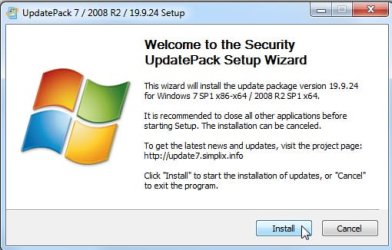
You should be able to manage it. Just run it and click install. It will look like this:

simplix.jpg
 

My Computers My Computers

System One System Two

  • Computer type
    PC/Desktop
    OS
    7 X64
    CPU
    i5 8400
    Motherboard
    gigabyte b365m ds3h
    Memory
    2x8gb 3200mhz
    Hard Drives
    various
    PSU
    pure power 11 400w cm
    Case
    Coolermaster
    Cooling
    cryorig m9i
  • Computer type
    PC/Desktop
    OS
    7x64
    CPU
    g5400
    Motherboard
    ga b365m ds3h
    Memory
    8gb ddr4 2400
    PSU
    xfx pro 450w
Thankyou. I will write this down and see how it goes.

Oh, and when I download it do I install it anywhere in particular or just let it do its thing?
 

My Computer My Computer

Computer type
PC/Desktop
Computer Manufacturer/Model Number
Home built Asus
OS
Windows 7 Pro 64bit
CPU
Intel® Core™ i3 Processor 3.7ghz
Motherboard
Asus Intel Prime H270-Pro LGA 1151 ATX
Memory
Crucial (2x8GB) DDR4-2400
Graphics Card(s)
on board
Monitor(s) Displays
BENQ GL2450HE (24 inch)
Screen Resolution
1980 x 1080
Hard Drives
C drive is SSD Crucial 500gb mostly for the OS
PSU
Corsair CX750
Case
A big black one
Cooling
Cooler Master Hyper TX3i on the processor
Keyboard
Logitech k2700 wireless
Mouse
Logitech M575 wireless trackball
Internet Speed
Just under about 7mb/s on a good day
Antivirus
Avira Free
Browser
Opera, Firefox, Chrome, and Supermium
Back
Top