New Windows 7 computer - how do I transfer old Word to Word 2013?

TommyO

New member
Local time
6:11 PM
Messages
27
I made the Easy Transfer using the ET cable yesterday. The files and setting of my old Windows 7 computer are now in my new Windows 7 computer. I have Microsoft Word 2013 on my new computer but it's empty. How can I get the documents from Word 2003 on my old computer to the new one?

I also have a lot of documents on my Works version 9 on the old computer. Can I transfer these to Word 2013? I suppose I could do it all manually but I'm hoping that someone knows of a trick to do the job fast.
 

My Computer My Computer

At a glance

windows 7
OS
windows 7
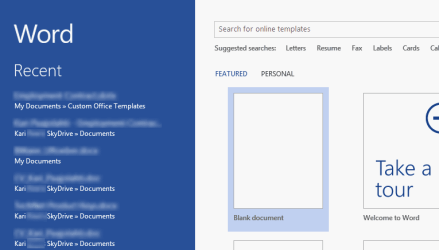
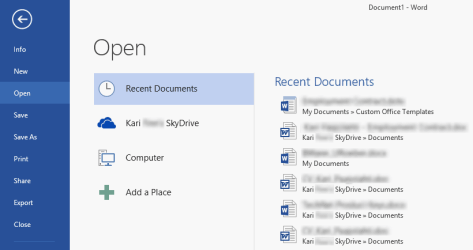
Word does not contain any documents which could be moved. I assume you are talking about the list of recent documents, shown either when Word is run (1st screenshot below) or later if File > Open is selected (2nd screenshot).

Recent Documents when Word 2013 is launched:

2013-04-27_201709.png

Recent Documents when user selects File > Open:

2013-04-27_201921.png

As Word saves by default to your personal Documents folder, if Easy Transfer had no issues they should already be in Documents folder under your personal user account folder (default location C:\Users\Your_Username).

If you are using the Windows Libraries, you can also find them from Libraries > Documents.

The Recent Documents list populates as you go; you need first open a document in Word on your new computer for it to appear on the list. The same with your Works files.

Kari
 

My Computer My Computer

At a glance

Windows 10 Pro x64 EN-GB1.6 GHz Intel Core i7-720QM Processor6 GBATI Mobility Radeon HD 5850 Graphics
Computer type
Laptop
Computer Manufacturer/Model Number
HP ENVY 17-1150eg
OS
Windows 10 Pro x64 EN-GB
CPU
1.6 GHz Intel Core i7-720QM Processor
Memory
6 GB
Graphics Card(s)
ATI Mobility Radeon HD 5850 Graphics
Sound Card
Beats sound system with integrated subwoofer
Monitor(s) Displays
17" laptop display, 22" LED and 32" Full HD TV through HDMI
Screen Resolution
1600*900 (1), 1920*1080 (2&3)
Hard Drives
Internal: 2 x 500 GB SATA Hard Disk Drive 7200 rpm
External: 2TB for backups, 3TB USB3 network drive for media
Cooling
As Envy runs a bit warm, I have it on a Cooler Master pad
Keyboard
Logitech diNovo Media Desktop Laser (bluetooth)
Mouse
Logitech Performance Mouse MX
Internet Speed
50/10 Mbps VDSL
Antivirus
Windows Defender 4.3.9431.0
Browser
Maxthon 3.5.2., IE11
Back
Top