How do i find recent word files ?

Kunwar Bedi

New member
Local time
6:54 AM
Messages
2
I am using Windows 7 Home Premium 32bit. have backed up all my folders and word files in a huge random bunch of 50 folders and 3000 word files, and put them all under 1 main folder in ( obviously ) 1 drive

Suddenly, I realised that i wanted to access my most recent documents. In the search area on the right corner, I see date modified but i get folders with old word files as well. Its still confusuing. Is it possible to order my word files from yesterday to a month back by date and time, and see the results of just the word files in chronological order

if so, how do i do this ?
 

My Computer My Computer

Computer type
PC/Desktop
Computer Manufacturer/Model Number
Dell
OS
Windows 7 Home Premium 32bit.
Welcome to Seven Forums Kunwar Bedi. There are many additional ways to sort the files in a folder. You could experiment with those.

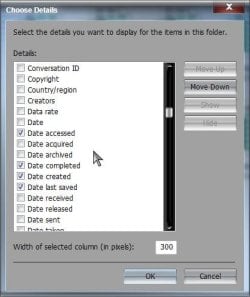
Right click an empty are in the folder> Sort by> More

You can choose from the extensive list such things as Date accessed, Date completed, Date created, Date last saved, etc.

Details.jpg

Experiment and see if you can't find a choice, or combination that works for you.

A Guy
 

My Computer My Computer

Computer type
PC/Desktop
OS
Windows 10 Home x64
CPU
INTEL Core i5-750 Quad-Core 3.37GHz
Motherboard
ASUS P7P55D
Memory
HyperX Fury Black Series 8GB (2 x 4GB) 1866Mhz
Graphics Card(s)
EVGA GeForce GTX 750 Superclocked 1GB 128-Bit GDDR5
Monitor(s) Displays
LG 32MA68HY 32" IPS
Screen Resolution
1920 x 1080
Hard Drives
Samsung 840 Evo 120GB, SEAGATE 500GB Barracuda® 7200.12, SATA 3 Gb/s, 7200 RPM, 16MB cache
PSU
ANTEC TruePower New TP-550, 80 PLUS, 550W
Case
ANTEC Three Hundred Illusion
Cooling
COOLER MASTER Hyper 212 Plus, 4 x 120mm 1 x 140mm Noctua's
Internet Speed
85 + Mbps
Antivirus
Avast
Browser
Vivaldi
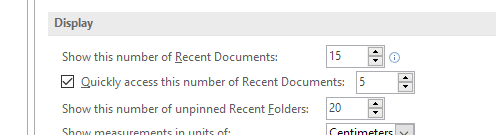
Don't forget the built-in options in Word Itself (word 2016 shown, Other versions may differ slightly )

Word Recent Docs.PNG

You can set the number of recent files visible in the Files-Open-Recent List up to 50 Files which should be enough for any type of normal use

If you have a need for more, set up and save a search, (or multiple searches), in File Explorer for *.Doc, *.Docx in the area you need and save the searches to a folder or desktop, double clicking the search will run it and give a current list of files which may be organized by the options shown above by A Guy
 

My Computers My Computers

System One System Two

  • Computer type
    PC/Desktop
    Computer Manufacturer/Model Number
    ChillBlast - Custom to my design
    OS
    Windows 11 Pro x64 [Latest Release and Release Preview]
    CPU
    Ryzen 9 5950X, 3.8 - 5.2 MHz
    Motherboard
    Asus Prime X570-Pro
    Memory
    64GB [2 x 32GB] DDR4 3200MHz
    Graphics Card(s)
    4GB NVIDIA GEFORCE GTX 1650 Ti
    Sound Card
    On-board SPDIF to 5.1 System + HDMI [5.1 system]
    Monitor(s) Displays
    32" UHD 32 Bit HDR Monitor + 43" UHD 4K 32Bit HDR TV
    Screen Resolution
    2 x 3840 x 2160 @60Hz
    Hard Drives
    1TB M2 SSD OS, 500GB Fast Access SSD, 2 x 8TB Data + Various Externals from 1TB to 4TB, 10TB NAS
    PSU
    NZXT C750 80 PLUS Gold 750W Modular PSU
    Case
    Workstation Case [Matt Black]
    Cooling
    NZXT Kraken X63 280mm CPU Cooler +2x Quiet Case fans
    Keyboard
    Logitech Wireless MX Keys & K400 + others
    Mouse
    Logitech Wireless MX Master 3S
    Internet Speed
    920 MB Down 50 MB Up
    Antivirus
    BitDefender Total Security Pro
    Browser
    Chrome (always run latest Non-Beta)
    Other Info
    Also run ...
    Laptop - Quad 8GB - Windows 10 Pro x64
    Nexus 7 Android tablet x2
    Samsung 10.2" tablet
    Blackview TAB 8 4G Android Tablet c/w Keyboard
    Wacom Intuos Pro Medium Pen Pad
    Wacom Intuos Pro Small Pen Pad
    Wacom Expresskeys Remote
    Loopdeck+ Graphics Controller
    Shuttle Pro v2 Control
  • Computer type
    Laptop
    System Manufacturer/Model Number
    Dell XPS 17 10750H
    OS
    Windows 11 Pro x64 Latest RP
    CPU
    Intel I7 10750H 5.0GHz
    Motherboard
    Dell XPS
    Memory
    32GB [2x16GB] DDR4 2933 MHz
    Graphics Card(s)
    nVidia GTX1650Ti 4 GB GDDR6
    Sound Card
    Stock [Realtek] 4 Speaker
    Monitor(s) Displays
    17" IPS UHD+ Infinity Edge Touchscreen
    Screen Resolution
    3840 x 2400
    Hard Drives
    2TB M2 NVMe, 4TB External + various 500GB & 1TB External NVMe (also have access to spinner HDD from
    PSU
    Stock
    Case
    Stock XPS Aluminium & Carbon Fibre
    Cooling
    Stock - Active Fan Control
    Keyboard
    Backlit + Various Logitech
    Mouse
    Stock Track Pad + Logitech MX Trackball
    Internet Speed
    72 MB Down 18MB Up
    Browser
    Chrome
    Other Info
    Also run ...
    Laptop - Quad 8GB - Windows 10 Pro x64
    Nexus 7 Android tablet x2
    10.2" tablet
    Sony Z3 Android Smartphone
    Wacom Intuos Pro Medium Pen Pad
    Wacom Intuos Pro Small Pen Pad
    Wacom Expresskeys Remote
    Loopdeck+ Graphics Controller
    Shuttle Pro v2 Control Pad
    10TB NAS
Welcome to Seven Forums Kunwar Bedi. There are many additional ways to sort the files in a folder. You could experiment with those.

Right click an empty are in the folder> Sort by> More

You can choose from the extensive list such things as Date accessed, Date completed, Date created, Date last saved, etc.

View attachment 377798

Experiment and see if you can't find a choice, or combination that works for you.

A Guy
I have found it difficult to make full use of the "Date Accessed" feature. For me, when a file has been accessed (and that seems to mean modified rather than just viewed), its Date Accessed column will immediately show the update, and so will its enclosing folder, when they are next viewed in Windows Explorer. But folders further up the folder hierarchy will not show the update. This seems illogical to me.

Also, (a tip) when trying to get the Sort by > More box, by clicking on a blank part of the Explorer window (as A Guy said) , it will not appear unless no file is selected in the explorer window. To deselect all files, click (left click) on a blank part of the Explorer window (the same part used to get the Sort by > More box).

Also, (similar to my first paragraph) I find that when sorting folders in "date modified" order, the folders currently listed (the ones you are looking at) do not themselves update their modification dates to reflect changed modification dates of files or folders which are lower down in the hierarchy more than about two levels. This also seems illogical to me. If you buy a used car whose nuts on the fixing bolts on the brackets holding the rear suspension to the chassis have been modified for drag racing, you would expect the answer to the question "has this car been modified?" to be "yes".
 

My Computer My Computer

Computer type
PC/Desktop
Computer Manufacturer/Model Number
Gigabyte ATX case with 500 W power supply GZ-M1
OS
Windows 7 Home Premium 64bit
CPU
Intel Pentium Edition G3220 3.0 GHz
Motherboard
Gigabyte Socket 1150 MicroATX Mot Ultra Durable, GA-H81M-S2H
Memory
8 GB DDR3 1600 MHz DIMM
Graphics Card(s)
Not Known
Sound Card
Not known
Monitor(s) Displays
Samsung LS24D590 23.6"
Screen Resolution
1920 x 1080
Hard Drives
256 GB Solid State Drive (C: on which Windows 7 is installed)-
1 TB internal conventional HD (X:)-
Two WD "Elements" " 2TB USB drives as backups
PSU
500 W
Case
Gigabyte ATX case
Cooling
Several fans!
Keyboard
Accuratus 301 USB Compact, white.
Mouse
Microsoft Basic Optical Mouse v2.0, two-button, tethered
Internet Speed
10 to 12 Mb per second
Antivirus
Kaspersky Internet Security 2016, Malwarebytes (paid)
Browser
Firefox (ocassionally Safari)
Other Info
The 256 GB SSD (C:) also has Adobe Photoshop CS6 and InDesign CS6, MS Office, Adobe Lightroom, and other small programs.
Back
Top