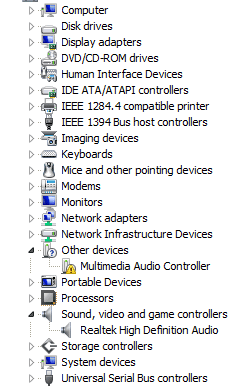
Hello, I've just done a clean install of windows 7 Ultimate x64, alongside my old windows XP Pro 32 bit. Everything works fine except the fact that i can't get any sound from my computer, with the error "No audio output device is installed" when i mouse over the volume icon with the red x. I've tried going to the HP's website and they don't have any drivers for 7. I've also tried Realtek's Audio codecs but they don't seem to do anything. In device manager it says multimedia audio controller with a yellow icon next to it. I've tried uninstalling then reinstalling but to no success. My old XP pro says that my sound drivers are ESS 1969 drivers so I got some online and tried to install them but windows said that I need x64 drivers instead when i try to install the inf file. I've done a search for my motherboard online hoping the maker will have the drivers but, but i find out that the sound card that my PC has is actually ALC 888 drivers. If you're trying to help bear in mind that I still have my Xp installed along side with working sound drivers.
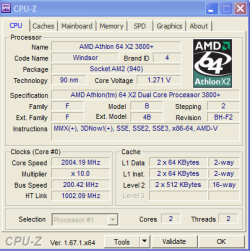
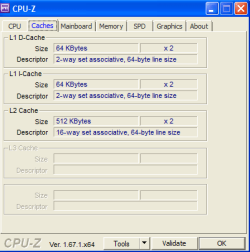
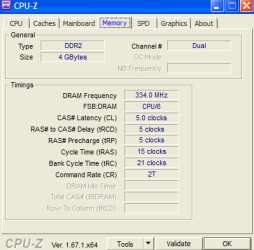
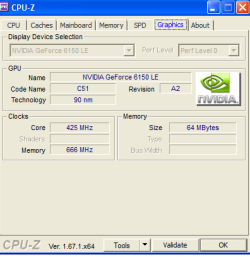
Full CPU report below;
PS-It only looks like xp because of my theme
Computer_ HP Pavilion a1600n media center edition.
4 GB Ram
System Info;
CPU-Z TXT Report
-------------------------------------------------------------------------
Description Audio device
Location bus 3 (0x03), device 9 (0x09), function 0 (0x00)
Common header
Vendor ID 0x125D
Model ID 0x1969
Revision ID 0x01
PI 0x00
SubClass 0x01
BaseClass 0x04
Cache Line 0x00
Latency 0x20
Header 0x00
PCI header
Address 0 (port) 0x0000A800
Address 1 (port) 0x0000A400
Address 2 (port) 0x0000A000
Address 3 (port) 0x00009C00
Address 4 (port) 0x00009800
Subvendor ID 0x125D
Subsystem ID 0x8888
Int. Line 0x0A
Int. Pin 0x01
PCI capability
Caps class Power Management
Caps offset 0xC0
Caps version 1.0
PCI registers
00 01 02 03 04 05 06 07 08 09 0A 0B 0C 0D 0E 0F
00 5D 12 69 19 05 00 90 02 01 00 01 04 00 20 00 00
10 01 A8 00 00 01 A4 00 00 01 A0 00 00 01 9C 00 00
20 01 98 00 00 00 00 00 00 00 00 00 00 5D 12 88 88
30 00 00 00 00 C0 00 00 00 00 00 00 00 0A 01 02 18
40 7F 90 00 00 00 00 00 00 00 00 00 00 00 00 00 00
50 00 00 00 00 00 00 00 00 00 00 00 00 00 00 00 00
60 00 00 00 00 00 00 00 00 00 00 00 00 00 00 00 00
70 00 00 00 00 00 00 00 00 00 00 00 00 00 00 00 00
80 00 00 00 00 00 00 00 00 00 00 00 00 00 00 00 00
90 00 00 00 00 00 00 00 00 00 00 00 00 00 00 00 00
A0 00 00 00 00 00 00 00 00 00 00 00 00 00 00 00 00
B0 00 00 00 00 00 00 00 00 00 00 00 00 00 00 00 00
C0 01 00 21 06 00 00 00 00 00 00 00 00 00 00 00 00
D0 00 00 00 00 00 00 00 00 00 00 00 00 00 00 00 00
E0 00 00 00 00 00 00 00 00 00 00 00 00 00 00 00 00
F0 00 00 00 00 00 00 00 00 00 00 00 00 00 00 00 00
are ESS 1969 drivers so I got some online and tried to install them but windows said that I need x64 drivers instead when i try to install the inf file. I've done a search for my motherboard online hoping the maker will have the drivers but, but i find out that the sound card that my PC has is actually ALC 888 drivers. If you're trying to help bear in mind that I still have my Xp installed along side with working sound drivers. Full CPU report below;
PS-It only looks like xp because of my theme
Computer_ HP Pavilion a1600n media center edition.
4 GB Ram
System Info;
CPU-Z TXT Report
-------------------------------------------------------------------------
Description Audio device
Location bus 3 (0x03), device 9 (0x09), function 0 (0x00)
Common header
Vendor ID 0x125D
Model ID 0x1969
Revision ID 0x01
PI 0x00
SubClass 0x01
BaseClass 0x04
Cache Line 0x00
Latency 0x20
Header 0x00
PCI header
Address 0 (port) 0x0000A800
Address 1 (port) 0x0000A400
Address 2 (port) 0x0000A000
Address 3 (port) 0x00009C00
Address 4 (port) 0x00009800
Subvendor ID 0x125D
Subsystem ID 0x8888
Int. Line 0x0A
Int. Pin 0x01
PCI capability
Caps class Power
ManagementCaps offset 0xC0
Caps version 1.0
PCI registers
00 01 02 03 04 05 06 07 08 09 0A 0B 0C 0D 0E 0F
00 5D 12 69 19 05 00 90 02 01 00 01 04 00 20 00 00
10 01 A8 00 00 01 A4 00 00 01 A0 00 00 01 9C 00 00
20 01 98 00 00 00 00 00 00 00 00 00 00 5D 12 88 88
30 00 00 00 00 C0 00 00 00 00 00 00 00 0A 01 02 18
40 7F 90 00 00 00 00 00 00 00 00 00 00 00 00 00 00
50 00 00 00 00 00 00 00 00 00 00 00 00 00 00 00 00
60 00 00 00 00 00 00 00 00 00 00 00 00 00 00 00 00
70 00 00 00 00 00 00 00 00 00 00 00 00 00 00 00 00
80 00 00 00 00 00 00 00 00 00 00 00 00 00 00 00 00
90 00 00 00 00 00 00 00 00 00 00 00 00 00 00 00 00
A0 00 00 00 00 00 00 00 00 00 00 00 00 00 00 00 00
B0 00 00 00 00 00 00 00 00 00 00 00 00 00 00 00 00
C0 01 00 21 06 00 00 00 00 00 00 00 00 00 00 00 00
D0 00 00 00 00 00 00 00 00 00 00 00 00 00 00 00 00
E0 00 00 00 00 00 00 00 00 00 00 00 00 00 00 00 00
F0 00 00 00 00 00 00 00 00 00 00 00 00 00 00 00 00
Attachments

My Computer
At a glance
Windows 10 Home x64i3-41608 GBR7 250x
- Computer type
- PC/Desktop
- Computer Manufacturer/Model Number
- Dell
- OS
- Windows 10 Home x64
- CPU
- i3-4160
- Memory
- 8 GB
- Graphics Card(s)
- R7 250x
- Hard Drives
- 1 TB
- Browser
- Chrome

 Didn't work.