
Solved Newbie on Outlook - problem setting up

kwil

New member
Member
VIP
Local time
7:26 AM
Messages
105
Hi...I've never really bothered about Outlook even though I've had it for ages in my MS Office 2007 suite.
Instead I opt for web-based email - Hotmail, Yahoo etc
However, I've found that whenever I want to send a 'Contact Us' email on a webpage, clicking on the link automatically brings up Outlook...and the offer of 'setting it up'.
Using the guide on: Outlook 2007: Setting up Email - Search the Go Daddy Help Center, I did this...using POP3

I set Outlook up using my Hotmail address as the 'new' email address.
Everything seemed fine during the process. However, when I tried sending an email to myself, it failed.
When I closed then re-opened Outlook, a window appeared with my Hotmail address as above and password, asking me to type in the address/password again.
I did this only to have the window appear again and again...and again:mad:
I tried sending an email to another email address of mine. All I saw was the progress bar which never completed.
I've now deleted the above Hotmail email address from Outlook, so I'm back to square one again.
Clearly, I'm doing something wrong. I've read the sticky above but am no further forward.
Can someone show me where I'm slipping up as I'm now determined to have this Outlook up and running?
Many thanks
 

My Computer

Computer type
PC/Desktop
OS
Microsoft Windows 7 Home Premium 64-bit 7601 Multiprocessor Free Service Pack 1
CPU
Intel(R) Core(TM) i7-2600 CPU @ 3.40GHz
Motherboard
ASRock H61M/U3S3
Memory
8.00 GB
Graphics Card(s)
Intel(R) HD Graphics Family
Sound Card
(1) Realtek High Definition Audio (2) High Definition Audi
Screen Resolution
1920 x 1080 x 32 bits (4294967296 colors) @ 59 Hz
Hard Drives
(1) ST3500413AS ATA Device (2) ST3500413AS ATA Device (3) Generic- Card Reader USB Device

My Computer

Computer Manufacturer/Model Number
Homebrew PC - "Alpha_Dawg"
OS
Windows 7 Ultimate 64 bit Steve Ballmer Signature Edition
CPU
Intel Core 2 Quad - Q9550 - 2.83GHz stock - OC'd to 3.6GHz
Motherboard
Gigabyte EP45-UD3P
Memory
4GB DDR2 800MHz (PC6400) OCZ Reaper
Graphics Card(s)
Nvidia GE Force 8800 GTS
Sound Card
Asus Xonar DX
Monitor(s) Displays
Samsung SyncMaster 2333HD
Screen Resolution
1920 x 1080
Hard Drives
WD Caviar Black 750GB - 7200RPM - 32MB cache
WD Caviar Green 1.5TB - 5400RPM - 64MB cache
WD Caviar Green 2.0TB - 5400RPM - 64MB cache
PSU
PC Power & Cooling Silencer 750
Case
Gigabyte 3D Aurora
Cooling
Case is Air - 5ea. 120mm fans (mix of Arctic and Xigmatec)
Keyboard
MS Natural Wireless KB
Mouse
MS Wireless Mouse
Internet Speed
50 mbps down/5 mbps up
Other Info
AVerMedia - AVerTVHD G2 Dual Tuner Card
Hi Darryl...thanks for taking time to reply.
I dowloaded Outlook Connector 32-bit.
I noted there was a link for 64-bit (I'm on Win7 Home Premium, 64-bit) but that indicated Office 2010.
Since I'm on Office 2007, I chose the 32-bit option.
All went fine and the program showed in Add/Remove Programs
However, I assumed it would place a shortcut on my Desktop which in turn would 'connect' me to Outlook where I could input the email info.
However, I can't find any Connector icon.
I then thought if I opened Outlook, there would be something there about 'Connector'...but no.
Nevertheless, as I'd done before, I added the Hotmail address and went through the Outlook setup procedure.
All again went fine and this time there was no pop-up box for typing in the address/password. So success there!
However, when I tried sending an email to myself, all I got was an indication that it was 'processing' the request. The processing never completed!
That places me back at the starting block.
Why does Microsoft make its programs so awkward to function at times?:mad:
I'm missing something, for sure...so can you or anyone else point me in the direction of my mistake?
Many thanks
 

My Computer

Computer type
PC/Desktop
OS
Microsoft Windows 7 Home Premium 64-bit 7601 Multiprocessor Free Service Pack 1
CPU
Intel(R) Core(TM) i7-2600 CPU @ 3.40GHz
Motherboard
ASRock H61M/U3S3
Memory
8.00 GB
Graphics Card(s)
Intel(R) HD Graphics Family
Sound Card
(1) Realtek High Definition Audio (2) High Definition Audi
Screen Resolution
1920 x 1080 x 32 bits (4294967296 colors) @ 59 Hz
Hard Drives
(1) ST3500413AS ATA Device (2) ST3500413AS ATA Device (3) Generic- Card Reader USB Device

My Computer

Computer Manufacturer/Model Number
Homebrew PC - "Alpha_Dawg"
OS
Windows 7 Ultimate 64 bit Steve Ballmer Signature Edition
CPU
Intel Core 2 Quad - Q9550 - 2.83GHz stock - OC'd to 3.6GHz
Motherboard
Gigabyte EP45-UD3P
Memory
4GB DDR2 800MHz (PC6400) OCZ Reaper
Graphics Card(s)
Nvidia GE Force 8800 GTS
Sound Card
Asus Xonar DX
Monitor(s) Displays
Samsung SyncMaster 2333HD
Screen Resolution
1920 x 1080
Hard Drives
WD Caviar Black 750GB - 7200RPM - 32MB cache
WD Caviar Green 1.5TB - 5400RPM - 64MB cache
WD Caviar Green 2.0TB - 5400RPM - 64MB cache
PSU
PC Power & Cooling Silencer 750
Case
Gigabyte 3D Aurora
Cooling
Case is Air - 5ea. 120mm fans (mix of Arctic and Xigmatec)
Keyboard
MS Natural Wireless KB
Mouse
MS Wireless Mouse
Internet Speed
50 mbps down/5 mbps up
Other Info
AVerMedia - AVerTVHD G2 Dual Tuner Card
*flicks 2 pence down*


personally kwill i wouldnt use outlook for speed, usability and ease of backup thunderbird all the way, more function then anything else i've found or can even compare to
 

My Computer

Computer Manufacturer/Model Number
Windows 7 Ultimate 64-bit
OS
Windows 7 Ultimate N 64-bit
CPU
AMD Black Edition - AMD Phenom X4 2.5 GHz Processor
Motherboard
Bio Star
Memory
8GB DDR2 800MHZ BRANDED
Graphics Card(s)
Palti NVIDIA GeForce GTX 460
Monitor(s) Displays
3D 23.6" & 22"
Screen Resolution
1920x1080@120Hz
Hard Drives
313GB SAMSUNG SAMSUNG HD321KJ
PSU
OCZ 600W StealthXStream PSU, PowerWhisper, Active PFC
Internet Speed
22793
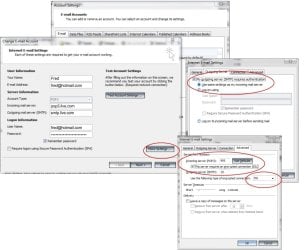
Another thing to look out for is under the "more settings" in your outlook account options.

To set up Windows Live Hotmail as a POP account in Outlook:

Select Tools | Account Settings... from the menu in Outlook.
Go to the E-mail tab.
Click New....
Make sure Microsoft Exchange, POP3, IMAP, or HTTP is selected.
Click Next >.
Type your name as you want it to appear in outgoing email under Your Name:.
Enter your Windows Live Hotmail address under E-mail Address:.
Make sure Manually configure server settings or additional server types is checked.
Click Next >.
Make sure Internet E-mail is selected.
Click Next >.
Make sure POP3 is selected under Account Type:.
Enter "pop3.live.com" (not including the quotation marks) under Incoming mail server:.
Type "smtp.live.com" under Outgoing mail server (SMTP):.
Enter your complete Windows Live Hotmail address ("[email protected]", for example) under User Name:.
Type your Windows Live Hotmail password under Password:.
Click More Settings....
Go to the Outgoing Server tab.
Make sure My outgoing server (SMTP) requires authentication is checked.
Verify Use same settings as my incoming mail server is selected.
Go to the Advanced tab.
Make sure This server requires an encrypted connection (SSL) is checked under Incoming server (POP3):.
Make sure SSL is selected for Use the following type of encrypted connection: under Outgoing server (SMTP):
Check that "995" appears under Incoming server (POP3) and "25" under Outgoing server (SMTP):.
Click OK.
Now click Next >.
Click Finish.
Click Close.
 

Attachments

  • hotmail_outlook_settings.jpg
    hotmail_outlook_settings.jpg
    88.4 KB · Views: 25

My Computer

Computer type
PC/Desktop
Computer Manufacturer/Model Number
Self Built
OS
Windows 7 Ultimate 64bit
CPU
AMD Phenom Quad core 9950 black edition
Motherboard
Gigabyte
Memory
16Gb
Graphics Card(s)
2x XFX Radeon 5850
Sound Card
PCI Express X-Fi Titanium / Logitech G35
Monitor(s) Displays
2x HP 2410i
Screen Resolution
1920x1080
Hard Drives
2x 500Gb Seagate
1x 300Gb Seagate
1x 1Tb Seagate
2x 1Tb Hitatchi
PSU
Jean Tech Storm 700W
Case
Cooler Master COSMOS S
Cooling
Akasa Evo Blue Pro
Keyboard
Logitech G15
Mouse
Mad Catz M.M.O. 7
Internet Speed
12mb
*flicks 2 pence down*


personally kwill i wouldnt use outlook for speed, usability and ease of backup thunderbird all the way, more function then anything else i've found or can even compare to
Hi Richy...You're in contact with a Firefox fan since its inception - and Thunderbird!...I agree with you on TB...but as I said in the original thread, clicking on some links automatically opened Outlook every time...so I just needed to have that sorted. Job now done..see below...but appreciate your comments!
Regards
 

My Computer

Computer type
PC/Desktop
OS
Microsoft Windows 7 Home Premium 64-bit 7601 Multiprocessor Free Service Pack 1
CPU
Intel(R) Core(TM) i7-2600 CPU @ 3.40GHz
Motherboard
ASRock H61M/U3S3
Memory
8.00 GB
Graphics Card(s)
Intel(R) HD Graphics Family
Sound Card
(1) Realtek High Definition Audio (2) High Definition Audi
Screen Resolution
1920 x 1080 x 32 bits (4294967296 colors) @ 59 Hz
Hard Drives
(1) ST3500413AS ATA Device (2) ST3500413AS ATA Device (3) Generic- Card Reader USB Device
Hi PooManUK...grateful for you help.
Worked perfectly!
My mistake was typing 'secureserver.net' with 'Pop3 & SMTP' incoming/outgoing...(thanks for nothing GoDaddy! - see original!)
Should have been '....live.com' in each case.
Many thanks again!
 

My Computer

Computer type
PC/Desktop
OS
Microsoft Windows 7 Home Premium 64-bit 7601 Multiprocessor Free Service Pack 1
CPU
Intel(R) Core(TM) i7-2600 CPU @ 3.40GHz
Motherboard
ASRock H61M/U3S3
Memory
8.00 GB
Graphics Card(s)
Intel(R) HD Graphics Family
Sound Card
(1) Realtek High Definition Audio (2) High Definition Audi
Screen Resolution
1920 x 1080 x 32 bits (4294967296 colors) @ 59 Hz
Hard Drives
(1) ST3500413AS ATA Device (2) ST3500413AS ATA Device (3) Generic- Card Reader USB Device
Your welcome pal, glad you got it sorted :)
 

My Computer

Computer type
PC/Desktop
Computer Manufacturer/Model Number
Self Built
OS
Windows 7 Ultimate 64bit
CPU
AMD Phenom Quad core 9950 black edition
Motherboard
Gigabyte
Memory
16Gb
Graphics Card(s)
2x XFX Radeon 5850
Sound Card
PCI Express X-Fi Titanium / Logitech G35
Monitor(s) Displays
2x HP 2410i
Screen Resolution
1920x1080
Hard Drives
2x 500Gb Seagate
1x 300Gb Seagate
1x 1Tb Seagate
2x 1Tb Hitatchi
PSU
Jean Tech Storm 700W
Case
Cooler Master COSMOS S
Cooling
Akasa Evo Blue Pro
Keyboard
Logitech G15
Mouse
Mad Catz M.M.O. 7
Internet Speed
12mb
Hi PooManUK...grateful for you help.
Worked perfectly!
My mistake was typing 'secureserver.net' with 'Pop3 & SMTP' incoming/outgoing...(thanks for nothing GoDaddy! - see original!)
Should have been '....live.com' in each case.
Many thanks again!

Chock up another one to the "loose nut behind keyboard" error! LOL! :roflmao:
Glad you got it sorted out!

On another note, if you liked TB... did you ever try setting TB as default mail app in default programs? <-- That may have sorted out the email link issue.
 

My Computer

Computer Manufacturer/Model Number
Homebrew PC - "Alpha_Dawg"
OS
Windows 7 Ultimate 64 bit Steve Ballmer Signature Edition
CPU
Intel Core 2 Quad - Q9550 - 2.83GHz stock - OC'd to 3.6GHz
Motherboard
Gigabyte EP45-UD3P
Memory
4GB DDR2 800MHz (PC6400) OCZ Reaper
Graphics Card(s)
Nvidia GE Force 8800 GTS
Sound Card
Asus Xonar DX
Monitor(s) Displays
Samsung SyncMaster 2333HD
Screen Resolution
1920 x 1080
Hard Drives
WD Caviar Black 750GB - 7200RPM - 32MB cache
WD Caviar Green 1.5TB - 5400RPM - 64MB cache
WD Caviar Green 2.0TB - 5400RPM - 64MB cache
PSU
PC Power & Cooling Silencer 750
Case
Gigabyte 3D Aurora
Cooling
Case is Air - 5ea. 120mm fans (mix of Arctic and Xigmatec)
Keyboard
MS Natural Wireless KB
Mouse
MS Wireless Mouse
Internet Speed
50 mbps down/5 mbps up
Other Info
AVerMedia - AVerTVHD G2 Dual Tuner Card
Hi Darryl...
Actually I had thought of that but tried changing the default to TB without success (couldn't figure out why) some time ago.
Since I always opened TB for email anyway and never used Outlook, then I didn't bother...up until I had to click on one link too many and kept getting those bloody 'please oh please use me' cries from Outlook!
With it all sorted now, I'll just keep Outlook as default and as a backup in the unlikely event of TB seizing on me at an awkward time.
Thanks again for your suggestion, nevertheless...
Regards
 

My Computer

Computer type
PC/Desktop
OS
Microsoft Windows 7 Home Premium 64-bit 7601 Multiprocessor Free Service Pack 1
CPU
Intel(R) Core(TM) i7-2600 CPU @ 3.40GHz
Motherboard
ASRock H61M/U3S3
Memory
8.00 GB
Graphics Card(s)
Intel(R) HD Graphics Family
Sound Card
(1) Realtek High Definition Audio (2) High Definition Audi
Screen Resolution
1920 x 1080 x 32 bits (4294967296 colors) @ 59 Hz
Hard Drives
(1) ST3500413AS ATA Device (2) ST3500413AS ATA Device (3) Generic- Card Reader USB Device
Back
Top