No 5.1 speaker config

kcirevam

New member
Local time
10:10 PM
Messages
11
Hello, first of all thanks for any help that you can provide.

I am running a rig with a ati radeon hd 4800 that is connected to a sony str-dh820 via an hdmi cable, than its sent through another hdmi cable to a 46 inch sharp aquas. my operating system is windows 7 64 bit.

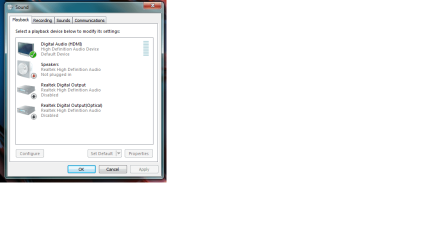
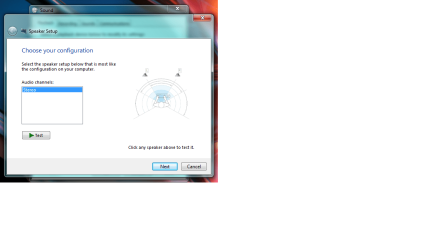
the problem is when i go to the speaker setup page in the playback devices it only says that a stereo setup is available. i would like to be able to have this work in 5.1.

thanks again
 

My Computer My Computer

Computer Manufacturer/Model Number
Custom
OS
Windows 7 64 bit
CPU
i7
Motherboard
p6t
Memory
12 gigs
Graphics Card(s)
ati radeon hd 4800
Monitor(s) Displays
46 inch sharp aquos
Hard Drives
1 terrabyte spin drive
1 64 gig ssd
Exactly what vendor ATI Radeon HD4800 do you have? There are several video card manufacturers that made this card.

Actually, go to the vendor site for the card and see if that card is supposed to have 5.1. Many Video cards only output two channel stereo.
 

My Computer My Computer

Computer type
PC/Desktop
Computer Manufacturer/Model Number
My Own Build
OS
Windows 10 64 bit
CPU
Intel i7 6700K
Motherboard
ASUS ROG Maximus VIII Hero
Memory
16GB Corsair Dominator
Graphics Card(s)
Intel CPU Graphics
Sound Card
RealTek
Monitor(s) Displays
27" Dell S2719dgf
Screen Resolution
2560X1440
Hard Drives
1 TB Samsung 850 EVO SSD for Win 10 Pro
500GB Samsung 850 EVO SSD for Win 10 Insider
2 TB drive for backup
PSU
EVGA Supernova 750G2
Case
BeQuiet Silent Base 600
Cooling
Deepcool Captain 120EX
Keyboard
Microsoft Wireless 2000
Mouse
Microsoft wireless
Internet Speed
100 MB/sec (Cable)
Antivirus
Microsoft Defender and Malwarebytes
Browser
Edge/Firefox
Other Info
Cakewalk (Sonar) by BandLab and Studio One 4.1 Pro recording studio software. MOTU 896Mk3 Hybrid recording interface, Frontier Tranzport wireless control unit, Behringer X-Touch Control Surface.
Five USB connected optical drives for CD Audio production using Nero BurningROM
sapphire
 

My Computer My Computer

Computer Manufacturer/Model Number
Custom
OS
Windows 7 64 bit
CPU
i7
Motherboard
p6t
Memory
12 gigs
Graphics Card(s)
ati radeon hd 4800
Monitor(s) Displays
46 inch sharp aquos
Hard Drives
1 terrabyte spin drive
1 64 gig ssd
the sapphire webs site says this


"Dolby® TrueHD and DTSHD Master Audio™ Support
Support for copy protected, high bandwidth, 7.1 channel surround sound over HDMI. Get a fully immersive, high definition audio experience with the latest Blu-ray movies. (Requires a DVI to HDMI dongle on some models, an HD capable monitor and a Blu-ray drive)"


my card includes the hdmi port
 

My Computer My Computer

Computer Manufacturer/Model Number
Custom
OS
Windows 7 64 bit
CPU
i7
Motherboard
p6t
Memory
12 gigs
Graphics Card(s)
ati radeon hd 4800
Monitor(s) Displays
46 inch sharp aquos
Hard Drives
1 terrabyte spin drive
1 64 gig ssd
Your Sony amp should show up as a device and have drivers. You need to select the Sony as the default output from the PC.
 

My Computer My Computer

Computer type
PC/Desktop
Computer Manufacturer/Model Number
Built 2/11/2011
OS
Windows 7 Pro-x64
CPU
i7-2600 3.4GHz - 3.8GHz Turbo
Motherboard
Intel DH67BL-B3
Memory
8Gb - 2x4GB, Muskin 991770 PC3-1333
Graphics Card(s)
Integrated Intel HD 2000
Sound Card
Integrated Intel 10.1 HD, RealTek ALC892
Monitor(s) Displays
Asus LCD VH222H, Haier HL24XSL2a
Screen Resolution
1920x1080, 1920x1080
Hard Drives
Crucial SSD C300-128Gb,
Western Digital WD5002AALX - 500Gb,
Western Digital WD7501AALS - 750Gb
PSU
Seasonic 650W 80+ Gold Modular
Case
Rosewill Defender
Cooling
Stock CPU, Four 120mm case fans, PCH fan added
Keyboard
Logitech EX100 Y-RBH94 Wireless
Mouse
Logitech EX100 M-RCE95 Wireless
Internet Speed
3.0/1.5 Mbs
Antivirus
Microsoft Security Essentials
Browser
Microsoft Internet Explorer 11
Other Info
Antec Veris Premier-Multimedia IR Station,
Cyber Accoustics-3602 Speakers,
AFT XM-5U Card Reader,
Hauppauge TV-HVR-2250,
Sony LX300 USB Turntable
you could be right, however i don't understand how a how a remote speaker system should have drivers

also sonys site doesn't list any
 

My Computer My Computer

Computer Manufacturer/Model Number
Custom
OS
Windows 7 64 bit
CPU
i7
Motherboard
p6t
Memory
12 gigs
Graphics Card(s)
ati radeon hd 4800
Monitor(s) Displays
46 inch sharp aquos
Hard Drives
1 terrabyte spin drive
1 64 gig ssd
I have a Sapphire HD4850. The Sapphire site does not list an HD4800 (that I could find), just several different models of the HD4850 and HD4890. Exactly what model video card do you have. A google search just shows up HD4800 "Series" video cards.

I've never used the HDMI port on my HD4850 so I can't say for sure exactly how it works, but some PC output is only Stereo unless you have a video, for example, that does generate multi-channel audio.

Do you have the latest drivers for this card? If not go to www.ati.com and download the latest drivers (including the Catalyst Control Center) and then see if that helps.

The Sony would not have anything to do with the PC, it's not attached as the "Sound Card".
 

My Computer My Computer

Computer type
PC/Desktop
Computer Manufacturer/Model Number
My Own Build
OS
Windows 10 64 bit
CPU
Intel i7 6700K
Motherboard
ASUS ROG Maximus VIII Hero
Memory
16GB Corsair Dominator
Graphics Card(s)
Intel CPU Graphics
Sound Card
RealTek
Monitor(s) Displays
27" Dell S2719dgf
Screen Resolution
2560X1440
Hard Drives
1 TB Samsung 850 EVO SSD for Win 10 Pro
500GB Samsung 850 EVO SSD for Win 10 Insider
2 TB drive for backup
PSU
EVGA Supernova 750G2
Case
BeQuiet Silent Base 600
Cooling
Deepcool Captain 120EX
Keyboard
Microsoft Wireless 2000
Mouse
Microsoft wireless
Internet Speed
100 MB/sec (Cable)
Antivirus
Microsoft Defender and Malwarebytes
Browser
Edge/Firefox
Other Info
Cakewalk (Sonar) by BandLab and Studio One 4.1 Pro recording studio software. MOTU 896Mk3 Hybrid recording interface, Frontier Tranzport wireless control unit, Behringer X-Touch Control Surface.
Five USB connected optical drives for CD Audio production using Nero BurningROM
i have tried updating the drivers however its really weird when i install them it doesn't ask to restart. also the date of release in the properties doesn't change even though that on the ati website says they were released 11/15/2011
 

Attachments

  • speakers 1.png
    speakers 1.png
    24.2 KB · Views: 120
  • speakers 2.png
    speakers 2.png
    36.6 KB · Views: 116
  • speakers 3.png
    speakers 3.png
    33 KB · Views: 96
  • speakers 4.png
    speakers 4.png
    28.9 KB · Views: 91

My Computer My Computer

Computer Manufacturer/Model Number
Custom
OS
Windows 7 64 bit
CPU
i7
Motherboard
p6t
Memory
12 gigs
Graphics Card(s)
ati radeon hd 4800
Monitor(s) Displays
46 inch sharp aquos
Hard Drives
1 terrabyte spin drive
1 64 gig ssd
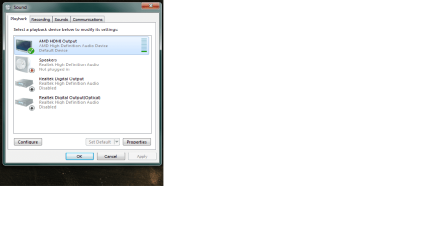
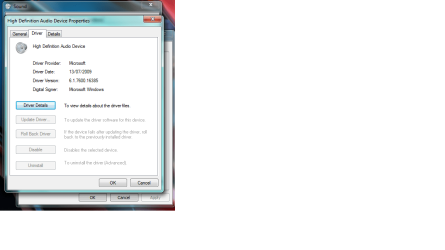
When you downloasded the driver from AMD, did you download the individual driver and CCC or the full Catalyst Suite? Reason for asking is that from that screen shot of your playback devices you don't have the AMD HDMI Audio driver installed, it is just running on the default Windows driver.

The audio driver is included in the full suite, but is not part of the driver only download.

@fireberd, it doesn't matter which 4800 series card he has (or any AMD card for that matter), as they all get the HDMI driver when you install the full Catalyst suite. Also they all have Realtek on them for the HDMI audio (no idea which Realtek chip it actually is). You can also get the audio driver directly from Realtek (ir under their high definition audio section),

Realtek

and they have the latest standalone version that is included in the full Catalyst suite.
 

My Computer My Computer

Computer type
PC/Desktop
Computer Manufacturer/Model Number
Me
OS
Win 7 Ultimate x64
CPU
FX-8350 @ 4.6 GHz so far
Motherboard
Asus M5A97 EVO
Memory
ADATA XPG V1 Series Black 8GB DDR3 1600
Graphics Card(s)
Sapphire R9 270x Dual-X
Sound Card
Xonar DGX w/ Corsair Vengence 1300
Monitor(s) Displays
Acer S232HL Abid
Screen Resolution
1920x1080
Hard Drives
120 GB OCZ Vertex 3
500 GB Seagate 7200.12
PSU
Antec Earthwatts 650W Green
Case
Antec Three Hundred
Cooling
Cooler Master 212 EVO
Keyboard
Logitech G510
Mouse
Logitech G500s
Internet Speed
35000/3000
i just installed the whole suite right now, again. i had removed the drivers trying to see if re-installing might help
however i am still haveing the same problem
 

Attachments

  • speakers 5.png
    speakers 5.png
    31.3 KB · Views: 61

My Computer My Computer

Computer Manufacturer/Model Number
Custom
OS
Windows 7 64 bit
CPU
i7
Motherboard
p6t
Memory
12 gigs
Graphics Card(s)
ati radeon hd 4800
Monitor(s) Displays
46 inch sharp aquos
Hard Drives
1 terrabyte spin drive
1 64 gig ssd
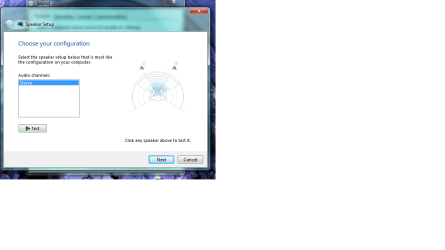
What is shown when you Click the "Configure" button for the HDMI? Are you given speaker options?

I can't check mine as I don't have an HDMI plugged in, or any close device I could connect the HDMI to.
 

My Computer My Computer

Computer type
PC/Desktop
Computer Manufacturer/Model Number
My Own Build
OS
Windows 10 64 bit
CPU
Intel i7 6700K
Motherboard
ASUS ROG Maximus VIII Hero
Memory
16GB Corsair Dominator
Graphics Card(s)
Intel CPU Graphics
Sound Card
RealTek
Monitor(s) Displays
27" Dell S2719dgf
Screen Resolution
2560X1440
Hard Drives
1 TB Samsung 850 EVO SSD for Win 10 Pro
500GB Samsung 850 EVO SSD for Win 10 Insider
2 TB drive for backup
PSU
EVGA Supernova 750G2
Case
BeQuiet Silent Base 600
Cooling
Deepcool Captain 120EX
Keyboard
Microsoft Wireless 2000
Mouse
Microsoft wireless
Internet Speed
100 MB/sec (Cable)
Antivirus
Microsoft Defender and Malwarebytes
Browser
Edge/Firefox
Other Info
Cakewalk (Sonar) by BandLab and Studio One 4.1 Pro recording studio software. MOTU 896Mk3 Hybrid recording interface, Frontier Tranzport wireless control unit, Behringer X-Touch Control Surface.
Five USB connected optical drives for CD Audio production using Nero BurningROM
this is what it shows, it should have the 5.1 or even 7.1 option
 

Attachments

  • speakers 6.png
    speakers 6.png
    39.5 KB · Views: 47

My Computer My Computer

Computer Manufacturer/Model Number
Custom
OS
Windows 7 64 bit
CPU
i7
Motherboard
p6t
Memory
12 gigs
Graphics Card(s)
ati radeon hd 4800
Monitor(s) Displays
46 inch sharp aquos
Hard Drives
1 terrabyte spin drive
1 64 gig ssd
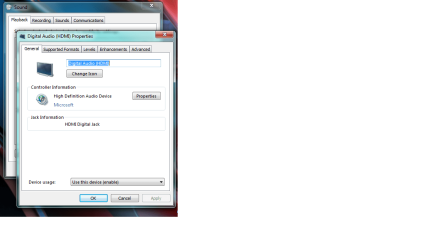
also i noticed in this part of the speaker setup it shows max speakers two and no compression options.
 

Attachments

  • speakers 7.png
    speakers 7.png
    23.4 KB · Views: 67

My Computer My Computer

Computer Manufacturer/Model Number
Custom
OS
Windows 7 64 bit
CPU
i7
Motherboard
p6t
Memory
12 gigs
Graphics Card(s)
ati radeon hd 4800
Monitor(s) Displays
46 inch sharp aquos
Hard Drives
1 terrabyte spin drive
1 64 gig ssd
Well that explains why there is no 5.1 sound. But, I don't have any info on what is in your video card. You can try the RealTek driver from the link and see if that will install and work. Before you install the driver, set a System Restore point so you can use System Restore to fall back in case it corrupts something.

Ultimately it may take a different video card that does have the wanted 5.1 surround sound.
 

My Computer My Computer

Computer type
PC/Desktop
Computer Manufacturer/Model Number
My Own Build
OS
Windows 10 64 bit
CPU
Intel i7 6700K
Motherboard
ASUS ROG Maximus VIII Hero
Memory
16GB Corsair Dominator
Graphics Card(s)
Intel CPU Graphics
Sound Card
RealTek
Monitor(s) Displays
27" Dell S2719dgf
Screen Resolution
2560X1440
Hard Drives
1 TB Samsung 850 EVO SSD for Win 10 Pro
500GB Samsung 850 EVO SSD for Win 10 Insider
2 TB drive for backup
PSU
EVGA Supernova 750G2
Case
BeQuiet Silent Base 600
Cooling
Deepcool Captain 120EX
Keyboard
Microsoft Wireless 2000
Mouse
Microsoft wireless
Internet Speed
100 MB/sec (Cable)
Antivirus
Microsoft Defender and Malwarebytes
Browser
Edge/Firefox
Other Info
Cakewalk (Sonar) by BandLab and Studio One 4.1 Pro recording studio software. MOTU 896Mk3 Hybrid recording interface, Frontier Tranzport wireless control unit, Behringer X-Touch Control Surface.
Five USB connected optical drives for CD Audio production using Nero BurningROM
yeah those drivers didn't work. no idea.....
 

My Computer My Computer

Computer Manufacturer/Model Number
Custom
OS
Windows 7 64 bit
CPU
i7
Motherboard
p6t
Memory
12 gigs
Graphics Card(s)
ati radeon hd 4800
Monitor(s) Displays
46 inch sharp aquos
Hard Drives
1 terrabyte spin drive
1 64 gig ssd
Others have had this problem and only two appear to have resolved it, but by doing what you've already done, one, two, that is re-installing the graphic driver. Unfortunately I don't have an HDMI cable to experiment on my end.

Edit: In your BIOS, do you have the SPDIF Mode Setting set to HDMI rather than SPDIF output?
 
Last edited:

My Computer My Computer

Computer type
PC/Desktop
Computer Manufacturer/Model Number
Wordsworth 5000
OS
Windows 10 Pro 64 bit
CPU
Core i7 6700K Skylake 4.0GHz
Motherboard
Asus Z170 Pro
Memory
Corsair Vengeance LPX DDR4 32GB 3000MHz
Graphics Card(s)
Asus Radeon RX480 Strix 8GB
Sound Card
Asus Xonar DSX
Monitor(s) Displays
HP 2709m
Screen Resolution
1920x1080
Hard Drives
Intel 600p M.2 PCIe NVMe SSD 512GB; Intel 335 SSD 240GB ;Western Digital Caviar Black 1TB
PSU
Thermaltake Toughpower Grand Platinum 850W
Case
Lian Li PC-B70
Cooling
CPU-Noctua NH D15, GPU-Stock, Case-Noctua 2x140, 2x120
Keyboard
Microsoft Natural Ergo 4000
Mouse
Microsoft Wireless Optical 1000
Internet Speed
Cable
Other Info
HP bd 340,
HP bd 240,
Klipsch Promedia 5.1 THX
There is nothing in the BIOS on my Intel motherboard for any HDMI options.
I have S/PDIF enabled, but that has nothing to do with my HD4850 video card's audio as the HD4850 has it's own sound device built on the Video card.

There are some video cards that require an S/PDIF connection to the PC for HDMI sound, but I don't think any of the HD 4800 series requires this.
 

My Computer My Computer

Computer type
PC/Desktop
Computer Manufacturer/Model Number
My Own Build
OS
Windows 10 64 bit
CPU
Intel i7 6700K
Motherboard
ASUS ROG Maximus VIII Hero
Memory
16GB Corsair Dominator
Graphics Card(s)
Intel CPU Graphics
Sound Card
RealTek
Monitor(s) Displays
27" Dell S2719dgf
Screen Resolution
2560X1440
Hard Drives
1 TB Samsung 850 EVO SSD for Win 10 Pro
500GB Samsung 850 EVO SSD for Win 10 Insider
2 TB drive for backup
PSU
EVGA Supernova 750G2
Case
BeQuiet Silent Base 600
Cooling
Deepcool Captain 120EX
Keyboard
Microsoft Wireless 2000
Mouse
Microsoft wireless
Internet Speed
100 MB/sec (Cable)
Antivirus
Microsoft Defender and Malwarebytes
Browser
Edge/Firefox
Other Info
Cakewalk (Sonar) by BandLab and Studio One 4.1 Pro recording studio software. MOTU 896Mk3 Hybrid recording interface, Frontier Tranzport wireless control unit, Behringer X-Touch Control Surface.
Five USB connected optical drives for CD Audio production using Nero BurningROM
I'm speaking only to kcirevam as the OP appears to have the same motherboard as I, an Asus P6T which does have the HDMI option in the BIOS. Indeed, in the BIOS at the option it says if you are using a graphics card in this manner for output then the HDMI option must be selected.
 

My Computer My Computer

Computer type
PC/Desktop
Computer Manufacturer/Model Number
Wordsworth 5000
OS
Windows 10 Pro 64 bit
CPU
Core i7 6700K Skylake 4.0GHz
Motherboard
Asus Z170 Pro
Memory
Corsair Vengeance LPX DDR4 32GB 3000MHz
Graphics Card(s)
Asus Radeon RX480 Strix 8GB
Sound Card
Asus Xonar DSX
Monitor(s) Displays
HP 2709m
Screen Resolution
1920x1080
Hard Drives
Intel 600p M.2 PCIe NVMe SSD 512GB; Intel 335 SSD 240GB ;Western Digital Caviar Black 1TB
PSU
Thermaltake Toughpower Grand Platinum 850W
Case
Lian Li PC-B70
Cooling
CPU-Noctua NH D15, GPU-Stock, Case-Noctua 2x140, 2x120
Keyboard
Microsoft Natural Ergo 4000
Mouse
Microsoft Wireless Optical 1000
Internet Speed
Cable
Other Info
HP bd 340,
HP bd 240,
Klipsch Promedia 5.1 THX
Does the driver set you installed for your card have the Dolby encoding drivers? I think the HDMI output will be "stereo" and it's up to the amp to decode the Dolby compression and output 5.1 sound. Your snapshot shows two channels but this doesn't necessarily mean two speakers. HDMI uses two channels for audio. The Dolby compression used on the PC side must match the Dolby decompression capabilities on the amp side.

Edit:
I should have said the sound standard for compression used on the PC side must match the amp. Whether you use Dolby or not really doesn't matter.
 
Last edited:

My Computer My Computer

Computer type
PC/Desktop
Computer Manufacturer/Model Number
Built 2/11/2011
OS
Windows 7 Pro-x64
CPU
i7-2600 3.4GHz - 3.8GHz Turbo
Motherboard
Intel DH67BL-B3
Memory
8Gb - 2x4GB, Muskin 991770 PC3-1333
Graphics Card(s)
Integrated Intel HD 2000
Sound Card
Integrated Intel 10.1 HD, RealTek ALC892
Monitor(s) Displays
Asus LCD VH222H, Haier HL24XSL2a
Screen Resolution
1920x1080, 1920x1080
Hard Drives
Crucial SSD C300-128Gb,
Western Digital WD5002AALX - 500Gb,
Western Digital WD7501AALS - 750Gb
PSU
Seasonic 650W 80+ Gold Modular
Case
Rosewill Defender
Cooling
Stock CPU, Four 120mm case fans, PCH fan added
Keyboard
Logitech EX100 Y-RBH94 Wireless
Mouse
Logitech EX100 M-RCE95 Wireless
Internet Speed
3.0/1.5 Mbs
Antivirus
Microsoft Security Essentials
Browser
Microsoft Internet Explorer 11
Other Info
Antec Veris Premier-Multimedia IR Station,
Cyber Accoustics-3602 Speakers,
AFT XM-5U Card Reader,
Hauppauge TV-HVR-2250,
Sony LX300 USB Turntable
ok so my bios did have it set to spdif, so i changed it to hdmi. however, it did not help. as to weather or not the drivers have dolby encoding drivers i am not sure. i installed the catalyst drivers and i am assuming that they would. is there a way to download them seperatly?
 

My Computer My Computer

Computer Manufacturer/Model Number
Custom
OS
Windows 7 64 bit
CPU
i7
Motherboard
p6t
Memory
12 gigs
Graphics Card(s)
ati radeon hd 4800
Monitor(s) Displays
46 inch sharp aquos
Hard Drives
1 terrabyte spin drive
1 64 gig ssd
Back
Top