Solved No audio at all

Rgh

New member
Local time
2:14 AM
Messages
6
Hello everyone, I just updated to Windows 7 Professional about 2 weeks ago. I keep having problems with my audio, apparently I do not have any sound driver/device installed.

I tried to narrow the problem by doing several system restores as the audio has worked until recently. I believe I accidentally uninstalled something while in the Add/Remove Programs tab of the Control Panel. I was trying to get rid of things that I do not use like I-Tunes..

After several system restores, I could not figure out the problem so I went to the Real-tek website because apparently that is standard. I downloaded the 32-bit driver for Windows 7 and installed it. Restarted my computer and the audio came on.

Went to a friend's house with no wi-fi (couldn't download anything), all I did was write and listen to music off my lap top. Came back to my home the next day, turned the computer on and now I apparently don't have any devices installed.

I tried to re-install the audio driver/device from the Real-tek website, and it didn't work. I've tried that twice, with the restart of the computer.

Can someone please assist me with this? I'm almost to the point of saving everything on an external hard drive and re-installing Windows.

Thank You.
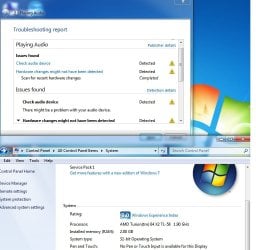
Screen.jpg
 

My Computer

Computer type
Laptop
Computer Manufacturer/Model Number
HP
OS
Windows 7 Professional - 32 Bit OS
CPU
AMD Turion 64 X2 TL-58 1.90 GHz (Dual)
Motherboard
AMD Turion <tm> 64 X2 TL-58
Memory
2 GB
Graphics Card(s)
NVIDIA GeForce 7150M/nForce 630M
Antivirus
Spybot, Ad-Aware
Browser
Mozilla Firefox

My Computer

Computer Manufacturer/Model Number
W530-3630QM1
OS
windows 7 home 64bit
CPU
INTEL-CORE I7
Memory
16GB
Hard Drives
750GB
Browser
Chrome
Thank you for the quick response - I checked on the bottom of my laptop and it says HP Pavillion dv 2500, it also says dv27 15nr.

Do you need more information then this?

Thank You.
 

My Computer

Computer type
Laptop
Computer Manufacturer/Model Number
HP
OS
Windows 7 Professional - 32 Bit OS
CPU
AMD Turion 64 X2 TL-58 1.90 GHz (Dual)
Motherboard
AMD Turion <tm> 64 X2 TL-58
Memory
2 GB
Graphics Card(s)
NVIDIA GeForce 7150M/nForce 630M
Antivirus
Spybot, Ad-Aware
Browser
Mozilla Firefox
Product number is KC453UEA#ABA
 

My Computer

Computer type
Laptop
Computer Manufacturer/Model Number
HP
OS
Windows 7 Professional - 32 Bit OS
CPU
AMD Turion 64 X2 TL-58 1.90 GHz (Dual)
Motherboard
AMD Turion <tm> 64 X2 TL-58
Memory
2 GB
Graphics Card(s)
NVIDIA GeForce 7150M/nForce 630M
Antivirus
Spybot, Ad-Aware
Browser
Mozilla Firefox
Follow Maxie's lead, but in between could you post some informational screen shots
  • Control Panel -> Sound -> Playback tab
  • Control Panel -> Sound -> Sounds tab
  • Device Manager -> Sound, video, and game controllers
 

My Computer

Computer type
Laptop
Computer Manufacturer/Model Number
HP Pavilion dv6-6c10us
OS
x64 (6.3.9600) Win8.1 Pro & soon dual boot x64 (6.1.7601) Win7_SP1 HomePrem
CPU
AMD A6-3420M APU with Radeon(tm) HD Graphics
Motherboard
Hewlett-Packard 1805
Memory
6.00 GB
Graphics Card(s)
AMD Radeon(TM) HD 6520G
Sound Card
(1) AMD High Definition Audio Device (2) IDT High Definiti
Monitor(s) Displays
HP W2072a 20" LCD (1600 x 900) @ 60 Hz
Screen Resolution
1366 x 768 x 32 bits (4294967296 colors) @ 60 Hz
Hard Drives
ST640LM0 00 HM641JI SATA Disk Device
Keyboard
Logitech k520 wireless KB
Mouse
Logitech m320 wireless mouse (bundled with KB)
Internet Speed
15/5 | 54 MB Wireless 'n'
Antivirus
Realtime: Defender or Avast | On-demand: Malwarebytes, ESET
Browser
IE 11 on Win8, IE 10 on win 7
Other Info
Media: [Gimp, Audacity, VLC] || Comm: [WEmail 2012, Skype] || Productivity: [OpenOffice,| Textpad] || Utils: [Sysinternals, cCleaner, Speccy, Defraggler]
No i found it .. But it is more or less the same Driver i posted
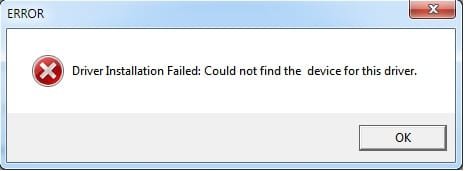
Thank you for your help - However I was given this message after trying to install off the first link.

Driver-Install.jpg

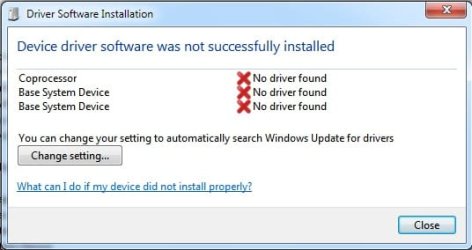
A balloon popped up in the lower right hand corner that said a driver was not properly installed and requested I click for more information. This was the screen that popped up:

Error-pop-up.jpg

I am downloading the one off the 2nd link but I am concerned that the "System Requirements" for that download apparently require Windows Vista and I am running on Windows 7 Professional. The laptop when it was originally bought, was running Vista but I've recently updated. Would that change things at all?

Follow Maxie's lead, but in between could you post some informational screen shots
  • Control Panel -> Sound -> Playback tab
  • Control Panel -> Sound -> Sounds tab
  • Device Manager -> Sound, video, and game controllers
Thank you for the reply:

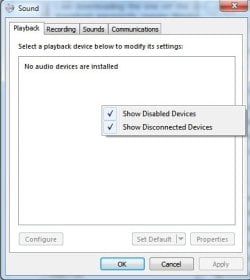
Playback Tab:

Playback-tab.jpg

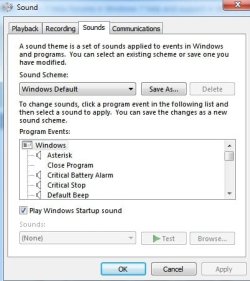
Sounds Tab:

Sounds-Tab.jpg

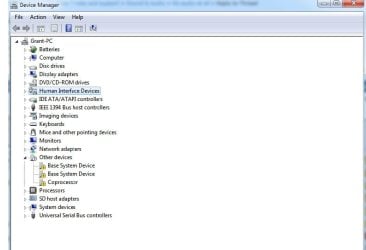
Device Manager Tab:

Strange.jpg

I was unable to locate "Sound, video, and game controllers" on this screen. This troubles me as it is not even an option unless I missed. If that is the case, I apologize.

Thank you.
 

My Computer

Computer type
Laptop
Computer Manufacturer/Model Number
HP
OS
Windows 7 Professional - 32 Bit OS
CPU
AMD Turion 64 X2 TL-58 1.90 GHz (Dual)
Motherboard
AMD Turion <tm> 64 X2 TL-58
Memory
2 GB
Graphics Card(s)
NVIDIA GeForce 7150M/nForce 630M
Antivirus
Spybot, Ad-Aware
Browser
Mozilla Firefox
Hi there .. First Install the Chipset Driver from the Link i gave you .. Right click on the Download and run as admin .. After that try the sound Driver .. I did know they where for Vista but they often work with Windows 7 ..
 

My Computer

Computer Manufacturer/Model Number
W530-3630QM1
OS
windows 7 home 64bit
CPU
INTEL-CORE I7
Memory
16GB
Hard Drives
750GB
Browser
Chrome
Thanks Rgh,

maxie is directing you to the solution - please continue with that path. I just wanted to make sure that other settings weren't causing the symptoms. Your screenshots clearly show that you need to install drivers.

As far as Vista/Win7 differences.... mfgrs don't always change the information when a new operating system comes out, even though the machine will run fine on the new OS. So, go ahead and install the Vista drivers as a base, that should get you up and running. Finding 'updated' chipset drivers and audio for AMD processors (especially for HP machines) has always thwarted me - so I end up loading whatever HP has to offer for my machine.

Your in good hands with maxie - carry on.

Bill

hmmmmm
was digging a little deeper and saw that HP offers an Intel chipset pkg on the link maxie provided. Yet your specs say
   Note
OS Windows 7 Professional - 32 Bit OS
CPU AMD Turion 64 X2 TL-58 1.90 GHz (Dual)
Motherboard AMD Turion <tm> 64 X2 TL-58


I'm also a little confused why the 32 bit OS was installed. Not that it presents an issue, just that your have a 64 bit machine running a 32 bit OS.

Back to the issue: What region is the machine from? NR indicates non regional. Sometimes we have to go to the HP regional site to find the information we need. UK, FR, IT... etc
 

My Computer

Computer type
Laptop
Computer Manufacturer/Model Number
HP Pavilion dv6-6c10us
OS
x64 (6.3.9600) Win8.1 Pro & soon dual boot x64 (6.1.7601) Win7_SP1 HomePrem
CPU
AMD A6-3420M APU with Radeon(tm) HD Graphics
Motherboard
Hewlett-Packard 1805
Memory
6.00 GB
Graphics Card(s)
AMD Radeon(TM) HD 6520G
Sound Card
(1) AMD High Definition Audio Device (2) IDT High Definiti
Monitor(s) Displays
HP W2072a 20" LCD (1600 x 900) @ 60 Hz
Screen Resolution
1366 x 768 x 32 bits (4294967296 colors) @ 60 Hz
Hard Drives
ST640LM0 00 HM641JI SATA Disk Device
Keyboard
Logitech k520 wireless KB
Mouse
Logitech m320 wireless mouse (bundled with KB)
Internet Speed
15/5 | 54 MB Wireless 'n'
Antivirus
Realtime: Defender or Avast | On-demand: Malwarebytes, ESET
Browser
IE 11 on Win8, IE 10 on win 7
Other Info
Media: [Gimp, Audacity, VLC] || Comm: [WEmail 2012, Skype] || Productivity: [OpenOffice,| Textpad] || Utils: [Sysinternals, cCleaner, Speccy, Defraggler]
Hi there .. First Install the Chipset Driver from the Link i gave you .. Right click on the Download and run as admin .. After that try the sound Driver .. I did know they where for Vista but they often work with Windows 7 ..

Thank You - The 2nd link that you gave me, I clicked on that one and scrolled down to the chipset and clicked on the first one. Downloaded it and right clicked it and tried to install it with it running as administrator. This is the message I got:

Error-chipset.jpg

Do you think its other programs that are blocking the process?

Thank You.

Back to the issue: What region is the machine from? NR indicates non regional. Sometimes we have to go to the HP regional site to find the information we need. UK, FR, IT... etc

The laptop was purchased in the US as far as I know, a family member's employer purchased the laptop a few years ago for work. They just bought him a new one and he gave me this one about 2 weeks ago as I am in the military and my old laptop was from 2004.

Thank You.
 

My Computer

Computer type
Laptop
Computer Manufacturer/Model Number
HP
OS
Windows 7 Professional - 32 Bit OS
CPU
AMD Turion 64 X2 TL-58 1.90 GHz (Dual)
Motherboard
AMD Turion <tm> 64 X2 TL-58
Memory
2 GB
Graphics Card(s)
NVIDIA GeForce 7150M/nForce 630M
Antivirus
Spybot, Ad-Aware
Browser
Mozilla Firefox
Hi there I think it is not Compatible with Windows 7 .. Try the following ..

1. Place the driver installation file on the Desktop.

2. Right Click the driver installation file and select Properties/Compatibility Tab. Select Vista

3. Click Apply/OK.

4. Right Click the file and select the Run As Administrator option to install.
 

My Computer

Computer Manufacturer/Model Number
W530-3630QM1
OS
windows 7 home 64bit
CPU
INTEL-CORE I7
Memory
16GB
Hard Drives
750GB
Browser
Chrome
It took a bit more digging but:

HP product specs: Product Specifications | HP® Support

HP Support page (Vista 32): Software & driver downloads HP Pavilion dv2715nr Entertainment Notebook PC

HP support NVIDIA chipset: NVIDIA nForce Chipset Driver

HP support Conexant audio: Conexant High-Definition SmartAudio 221 Driver
--> This is the same audio driver maxie pointed to, just referenced from the dv2715nr support page.

I had a HP F762NR machine and it always drove me crazy trying to find the right drivers on HP and Nvidia.

Try installing the Nvidia chipset driver and then the Conexant Smart audio driver. I did see one post on the HP forum that said their machine complained about compatibility, but their's was a different machine.

As always, please post any errors you encounter.

Thanks,

Bill
 

My Computer

Computer type
Laptop
Computer Manufacturer/Model Number
HP Pavilion dv6-6c10us
OS
x64 (6.3.9600) Win8.1 Pro & soon dual boot x64 (6.1.7601) Win7_SP1 HomePrem
CPU
AMD A6-3420M APU with Radeon(tm) HD Graphics
Motherboard
Hewlett-Packard 1805
Memory
6.00 GB
Graphics Card(s)
AMD Radeon(TM) HD 6520G
Sound Card
(1) AMD High Definition Audio Device (2) IDT High Definiti
Monitor(s) Displays
HP W2072a 20" LCD (1600 x 900) @ 60 Hz
Screen Resolution
1366 x 768 x 32 bits (4294967296 colors) @ 60 Hz
Hard Drives
ST640LM0 00 HM641JI SATA Disk Device
Keyboard
Logitech k520 wireless KB
Mouse
Logitech m320 wireless mouse (bundled with KB)
Internet Speed
15/5 | 54 MB Wireless 'n'
Antivirus
Realtime: Defender or Avast | On-demand: Malwarebytes, ESET
Browser
IE 11 on Win8, IE 10 on win 7
Other Info
Media: [Gimp, Audacity, VLC] || Comm: [WEmail 2012, Skype] || Productivity: [OpenOffice,| Textpad] || Utils: [Sysinternals, cCleaner, Speccy, Defraggler]
Well done Bill .. It was all a bit confusing the OP stated in Post 3 >>> I checked on the bottom of my laptop and it says HP Pavillion dv 2500, it also says dv27 15nr. .. The dv27 refers to DV2700 not the 2500 how ever that does not matter now thanks to you ..
 

My Computer

Computer Manufacturer/Model Number
W530-3630QM1
OS
windows 7 home 64bit
CPU
INTEL-CORE I7
Memory
16GB
Hard Drives
750GB
Browser
Chrome
If only mfgrs would use the same terminology, dating, and versioning - every users life would be much simpler.

I'll leave this in your capable hands maxie.
 

My Computer

Computer type
Laptop
Computer Manufacturer/Model Number
HP Pavilion dv6-6c10us
OS
x64 (6.3.9600) Win8.1 Pro & soon dual boot x64 (6.1.7601) Win7_SP1 HomePrem
CPU
AMD A6-3420M APU with Radeon(tm) HD Graphics
Motherboard
Hewlett-Packard 1805
Memory
6.00 GB
Graphics Card(s)
AMD Radeon(TM) HD 6520G
Sound Card
(1) AMD High Definition Audio Device (2) IDT High Definiti
Monitor(s) Displays
HP W2072a 20" LCD (1600 x 900) @ 60 Hz
Screen Resolution
1366 x 768 x 32 bits (4294967296 colors) @ 60 Hz
Hard Drives
ST640LM0 00 HM641JI SATA Disk Device
Keyboard
Logitech k520 wireless KB
Mouse
Logitech m320 wireless mouse (bundled with KB)
Internet Speed
15/5 | 54 MB Wireless 'n'
Antivirus
Realtime: Defender or Avast | On-demand: Malwarebytes, ESET
Browser
IE 11 on Win8, IE 10 on win 7
Other Info
Media: [Gimp, Audacity, VLC] || Comm: [WEmail 2012, Skype] || Productivity: [OpenOffice,| Textpad] || Utils: [Sysinternals, cCleaner, Speccy, Defraggler]
Everything works great now, I very much appreciate it. Thank you!
 

My Computer

Computer type
Laptop
Computer Manufacturer/Model Number
HP
OS
Windows 7 Professional - 32 Bit OS
CPU
AMD Turion 64 X2 TL-58 1.90 GHz (Dual)
Motherboard
AMD Turion <tm> 64 X2 TL-58
Memory
2 GB
Graphics Card(s)
NVIDIA GeForce 7150M/nForce 630M
Antivirus
Spybot, Ad-Aware
Browser
Mozilla Firefox
Great news glad you got it sorted
 

My Computer

Computer Manufacturer/Model Number
W530-3630QM1
OS
windows 7 home 64bit
CPU
INTEL-CORE I7
Memory
16GB
Hard Drives
750GB
Browser
Chrome
Back
Top