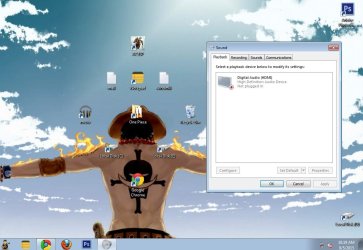
No audio device found

monkeyDLuffy

New member
Local time
9:09 AM
Messages
4
Hello,
I had been experiencing buzz sound in my headphones 2-3 months back which I fixed by changing the frequency to 'studio quality'(192000 Hz), every other frequency was buzzing and didn't have any response.
After 1 month, suddenly the voice button muted, and there was no sound, neither in headphone, nor, speakers.
When I click the voice button, it starts trouble shooting and concludes that nothing is wrong.
I tried re-installing the Via HD driver but it replies that there is no audio driver installed.
and in the device manager there is a new device named 'High Definition Audio Device'...
Pls. Help
Thank you
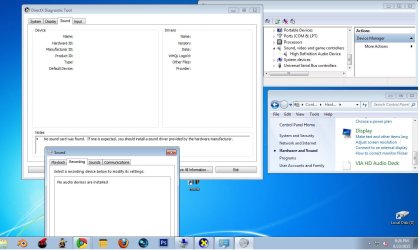
g.jpg

PS. I also use amplitube, which is a guitar effects app.
 

My Computer

Computer type
PC/Desktop
Computer Manufacturer/Model Number
Gigabyte technology Co.
OS
Windows 7 Ultimate x32 SP1
Graphics Card(s)
AMD Raedon HD 5450
Antivirus
K7
Browser
Google Chrome
16 bit/44.1Khz is the "CD standard" for audio.

I have a (Sonar) recording studio.

Is the VIA the correct sound hardware?

I see "High Definition Audio Device" which is the generic Windows installed audio driver (could be for HDMI audio?).

Check the BIOS to verify that audio is enabled. If the audio is enabled and Windows compatible and no hardware driver is installed, Windows will install the generic, basic function, High Definition Audio Driver.
 

My Computer

Computer type
PC/Desktop
Computer Manufacturer/Model Number
My Own Build
OS
Windows 10 64 bit
CPU
Intel i7 6700K
Motherboard
ASUS ROG Maximus VIII Hero
Memory
16GB Corsair Dominator
Graphics Card(s)
Intel CPU Graphics
Sound Card
RealTek
Monitor(s) Displays
27" Dell S2719dgf
Screen Resolution
2560X1440
Hard Drives
1 TB Samsung 850 EVO SSD for Win 10 Pro
500GB Samsung 850 EVO SSD for Win 10 Insider
2 TB drive for backup
PSU
EVGA Supernova 750G2
Case
BeQuiet Silent Base 600
Cooling
Deepcool Captain 120EX
Keyboard
Microsoft Wireless 2000
Mouse
Microsoft wireless
Internet Speed
100 MB/sec (Cable)
Antivirus
Microsoft Defender and Malwarebytes
Browser
Edge/Firefox
Other Info
Cakewalk (Sonar) by BandLab and Studio One 4.1 Pro recording studio software. MOTU 896Mk3 Hybrid recording interface, Frontier Tranzport wireless control unit, Behringer X-Touch Control Surface.
Five USB connected optical drives for CD Audio production using Nero BurningROM
16 bit/44.1Khz is the "CD standard" for audio.

I have a (Sonar) recording studio.

Is the VIA the correct sound hardware?

I see "High Definition Audio Device" which is the generic Windows installed audio driver (could be for HDMI audio?).

Check the BIOS to verify that audio is enabled. If the audio is enabled and Windows compatible and no hardware driver is installed, Windows will install the generic, basic function, High Definition Audio Driver.
Hello,

When the sound was functional, the ' 16 bit/44.1Khz' frequency was not working/ buzzing(buzzing like there is no signal in the radio, buzzing).

The driver came with the CD which the manufacturer provided.(I also checked it online.)

It's for HDMI audio. But it says it is unplugged -
so.jpg

How do I check the BIOS to verify that audio is enabled?

Thanks.
 

My Computer

Computer type
PC/Desktop
Computer Manufacturer/Model Number
Gigabyte technology Co.
OS
Windows 7 Ultimate x32 SP1
Graphics Card(s)
AMD Raedon HD 5450
Antivirus
K7
Browser
Google Chrome
The HDMI changes things. First, you only have the generic "High Definition Audio" driver and not the correct driver for the video hardware. Get the correct AMD driver as a start.

The correct HDMI driver may also fix the buzzing problem.
 

My Computer

Computer type
PC/Desktop
Computer Manufacturer/Model Number
My Own Build
OS
Windows 10 64 bit
CPU
Intel i7 6700K
Motherboard
ASUS ROG Maximus VIII Hero
Memory
16GB Corsair Dominator
Graphics Card(s)
Intel CPU Graphics
Sound Card
RealTek
Monitor(s) Displays
27" Dell S2719dgf
Screen Resolution
2560X1440
Hard Drives
1 TB Samsung 850 EVO SSD for Win 10 Pro
500GB Samsung 850 EVO SSD for Win 10 Insider
2 TB drive for backup
PSU
EVGA Supernova 750G2
Case
BeQuiet Silent Base 600
Cooling
Deepcool Captain 120EX
Keyboard
Microsoft Wireless 2000
Mouse
Microsoft wireless
Internet Speed
100 MB/sec (Cable)
Antivirus
Microsoft Defender and Malwarebytes
Browser
Edge/Firefox
Other Info
Cakewalk (Sonar) by BandLab and Studio One 4.1 Pro recording studio software. MOTU 896Mk3 Hybrid recording interface, Frontier Tranzport wireless control unit, Behringer X-Touch Control Surface.
Five USB connected optical drives for CD Audio production using Nero BurningROM
The HDMI changes things. First, you only have the generic "High Definition Audio" driver and not the correct driver for the video hardware. Get the correct AMD driver as a start.

The correct HDMI driver may also fix the buzzing problem.

Hello,
All the drivers are updated and the device manager doesn't let me change the driver because the latest driver is installed.
 

My Computer

Computer type
PC/Desktop
Computer Manufacturer/Model Number
Gigabyte technology Co.
OS
Windows 7 Ultimate x32 SP1
Graphics Card(s)
AMD Raedon HD 5450
Antivirus
K7
Browser
Google Chrome
Reseat the video card and see if that helps. Power off the PC, open the case and remove the Video Card, then reinsert it making sure its fully and correctly seated.
 

My Computer

Computer type
PC/Desktop
Computer Manufacturer/Model Number
My Own Build
OS
Windows 10 64 bit
CPU
Intel i7 6700K
Motherboard
ASUS ROG Maximus VIII Hero
Memory
16GB Corsair Dominator
Graphics Card(s)
Intel CPU Graphics
Sound Card
RealTek
Monitor(s) Displays
27" Dell S2719dgf
Screen Resolution
2560X1440
Hard Drives
1 TB Samsung 850 EVO SSD for Win 10 Pro
500GB Samsung 850 EVO SSD for Win 10 Insider
2 TB drive for backup
PSU
EVGA Supernova 750G2
Case
BeQuiet Silent Base 600
Cooling
Deepcool Captain 120EX
Keyboard
Microsoft Wireless 2000
Mouse
Microsoft wireless
Internet Speed
100 MB/sec (Cable)
Antivirus
Microsoft Defender and Malwarebytes
Browser
Edge/Firefox
Other Info
Cakewalk (Sonar) by BandLab and Studio One 4.1 Pro recording studio software. MOTU 896Mk3 Hybrid recording interface, Frontier Tranzport wireless control unit, Behringer X-Touch Control Surface.
Five USB connected optical drives for CD Audio production using Nero BurningROM
Reseat the video card and see if that helps. Power off the PC, open the case and remove the Video Card, then reinsert it making sure its fully and correctly seated.

Hello,

No luck,
Still the same.

PS. I also installed Asio4all(earlier) which is required for amplitube, and helps capture low/ high frequency.
 

My Computer

Computer type
PC/Desktop
Computer Manufacturer/Model Number
Gigabyte technology Co.
OS
Windows 7 Ultimate x32 SP1
Graphics Card(s)
AMD Raedon HD 5450
Antivirus
K7
Browser
Google Chrome
Back
Top